Who is stalking your Facebook profile, check with our step-by-step guide. Understand your Facebook privacy settings and take control of your social media account instantly.
There are many Facebook users seeking methods of finding out whether someone is stalking or viewing out their profile. However, does Facebook really allow you to see who visited your profile? In this guide, you can learn all about Facebook privacy settings.
In this article, we separate facts from fiction and explore the Meta platform algorithm in order to provide you with a safe method of figuring out who is viewing or stalking your Facebook profile.
Can you See Who Viewed Your Facebook Profile
No, Facebook does not have an official feature that shows you who viewed your profile. The official privacy statement from Facebook clearly mentions, “Facebook does not allow users to track who views their profile.” In case you get any third-party application or website that can help you find out who views your profile, you should know it’s just a scam trying to steal your identity.
Find who Find who is viewing or stalking your Facebook profile? Ultimate Guide with Expert Tips
A recent report has estimated that nearly 7.5 million people experience cyberstalking annually. The victims are usually women, children, and members of the LGBTQ+ community.
That said, Facebook doesn’t provide its users with a list of profile visitors. This doesn’t mean there aren’t workarounds to your problems or measures you can take to protect your privacy on the platform.
Here is a video for your reference on Facebook Profile Viewers:

[Via Pexels]
My goal with this article is to address the issue of stalking on Facebook and determine whether there is a way to identify who is cyberstalking you. I’ll also be sharing some tips you can use to safeguard your Facebook and yourself from stalkers.
So, without much further ado, let’s dive in.
Understanding Facebook Profile Stalking
Does Facebook show you who viewed your profile? This is a question I’ve seen tossed around among Facebook users, especially those who are concerned about their privacy on the platform. We must clear the air surrounding this question before we proceed any further with this article.
No, Facebook doesn’t have a feature that lets you know who is viewing your profile. Facebook adheres to a user-controlled privacy policy. It is a policy that Facebook has honored since its launch and one that the platform’s regular users have embraced.
Thanks to this policy, users like me can rest easy knowing their interactions and data remain completely private.

[Via Pexels]
That said, I can also understand how this feature could prove frustrating for folks who want to find out whether they are being stalked on Facebook. You can suspect that someone is stalking you based on how frequently they view, react to, or engage with your posts.
Simply reacting or engaging with a post doesn’t necessarily mean that someone is stalking your profile. However, if that same person also starts sending you abusive or inappropriate messages, this is something to be concerned about.
Things could escalate to something much worse if you don’t take the steps necessary to cut off interactions with such an individual.
Can You See Who is Stalking Your Facebook Profile via Third-Party Apps
As Facebook itself doesn’t show you who’s checking out your profile page, people start looking for help elsewhere. In your quest for a solution, you are going to come across apps on the internet that promise you an easy fix.
One Google search and you’ll be met with countless third-party apps claiming to unveil the names of everyone who has ever viewed your Facebook profile. These apps can be best described as scams attempting to defraud people desperate enough to identify their stalkers.
Steer clear of such apps. There isn’t an app out there that can reveal who has viewed your Facebook profile. Instead, they pose a serious security threat to your phone and computer. Most of these apps also contain malware that can severely affect your system’s performance.
You’ll find these apps demanding access to your Facebook profile or asking you to sign up. Doing so will put your data at risk of being stolen and misused.
My advice to you would be to stay away from such apps. You don’t need them as there are other, more legitimate tricks to help you ferret out a Facebook stalker.
Legitimate Methods to identify who viewed your profile on Facebook
Here are a few tricks that have worked for Facebook users before. Perhaps they can help you find your stalker as well.
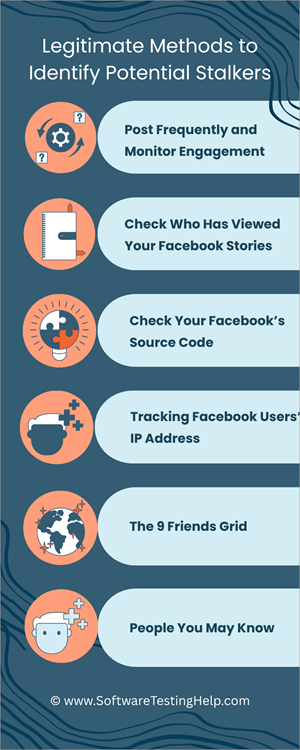
#1) Post Frequently and Monitor Engagement
While not an effective way to identify stalkers, this method can help you narrow down your suspects. I would suggest posting engaging content, such as videos and images, frequently. Once done, check who is interacting with this content.
If you find certain individuals consistently engaging with the posts as likes, shares, or comments, they could be your stalkers.
#2) Check Who Has Viewed Your Facebook Stories
Although Facebook doesn’t show you who has viewed your profile, it does present a list of everyone who has watched your Stories. Stories was launched way back in 2017, allowing users to post a video or image that’ll automatically disappear after 24 hours.
Unlike regular posts, Facebook basically shows you a list of all the profiles that have viewed your published Story within the 24 hours it lasted. Thus, post Stories frequently and check the audience list. If you find someone on that list who’s been checking out your Story but hasn’t interacted with you directly, this person could be a potential stalker.
#3) Check Your Facebook’s Source Code
You’ve tried the above two methods to no avail. If so, it is time to get a bit technical. You can find out who the top viewers of your Facebook profile are by checking out its source code.
Here’s how you do it:
1. First, open Facebook in your browser.
2. Press the shortcut – “Ctrl + click” or simply right click on the page and select “View Page Source”.
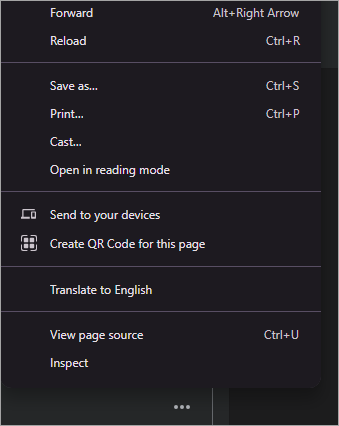
3. Now open the search bar by hitting the shortcut – “Ctrl + F”.
4. In the search bar, enter “buddy_id”.
5. You’ll now be presented with a list of IDs with “buddy_id”.
This list will contain the usernames of everyone who frequently views or visits your Facebook profile page.
#4) Tracking Facebook Users’ IP Addresses
This is a step I suggest you only take if you are desperate to identify your stalker. You’ll basically be setting up a trap by using a tracking link.
- First, you’ll need to choose a site, preferably something that people are more likely to click on. Share it on your Facebook page.
- Create an alternative link to the website by visiting a site like Grabify.
- Copy the “Access Link” created by the website, as it will help you track everyone who clicks on the shared link.
- Now that you have the link, simply share it on your Facebook. Make sure the post encourages people to click on the link.
- Wait a day or two, and then visit the Access Link to check out a list of all the IP addresses that ended up clicking on the link.
#5) The 9 Friends Grid
The 9 Friends Grid here is a 3×3 grid that appears on your profile page. It is on the right side of your Facebook profile page. It primarily displays a selection of friends with whom you interact most often.
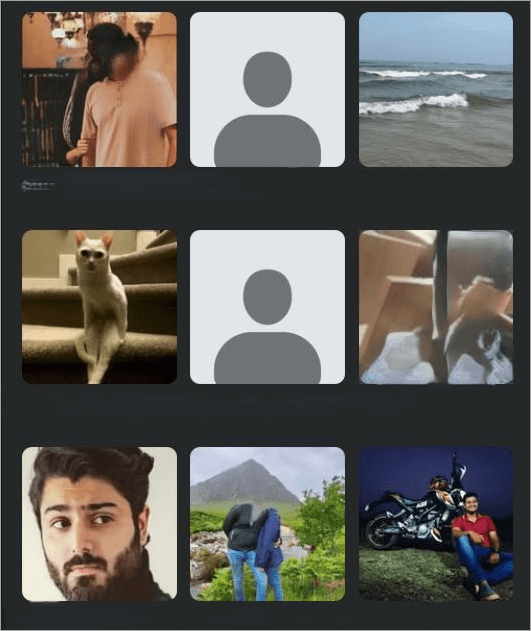
Facebook’s algorithm considers the following factors when curating this grid:
- How frequently do you interact with a friend?
- The messages and comments you’ve shared with a friend recently.
- Interactions you’ve had with mutual friends.
- How often do you and your friend search for each other on the platform?
- How often does a friend visit your profile?
- Relationship status or the close ties you share with the friend. For instance, they could be your family or a significant other.
You could refer to this grid to identify a potential stalker on your friends list. This grid changes constantly, and new friends are displayed based on your interactions.
If the grid keeps changing with new friends being displayed while one particular individual remains a constant, they could be stalking you.
While this isn’t a sure-fire way of identifying your stalker, I would still suggest referring to this grid to narrow down your list of suspects.
#6) People You May Know
This is yet another feature you can use to pinpoint the identity of your stalker. Facebook’s algorithm will frequently suggest friends to you based on the following factors:
- Mutual Friends
- Shared Workplaces
- Shared School
- Recent proximity to your location.
- Someone who is checking out or visiting your profile frequently.
That last point is why I felt it made sense to include this feature here. Again, just because someone appears in the “People You May Know” section does not mean they are stalking you. That said, I still suggest referring to this section to identify someone who could end up being your stalker.
Once you identify someone suspicious, reach out to friends you share with them and enquire about them. Review their profile. You could try confronting them, but that wouldn’t be wise.
Although the above methods can help find suspicious individuals, they can’t be used to confirm your suspicions. Confronting people simply for viewing or interacting with your profile isn’t a good idea.
Instead of finding out who views your Facebook profile, the better option would be to fortify your profile page’s privacy and security.
How to Protect Your Facebook Profile From Stalkers
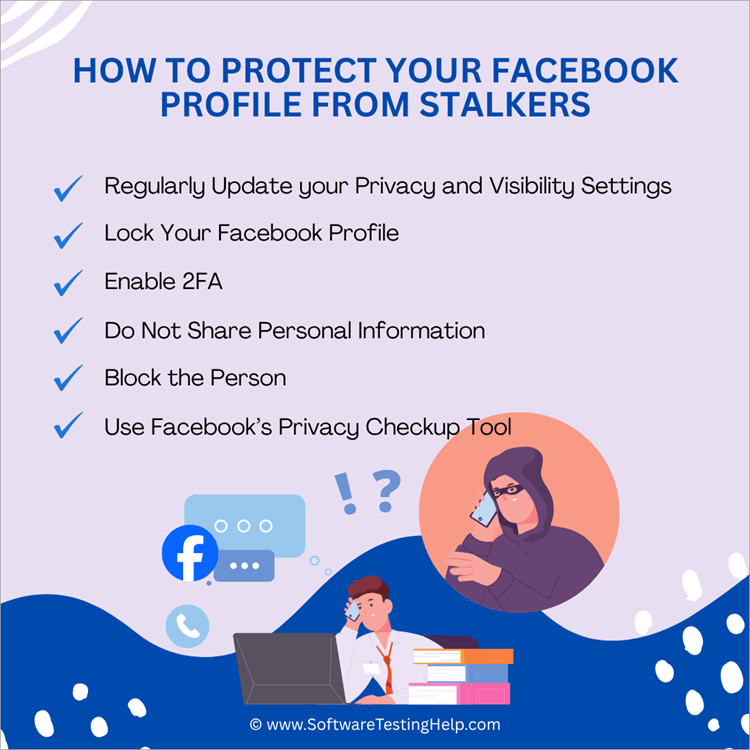
#1) Regularly Update your Privacy and Visibility Settings
As I mentioned before, privacy on Facebook is mostly user-controlled. The platform has empowered its users with the ability to view and edit their privacy settings at any time. You can basically control who gets to see whatever you share on Facebook.
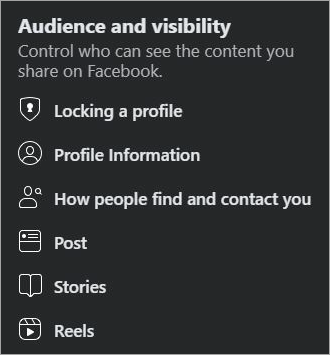
You can decide to restrict your post, story, reel, and entire page’s visibility to make sure only a select few have access to it. You can switch your profile from public to private, thus ensuring only people on your friends list have access to your posts.
You can also control who can follow you or send you a friend request. All you have to do to make these changes is navigate to Facebook’s Settings and scroll down to the “Audience and Visibility” section.
#2) Lock Your Facebook Profile
Facebook presents its users with a quick way to completely restrict their profile’s visibility. By locking your profile, only people on your friends list will have access to your profile page and anything you post on it.
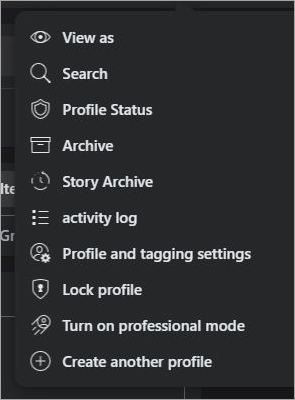
This feature isn’t available in all countries, and it will only work if your Facebook profile isn’t set on “Professional Mode”.
Here’s what you need to do to lock a profile:
- Open Facebook and click on your profile pic.
- On your profile page, tap on the three horizontal dots.
- In the resulting menu, select “Lock Profile” and confirm.
#3) Enable 2FA
This is something I suggest you do to assuage any concern you may have about a suspected stalker. With 2-factor authentication enabled, a stalker trying to access your account will have a tough time bypassing the initial sign-in page even if they have your password.
This added layer of security is something I suggest you set up, irrespective of whether you suspect someone of stalking you.
Be very careful of what you end up sharing on Facebook, especially if you suspect a stalker on your tail. Check every post you share carefully, especially when those posts contain an image or video.
You don’t want to share a visual post that may disclose details like your phone number or home address. Stalkers will use any personal information you share to further invade your privacy.
#5) Block the Person
Blocking is perhaps the best way to completely cut off all forms of interaction with someone on Facebook. When someone is blocked, they won’t find your profile or see any posts you share. It will be as if your profile has ceased to exist for them. They may try to use an alternative account to monitor your profile.
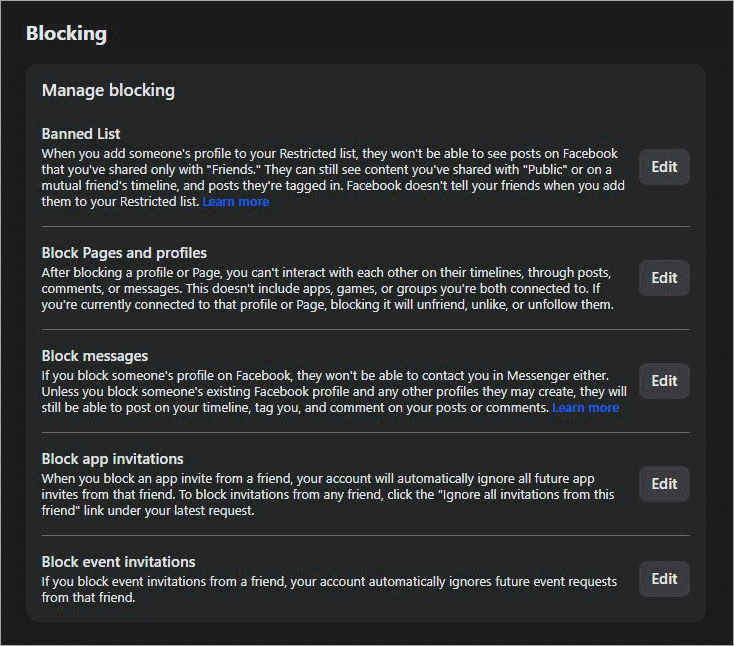
In that case, edit your Facebook privacy settings. Make sure its visibility is restricted to friends only.
#6) Use Facebook’s Privacy Checkup Tool
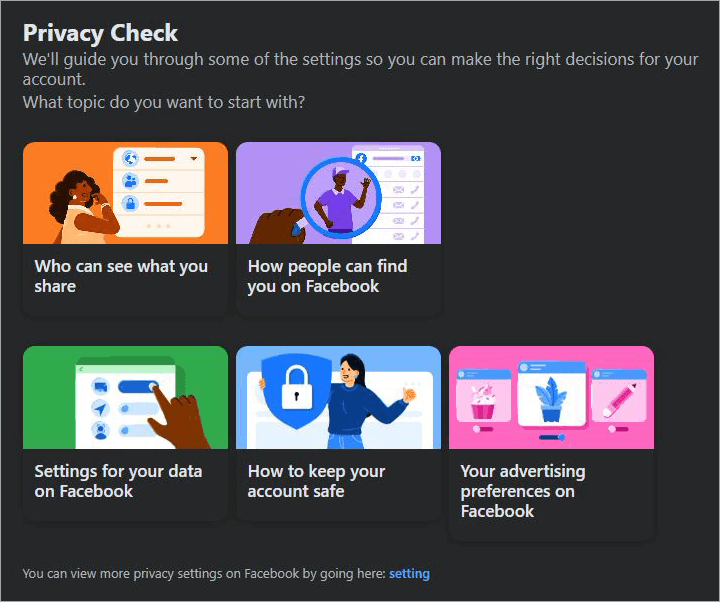
Facebook’s Privacy Checkup Tool lets you review your privacy and security settings. I suggest using this tool frequently to make sure your Facebook privacy is top-notch.
You can use Facebook’s Privacy Checkup Tool to review the following details:
- Who can see the information you share
- Control who can see future and past posts
- Choose who can see the information (marriage and relationship status) on your profile page.
- Who can find you on Facebook?
- Who can contact you on Facebook?
- How secure is your Facebook account in terms of password protection?
To access Privacy Checkup, simply click on your profile picture on Facebook, click “Settings and Privacy” => “Privacy Checkup”.
What to Do if You Identify a Stalker?
If you were successful in identifying your stalker, do not engage with them. Do not try to confront them. Instead, use the tools Facebook has provided you to take action.
- Block the user right away to make sure they have no way of reaching out to you or checking out your profile.
- Use the “Report” button to alert Facebook of the user.
- If they were harassing or bullying you on the platform, document this as evidence. Take screenshots, as they will come in handy during the investigation.
- If the stalking is severe, it is best to reach out to your local police department and file an official complaint.
- The police may help you secure a protective order from the court that legally prohibits your stalker from contacting you in any shape or form.
Finally, I would suggest being vigilant on platforms like Facebook. Review your Facebook privacy settings and tighten them to restrict access to your page or content.
Frequently Asked Questions
1. Can you see who views your profile on Facebook?
No, Facebook doesn’t have a feature that allows you to check who has viewed your profile.
This policy is expected to remain in place for many years to come as the platform promises a discreet experience to all of its users, making sure their activity and interactions on the platform remain private.
2. How do I know if someone is stalking my account?
There isn’t a sure-fire way of knowing whether someone is stalking your account. You can employ certain tricks to identify a potential stalker. You could try monitoring interactions on posts, checking your Stories audience list, or checking your Facebook profile’s source code.
These tricks could end up revealing who the top viewers of your Facebook profile are.
3. Can someone on Facebook know I viewed their profile?
No, there’s no way for anyone to find out if you’ve been viewing their profile unless you frequently check out the Stories they publish or engage with the content they post through likes, shares, and comments.
4. Can you tell if someone screenshots your profile?
No, Facebook doesn’t notify you if someone has taken a screenshot of your profile. However, Facebook does alert users if they’ve taken a screenshot of their Facebook Messenger chat window while it was set on “Vanish Mode”.
5. Can you tell if a non-friend is viewing your Facebook Story?
That depends on your Facebook Story’s privacy setting. If the Story’s setting is public, then a non-friend will view it, and you’ll know that by checking the Story’s audience list.
To make sure a non-friend isn’t viewing your Facebook Story, change its setting to private or lock your Facebook profile altogether.
Conclusion
Does Facebook have profile views? No, it does not. Therefore, you are going to have a tough time identifying a potential stalker on the platform. That said, there are some effective workarounds to this problem, and I’ve listed them in this article.
You can employ as you wish to protect your Facebook data and yourself from some shady individuals. A recent report suggests that nearly 80% of all stalking victims today were stalked using technology like Facebook.
As such, I would suggest practicing caution when you are using the platform. Tighten your profile’s privacy and security settings, consistently use Facebook’s Privacy Checkup Tool, and immediately block or report anyone who is trying to bully or harass you on the platform.
Research Process: The total time involved to complete and publish this article is approximately 42 hours. This content was created through a structured research approach to ensure accuracy and reliability.
For more quick Facebook-related guides, you can explore our range of tutorials below:
- Top 11 Facebook Lead Ads Integrations with Your CRM
- Why Does Facebook Keep Logging Me Out? Quick Fixes
- How to Fix Facebook Dating Not Showing Up Issue
- The Top 11 Facebook Video Downloader Software
- How to Find Recently Watched Facebook Videos History
- Download Facebook Reels Videos Online for Free
- Does Facebook Notify of Screenshots
Was this helpful?
Recommended Reading
-

A complete Step-by-step guide on how to delete user profiles in Windows 10 or 11. Quickly remove user profiles in Windows and explore the various ways to delete the user profile registry from this article: Windows user profiles are a unique feature that allows users to configure personal preferences, files,…
-
Here is a complete guide on How to activate LinkedIn Private Mode. Follow the steps & explore what you can do with your LinkedIn Private Profile: Many of us know LinkedIn informs us about those who have visited our profile. But then, there is a disadvantage that one couldn't browse…
-
Can't find the Facebook video that you watched? Find your recently watched Facebook Videos History on any device. Retrieve Facebook video watch history and revisit any lost video instantly: Let’s say you came across a hilarious video on Facebook yesterday. You can’t wait to watch it again right away. Alas!…
-
Do you know how to see who blocked you on Instagram? Explore the proven tips & techniques in this simple guide to check out if someone blocked you on Instagram: Let’s say you have a friend on Instagram, and you engage with them almost every day in some form or…