Learn how to find, view or see TikTok watch history from our step-by-step guide and recover or revisit videos anytime on iOS and Android devices.
Ever watched a TikTok video and forgot to like, save, or follow the creator—then spent hours trying to find it again? You’re not alone. Many users don’t know that TikTok does offer ways to view watch history, even though it’s not very obvious.
TikTok now offers multiple ways to check your watch history and recover recently viewed videos. In this guide, you’ll learn how to see TikTok watch history, use the Activity Center, download your TikTok data, find, delete or download watched videos on TikTok
How to See TikTok Watch History
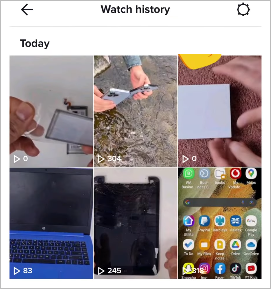
To access the watch history in TikTok, first open the app → tap on Profile → tap on Menu icon → then click on Settings and Privacy → Activity Center → Watch History. This will allow you to see all the videos you have been watching on TikTok lately.
TikTok Watch History: How to Find old Watched Videos

TikTok Watch History allows users to revisit their previously watched but disliked, saved, or followed content. If you have unintentionally refreshed your content feed or forgotten to bookmark a video, there are ways to view your content history, and they are made possible through the feature, Watch history.
By the end of this guide, you’ll know exactly how to find watch history on TikTok and quickly recover videos you’ve already seen—without scrolling endlessly through your For You page.
How to See TikTok Watch History on Mobile (iOS & Android)
The procedure to see the TikTok Watch History is pretty much the same for iPhone users and Android users, but there may be slight differences in the menus according to the TikTok app version.
- Step 1: Open the TikTok app on your phone.
- Step 2: Tap the Profile icon in the bottom-right corner.
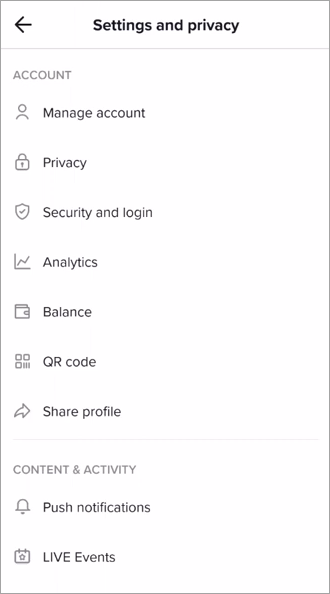
- Step 3: Tap the Menu icon (three horizontal lines) in the top-right corner.
- Step 4: Select Settings and Privacy.
- Step 5: Open Activity Center.
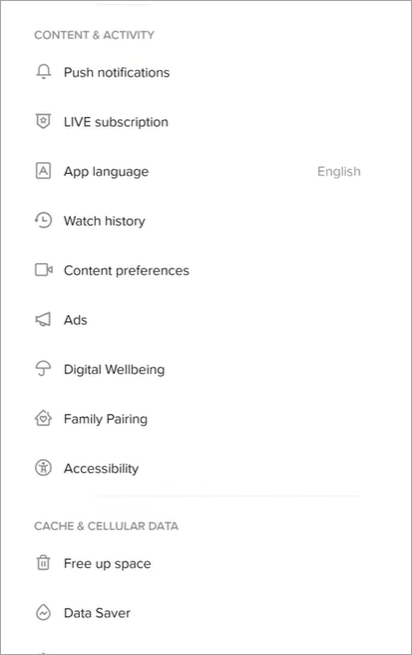
- Step 6: Tap Watch History.
How to See TikTok Watch History on Desktop or Computer
The steps to see your history of previously watched videos on iPhone and Android are discussed in above section, but on desktop there is no direct way of accessing this feature because the TikTok app is primarily designed for mobile phones. But you can download the history and check for watch history.
The TikTok API optimizes for mobile viewing, and it does not expose data such as the history of previously viewed videos to the desktop web API. A partial solution is to download data from the desktop version of the app.
Follow the steps below to understand the process:
- Step 1: Open the TikTok app on desktop and log in.
- Step 2: Click on the Profile -> Settings from the drop-down menu -> Privacy -> Download your Data. Choose the format in which you want the data and click the Request Data button.
- It takes up to four days for the data to be ready for download.
- Step 3: Return to the Download tab to see if it’s ready and download it. Once downloaded, the history is accessible as links to videos watched on specific dates.
Refer to this video to understand how to search by date on TikTok:
Advantages of Retaining Your TikTok Watch History
The following points will outline the various advantages:
1. Quick Access: Turning on video watching history improves the viewing experience for the account owner as they can always easily return to see or re-watch the videos, just in case there was a video that got lost in the view, or one that they want to follow.
Hence, instead of spending several minutes to hours searching for a specific video you previously watched, the watch history can make it easier.
2. Personalized Content: The TikTok algorithm personalizes the viewing experience using watch history to find related content.
Therefore, a user who has turned on this feature can seamlessly watch content in which they are interested, all without having to do anything much more than scrolling through the videos, instead of spending several hours viewing content that is not in their niche or searching additionally for videos in their niche.
3. Improved Content Awareness: A user can easily discover new trends or genres in the same niche, which might have passed without their notice. This can further enhance creativity and experience.
The other benefit is for users who want to be aware of their content consumption habits, in that they can understand what, why, and how they are spending more time on certain videos than others. Users who realize their content consumption habits can better set limits and be mindful of their viewing experience.
4. Understand User Preferences: Watch history can help users to understand their audience and preferences. They can study what their viewers are mostly interested in and hence refine their content to improve audience and viewer metrics.
5. Demographic Insights: It helps inform creators about their audience demographics, which can help tailor content to connect better with specific groups.
6. Fosters Community Engagement: Creators can create videos that can help grow their communities organically, and which can help connect with them meaningfully and boost their influence.
7. It can help users generate videos with better monetization and earnings.
How Does TikTok Watch History Work
TikTok uses an algorithm, a technology that tracks down the users’ watch history and other types of engagement on the platform, such as likes, shares, and comments. This data is displayed for the user’s convenience, like for rewatching.
The algorithm also used the data to improve the user’s watching experience, in that it can recommend other videos based on the interests of the user, as deciphered from the already watched content. The platform can find similar/related videos in the same niche to recommend them to the user.
Features of TikTok Watch History
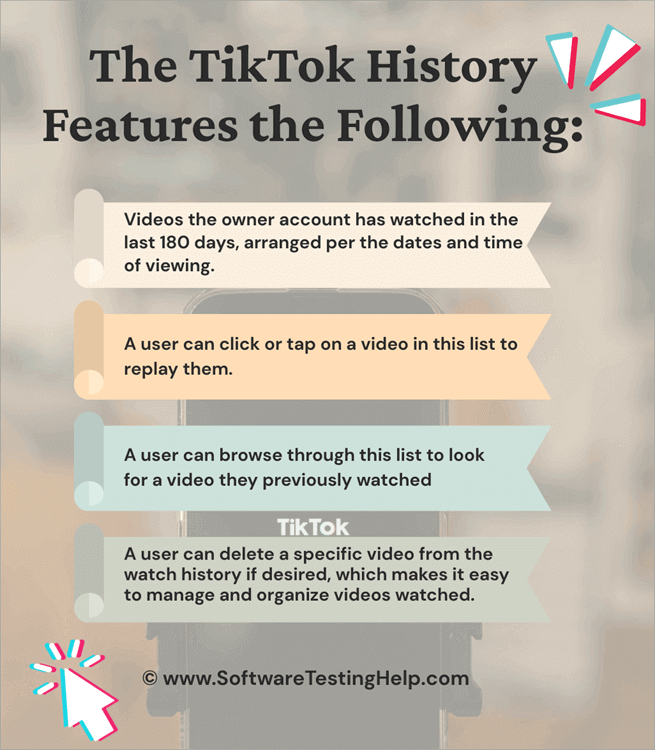
The features include:
- Videos the owner account has watched in the last 180 days, arranged by date and time of viewing.
- A user can click or tap on a video on this list to replay it.
- A user can browse through this list to look for a video they previously watched.
- Users can remove a specific video from their viewing history, which improves video organization.
Risk associated with TikTok History
The risks of saving a list of previously watched videos in the watch history include those related to tracking by algorithms, and these histories may fall into the hands of unwarranted people in case the account is hacked or accessed illegally.
Your history might be accessible to third parties in specific situations. Third parties could access user data about their viewing habits and histories, which would put users’ private viewing experiences at risk.
Advertising is using the data you watched, raising concerns about aggressive targeting and intrusive ads. It can also lead to certain stressors, knowing that user behavior data is being analyzed on platforms like TikTok. Such things have led users to reconsider their interaction on social platforms such as Facebook.
Ways to Clear Your TikTok Watch History
Clearing your TikTok watch history provides a fresh start for your TikTok account. However, clearing the watch history does not mean that the history will not be saved in the account again until you switch off the feature to save it.
Refer to the sections that follow to learn how to disable the feature. Clearing the TikTok watch history also means you eliminate all the data related to this history.
Check the section below if you want to delete videos one at a time:
- Clearing the cache does not necessarily mean that the watch history is also cleared. Cached data cleared in this case is the temporary files and data stored on your device on which TikTok is being used. Clearing the cache frees up space on the device, so the app data will not take up more space than necessary.
- To clear the cache on the TikTok app, navigate to Profile -> Tap the menu icon in the upper right corner -> Settings and Privacy -> Cache & Cellular -> Free up space -> Tap the Clear option beside Cache.
How to Delete Your TikTok Watch History
Deleting TikTok watch history may be helpful to avoid several risks associated with saving your video-watching behavior. TikTok recommends avoiding videos you’ve already seen or don’t like.
Here’s how to delete your video-watching experiences on TikTok:
Step 1: Open the TikTok app and tap Profile at the bottom right corner.
Step 2: Click the three bars in the top right corner to access the menu.
Step 3: Navigate to Settings and Privacy -> Content & Activity -> Watch History, then select the option, then either select all watch history in the lower-left corner or tap on the videos you want to delete or remove from the watch history, each after the other. Confirm deletion.
Improving Privacy for TikTok’s Watch History
This section will explain how to switch off TikTok watch history on your account.
Tweaking off the feature to save your watch history may be helpful in some circumstances, although it will lead to less personalized content suggestions. A user can always come back and turn it back on to enjoy a personalized video-watching experience.
Step 1: Navigate to Settings & Privacy -> Privacy -> and then go to the “Private account” option if interested in limiting who can view your videos, “Who can send you messages” to control who is allowed to send you messages, and “Who can duet/react with your videos” to control who can react to videos you post.
Step 2: Navigate to the “Watch history” screen to toggle off the watch history.
How TikTok Watch History Differs From Other Platform History
Different social media platforms have different methods of tracking user watch behavior and suggesting content based on previous interaction.
Compared to YouTube, which uses subscription habits, searches, and viewing patterns over an extended period to provide users with video recommendations, TikTok primarily uses likes and comments to offer content recommendations.
TikTok provides a feature for users to access their watch history from a dedicated page, while Instagram Reels does not. Hence, TikTok may be regarded as more transparent and with a direct engagement with past content.
TikTok offers a more in-depth watch history dedicated page compared to Facebook Watch, which adopts a more general approach.
Steps to Download Your Data including Watch History
Follow the steps below to download your TikTok data:
(i) Navigate to Settings and Privacy
(ii) Then click on Account & Profile section
(iii) Select Personalization and Data
(iv) Now click on Download your data
A pending request will be created, after which you will receive a notification when the data is available for download.
It can be downloaded as a zipped file, and you can review and save the information.
How to Find Watched Videos Using TikTok Search
TikTok lets you use search filters to find videos by keywords and see the ones you have already watched for the last 180 days.
Here is how to do so:
Step 1: While on the Home tab, tap the Search icon represented by the magnifying glass. Type in a search term, e.g., the title of the video you know, and tap search.
Step 2: Tap the Menu, then Filters. Tap Watched from the Video category, then Apply to restrict the results to videos you have watched before.
Frequently Asked Questions
1. How do I delete my TikTok history?
To delete your TikTok watch history, open the TikTok app and log in. Tap the menu button represented by the three dots in the upper right corner and navigate to Settings and Privacy -> Watch History.
Tap and hold one or more videos in the shown Watch History list and confirm deletion.
2. What happens if I delete a video from TikTok?
When you delete a video from TikTok, for instance, from the TikTok watch history, the deletion is permanent. The deleted video will not be recoverable in your watch history.
If you want to revisit a video you previously watched, you will need to remember the user or video name or use keywords to discover the video. This takes a lot of time, and therefore, saving your TikTok watch history helps.
3. How do I view my TikTok watch history?
Your TikTok watch history, for all the videos you viewed in the last 180 days, can be viewed under your profile.
Open the TikTok app, navigate to your Profile by tapping the Profile icon in the lower right corner, tap the menu icon represented by the three short parallel lines in the upper right corner, then tap on Settings & Privacy -> Privacy -> Content & Activity, where you can see Comments and Watch History.
Select Watch History after tapping the option to view your watch history. If it is not enabled, tap the gear icon to enable or disable it altogether.
From the Privacy options, you can navigate to Download Data and follow prompts to set TikTok to process the history.
Once it is ready, which may be after several days (up to 4 days), come back and download the file and access the Browsing.txt, and you can see the links of watched videos and their timestamps.
4. What is TikTok watch history?
TikTok watch history is a feature that lets users easily and quickly revisit videos that they have watched before. You won’t have to recall or look for a video to watch it again.
For people who value privacy, for instance, in case the account is at risk of hacking or the possibility of being accessed by another person, deleting the watch history or tweaking the feature off altogether can be more helpful.
Navigate to Privacy -> Account & Profile section -> Personalization and data -> Settings and Privacy -> Privacy -> Content & Activity, then click or tap Watch History to see the videos you previously watched and select one, more, or choose the Select all watch history and confirm deletion.
5. How do I recover my TikTok watch history?
Once deleted, a TikTok watch history cannot be recovered. The only way is to look for the videos manually on the app, in case you remember the users who had posted the videos, or the name or title of those videos, or use keywords to see if you can find the videos again.
It can be hard sometimes. You need to tweak the feature to save your watch history if it is turned off. To do this, navigate to Privacy -> Account & Profile section -> Personalization and data -> Settings and Privacy -> Privacy -> Content & Activity, then click or tap Watch History.
How to find a video on TikTok when you accidentally refreshed?
In the case when the user has accidentally refreshed the app and deleted video, there are few ways to access video. One can start with the Watch History option on the Activity Center page if available. However, one may need to look at other pages such as the page of Liked Videos or Saved (Favorites) because many people usually like or save their favorite videos before refreshing them.
Conclusion
Turning on your TikTok watch history is helpful if you always revisit the videos you have watched previously. It makes it easier and quicker to locate those videos.
However, if you are overly mindful of your privacy, then tweaking this feature off and deleting your watch history can be an essential action. TikTok allows you to manage each or all videos at a go when deleting this history.
Research Process:
The total time involved to complete and publish this article is approximately 34 hours. This content was created through a structured research approach to ensure accuracy and reliability.
For more TikTok-related guides, you can explore our range of tutorials below:
- How To Go Live On TikTok: Common Mistakes To Avoid
- Top 10 Apps Like TikTok: Best TikTok Alternatives
- 11 BEST TikTok Video Downloader
- When is the Best Time to Post on TikTok [Ultimate Guide]
- The 7 Best TikTok Online Viewer Anonymous Apps
Was this helpful?
Recommended Reading
-

Steps to check the call history of any mobile number online easily and the top 7 apps to check and retrieve mobile call history free. A lot of people look for ways to check a call history online, either because they wish to restore lost call history data, view previous…
-
This tutorial reviews the top TikTok Video Downloader with comparison to help you download your favorite TikTok videos for watching offline: TikTok has become a sensation within a very little span of time. It was founded in China in the year 2016, with the name 'Douyin'. In 2017, the Chinese…
-

Discover the top TikTok Anonymous Viewers for quickly browsing through user profiles, videos, comments, etc. Pick the best TikTok Online Viewer to easily watch TikTok content without logging in: Surfing through the internet for a reliable site that does not engage you in registration or crossing several captchas can be…
-
A must-read guide for anyone among the millions of TikTok fans who are seeking TikTok-like apps. Explore the Top TikTok Alternatives along with their functionalities: The number of social media users has rocketed in the past decade. Be it a kid, a teenager, an adult, or a senior citizen, all…