Visualize complex data in seconds with the most powerful AI data analyst – Julius AI. Deeply explore its ability to analyze and visualize huge data effectively into a simplified form from this Julius AI Review:
For any business to thrive in this fast-paced AI world to build an executive-level dashboard for having real-time insights into their business Outcome, get clarity on ‘Historical Data(In Scope) versus Real-Time Data (Out of Scope)’, and vice versa, and become a Revenue Rockstar, they need to have the Next-Gen powerful tool in place to assess their business’s insights to simplify their complex datasets analysis to non-technical users.
This is where the powerful and most advanced Data Analysis, Visualization, and Predictive modeling tool Julius AI comes into the picture. It allows users to interact with their data through Natural Language Queries/Prompts. Julius AI’s usage doesn’t stop at business insights alone but has extended capabilities for individual usage.
Table of Contents:
- Julius AI Review: Your Ultimate AI Partner for Data Analysis
- What is Julius?
- Who is Julius AI Best For
- Key Features of Julius AI
- Personal Experience with Julius AI
- Julius AI for Data Analysis
- Key Takeaways
- Julia AI Stumbles a Bit & Worth Notice
- Julius AI Chat
- What is Julius Math AI
- Key Tips to Increase the Efficiency of Julius AI
- Julius AI Data Security
- Pros & Cons
- Julius AI Pricing
- Julius AI Rivals / Contenders
- Julius AI Review Verdict
- Frequently Asked Questions
- Conclusion
Julius AI Review: Your Ultimate AI Partner for Data Analysis
Data Analysis is for analyzing data, leveraging trends of sales, getting the visuals, and having actionable insights of any large data that supports better decisions about your business performance. So, AI prompts are helping to do this data analysis swiftly in seconds.
What is Julius?
Julius AI – Powered by GPT-4 is one of the versatile AI Chatbot platforms for Data Analysis/Statistical analysis, which offers various kinds of key features catering to different user needs along with pricing subscription tiers.
Julius AI is a promising AI assistant that can save hours in analyzing giant complex datasets, and data visualization tasks in seconds as it is designed to be intuitive with a user-friendly interface to get expert-level insights without much complexity. Also, can analyze various structured data, including CSV files, SQL databases, and Excel Spreadsheets.
Hence, Julius AI acts as an intelligent Data Analyst tool for having actionable insights even for those individuals having no background in Data Science or Statistics Analysis.
Glance at Julius AI YouTube video can be accessed here:
Who is Julius AI Best For
Julius AI has many domain use cases and is meant for individuals and as well as for teams who have their complex raw data for analysis, visualization purposes and extract the insights of their data for making better decisions of insights including business professionals, non-technical users, and researchers.
Julius AI can offer quick resolutions to students as well as solve their complex mathematical problems and other subject queries in Physics and Chemistry.
Julius AI chatbot is specifically designed for various ranges of users like:
- Data analysts may use it to speed up the analysis tasks and generate the visualization reports in seconds for any presentations.
- Researchers: Exploring the datasets for their thesis submissions, identifying any correlations, and visualizing their research findings on the thesis in support of their presentations and or publications.
- Teachers: Tutors can use this for their teaching and for solving any complex mathematical equations and finding answers swiftly.
- Students may upload any unresolvable maths problems or have any queries on other subjects like Physics and Chemistry in their homework, they can upload here and seek the help of Julius AI Chat or Julius Math AI and get the answers in seconds.
- Business Owners and Business Managers: To have a clear understanding of business Outcomes or performance, track them, and make data-driven decisions based on the visualization reports, business managers and Owners opt for Julius AI for their data analysis and Statistical Charts.
- Sales Executives and Marketing Teams: These teams can take advantage by Predicting the sales trends along with growth opportunities and tracking their sales performance effortlessly.
- Healthcare Professionals: In this current AI world, there is a huge demand for such AI tools in health sectors too for analyzing the Patients’ data, and understanding their visuals to provide treatments and get clear insights into their patients to have the proper decisions made by the healthcare practitioners, hence such AI tools are handy.
Key Features of Julius AI
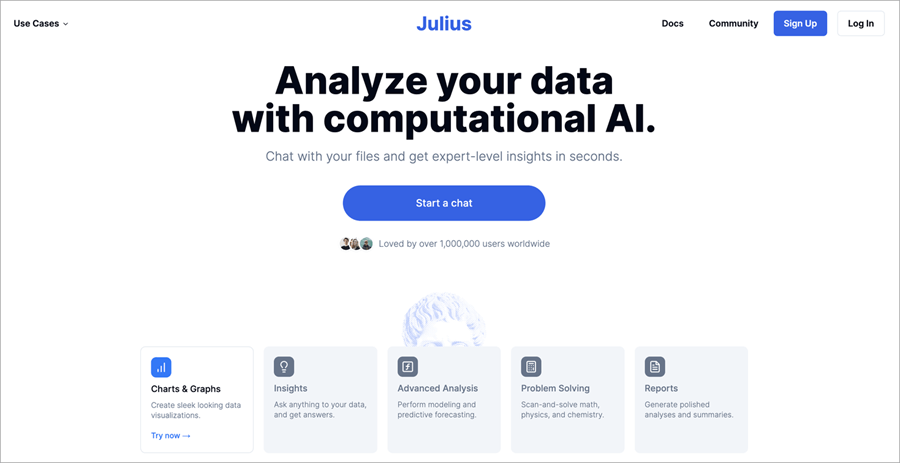
1. Simple Charts and Graphs: Creating sleek-looking data visualizations
2. Data Insights: By asking anything and getting answers instantly
3. Advanced Analysis: For Predictive forecasting
4. Problem-solving capabilities: For scanning and solving Math, Physics, and Chemistry.
5. Generate Sophisticated, polished summaries and analysis charts
Personal Experience with Julius AI
Integrating the Julius AI into the workflow has made a commendable difference in efficiency in how to approach the data analysis.
Raw data sets are transformed into various kinds of charts, and graphs to get an understanding of the hidden data patterns and their relationships which would have been a more time-consuming & tedious task using a manual analysis approach.
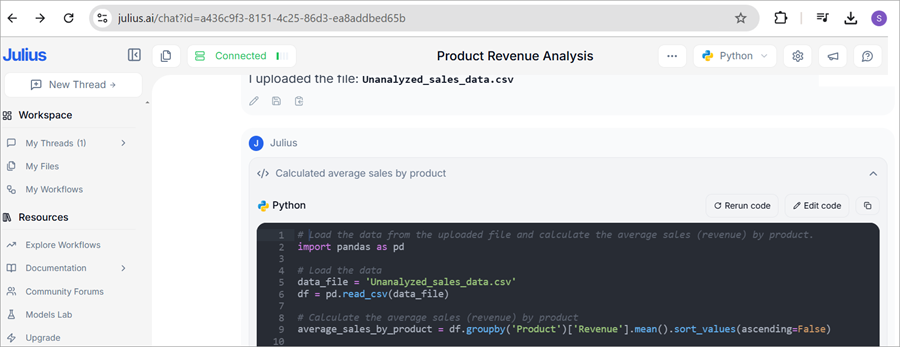
I figured out there was a large data set from a recent sales research project and a file that had all the unanalyzed data listed in CSV format. File name “Unanalyzed_sales-Data.csv”, had the data of different Categories & / Products and wanted to understand average sales by product and do the analysis of its average revenue by-products for better decision making.
How Julius AI unfolded the quick analysis with more accurate results is that,
- Firstly, by asking a simple Natural Language Query,” Show me average sales by product”.
- I uploaded the data file named “Unanalyzed_sales-Data.csv”, and received a swift answer from Julius AI. Julius AI, analyzed that file and generated a Python code, then applied it to data sets.
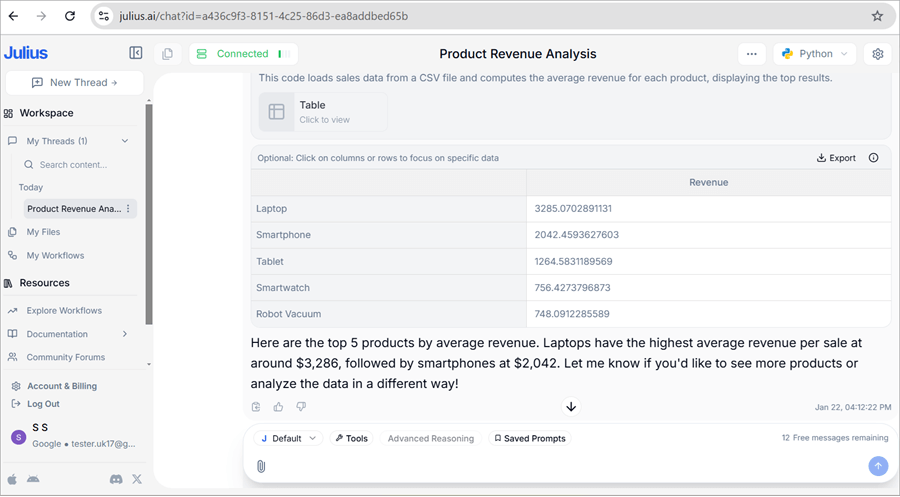
- Listed the top 5 products’ average revenue quickly, which would have taken more time by doing it manually going through each category and product. Here Julius AI Algorithm helped to have the spot-on answer.
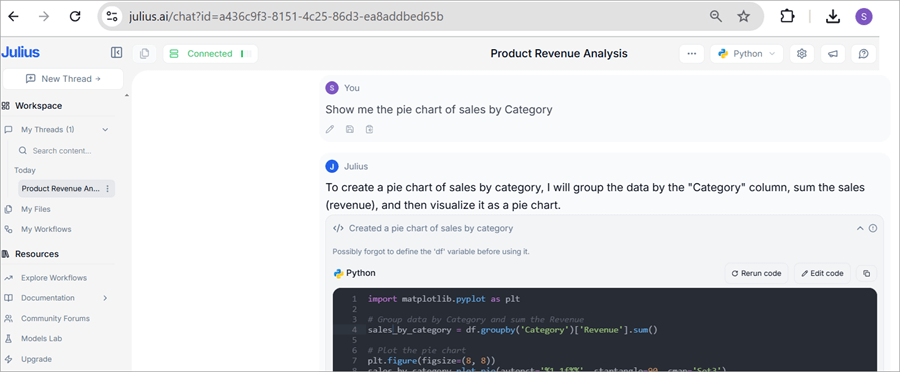
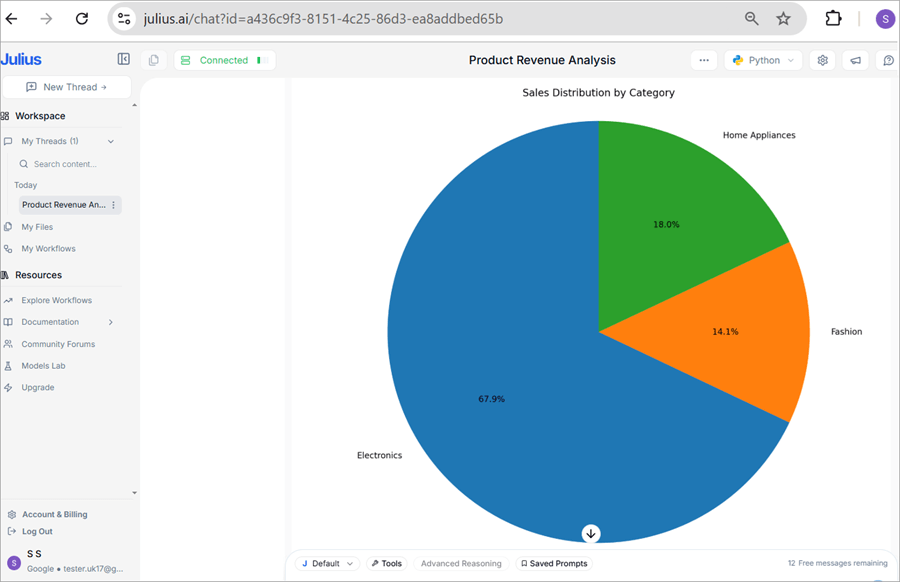
- Then for Presentation purposes wanted to have the data visualization report too, hence my next query to Julius AI was, “Show me the Pie chart of sales by Category” <Note that you may query/ask Julius AI for any other pictorial representation to provide and it will be tailored to as per your query, in my case I asked for pie chart>
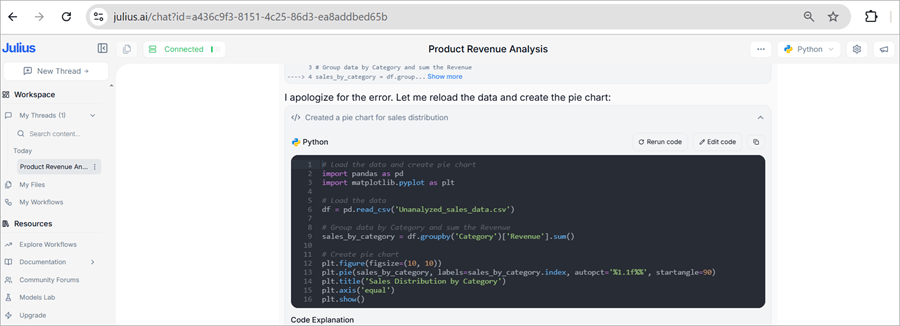
- Julius AI made a clear visualization of the file generated the Python code for the query I requested and applied it to the data file I uploaded then it instantly displayed the ‘Sales Distribution by Category’ Pie chart within seconds.
- With Julius AI’s Efficiency, the final simplified results were much clearer and helped to share across stakeholders’ team with more recommendable actions and features across the Visualization reports which can be more interactive in usage but just not restricted to these queries alone.
Sample chart view / interactive visualizations of datasets look as shown below image:
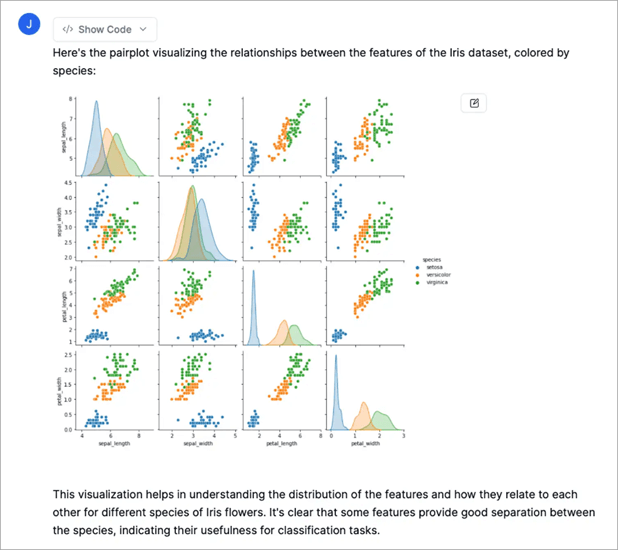
If you are dealing with data regularly and want to see the results in a much faster way and extract the data insights intuitively, undoubtedly the Julius AI might be the handy solution if you are hunting for one. You will see a practical example and how quick the response was in below “How to use Julius AI for Data Analysis” section for your data analysis and visualisation insights report.
A quick outline of how I used this Julius AI tool for analysis and noticed quick advantages of it are listed in the below sections with sample screenshots for better understanding.
Julius AI for Data Analysis
To use the Julius AI effectively, here is the step-by-step guide:
- Set up Your Workspace
- Create an Account using your email ID
- Upload your Data Source
- Initiate the Chat Session (you create the conversation)
- Ask your Specific Questions (ask questions by setting active data source)
- Utilizing Data Visualization
- Generate the reports
Let us see the above steps in detail on the Julius AI Platform, signed up for the Free trial version:
#1) To set up your Workspace:
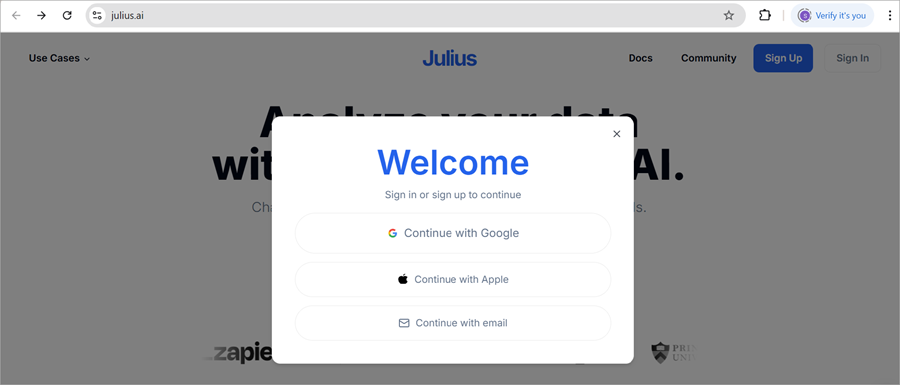
First and foremost, you need to do is to create your account by visiting their website – either using directly your Google Account or by creating a new account.
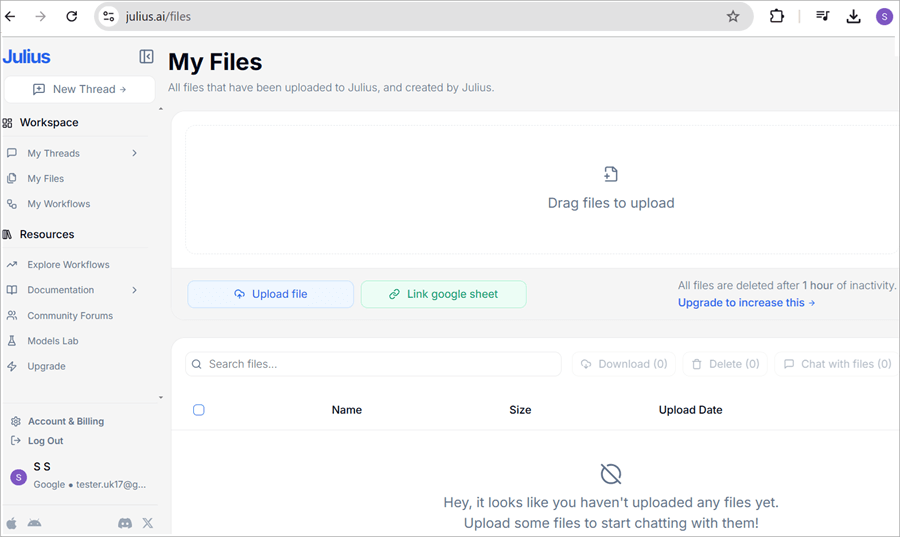
Uploading the Data: Once you have logged in, go to ‘My Files’, and click on the ‘Upload File’ button, alternatively you may drag and drop in any formats like CSV, Excel sheets formats to JSON, and multimedia formatted files directly into Julius AI Workspace. Also, for seamless integration, you may connect/link your Google Sheets by clicking the ‘Link Google sheet’ button.
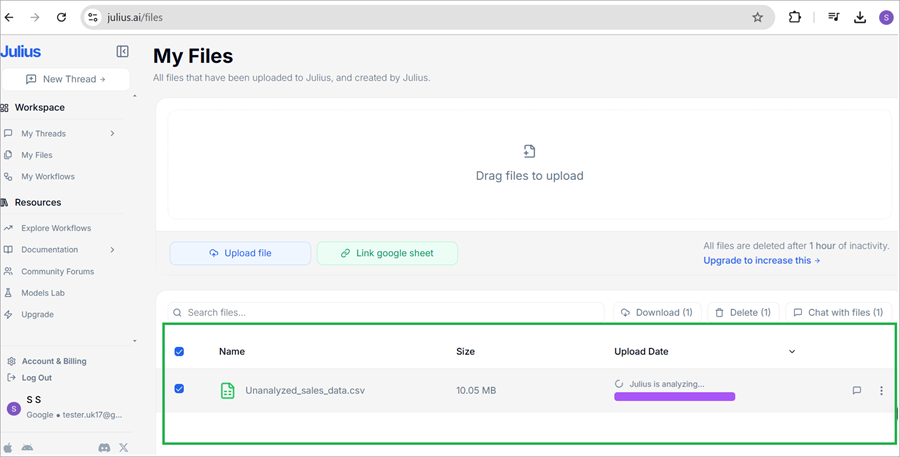
For example, in the below image, the CSV file is uploaded and saved under the ‘My Files’ section
#2) Initiate the Chat Session (you create the conversation)
#3) Ask your Specific Questions (ask questions by setting active data source)
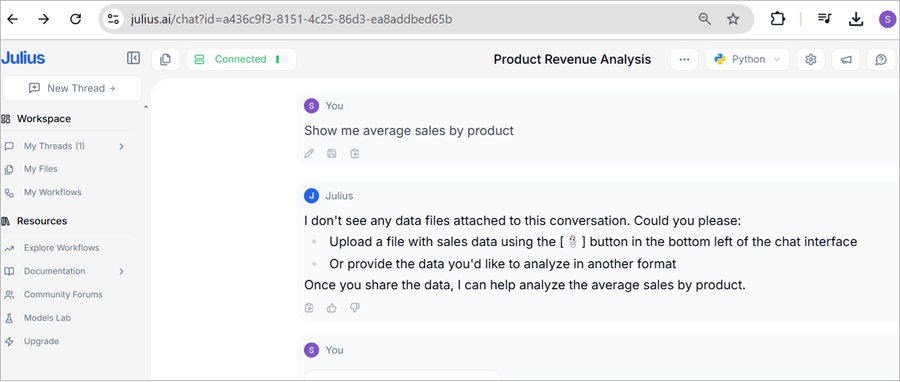
Now go to the Chat section, start asking your queries like the file uploaded in ‘Step 1’ related would be like this,” Show me average sales by product” and click Enter.
You get to see the next instructions given by Julius AI Chat, follow those steps,
In the below image, I got those instructions.
Then Upload the File by clicking on the ‘Attachment icon’ you get to see the My Files saved file listed, select it then click enter and just sit back and watch.
Julius AI chat transforms your commands/query asked and generates it into Python code then applies them to Datasets.
#4) Utilizing Data Visualization
Next, you may command / prompt Julius AI to create visualizations from the data uploaded. You can request for variety of charts such as Bar plots, Linear Plots, Histograms, Scatter plots, and Pie Charts.
Julius AI Chat will generate the requested charts for you and display them in the chat for you then you may right-click on the image displayed and save it for your future reference.
For Example: I prompt Julius like this: “Show me the Pie chart of sales by Category”
Again, the Julius AI Chat generates the Python Code and generates the Pie chart as per the query requested.
Note in the below image, that Julius caught the error and corrected and generated the right Pie Chart.
#5) Generated Graphs and Exporting the Results
Based on the Data visualization analysis and Pie Charts analysis in the previous step, if you have amended any data and wish to export that file, prompt/ask Julius to export your data file and which format you wish to save. Julius AI chat will generate the link with a download button to export your file. The example prompt looks like this: “Filter the sales data deals by Region and give me the report file in CSV format”
In response, you will see the prompt response below with a download link.
- I have filtered the Sales data deals by Region and saved it to cvs file named ‘filtered_sales_data.csv’
- You can download the file at this link.
For more information on how to interact with Julius AI Chat, check the below links.
The official video on a high-level walkthrough on how to use Julius AI is – https://julius.ai/docs/how-to
Also, you may check the Julius Starter Guide at https://julius.ai/docs/chat-start-guide
Key Takeaways
- Julius AI effectively and remarkably analyzed the ‘unanalysed_sales_data.csv ‘file’s data with impressive accuracy, generated Python code, and provided the final Product Revenue Analysis.
- Julius AI was swift in transforming the data and providing the graph view of your choice.
- Julius is truly a winner in terms of Data Analysis & Visualisations, Speedy insights for your presentations and or publications
- Moreover, Julius is Offering a limited Free trial version too! So that’s a fun part of it. Make the best use of those 15 queries and know the platform better before you commit to the paid subscription tiers.
Julia AI Stumbles a Bit & Worth Notice
Julius AI stumbles upon some of the bits like:
- Data Science statistical analysis especially highly complex models or research model level thesis analysis and cannot be expected to replace the entire Specialised statistical software, but can handle the basic Statistical analysis & insights gracefully.
- Customizations are a bit limited in the free trial version if you are craving for that extra stylishness insights if you wish to have more creative control over your visualizations. But generally, the Julius AI visualizations are sophisticatedly generated and well-designed.
- Do not make a fuss with Data Formatting: Make sure the Data source/ data files especially the CSV and spreadsheets uploading are clean, are labeled properly, have column headings, and are well-structured to avoid last-minute hiccups.
Julius AI Chat
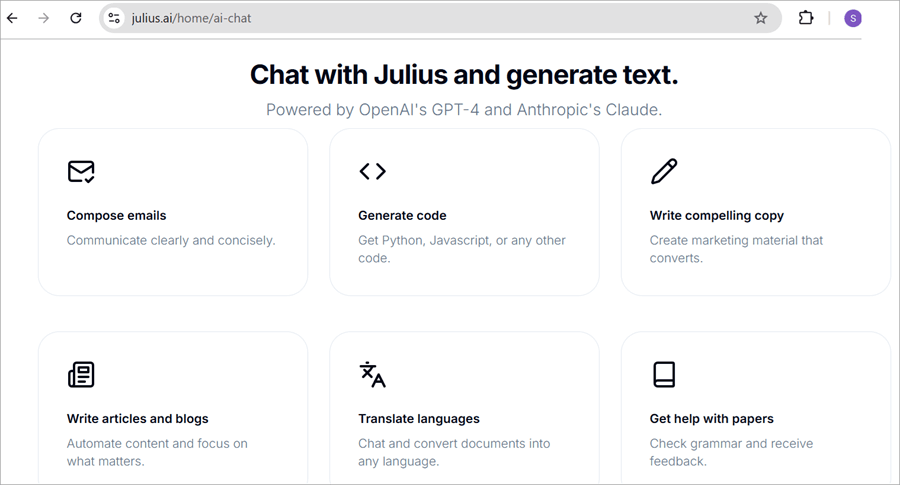
With Julius AI Chat you can generate emails & messages, write code, scan and solve, covert your files or / Translate to desired languages, and even chat with your files and much more, hence Julius AI is the ultimate AI Chatbot.

What is Julius Math AI
You must be wondering what Julius Math AI is. Just hang on with this article till the end to unleash the potential of this Julius Math AI!
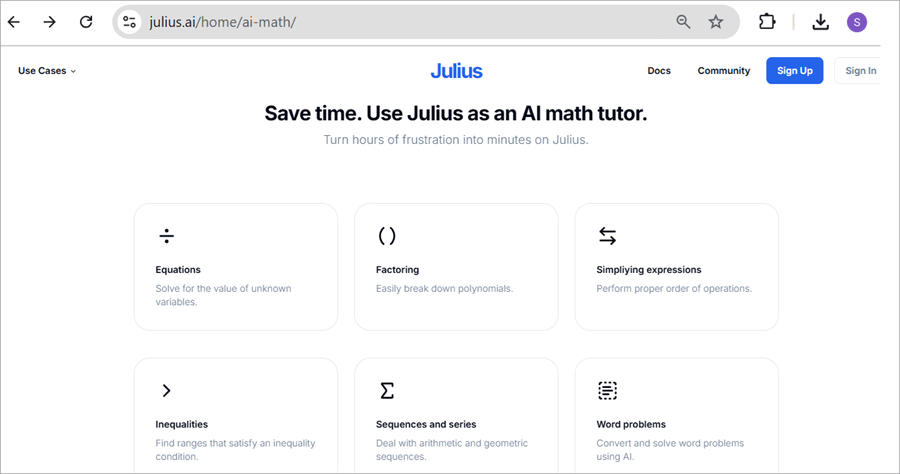
Think that Julius Math AI is your Math AI for solving any kind of mathematical equations, and problems and you get the expert-level answers and or get an expert-level tutoring with this ultimate AI math problems solver.
For Tutor, it can save hours by using Julius as an AI math tutor and get solutions in minutes.
Example: Tutors can rely on solving the below mathematical equations be they easy or complex ones such as,
- Equations
- Factoring
- Simplifying Expressions
- Sequences and Series
- Word Problems and
- Inequality conditions
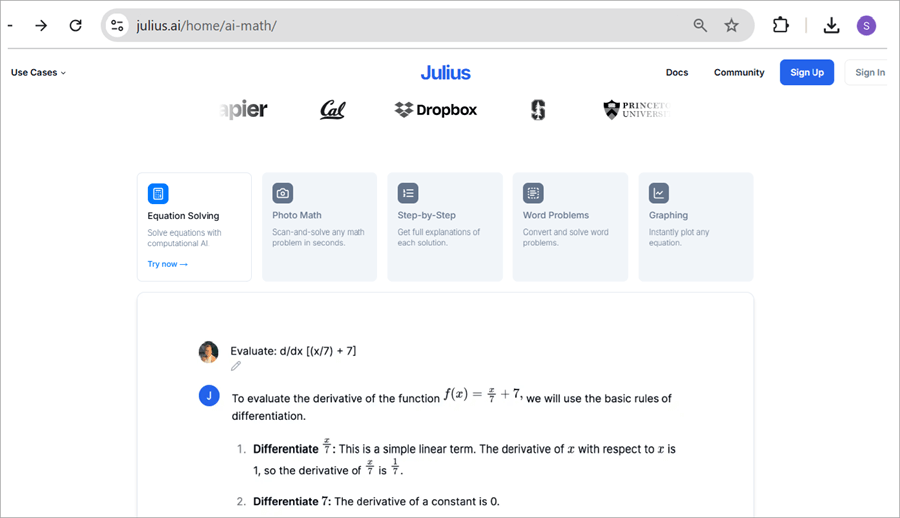
You are sure to get step-by-step, an accurate solution in seconds for any kind of math problem with this leading Julis Math AI chatbot.
Usage just doesn’t stop here for tutors alone, but also for Students! yes, you read it right!
Students can make use of this Julius Math AI by using features like ‘Scan-and-Solve’ Photo Math for their complex maths problems and step-by-step AI-generated solutions explanations to do their homework. It is capable of analyzing Images or Screenshots, ie when you upload the image with a math problem the Julius AI tool will perform the analysis accordingly.
Hence, Julius is considered as most accurate Math AI tool to solve maths equations. A recent review shows that it is 31% more accurate than the GPT-4o.
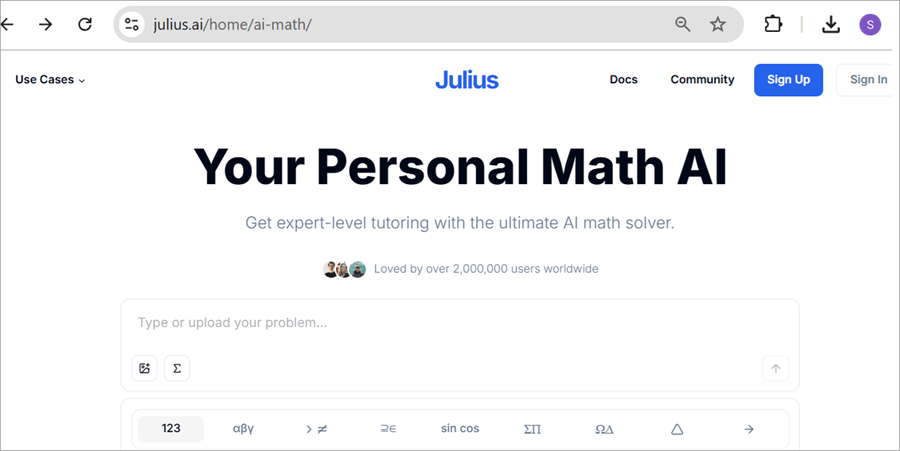
For more information on how to upload the math problem etc and how to get started and start using the Julius Math AI, you may visit the site, also see the below screenshots for your reference and to get clarity.
Key Tips to Increase the Efficiency of Julius AI
Julius AI will not directly start the analysis of your data, first, you need to feed your data file to it and then Julius AI will write code for that data in Python language using AI and that code analyzes your data, hence asking a right clear crisp question to Julius AI prompt will save you a lot of time.
Key points to enhance the Julius AI efficiency are:
- Ask/ query clearer questions, so that Julius AI can help you get what you want.
- Think about what answers you are expecting before you ask in the prompt.
- Also, think about how you want your complex data to be organized within the app and make your analysis easy, reproducible, and intuitive.
- Think that Julius AI is your super-smart data analyst and is way easy to work with.
For Data formatting guidelines check https://julius.ai/docs/data-structuring
Julius AI Data Security
Julius AI has strict data access control, every user has access to their files, data sets, or spreadsheets in their secure notebook data file storage within the app. The data files uploaded to Julius AI will be automatically erased from the servers after 1 hour of inactivity or whenever it is deleted within the app.
In the Future, Julius has plans to offer a longer period retention of data files for future/later usage to users and it will be an opt-in feature as mentioned on the Julius community page below.
Pros & Cons
| Pros | Cons |
| The platform provides coding assistance for beginners for data analysis and coding | Pricing is not disclosed upfront |
| Effective Data visualization capability in providing clearer insights. | May face minor glitches, not too major ones like occasional formatting issues which require manual corrections/checks and may be time-consuming. |
| Can interpret large complex data sets making businesses and individuals to deal with extensive data effectively, hence has Robust data analysis capabilities. | |
| It simplifies the Graph creation process. | |
| Can resolve basic to complex arithmetic mathematical problems | |
| The platform has a user-friendly interface |
Julius AI Pricing
Julius AI’s Pricing structure caters to different individuals and businesses with a diverse pricing structure.
| Free Plan : Free to use with 15queries a month |
| Team Plan : Centralized Billing and longest input prompts |
| Essential Plan: $45.00USD per month for unlimited queries with longer conversations |
| Pro Plan : $60.99 per month with premium Customer Support |
| Team Plan : Centralized Billing and longest inputs prompts |
Details of Julius AI Pricing Subscription tiers are as follows:
1. Free Plan: With this Free plan you can send up to 15 messages a month with its most advanced AI Model. Once this monthly limit is hit you may opt to upgrade your plan on your Account Page.
The main purpose of this plan is to try, understand, and test the platform before you purchase the paid subscription version.
2. The Basic plan, with this plan (i) you can send up to 250 messages /Queries per month and (ii) you can Export unlimited datasets, dashboards, and visualizations.
This Basic Plan costs USD 20.00 per month.
You can opt to bill annually or monthly and the price varies accordingly. Also, there is 50% discount for the students and any research workers/professors which can be availed by notifying them via email.
3. Essential Plan: With this Essential plan, everything provided in the Basic plan +
- You can send unlimited messages and better longer conversations
- You can Export unlimited datasets, dashboards, and visualizations.
This Essential Plan costs USD 45.00 per month.
You can opt to bill Annually or Monthly and note that the price varies slightly
4. Pro Plan: With this Pro plan, you get everything provided in Essential +
- You can send unlimited messages and
- You can Export unlimited datasets, dashboards, and visualizations.
- You get access to the Premium Customer Support facility
- Earlier access to any Premium Features introduced
- You get access to the CEO’s Cell Phone Number
This Pro Plan costs $60.99 per month.
You can opt to bill Annually or Monthly and note that the price varies slightly.
5. Team Plan: With this Team plan, you get everything provided in Pro Plan +
- Longest input lengths of prompts
- Centralized Billing.
Note: Upgrade plans and prices may look and vary as per your registrations as a Teacher, Student, or Research worker, etc, and the best Julius AI plan will depend on your specific budget, needs, and how frequently you get to analyze the data, so consider these factors accordingly.
The plan may list like this too in your Julius AI account section as:’ LITE, STANDARD and TEAM’
Or ‘BASIC, ESSENTIAL, PRO and TEAM’
Julius AI Rivals / Contenders
Although Julius AI seems very reliable and promising when it comes to AI Chatbots for statistical/Data analysis and visualizations in seconds, there exist rival contenders who are equally talented with their specific unique strengths.
Among them some of 5 popular Julius AI Alternatives/contenders are:
- Tableau
- Microsoft Power BI
- Polymer
- Powerdrill AI
- Gemini AI
Julius AI Review Verdict
Julius AI is refreshingly, surprisingly a capable and yet approachable Data Analysis tool.
Julius AI offers its intuitiveness and two-way conversation approaches having the potential to empower the people’s data-driven decision-making.
Although it is not replacing human Data Scientists one thing is for sure it is excelling in making the data analysis, visualization process, and predictive analysis much faster, fun way, and an easy game changer which is unavoidable and is truly transforming.
Frequently Asked Questions
1. Is Julius AI Free to use?
Yes! By default, the Julius AI is free to use with an advanced AI model and can send up to 15 messages a month. Once this month’s limit is reached you may upgrade to suitable Subscription tiers by going to your Account page. (Pre-requisite: Signed up / Registered Users).
2. How does Julius AI process the data?
Julius AI makes use of NLP (Natural Language Processing) and an advanced AI to understand any data requests. It is capable of cleaning up the large scattered data, identifying the standard key patterns, and performing the calculations.
3. What happens to the files uploaded to the Julius AI prompt?
Each user has access to their data in secure data file storage within the app. The data files uploaded are completely erased from the servers after 1 hour of inactivity or whenever deleted within the app.
4. What Data Sources/ files are supported by Julius AI?
Currently supports all kinds of file formats, but is not restricted to just Spreadsheets (.xls, .xlsx, .xlsb, .xlsm, .csv) including Google Sheets, and PostgreSQL databases.
If you have different file formats, nothing to worry about, Julius AI will support and let you upload very huge data files up to 8GB on your paid plan accounts. Try to upload it within Julius Chat and check.
5. Is there a discount for Students and Teachers?
Yes! Julius AI offers 50% discount for students and also to other members of academia. Just after Sign up send out an email to this official email: team@julius.ai and let them know you are a student before subscribing to any of the tiers. Juli’s AI team will be in touch to update you on how to apply a 50% discount on your account.
6. What Can I do in Julius AI?
You can do multiple things in Julius AI by using Natural Language queries or Prompts.
More than a million people are currently using Julius AI for their,
• Academic research data analysis (like Bioinformatics data, Biology experimental results work, doctoral thesis data, and survey analysis)
• Data Science Analysis (like Economics data by predicting the prices of housing, detecting Credit Card Fraud, and customer clustering segmentation)
• Business data analysis (like Cybersecurity data, Sales Forecasting, behavioral data, and Google Ad Reports
For Example: prompts to use with Julius AI are, Connecting your data file(spreadsheets), Listing your data (what data source you have), Manipulating the data (add an extra new column for your profit) Analyzing the data (to get insights into what is the average monthly revenue looks like) Visualizing your data (what was sales over time in a chart format it will show) Downloading your transformed data ( exporting to CSV file and providing the Download Link).
Can choose your preferred programming language between Python and R for any research work data.
For more use-cases references, check them out here: https://julius.ai/use_cases
Conclusion
Since the launch of GPT-4(Generative Pre-trained Transformer-4), there has been an incredible increase in efficiency across various sectors. Among such tools, significant for Data Analysts for statistical analytics is Julius AI, which allows us to analyze, interpret, and process through chat prompts.
Churns through your data, identifying trends and visualizing insights easily to understand regardless of your expertise level. Julius AI is a robust tool and stands out for its combination of advanced analytical capabilities, Interactive conversations, and automated data visualizations including simple graphs and bar/linear Charts.
Hence to derive actionable insights from their data efficiency Julius AI is one of the valuable assets for businesses, Sales-marketing teams, and individuals at large.
Was this helpful?
Recommended Reading
-

Discover all about the unique features and character creation capabilities of Janitor AI along with its alternatives. Converse with the fictional AI characters of your choice and customize as per your needs: Conversational AI tools are finding varied applications in offering automated customer support, supporting online searches by providing relevant…
-

List of the Best Artificial Intelligence AI Software With Reviews And Comparison. What is AI Software? Artificial Intelligence (AI) Software is a computer program which mimics human behavior by learning various data patterns and insights. Top features of AI software include Machine Learning, Speech & Voice Recognition, Virtual Assistant etc.…
-
Read this Comprehensive Review of the Top AI Chatbots with Pricing, Features & Comparison to Select the Best AI Chatbot for your Requirements: What Are Chatbots? Artificial Intelligence (AI) chatbots use machine learning to converse with people. The first-ever AI chatbot was developed in the 1960s by Joseph Weizenbaum, a…
-

Deeply explore the best-rated AI Field Management Software solutions with features and pricing. Choose the right tool to optimize and streamline your field operations perfectly: The realm of fieldwork isn’t easy. It is hectic and ripe with issues of mismanagement. Miscommunication, overscheduling, absent workers, and missed appointments are some typical…
-

Unveil the exclusive features of Viggle.ai and generate powerful AI-driven videos to animate your characters. Discover how Viggle.ai's innovative platform can be a game-changer for your business needs: Animation isn’t child’s play. For a long time, it was a job exclusively meant for professional animators and artists. This is no…
-
Level up your programming game with the top-notch AI coding tools. Compare the prominent AI code generators to pick the right AI tool for coding to boost code quality: With the revolutionary change of artificial intelligence, the way software developers and engineers work has completely changed. Writing code, debugging, interacting…
-
Enhance your hiring process with the top AI Recruiting tools in the market. Use the right AI recruitment software to simplify and automate multiple hiring tasks quickly and smartly: Recruitment is the most challenging function an organization must tackle for its survival and growth. Ask any professional tasked with recruiting…
-
GitHub Copilot is an AI-powered coding assistant that acts as your personal pair programmer, providing suggestions and helping you write code more efficiently: GitHub Copilot is your AI Pair Programmer that offers autocomplete code suggestions. It can receive suggestions as you start writing code or by providing a natural language…