This Article Lists the Top Hardware Monitoring Tools along with their Features, Comparison, and Pricing. Select the Best Hardware Monitoring Software Today:
Hardware Monitor Tool is a software that communicates with various hardware components and provides the values of physical properties of these components in an easy-to-understand format by fetching data from different sensors.
Physical components such as Motherboard, CPUs, Fans, etc. have hardware sensors to detect and measure particular changes of physical properties like temperature and voltage. This software will represent these properties in numerical values.
Let’s discuss some of the most popular Hardware Monitoring Tools in this article!!
Table of Contents:
Software for Hardware Monitoring

Our Top Recommendations:
 |  |  |  |
 | | | |
| NinjaOne | Paessler PRTG Network Monitor | ManageEngine OpManager | Site24x7 |
| • OS Patching • Standardized Deployment • Remote Management | • Bandwidth Monitoring • SLA Reporting • Custom Alerts | • Network Visualization • Fault Management • Storage Monitoring | • Auto data discovery. • Comprehensive visualisation. • Support Hybrid environments. |
| Price: Quote-based Free Trial: Available | Price: Starts at $2149/yr Free Trial: Available | Price: Starts at $95 Free Trial: Available | Price: Starts at $35/month Free Trial: 30 Days |
| Visit Site >> | Visit Site >> | Visit Site >> | Visit Site >> |
Hardware Monitor Market Size and Challenges

According to ManageEngine, 50% of the network downtimes are because of hardware failures. ScienceDirect has done an analysis of unplanned downtime in the data center.
The below image shows that Software system failure, Hardware system failure, and Human error are the top reasons for unplanned downtime. A good hardware monitoring software will help you to find the faulty hardware that can cause your network down.

Challenges that businesses face while identifying and implementing a hardware monitor:
Monitoring network devices for good performance is a challenge in a multi-vendor network environment. It is challenging to monitor a variety of hardware from various OEMs.
Distributed network, Implementation & Configuration of the hardware monitoring solution and Support for hardware upgrades are the top challenges that businesses face in identifying and implementing hardware monitoring.
List of the Best Hardware Monitoring Tools
Enlisted below are the Top Hardware Monitoring Solutions available in the market.
- NinjaOne (Formerly NinjaRMM)
- Paessler PRTG Network Monitor
- ManageEngine OpManager
- Site24x7
- HWMonitor
- Open Hardware Monitor
- HWiNFO
- AIDA64
- Core Temp
- SpeedFan
- Real Temp
- SolarWinds Server and Application Monitor
Comparing the Top Hardware Monitoring Software
| Best for | Platforms | Free Trial | Price | |
|---|---|---|---|---|
NinjaOne (Formerly NinjaRMM) | Small to medium-sized businesses & freelancers. | Windows, Mac, Linux, iOS, & Android | Available for 30 days | Get a quote. |
Paessler PRTG Network Monitor | Small to large businesses. | Windows | A free trial is available for the unlimited version. | It starts at $2149 for 500 sensors and 1 server installation. |
ManageEngine OpManager | IT teams, Small to large businesses. | Web-based, Windows, Linux, Mac, iOS, Android | 30 days | Quote-based |
Site24x7 | Managing heterogeneous databases from different setups | Android, iOS, Windows, and Linux | Available for 30 days | Starts at $35 per month. |
HWMonitor  | Small to medium-sized businesses. | Windows | — | Free |
Open Hardware Monitor | — | 32-bit or 64-bit Windows XP/Vista/7/8/8.1/10 X86 based Linux OS | — | Free |
HWiNFO | Small to large businesses | Windows & DOS OS. | — | Free |
#1) NinjaOne (Formerly NinjaRMM)
Best for Managed service providers (MSPs), IT service businesses, and SMBs / mid-market companies with small IT departments.
Pricing: NinjaOne offers a free trial of their product. Ninja is priced on a per-device basis based on the features needed.
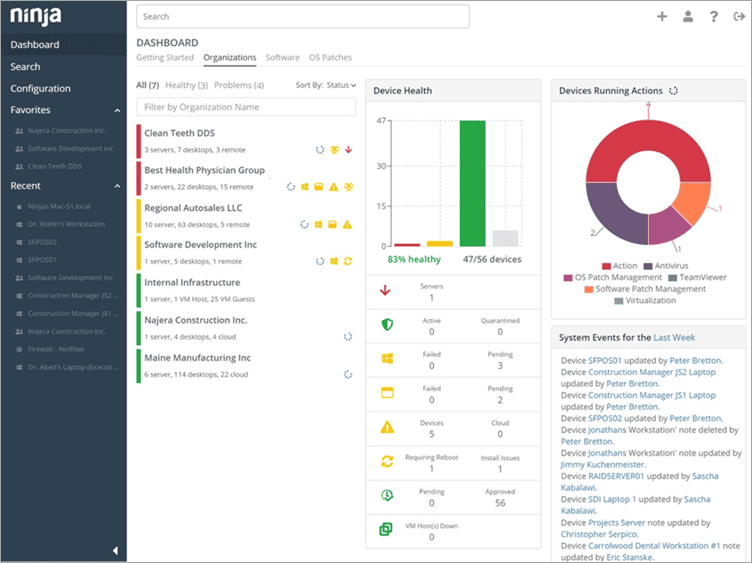
NinjaOne automates the hardest parts of IT, delivering visibility, security, and control over all endpoints for more than 20,000 customers.
The NinjaOne automated endpoint management platform is proven to increase productivity, reduce security risk, and lower costs for IT teams and managed service providers. The company seamlessly integrates with a wide range of IT and security technologies. NinjaOne is obsessed with customer success and provides free and unlimited onboarding, training, and support.
NinjaOne is #1 on G2 in endpoint management, patch management, remote monitoring and management, and mobile device management.
Features:
- Monitor the health and productivity of all your Windows and MacOS workstations, laptops, and servers.
- Get full hardware and software inventories.
- Remotely manage all your devices without interrupting end-users through a robust suite of remote tools.
- Automate OS and third-party application patching for Windows and MacOS devices.
- Standardize the deployment, configuration, and management of devices with powerful IT automation.
- Directly take control of devices with remote access.
Verdict: NinjaOne has built a powerful, intuitive IT monitoring platform that drives efficiency, reduces ticket volumes, improves ticket resolution times, and that IT pros love to use.
#2) Paessler PRTG Network Monitor
Best for small to large businesses.
Pricing: Paessler provides a 30-day free trial for the unlimited version. It offers a free version as well. The pricing plans start at $2149 for 500 sensors and 1 server installation.

PRTG is an all-in-one network monitoring software. All your cloud computing services can be monitored and managed centrally. It can monitor all types of servers in real-time for Availability, Accessibility, Capacity, and Reliability.
Features:
- You will be able to identify the bottlenecks by knowing about the bandwidth used by devices and applications.
- It provides features for monitoring specific data sets from databases.
- It will provide detailed statistics for the applications running in your network.
- It will help you to track the entire local network including Workstations, Routers, Switches, etc.
Verdict: PRTG is a complete solution and you will not need any additional plugins. It is an easy-to-use and powerful platform for monitoring the systems, devices, traffic, and applications over your IT infrastructure.
#3) ManageEngine OpManager
Best for IT teams, Small to large businesses.
Price: Standard, Professional, and Enterprise editions available. Contact for a quote.

OpManager stands apart from other operation management tools in two key departments. It is excellent hardware monitoring software. It can be used to monitor routers, printers, storage devices, and other hardware components that exist on your network.
It’ll alert you of its performance and health in real time. As such, you can fix any issue affecting them before it is too late. Besides hardware monitoring, you can also employ the tool to monitor wireless networks, firewalls, and other key elements on your network infrastructure.
Features:
- Continuous Network Monitoring
- Network Visualization
- Fault Management
- Distributed Network Monitoring
Verdict: With OpManager, you get end-to-end visibility and analytics into all hardware devices that exist on your network infrastructure. It is easy to use, affordable, and can prove quite effective in tackling faults plaguing your network hardware devices.
Read our ManageEngine OpManager Review Here
#4) Site24x7
Best for Managing heterogeneous databases from different setups.
Pricing:
- A 30-day free trial is available.
- All-in-one pricing model prices are as follows:
- Pro- $35 per month.
- Classic- $89 per month.
- Enterprise- $225 per month.
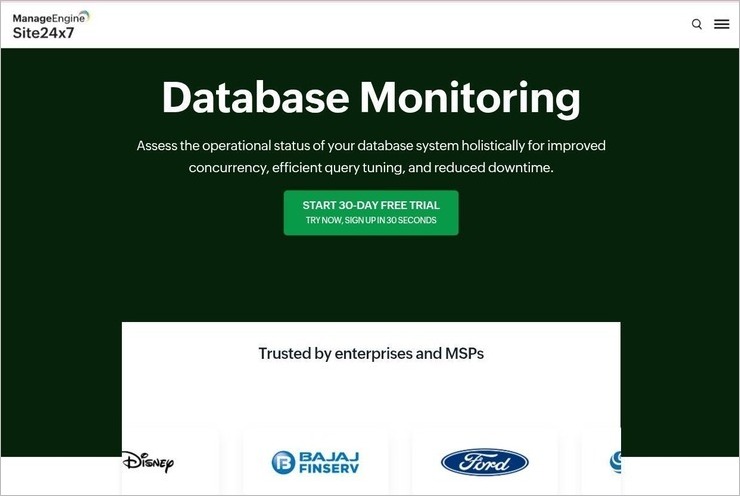
Site24x7 is one of the best hardware monitoring solutions that ensures improved concurrency, and reduced downtime. It can monitor a variety of databases including MySQL, Amazon RDS, Oracle, SAP HANA, Cassandra, DB2, and more. It automatically discovers the data and organizes it into a holistic dashboard to provide a complete overview of all the data in one place.
It supports a hybrid setup that includes both cloud as well as on-premise setup. It can monitor and manage different databases including Oracle, MSSQL, MySQL, NoSQL, Cassandra, and so on. It has been trusted by various enterprises and MSPs including BeyondTrust, GoDaddy, Disney, Ford, SAP, upland and many more.
Features:
- Automatically detects data and visualizes it in a single view via dashboards.
- Ensures reduced downtime, failover mitigation, and business continuity.
- Supports cloud as well as on-premise setup and monitors heterogeneous databases.
- Monitors a diverse range of databases including Oracle DB, MSSQL, MySQL, PostgreSQL, and more.
- Ensures enhanced interoperability by providing a comprehensive visibility of different databases.
- In-depth query insights are provided to analyze and troubleshoot effectively.
Verdict: Site24x7 is best in offering an AI-powered database management tool that guarantees a panoramic view of all the databases of the company across different setups including SQL, NoSQL, Oracle, etc. It automatically discovers data and visualizes it to provide a complete overview of all the nodes in the cluster.
#5) HWMonitor
Best for small to medium-sized businesses.
Price: HWMonitor is available for free. HWMonitor Pro is available in two types of licenses i.e. Standard ($22.31) and Extended ($39.10).

This hardware monitoring program works by Reading voltages, Temperatures, Fans, and Speed. It supports Windows OS. Through S.M.A.R.T. it can read hard drives temperature. It can read the video card GPU temperature. An extended version of HWMonitor is also available i.e. HWMonitor Pro.
Features:
- HWMonitor Pro is available for Windows and Android platforms.
- HWMonitor Pro provides the features of Remote monitoring, a Graph generator, and Improved interface.
- By making use of a simple TCP/IP connection, it can watch the sensors of one or several distant PCs or Android devices.
- Its graph generator can save monitoring data and generate logging graphs.
Verdict: HWMonitor is a lightweight program and gets updated regularly.
#6) Open Hardware Monitor
Price: This open-source software is available for free.

Open Hardware Monitor can monitor Temperature sensors, Fan speed, Voltages, Load, and Clock speeds of the computer. It provides support to most of the hardware monitoring chips.
Features:
- Open Hardware Monitor reads core temperature sensors of Intel and AMD processors for monitoring the CPU temperature.
- It can display the temperatures of the SMART hard drive.
- You can view the monitored values in the main window, in a customizable desktop gadget, or in a system tray.
Verdict: Open Hardware Monitor is an easy-to-use, free, and open-source software for monitoring temperature sensors, fan speeds, voltages, load, and clock speeds.
Further Reading => Simple Ways to Know What Kind of Motherboard You Have
#7) HWiNFO
Best for small to large businesses.
Price: Free

HWiNFO is a free software for Hardware Analysis, Monitoring, and Reporting. It is for in-depth hardware information, Real-time system monitoring, and Reporting. It supports Windows and DOS operating systems.
Features:
- Accurate monitoring of all system components for actual status and failure prediction.
- It provides a customizable interface with a variety of options.
- Multiple types of reports, Status logging, and Interfacing with other tools or add-ons.
- It can identify the BIOS information like a manufacturer and Version number.
- It can identify the manufacturer of the processor, its version, and current & max clock speed, etc.
Verdict: The number of open slots and used motherboard slots, general information, driver details, etc., can be identified with the help of HWiNFO.
#8) AIDA64
Best for small to medium-sized businesses and home users.
Price: AIDA64 has four editions i.e. AIDA64 Extreme (Starts at $39.95 for 3 PCs), AIDA64 Engineer (Starts at $199.90), AIDA64 Network Audit (Starts at $100 for 10 nodes), and AIDA64 Business (Starts at $199 for 10 nodes). You can try all these products for 30 days. It also offers a 30-day money-back guarantee.

AIDA64 has hardware monitoring features like Sensor monitoring, Sensor logging and Alerting, OSD Panel & Desktop Gadget, External LCD & VFD support, Smartphone & Tablet integration, and Uptime & Downtime statistics. All these features are available with AIDA64 Extreme, AIDA64 Engineer, and AIDA64 Business.
Features:
- AIDA64 Extreme and AIDA64 Engineer are diagnostic and benchmarking software.
- AIDA64 Business is a solution for IT asset management. AIDA64 Network Audit is the solution for network inventory.
Verdict: AIDA64 is the solution for Windows OS that will help you with System information, Diagnostics, and Benchmarking.
#9) Core Temp
Price: Core Temp is available for free.

Core Temp is a compact solution for monitoring processor temperature. With the help of Core Temp, you will get information on the temperature of each core in each processor of your system. It supports Windows OS.
Features:
- CoreTemp has a unique feature of displaying the temperature of each core of every processor in the system.
- You will be able to see the temperature fluctuations in real time with varying workloads.
- The mobile app is available for Android and Windows phone devices. This will help you to monitor on the go.
- It provides a graph view.
- It provides color-coded readings.
Verdict: Core Temp is a customizable, expandable, and easy-to-use platform. You can get information on memory utilization. It is a motherboard agnostic.
#10) Speed Fan
Best for Microsoft Windows.
Price: Free

This program is used for monitoring Voltages, Fan speeds, and Temperatures. It works with computers that have hardware chips. It supports Windows OS. The recommended maximum fan speed is 100. Depending on the noise of the fan you can reduce it to 95 or 90.
The minimum value can be set to the speed at which there will be no noise from the fan.
Features:
- The correct configuration of SpeedFan will change the fan speeds according to the system temperatures.
- SCSI disks are also supported by SpeedFan.
- SpeedFan can access S.M.A.R.T. info and provide hard disk temperatures.
Verdict: By accessing the digital temperature sensors it can change the fan speeds accordingly.
#11) Real Temp
Price: Free

This temperature monitoring program is for Intel Single Core, Dual-Core, Quad-Core, and Core i7 processors. These processors contain a digital thermal sensor for each core. These sensors will provide temperature information relative to TJMax. It supports the Windows operating system.
Features:
- Real Temp supports all Intel Core-based processors for reading temperature.
- You can calibrate Real Temp for each core of your CPU.
- It provides the Test Sensors feature for checking the DTS sensors. It will help you to find problems.
- It provides the features of reporting and logging the Intel PROCHOT# thermal throttle activity bit.
- It shows MHz, TJMax, CPUID, APIC ID, and calibration settings.
Verdict: RealTemp will track the minimum and maximum temperatures along with full logging features. It doesn’t require any installation or registry modifications. It doesn’t provide support to Pentium 4 processors.
#12) SolarWinds Server and Application Monitor
Best for small to large businesses.
Price: SolarWinds offers a free trial for 30 days. Its price starts at $2995.

SolarWinds Server and Application Monitor is a simple and powerful solution that will help you to resolve issues faster through reports and smart alerts. It can monitor Azure and AWS IaaS, PaaS, and SaaS.
Features:
- Solarwinds Server & Application Monitor provides more than 1200 application monitoring templates.
- It provides the features of Server capacity planning, Custom app monitoring, Application dependency mapping, and Azure monitoring.
- It has the features of Active directory monitoring, Agentless server monitoring, and Apache Cassandra monitoring.
- It will help you identify the root cause of the response time issues of the applications and servers.
Verdict: SolarWinds Server and Application Monitoring is a customizable monitoring solution. It will be a unified monitoring of applications across Private, Public, and Hybrid cloud environments.
Conclusion
These are our top 10 Hardware Monitoring Tools. Our top recommendations include SolarWinds Server and Application Monitor, NinjaRMM, and Paessler PRTG Network Monitor.
SolarWinds provides the Server and Application Monitor. AIDA64, Open Hardware Monitor, HWMonitor, and HWiNFO are hardware monitoring solutions. ManageEngine OpManager and Paessler PRTG Network Monitor are network monitoring solutions.
Core Temp and Real Temp are temperature monitoring programs. SpeedFan is a program that can change the fan speed according to system temperatures.
HWiNFO, Open Hardware Monitor, Core Temp, SpeedFan, and Real Temp are free hardware monitoring solutions.
We hope this Hardware Monitor article will help you select the right solution.
Review Process:
- Time Taken To Research This Article: 18 Hours
- Total Tools Researched: 14
- Top Tools Shortlisted: 10
Was this helpful?
Recommended Reading
-

Read this review and comparison of the top Infrastructure Monitoring Tools and Services to select the best Infrastructure Monitoring Tool: Infrastructure Monitoring Tools and Services are solutions to help the engineering team maintain and optimize the IT infrastructure through metrics, visualizations, and alerts. These Infrastructure Monitoring solutions will improve operational…
-
Explore and compare the top Ping Monitoring Tools and go for the best ping tool to monitor host availability, connection quality, status, etc: Ping stands for Packet Internet or Inter-Network Groper. It helps in testing and verifying the status of a particular IP address. Ping monitoring is defined as the…
-

Evaluate the top Cost Monitoring Software for Azure with features. Select the best Azure Cost Monitoring tools to analyze, manage, and monitor your overall costs across all Azure services: In the ever-evolving landscape of cloud computing, managing costs efficiently as an organization grows its footprint in Microsoft Azure is a…
-
The List of the Best On-premises and Cloud-Based Call Center Software for Inbound and Outbound Calls with Pricing and Feature Comparison: What is Call Center Software? Call Center Software is an application that has the functionality for managing customer communications coming from multiple channels and sources. It helps agents make…