Do you often take screenshots on Facebook? Discover the answer for does Facebook Notify of Screenshots of Photos or Stories from our complete guide and protect your privacy:
Have you ever wondered whether Facebook notifies someone on the other side whenever you
take a screenshot of it on your phone or computer?
Since Snapchat has been doing this since 2011, Facebook users have rightfully been concerned about the platform following in the former’s footsteps.
Table of Contents:
- Can People See When You Screenshot on Facebook
- Does Facebook Notify of Screenshots: Explore Now
- Why Facebook Does Not Notify of Screenshots?
- Facebook Features: Do They Render Screenshot Notifications
- Screenshot Notifications: Facebook vs. Other Platforms
- Screenshot Policy of Other Facebook Applications
- Facebook’s Privacy Policy As of 2026
- Does Facebook Notify Screen Recording?
- Tips to Improve Privacy on Facebook
- How to Know if Someone Takes a Screenshot of Your Facebook Profile
- Frequently Asked Questions
- Conclusion
Can People See When You Screenshot on Facebook
With this article, I want to put this question to rest once and for all. So, does Facebook notify of screenshots? I’ll answer this question in a nuanced and definitive way through this article.
The video tutorial below shows how Facebook understands Privacy:
So, without much further ado, let’s dive in.
Does Facebook Notify of Screenshots: Explore Now
[via Meta]
Let’s talk about the obvious issue. No, Facebook does not notify its users if someone has taken a screenshot of their posts, profile, photos, feed, or stories. I’ve read Facebook’s privacy policies and gone through all announcements they’ve made as of 2026.
There’s been no mention of a built-in feature that notifies users when a screenshot is taken, whether on a phone or a computer. That said, there is one notable exception to this – Facebook Messenger’s Vanish Mode.
When enabled, Vanish Mode automatically deletes messages after viewing. If you try to take a screenshot of your Messenger chats while it’s set on “Vanish Mode”, Facebook will notify the person on the other side of this chat, as not doing so will defeat the purpose of this mode.
Why Facebook Does Not Notify of Screenshots?
With Snapchat brazenly notifying users whenever a screenshot is taken, one has to wonder what is stopping Facebook from following suit. The answer to this question lies in the platform’s focus on user-controlled privacy. Facebook empowers its users to manage who on the platform gets to view and consume content posted by them.
As such, it doesn’t see the need to be proactive with its security measures, especially with regard to tracking screenshots. Check our detailed guide on how to take a screenshot on Windows 10.
Facebook Features: Do They Render Screenshot Notifications
As I said before, I’ll be taking a more nuanced approach to this often asked question. I’ll be covering each aspect or feature of Facebook and answering whether the platform notifies users when you take a screenshot.
#1) Does Facebook Notify Screenshots of Stories
Facebook does not notify its users if they take a screenshot of their published photo. Facebook doesn’t have a built-in feature designed to track screenshots of stories on the platform. This means you can take a screenshot without worrying about the story’s owner being notified of your action.
What to do to stop someone from taking screenshots of your Stories
This is a legitimate concern to have, especially if you are possessive of the content you publish on the platform. As I said before, Facebook facilitates user-controlled privacy. This means you can configure the platform’s settings to control who gets to view your stories.
Here is an image that depicts Facebook Stories:
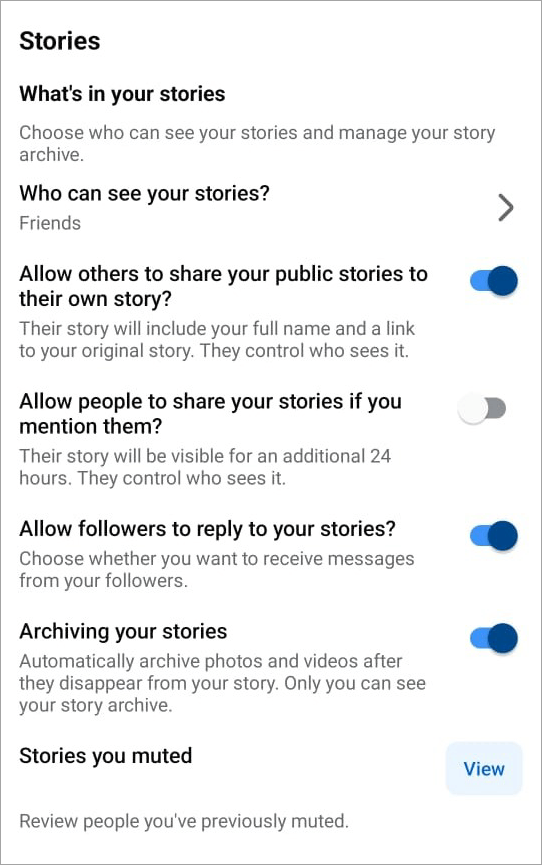
Simply navigate to your story’s settings, and in the “Who can see your story?” section, select “Friends” to make sure nobody outside your friends list can view your story. You can get even more specific with the “Custom” configuration, which lets you manually choose who gets to see your stories.
#2) Does Facebook Notify Screenshots of Photos, Videos, and Reels?
As is the case with Stories, Facebook does not notify someone if you’ve captured a screenshot of their posted photos, videos, or reels. It does not matter whether the post in question was private or public. Facebook will under no circumstances alert a user if you capture a screenshot of their post.
What to do to stop someone from taking screenshots of your photos, videos, and reels?
If you are concerned about other users capturing screenshots of any post you publish, you can take certain measures. These measures will help you retain the right over the content you publish and restrict its duplication.
Given below is the image of Facebook Reels:
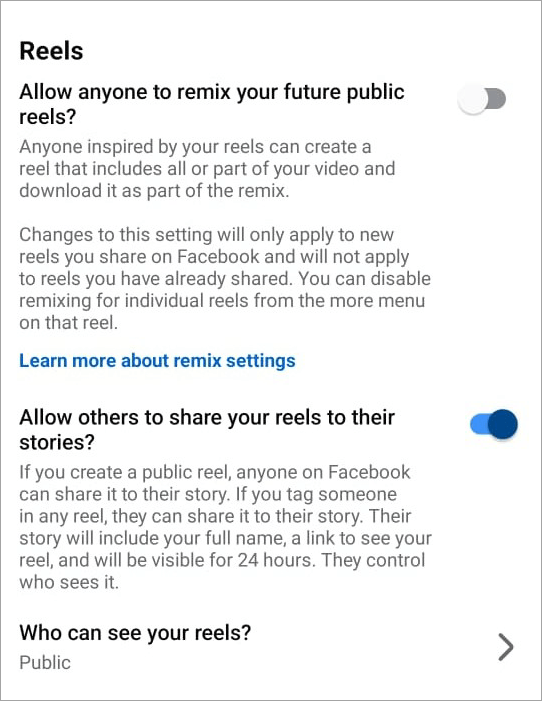
The very first thing you can do is add a watermark to the image or video you post. This way, even if someone takes a screenshot of your content and publishes it again, their audience will know whose content it is.
You can apply further restrictions to your posts to ensure they are only visible to a specific set of people. If you are concerned about people taking screenshots of your profile picture, simply tap on your picture and tap or click on the “Turn on the profile picture guard” option.
#3) Does Facebook notify screenshots of the feed or pages?
No, Facebook does not alert a user if you take a screenshot of any random page on someone’s profile. Everything posted on a Facebook page is fair game, and the platform will notify no one if you wish to take a screenshot of it.
What to do to stop someone from taking screenshots of your feed or pages
To prevent screenshots of your page or feed, you can configure Facebook’s settings to limit your page’s visibility. You have the option to set your feed to private or restrict its view to friends only.
Do the following to limit visibility:
1. Go to Settings.
2. Navigate to Audience and Visibility.
3. Under this section, find and tap on Profile and Tagging as shown below.
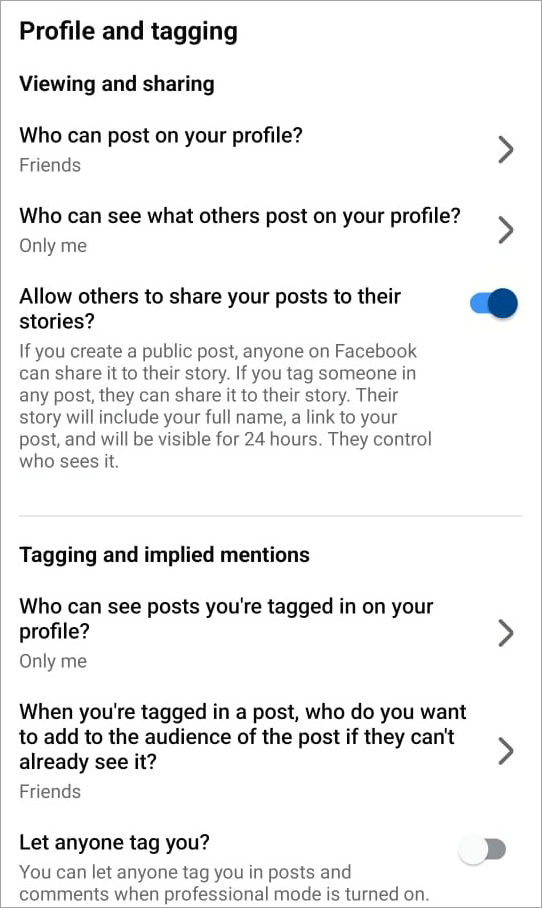
4. Here, you’ll find the option to customize who gets to view your page and whether others can share your content.
#4) Does Facebook Messenger Notify Screenshots?
We are finally talking about one aspect of Facebook where the platform notifies if a screenshot is captured. Facebook Messenger is a feature within the platform that enables messaging or chats between users.
Facebook Messenger will not notify someone if you take a screenshot of regular chats. However, a user will be notified if you take a screenshot of chats with “Vanish Mode” on.
Vanish Mode, also known as Disappearing messages, is a great feature for individuals who desire more privacy, especially when it comes to direct messaging. With “Vanish Mode” on, any message sent will vanish after 24 hours.
So, if you don’t want anyone taking screenshots of your chats, simply tap on a one-on-one chat window on Messenger to enable Vanish Mode.
#5) Notifications When Saving Photos
You don’t necessarily have to take screenshots of photos when Facebook allows you to download them to your system. The other user won’t know about this download. If you don’t want anyone downloading your photos, simply do the following:
1. Go to Settings.
2. Navigate to Audience and Visibility.
3. Under this section, find and tap on Posts as in the image below.
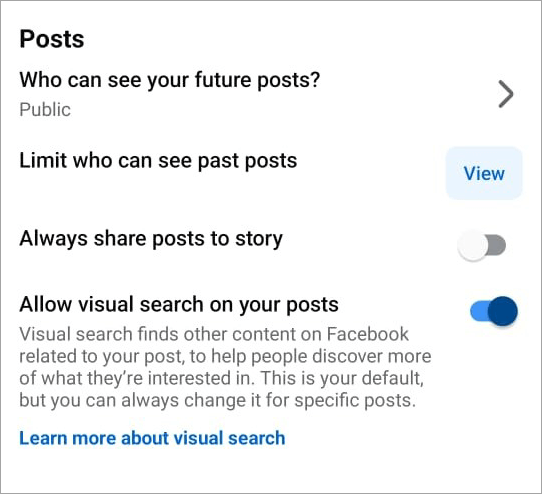
4. Make the necessary configurations to restrict the visibility of your posts.
Screenshot Notifications: Facebook vs. Other Platforms
Whether someone will be notified when you take screenshots isn’t limited to Facebook alone. There are other social media platforms out there that may raise the same question in you.
To clear up any confusion, please refer to the table below.
| Platform | Screenshot Alert | Exception |
| Snapchat | Screenshot alert sent to users | – |
| X (Twitter) | No Alert sent | – |
| No alert sent for screenshots of feed, photos, videos, stories, and reels | Screenshot of chat sent if in vanish mode. | |
| No alert sent for screenshots of chats | Alert sent if a screenshot of “view-once” messages is taken. |
Screenshot Policy of Other Facebook Applications
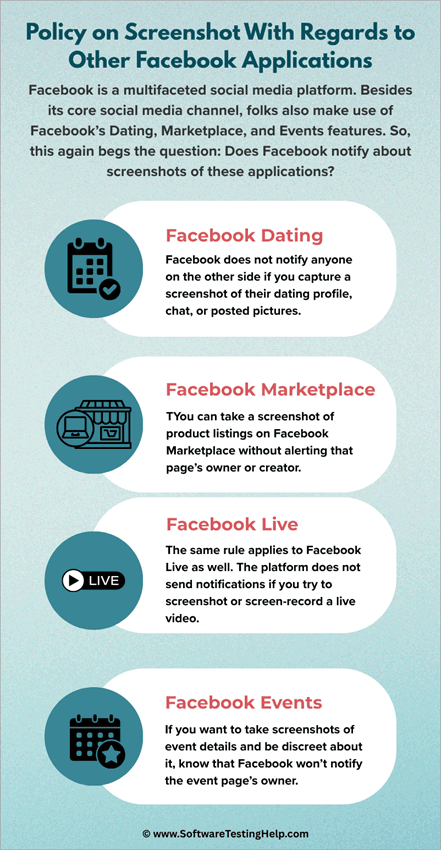
Facebook is a multifaceted social media platform. Besides its core social media channel, folks also make use of Facebook’s Dating, Marketplace, and Events features. So, this again begs the question: Does Facebook notify about screenshots of these applications?
#1) Facebook Dating
When it comes to Facebook Dating, screenshot alerts aren’t something you have to worry about. Facebook does not notify anyone on the other side if you capture a screenshot of their dating profile, chat, or posted pictures.
Similarly, you won’t be notified if someone else tries to take a screenshot of your chats and dating profile.
Check our detailed guide on how to fix Facebook Dating Not Showing Up Issue
#2) Facebook Marketplace
Taking screenshots of product listings is a common practice that both individuals and businessmen casually partake in. You can take a screenshot of product listings on Facebook Marketplace without alerting that page’s owner or creator.
#3) Facebook Live
The same rule applies to Facebook Live as well. The platform does not send notifications if you try to screenshot or screen-record a live video. Although you can capture a screenshot discreetly, I would still caution against reproducing this live video, as it could mean serious violation of copyright laws.
#4) Facebook Events
I can’t recall how many times I’ve taken a screenshot of events posted on Facebook. This was, after all, a convenient and quick way for me to remember important information about the event, like its date, time, venue, etc.
If you want to take screenshots of event details and be discreet about it, know that Facebook won’t notify the event page’s owner.
Facebook’s Privacy Policy As of 2026
Facebook’s Privacy Policy has pretty much remained consistent since its inception, with little modifications here and there. Privacy on the platform is largely user-controlled. This means user actions such as taking screenshots or saving a photo do not warrant an alert from the platform.
Nothing will change in this department in the near future as well. Facebook does not track screenshots, unless it is on Facebook Messenger (only in vanish mode). While Facebook does not track screenshots, you can still protect your content and improve privacy by restricting the visibility of your posts.
Below are the privacy settings you can choose to limit your Facebook profile’s visibility:
| Public | Posts on your profile are visible to everyone |
| Friends | Post visibility is restricted to just your friends |
| Custom exclusion | Limit post visibility even further by allowing access to only some people on your friends’ list |
| Only Me | Posts on your profile are only visible to you |
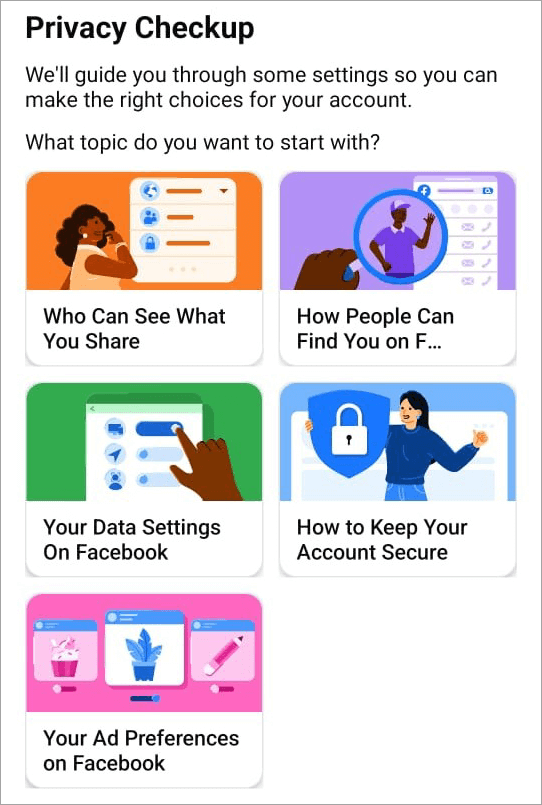
Facebook allows you to perform a Privacy Checkup of your profile to see how your profile is being viewed by the platform’s general audience. I suggest performing this check-up to make sure you’re satisfied with your profile’s visibility and privacy settings.
Does Facebook Notify Screen Recording?
So far, we’ve talked in great detail about screenshots and whether Facebook notifies you of them. Besides screenshots, people can try to screen record your Facebook stories, profile, or chat, as well. This begs the question: Does Facebook notify you of screen recording?
The short answer here would be no. The longer answer is as follows:
Does Facebook notify when you screen record stories?
As is the case with screenshots, Facebook does not notify when someone screen-records a story on the platform. As such, you are free to use your computer or phone’s screen recorder to capture a live story on Facebook.
Does Facebook notify when you screen record posts/reels?
No, Facebook will not notify when you screen record a reel or post. This means you are free to use your phone or computer’s screen recorder to record the entire reel or post it on someone’s Facebook. Facebook does not have a built-in detector as of yet to identify screen recorders. So, you can record to your heart’s content without alerting anyone.
That said, I would suggest not reusing or reposting the reels or stories you’ve recorded without the original creator’s permission. Reposting someone’s content on Facebook without consent could be deemed a violation of copyright laws, which could land you in legal trouble.
Tips to Improve Privacy on Facebook
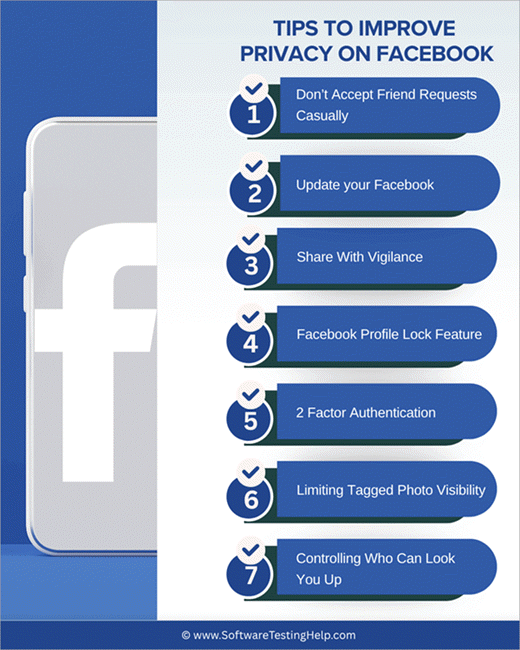
The core question I’ve centered this article on hinges on the concern of privacy on the platform. If you are truly worried about unwanted people accessing your stories, messages, or posts, I suggest following the below privacy tips:
1. Don’t Accept Friend Requests Casually
It is my number one rule to accept friend requests only from someone I know or am aware of. One shouldn’t fraternize with strangers, whether it is face-to-face or online. You never know what their intentions might be.
To be on the safer side, don’t accept friend requests from any random person. At least try to verify that person’s identity before you accept their request.
2. Update your Facebook
All apps, Facebook included, must be up-to-date. An out-of-date Facebook privacy setting will not function as intended. This will leave your profile vulnerable to view and access by people you don’t want snooping into your online presence. Therefore, make sure your Facebook is up-to-date with the latest version.
3. Share with Vigilance
Be extra careful about what you end up sharing on the platform. Don’t share selfies with your neighborhood clearly visible in the background. Inspect your photos and videos before sharing them with the broader Facebook audience. Make sure it doesn’t contain any private or sensitive information that strangers can exploit online.
4. Facebook Profile Lock Feature
Profile Lock is a great feature offered by Facebook to help users strengthen their privacy on the platform. With a profile lock enabled, Facebook will restrict who can view and engage with your profile and all of its content. Visibility to your profile and its content will become limited to only your friends and followers.
This means strangers or people outside your friends list won’t see your posts or be able to download the images or reels you’ve published.
Enabling Profile Lock is simple, and it can be done by following the steps below:
- Open Facebook and click on your profile pic
- Then, click on Settings -> Audience and Visibility -> Profile Locking.
- On the resulting page, click on the “Lock Your Profile” button.
5. 2-Factor Authentication
If you are concerned about someone trying to break into your account, I suggest fortifying it with two-factor authentication (2FA).
With 2FA on, no one will access your account even if they somehow know your password, as they’ll have to go through the second factor to authenticate their identity. You can configure 2 factor authentication via Facebook’s Password and Security settings.
6. Limiting Tagged Photo Visibility
You can limit the visibility of the photos you are tagged in to prevent someone from taking screenshots of them. You can do so by making the configurations via Settings -> Profile and Tagging -> Who Can See posts You’re Tagged in on your profile?
You can configure this setting to “Only Me” Friends” or “Specific Friends” to drastically limit a tagged photo’s visibility.
7. Controlling Who Can Look You up
This is again where Facebook’s user-controlled privacy features will come to your aid. Facebook lets you control how people can find and engage with you on Facebook. Simply navigate to Settings -> Audience and Visibility -> How People Find and Contact You.
Here, you’ll find various options, which you can configure to control who can look you up, how you get message requests, and who Facebook suggests your profile to.
How to Know if Someone Takes a Screenshot of Your Facebook Profile
You may have come across several apps and so-called solutions that claim to alert you when someone takes a screenshot. In my research, I found out that none of these apps was actually reliable. You may find a plethora of such apps listed online.
Almost all of them are suspiciously shady. I would suggest staying away from such apps. They could end up doing more harm to your smartphone than actually helping detect a screenshot attempt on Facebook.
Facebook itself doesn’t have built-in screenshot detection capabilities. As of 2025, it doesn’t feel like Facebook will be following in Snapchat’s footsteps and introducing such a feature anytime soon.
The only notable exception here is Facebook Messenger’s vanish mode notification. When Messenger is switched to “Vanish Mode”, the messages will disappear 24 hours after they’ve been sent. Since capturing screenshots will defeat the purpose of disappearing messages, Facebook notifies users when a screenshot is taken.
Frequently Asked Questions
1. Can someone tell if you screenshot Facebook?
No, there is no way for someone to know if you’ve captured a screenshot of their profile page, published photo, or story. Facebook does not notify users if a screenshot of their page or feed was taken. That said, Facebook does notify if you’ve taken a screenshot of a one-on-one chat window on Messenger that’s on “vanish mode”.
2. Does Facebook notify you if someone saves your photo?
No, Facebook does notify you if someone has downloaded or saved your photo. If you wish to prevent unauthorized downloading of your video or photos on the platform, you can do certain things.
You can only post photos with a watermark on them or limit the post’s visibility to specific people or your friends only.
3. Which apps notify screenshots?
Snapchat is an app that famously alerts users when a screenshot of their snaps or published stories is taken.
Facebook, Instagram, and WhatsApp alert users when a screenshot of chat windows on “disappearing messages” is taken. Telegram is another app that notifies users if screenshots of secret chats are taken.
4. Does Facebook allow screenshots?
Yes, there are no restrictions imposed by Facebook on users capturing screenshots of posts or stories published on the platform. However, screenshots may be restricted in certain cases, like when the guard on the profile picture is turned on.
5. Does Facebook notify when you look at a profile?
No, Facebook will not notify a user for simply looking at someone’s profile. There isn’t a built-in feature, nor will there be one in the near future, that offers this capability, as it feels counterintuitive to the platform’s long-adhered user-controlled privacy policy.
6. Does Facebook notify when you screen record?
No, screen recording notifications aren’t a thing on Facebook. As Facebook offers user-controlled privacy, it doesn’t expressly send notifications if someone tries to screen-record a reel, post, or story on Facebook.
7. Can I use profile lock to prevent screenshots?
Profile lock limits access to your profile and restricts its visibility. As such, only your friends can see and engage with your posts. Profile lock does not prevent screenshots, as people on your friends list can take screenshots of your posts.
8. Does Facebook notify screenshots in private messages?
To answer this question, you need to understand the special privileges you have as a user of Facebook Messenger. You can have a regular chat window or enable vanish mode.
• Regular Chat Window: No screenshot notifications will be sent if you try to capture screenshots of messages on a regular chat window.
• Vanish Mode Window: With vanish mode, messages sent are set to disappear after 24 hours. Facebook will notify the person on the other side of this chat window if Vanish Mode is enabled.
9. Will Facebook add screenshot notifications in the future?
I’ve scoured the internet for news on whether Facebook could announce a screenshot-detection feature sometime down the line. There has been no official news that confirms Facebook’s intention to introduce screenshot notifications in the future. It seems unlikely that Facebook will introduce this feature.
10. Does Facebook notify you when you screenshot someone’s profile picture with guard on?
The profile picture guard is meant to prevent someone from downloading or saving your profile picture. That’s where its purpose ends. Having the guard does not mean that Facebook will notify you when someone takes a screenshot of your profile picture.
11. How is Facebook different from Snapchat regarding screenshots?
Snapchat is a rare social media platform that notifies users if someone tries to take a screenshot of their profile, snaps, or stories. Facebook does not notify users of screenshots, except for Facebook Messenger on vanish mode.
12. Does Facebook notify screenshots in groups?
No, a Facebook group screenshot can be taken without triggering a notification from the platform. You can take a screenshot of all content within Facebook Groups, and the platform will not send a notification alerting others in the group.
Conclusion
If you are worried about someone on the other side being notified of you taking a screenshot of their post or feed, don’t be. Facebook does not alert to captured screenshots with one notable exception. You can take screenshots of stories, photos, videos, and regular chat messages without alerting the other person.
This means you can take screenshots without worry. That said, there is a flip side to this very freedom, where you too may not be notified if someone takes a screenshot of your published content.
If you are concerned about that happening, I suggest familiarizing yourself with Facebook’s privacy settings. That will help you restrict your profile’s visibility and reduce the chances of your content being duplicated or reproduced.
Research Process:
The total time involved to complete and publish this article is approximately 36 hours. This content was created through a structured research approach to ensure accuracy and reliability.
For more quick Facebook-related guides, you can explore our range of tutorials below:
- Best Facebook Video Downloader Software (Top Rankings)
- Why Does Facebook Keep Logging Me Out? Quick Fixes
- Top Facebook Lead Ads Integrations with Your CRM
- How to Find Recently Watched Facebook Videos History
- Download Facebook Reels Videos Online for Free
Was this helpful?
Recommended Reading
-

Quickly download your favorite Facebook reels video on your device in HD format. Pick the best Facebook Reels downloader to save and share your beloved reel with your friends: Whenever I am on Facebook, coasting from one reel to another, I come across a short video that’s just too good…
-

Is Facebook dating not showing up in your app? Explore the troubleshooting steps for the Facebook dating not working issue and fix the FB dating not working problem within minutes: Facebook's new feature, Facebook Dating, helps people who share common interests and are looking for lovers to find each other.…
-
List and comparison of the top Facebook Video Downloader with features and pricing. Select the FB Video Downloader software from this list per your requirements: You have to be living under a rock to not know what Facebook is. It is after all a behemoth amongst social media platforms. From…
-
Read, review, compare, and select among the list of top platforms available in the market today for Facebook Lead Ads Integrations with your CRM: Introduced in 2015, Facebook Lead Ads is a tool invented to help marketers generate leads while keeping the cost of lead acquisition at bay. This is…