


Learn about the various types of Automation Testing and discover the truth behind some misconceptions in this tutorial.
In this second part of the test automation tutorials series, I will briefly describe the types of automated tests and then I will also clear some misconceptions about the test automation process.
What is Automation Testing?
Automation testing can be defined as running a set of tests repeatedly without having to execute them manually. Adding automation tests to your test strategy helps save costs and time.
Table of Contents:
Types of Automation Testing

The types of automation tests determine which test suites can be automated. This topic is often misunderstood by testers who confuse it with automation frameworks, which dictate how you organize your test suite for convenient execution.
In this article, we will inspect the Automation testing types and will take a brief look at the automation frameworks.
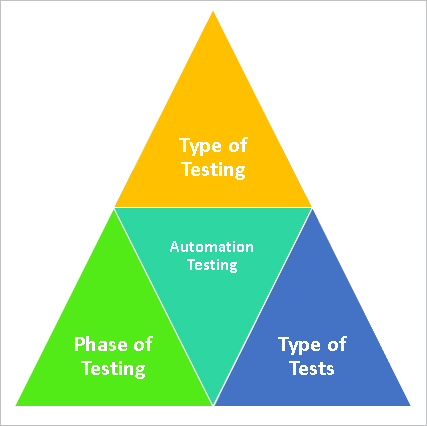
Let’s understand the above classifications.
Automation Based on Type of Testing
#1) Automation of Functional Tests
Functional tests are written to test the business logic behind an application. Automating these means writing scripts to validate the business logic and the functionality expected from the application.
#2) Automation of Non-Functional Tests
Non-functional tests define the non-business requirements of the application. These are the requirements related to performance, security, databases, etc. These requirements can remain consistent or can be scaled as per the size of the software.
Automation Based on the Phase of Testing
Automation of Unit Tests
These tests are run during the development phase itself, ideally by the dev after the completion of development and before handing over the system to the testers for testing.
Automation of API Tests
API tests are run during the integration phase. These may be run by the development or testing team and can be run before or after the UI layer is built for the application. These tests target the testing based on the request and response on which the application is built.
Automation of UI-based tests
UI-based tests are run during the test execution phase. Testers specifically run these tests only once before they hand over the UI of the application. This tests the functionality and business logic of the application from the front end of the application.
Automation Based on the Type of Tests
Unit Tests
Unit Tests are tests that are built to test the code of an application and are usually built into the code itself. They target coding standards for how the methods and functions are written.
These tests are more often written by the developers themselves. However, in today’s world, automation testers may also be asked to write them.
Executing these tests and getting no bugs from them will mean that your code will compile and run without any code issues. These tests rarely target the functional aspects of the application and, as they target code, it is more appropriate to automate them so that the developer can run them as and when required.
Smoke Tests
The smoke test is a famous test performed in the test life cycle. Post-build tests, which are executed immediately after any build is released, ensure that the application is still functioning.
This is a small test suite and is something that will be executed multiple times and it makes sense to automate it. These tests will usually be functional and depending on the type of application, a tool can be picked for them.
API tests
API testing has become very famous in the past few years. Applications built on the API architecture can perform this testing.
In API testing, the testers validate the business layer of the application by checking the request-response combinations for the various APIs on which the application is built. API Tests can also be done as part of the integration tests below.
Integration Tests
Integration test, as the name itself suggests, means testing the application by integrating all the modules and checking the functionality of the application.
Integration testing can be done through API testing or can be done through the UI layer of the application.
UI Tests
UI tests are done from the UI layer or the front end of the application. This may target testing functionality or simply test the UI elements of an application.
Automating the UI to test the functionality is a common practice. However, automating the GUI features is one of the more complicated automations.
Regression Tests
One of the most commonly automated test suites is the regression test suite. Regression, as you may already know, is the test that is done at the end of testing a new module to ensure that none of the existing modules have been affected by it.
It is repeated after each new iteration of testing and the main test cases stay fixed with usually a few new additions after a new iteration. As it is frequently run, almost all the test teams try to automate this pack.
Automation as Continuous integration
Continuous Integration may again run on the automated regression tests themselves, however, in achieving CI, we enable the regression or identified test suite to be run every time a new deployment is done.
Security Tests
Security testing can be both functional and a non-functional type of testing which involves testing the application for vulnerabilities. Functional tests will be composed of tests related to authorization etc., whereas non-functional requirements may be tested for SQL injection, cross-site scripting, etc.
Performance Tests and Quality Control
Performance tests are non-functional tests that target requirements like testing of load, stress, and scalability of the application.
Acceptance Tests
Acceptance tests again fall under functional tests which are usually done to ensure that the acceptance criteria given by the client has been fulfilled.
So far, we have described the type of tests that can be automated and various classifications of the same, all classifications eventually will lead to the same end results of a test suite being automated. As we said earlier, a little understanding is required of how these are different from frameworks.
Once you have identified the tests that you want to automate from the above classification, then you will need to design your logic in a manner to execute these tests smoothly, without much manual intervention. The design of a manual test suite into an automated test suite is where the frameworks come in.
Top Test Automation Types
We will now explore the Top 3 Test Automation Types
- Unit Testing
- API Testing
- GUI Testing
#1) Automated Unit Tests
Automated Unit tests are written to test the code level. Bugs are identified in the functions, methods, and routines written by the developers.
Some companies ask the developers to do the unit testing themselves, while others hire specialized test automation resources. These resources have access to source code and they write unit tests to break the production code.
Because of the presence of unit tests, whenever the code compiles, all unit tests run and tell us the result if all the functionality is working. If any unit test fails, then it means that there is now a bug present in the production code.
Some of the most popular tools present in the market include NUnit and JUnit. Microsoft also provides its own framework for unit testing, called MSTest. Go through the websites of these tools and they will provide you with more examples and tutorials on how to write unit tests.
#2) Automated Web Service / API Test
The Application Programming Interface (API) makes it possible for the software to talk to other software applications. Just like any other software, APIs need to be tested. In this type of testing, GUI is usually not involved.
What we test here is usually the functionality, compliance, and security issues. For web applications, we can test the Requests and Responses of our application to see if they are secure and encrypted or not.
Here is an example of where we can use API Testing. The most popular tool for API testing is SOAPUI, which has both free and paid versions. There are other tools as well, which you can use according to your needs.
#3) Automated GUI Tests
This type of automated testing is the toughest form of automation, as it involves testing the User interface of the application.
It is tough, as the GUIs are highly subject to change. But this type of testing is also closest to what the users will do with our application. As the user will use the mouse and keyboard, automated GUI tests also mimic the same behavior by making use of the mouse and keyboard to click or write to objects present on the user interface.
Because of this, we can find the bugs early and it can be used in many scenarios, such as regression testing or filling up forms, which takes too much time.
The most popular GUI testing tools include Micro Focus Unified Functional Testing (UFT), Selenium, Test Complete, and Microsoft Coded UI (which is a part of Visual Studio Ultimate and premium editions).
Just like the types of automation tests, there are several types of frameworks as well.
Automation Frameworks
Some commonly used automation frameworks include:
- Linear (Record and playback)
- Keyword Driven
- Data Driven
- Page Object Model
- Modular
Further Reading => Automation Frameworks
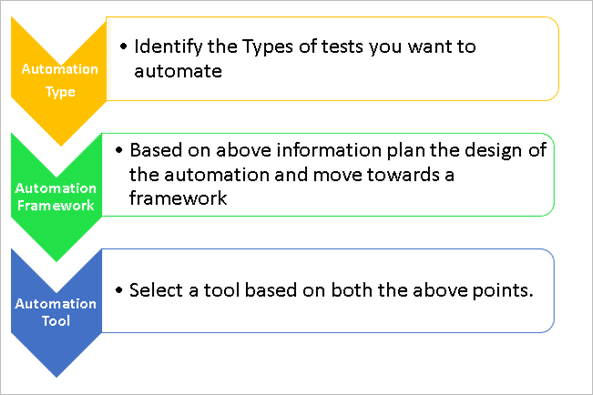
As you can see, the first step in the process of automation is to identify the type of automation, then you can identify the framework to design and, keeping these in mind, you can select the tools that suit your needs.
Automation Tools
Based on the type of testing you are targeting and the type of framework that you may want to build around it, the following tools are available to use:
- Selenium: A very powerful tool for testing Web Applications. Provides multiple browser support.
- Junit and Nunit: Tools majorly used for Unit testing by the developers.
- QTP: Great tool for non-web applications and comes with a built-in object repository.
- Sikuli: Open source tool for GUI testing.
- Soap UI: Tool for API testing.
- Rest Assured: Library to create an API test framework.
- Appium: Tool that supports mobile testing, native app testing, hybrid, and mobile web application testing.
- Jmeter: A tool that is used for performance tests.
- TestNG: TestNG is not an automation tool in itself. However, it provides great support to automation frameworks built with selenium, appium, rest assured, etc.
Further Reading => Test Automation Tools
Misconceptions About Automation Testing
Over the years, I have heard some misconceptions about test automation. I think I should clear them in this article.
Misconception #1: Automation is here to replace manual testers.
Test automation is used to help testers make testing faster and in a much more reliable manner. It can never replace human beings.
Think of test automation as a car. If you walk, it will take around 20 minutes to reach your home. But if you use a car, you will reach it in two minutes. The driver of the car is still you, a human, but the car helps the human to achieve his/her goal faster. Also, most of your energy is saved, as you don’t walk. Thus, you can use this energy to perform more important things.
Automation testing follows the same principle. You use it to quickly test most of your repeated, long and boring tests and save your time and energy to focus & test new and important functionality.
As James Bach said with a wonderful quote:
“ Tools don’t test. Only people test. Tools only perform actions that “help” people test. “
Tools can be clicked on objects. But where to click will always be told by a manual tester. I think you get my point now.
Misconception #2: Everything under the sun can be automated
If you try to automate 100% of your test cases, maybe you will be able to do so, but if you could do that, then our first point becomes false. If everything is automated, then what will a manual tester do?
Confused? Right?
The point is that you cannot automate 100% of your test cases. Because we, as testers, believe that no application can be tested 100%. There will always be some scenarios that we will miss. There will be bugs that come only when your application is used by the clients.
If the application cannot be 100% tested, then how can you promise 100% automation?
There is also a very thin chance that you will be able to automate all of your existing test cases. There are always scenarios that are difficult to automate and are easier to do manually.
For example, a user will enter the data, the second user will approve the data, the third user will view the data and the fourth user is prohibited from viewing the data. Automating these scenarios is possible, but it will require significant time and effort. Doing it manually would make things simpler.
Remember, we use cars to get to distances, but there may be lengthy signals along the way, there will be fuel consumption, there will be parking space issues, parking charges, and a lot more issues. In some scenarios, we just walk to reach our destination easily.
Thus, you should not try to automate everything. Just automate those scenarios that are important and those that take a lot of time to do manually.
Misconception #3: Automation only involves recording and playback.
Please don’t live in a fantasy world. This fantasy is created by false advertisements from different automation tool vendors. They say you just record and playback your steps and your test cases will be automated. Well, that’s a Big Lie!
Automation is everything and not just recording and playback. Pure automation engineers normally don’t use the recording or playback feature at all. Recording and playback are generally used to get an idea of how the tool is generating a script for our steps.
Once we get to know the scripting, we always use scripting to create automated tests. Remember, you must know programming if you want to do test automation. On the other hand, don’t be disappointed if you don’t know programming. Just like any other task, programming can also be learned with practice and dedication.
Many people, regardless of their non-Computer Science background, have become exceptional automation engineers by learning programming over time. At Microsoft, they hire testers who can do programming. They are called SDET (Software development engineers for Test). The first line of the job description says the “SDET’s write a lot of code….”.
Embrace programming instead of avoiding it. It will make you an amazing tester.
Conclusion
I hope this article has helped you to clarify some concepts related to test automation. We have discussed a wide range of automation testing types, along with different classification methods.
Suggested reading =>> Latest Tools for Automated Unit Testing
The main classifications include:
- Automation based on Type of testing (Functional or non-functional).
- Automation based on Phase testing (Unit, API, or UI).
- Automation based on various types of tests (Multiple testing types).
We have also listed down the various tools that can be used for these types of automated testing.
In our upcoming article, we will discuss the step-by-step procedure on how to start test automation in your organization.
Feel free to post your thoughts and feedback in the comments section given below. We would love to hear from you.
PREV Tutorial #1 | NEXT Tutorial #3
Was this helpful?
Recommended Reading
-

Read This Informative Article to Understand the Differences Between Manual Testing Vs Automation Testing Along with Scenarios Where Automation Can be Used: Software Testing is the process that is carried out throughout software development. It is the process of checking, verifying, and validating the requirements of the product. We are…
-

Alpha and Beta testing are Customer Validation methodologies (Acceptance Testing types) that help in building confidence to launch the product and thereby result in the success of the product in the market. Even though they both rely on real users and different team feedback, they are driven by distinct processes,…
-
Know the Difference Between Functional Testing Vs Non-Functional Testing with Examples: Software Testing is broadly categorized into Functional and Non- Functional Testing. Let us discuss in detail about these testing types along with the exact differences between both functional and non-functional tests. What is Functional Testing? Functional testing is testing the…
-

In this article, we will look at how to perform automation testing of JAVA/J2EE applications. Let's get started. Generally, J2EE applications are very large and contain several components from the front-end screen to back-end database. Automated testing is preferred over manual testing for such large applications due to time and…


Superb Article!
I experienced that if we are ready with automated test scripts, it helps a lot in Regression testing and we get a chance to verify the newly implemented changes.
Waiting for “Framework” article @Mohammad Saad
Thanks!
Good Article…Learing a lot from this website.
Looking forward to read more articles on this topic.
Must read article for all the testers..
n can we use TestNG also as a Unit testing tool..?
very knowledgeable and interesting. I did not fall sleep while reading 🙂
Gurpreet,Tejaswini,prince,Shiela,Jo,Kesav. Thank you all for your appreciation.
Hi Very Nice blog,
I have doubt
1. Automated Unit Tests:- Dev team will do
2. Automated Web Service / API Tests:
3. Automated GUI Tests.: what will test how to test?
And where tester will to Regression testing?
Must read series …waiting for next “how to start test automation in your organization step by step”
Dear @Jo,
Regression testing means When new functionality developed in existing project then tester have to test the impact or behaviour of new system in everywhere!
Awesome article!
Very nice article.
Very informative…
Must read series …waiting for next “how to start test automation in your organization step by step”
Good article!
Awsome….thankyou very much STH (Y)
Thank you for this article!!
Thanks for this. This topic is very interesting.
Well, its quite motivating! I am a Game Tester. I was thinking from a couple of months to start studying automation. This article cleared my view and vision towards Automation testing. Thanks 🙂
Hi,
As specified in the last portion of the article, I run away from programming every time. I am a Manual Tester and now I am seeking for job opportunities, but due my lack of knowledge in Automation Testing, I am not getting a good job. That is the reason I have started reading tutorials online, but believe me – I don’t like coding at all. I always escape. But I feel I have to learn it as without doing so I can’t change my job or can make a better career.!!
@Jo, These all test types can be part of your regression testing. Regression Testing means to find a bug in your existing functionality in case of change in your application. This change could occur on unit level, API Level or GUI level. So regression can occur anywhere.
Very useful for me to improve my activity.
Everything is perfect and same realized in my Test Developer Role in one of my recent project.
Words for Automation are also true for some of misconceptions.
Thanks to share. 🙂
Very useful 🙂
which concepts we should learn for programming,for testing<,,what are the ways to learn,,where we can get it?plss refer me
Thanks for the very useful information………..
I’m a bit confused by something stated in the article:
“Automation of UI based tests:
UI Based tests are run during the test execution phase. These are specifically run by the testers and are run only once before the UI of the application is handed over to them.”
Who is the “them” referenced here? It doesn’t seem like it can be the testers. Should it say “the users” instead of “them”?
Thanks for the article, very useful..Could you please add article on automating API tests.
Awesome article… This article will change the mindset of Testers.
DevOps is good upcoming option to integrate automated unit test in given release cycle
Amazing Description on Automation … Learned a lot from it.. Waiting for more topics on the same. Thanks for bringing it up.
Good article
Superb knowledgeable share.
Good article!
help me a lot in my job.
Thank you very much!