Learn the causes of the Steam Pending Transaction and easy fixes for transaction errors on the Steam app.
If your purchase is pending on Steam, don’t panic. You are definitely not the only one; there is definitely something that you can do!
There is nothing more annoying than having a Steam pending transaction when you want to start playing the latest game. It may be a Steam pending balance or even checkout; such problems occur because of verification issues or server problems.
In this tutorial, you will find out:
- The exact reason for pending Steam transactions
- How much time should you give to it
- The fastest method to fix this problem
The tutorial is all about what causes the Steam transaction to be pending and what can be done to fix it easily and quickly.
What is a Steam Pending Transaction?

A Steam pending transaction occurs when Valve has confirmed your intention of purchasing a game, but has not yet been given final authorization from the payment method provider. This is a transitional state during which time your funds may be effectively “blocked” by the bank, while the Steam servers wait to finalize your transaction but Steam won’t hand over the license until the verification is 100% complete.
The term pending refers to an incomplete action; in this case, a partially processed purchase.
- The Steam end is waiting for confirmation before the game addition
- The bank is processing your request
Additional hint: Do not make another attempt to complete a purchase right away.
How long does a pending Steam transaction take?
A Steam pending transactions usually get processed between 30 minutes and 2 hours. Though, based on your payment method, the time may go up to 24 hours, or, in some instances related to banks, even 2 or 3 days. A Steam Pending transaction indicates that Steam has yet to receive the authorization from your bank or financial service company. In case of delays, you will be able to cancel the transaction in Your Account – Purchase History.
What is a Steam
Steam is an online gaming application that allows users worldwide to connect and play games. This platform makes it easier for people to play together, as, on this application, people can create groups based on interests. This platform allows players to play together and stream their gaming skills.
Steam is a leading application in the gaming field which has enabled advanced gaming interests and brought them collectively to one place with ease of communication.

[image source]
Why Is Your Steam Purchase Pending?
Pending status does not necessarily mean that there is something wrong with the system; more often than not, it means that there is a miscommunication between three entities – Steam, the payment gateway (NovaPlay or PayPal), and your bank.
Below are some of the most common roadblocks in 2026 when it comes to making purchases through Steam.
Payment Gateway Delays
Transactions made on Steam are processed via the payment gateway and not your bank account. If the money reaches the payment gateway, but it cannot send an acknowledgement back to Steam about receiving the payment, the transaction becomes pending. Moreover, closing the browser window too soon also results in timeouts and pending transactions.
Bank Authorization Issues
In some cases, your bank may put a hold on the money, without releasing the transaction to you. Such problems arise when your bank is conducting a fraud check (such as rapid purchasing at a sale) or international payments using cards that cannot be used outside their country.
Steam Server Issues On other occasions, there may be an issue with Steam. Heavy traffic on Steam during a sale could result in payments being held and unable to be completed. Moreover, maintenance procedures usually conducted every Tuesday may affect transactions conducted shortly before the shutdown period.
Steam Pending Transaction Time (By Payment Type)
The table below shows how long Steam Pending Take approximately.
| Payment Type | Time |
| UPI | 10 min – 24 hrs |
| Debit/Credit Card | Instant – 2 hrs |
| Net Banking | 30 min – 24 hrs |
| PayPal | Instant |
Ways to Fix Steam Pending Transaction Error
A Steam pending transaction error can be frustrating, but in most cases, it can be resolved quickly by checking your payment method, network connection, and account status.
Below are 7 easy and simple troubleshooting steps that can help To overcome unnecessary delays or repeated errors and ensure your purchase goes smoothly.
#1) Cancel Pending Transaction
While using Steam, users are provided premium features at a reasonable price so users can pay to access them. Sometimes these issues may arise as the previous payment is yet to be verified and initiated. Steam works from the bottom to the top order, so first, it clears all pending transactions and then starts a new one.
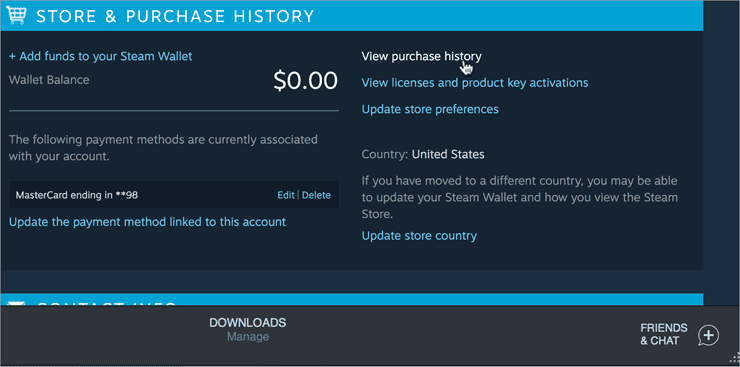
So you can click on your user profile and then click on “Account details” which will lead you to the screen displayed below.
Click on “View purchase history” and check if any payment has a pending tag, then wait until that payment is cleared.
[image source]
#2) Check If the Website is Down
If you have checked your payment history twice and thrice and still there is pending transaction Steam then you must move to the following method.
Sometimes, because of various technical and traffic issues, the applications cannot respond efficiently, resulting in situations like server down. However, this is not something that can happen every other day, but rarely. So you can check if the application is down or not at unofficial Down Detector.

#3) Disable Proxy and VPN
To make the connection more safe and secure, some users use Proxies and VPNs, allowing them to access applications without being vulnerable. In the case of payments, a VPN is not a good choice because a VPN slows down the network speed on your system, and thus payments are delayed or marked as pending.
So, disable all Proxy and VPN settings on your system if repeated transactions are marked as pending.
#4) Use Another Payment Method
This is not mandatory that the issue will always be with your system. There are possibilities that your payment method might have some problems. These issues include reasons like account sync, payment limit, parental controls, and many more. So if you cannot make a payment, then try using some other methods of payment.
Note: While making payments on applications, always prefer using a trusted and secure method.
#5) Check Network Connection
There can be any issue when an error arises, so you have to keep looking for the actual cause one after another. There is a possibility that while you are checking the server down and other reasons, the issue might be with your internet connection.
So you must check your internet connection because while using Wi-Fi, users face issues known as No Internet, Connected. So active signal of Wi-Fi on your system does not necessarily mean that you are connected to the internet.
#6) Check if the Bank Server is Down
When you have checked all these possible reasons, and nothing seems to fit in, there is a very slight probability that the bank server might be the issue. However, bank servers are safe and highly stable, but sometimes, they are down for maintenance reasons.
So if you cannot make a transaction from a particular bank, then try switching to another bank and make payment from them.

#7) Contact Steam Support
After trying all the methods listed above and still not concluding, it may be an issue with your Steam account. So please do not waste another second and directly contact the Steam Support team and explain your issue to them and find the real problem with your account.
The following are the options you need to select when contacting Steam Support.

Now you can select the issue from the list.
What to do if Money is Deducted but Still transaction is Pending
It is a common and stressful scenario to receive a bank SMS about the debiting of the sum and seeing a Working or Pending message at Steam. It indicates that the sum is on a Pre-Authorisation hold by the bank while the “handshake” between Steam and the bank has not yet taken place.
Check Steam Purchase History
The first thing you should do before contacting the bank is checking the status of your transaction on the Steam website or via the Steam application. Here is how to do this:
Go to the username → Account details → View purchase history
Check for:
- Pending – still processing, cancel if possible
- Failed – Didn’t go through; refund is automatic if charged
- Successful – game will be added to the library; restart Steam
Verify Bank Statement
Look for the transaction type in the banking application. In 2026, all banks make a difference between transactions labeled “Cleared” and “Authorized/Hold.”
- When the status is “Authorized,” your bank just waits until Steam claims the payment.
- If Steam does not do that within 24-48 hours (because of timeout or any other reason), the bank automatically releases the hold.
When Refund Happens Automatically
In case the transaction is failed or canceled, the refund processing will be made by your bank. Not Steam!
- Steam wallet: About 24 hours
- Bank cards: 3 to 5 business days (sometimes 10)
- Net banking/UPI payments: 48 to 72 hours
Note: The Steam support team cannot speed it up—they do nothing when the transaction is marked as failed.
My Real Experience with Steam pending transaction
A regular player of Steam and SEO analyst, I have been in such a “pending” situation myself once during a big sale. During a purchase of a present, there was a failure of internet connectivity where Steam showed “working” while money had been withdrawn from the bank.
The “Panic” Phase: My first instinct was to cancel and retry—however, this would have been wrong since this can lead to having two withdrawals at once.
My Step-by-Step Fix (What Actually Worked)
- Rather than attempting to make the purchase again, I used an easy solution:
- The Two-Hour Rule: Close Steam and wait. The system needs some time for the change to be processed.
- Checking Your Browser: Sign into Steam using Google Chrome (Incognito mode). Web-based solutions usually have quicker updates than their apps.
- Final Outcome: A couple of hours later, the status was changed to Failed, and because I did not intervene, the transaction was canceled by the bank automatically after 24 hours.
Frequently Asked Questions
Why is the transaction pending on Steam?
Various reasons can result in transactions pending on Steam error. Some of them are listed below:
1. Pending payment
2. VPN and proxies.
3. Server down.
4. Bank issues.
What to do when a purchase is pending on Steam?
You first need to wait for some time and then, if the payment hasn’t been processed yet, follow the steps listed below:
1. Check for any pending payment.
2. Disable proxies and VPN.
3. Check Steam servers.
Why does it say my transaction is pending?
When your screen keeps displaying transaction is pending, it means that the transaction is initiated from your end but has to be verified from the bank’s end. So until a confirmation from the bank is released, your payment is marked pending.
How long does a pending transaction take Steam?
The transaction period depends on the bank’s policies, but according to Steam support, it takes up to 10 days.
How long do pending funds take Steam?
Pending funds may take more than just minutes and hours and they can be highly annoying. But at max, these funds can take up to 10 days.
How can I cancel a pending transaction?
To cancel a Steam pending purchase, click on the payment on the application and click on cancel payment. The application will verify the cancellation, and then this will initiate the cancellation process.
Why was money deducted but game not added?
This is the most common problem with Steam purchases—you’ve got authorization from your bank for the payment (deduction or pending amount), but Steam hasn’t gotten the final verification yet.
Therefore, your money seems to be gone, and Steam is pending. For most people, this problem gets sorted out within 2–24 hours. Otherwise, the transaction fails, and the pending amount gets credited back to your account.
Will Steam refund automatically?
Yes, but here’s the trick: Steam doesn’t really give you a refund since it never got the payment in the first place!
When there’s a failed transaction, Steam cancels the purchase request, and the pending amount is refunded to your account.
Timelines:
Steam Wallet: ~24 hours
Cards: 3–5 business days (up to 10 days)
Conclusion
You may be quite aware that errors during financial transactions can be frustrating and worrying. Even the most dependable systems can experience downtime for maintenance, which is why this article focuses on Steam pending transaction errors, exploring their causes and providing practical solutions to fix them.
Article Research and Writing
- Time taken to research and write the solutions: Approximately 50 hours were spent on comprehensive research, review, evaluation, verification, and final preparation to ensure accurate and reliable information.
- Total Steam Transaction Methods Researched: 15
- Top Steam Solutions Shortlisted: 7
Was this helpful?
Recommended Reading
-

This tutorial reviews the top PayPal alternatives with their pricing, features, and comparison. Select the best alternative to PayPal for online fund transfers: PayPal is a popular online payment system that serves as an alternative to traditional cash and check transactions. The company, started by Elon Musk, Peter Theil, and…
-

Review and compare the top Payment Gateway providers and select the best payment gateway for hassle-free payments for your business: A few questions that come to mind when we talk about payment gateways are: What is a payment gateway? How does a payment gateway work? How to build a payment…
-

Here is the Tester’s Guide to Payment Gateway Testing: What are the payment processors? According to Wikipedia, “A payment processor is a company (often a third party) appointed by a merchant to handle transactions from various channels such as credit cards and debit cards for merchant acquiring banks. The payment processor…
-
How to Test VPN Speed: List of the Top 5 Fastest VPNs. As threats to online privacy and security continue to escalate around the world, choosing the right VPN has never been more challenging. There are hundreds of VPNs available nowadays and each claim to offer the best service. Although…
-
Is VPN Safe? Is it worth getting a VPN? Understand how safe VPNs are. Review the top Safe VPNs listed in this tutorial with comparison: Virtual Private Network (VPN) software is used for anonymous online connections. You can use the Virtual Private Network software to connect to the net without…
-
List and Comparison of the Best free VPN For Windows Systems: A VPN is a group of digital technologies that are used to create a private/secure network by linking the computer to each other. Online privacy is every user’s right and they do not need to pay for it. These…
-
A Complete Guide to Testing Banking Applications: BFSI (Banking, Financial Services, and Insurance) Testing Process and Tips Banking applications are one of the most complex applications in today’s software development and testing industry. What makes banking applications so complex? What approach should be followed to test the complex workflows involved…