


Read this comprehensive review of the top Word Processing Software to select the best free Word Processor for Windows, Mac, iOS, and Andriod:
Microstar developed the world’s first word processor WordStar in 1979. Since then the word processor market has come a long way. Today, there are different types of paid and free word processor apps available online.
In this tutorial, we will review free word-processing software. After reading this review, you can select the best free word-processing program that meets your exact requirements.
Word Processor Review
The following table shows the expected Global Office Market Size [2020 – 2027]:

List of the Best Free Word Processor
Here is the list of popular and free word-processing software:
- LibreOffice
- WPS Office
- Google Docs
- Office Word Online
- Dropbox Paper
- Apache OpenOffice
- FocusWriter
- Etherpad
- SoftMaker FreeOffice
- Writemonkey
- ONLYOFFICE
Comparing Top Word Processing Software
| Name | Best For | Supported OS | Ratings ***** |
|---|---|---|---|
| LibreOffice | All types of firms to compose and edit word processing, spreadsheets, database, and other documents for free. | Windows, macOS, Linux, and Android platforms |  |
| WPS Office | Composing, editing, and sharing documents for free. | Windows, macOS, Linux, iOS, and Android platforms | |
| Google Docs | Composing, editing, and sharing word documents for free. | Windows, macOS, Linux, iOS, and Android platforms | |
| Office Word Online | Individuals and students to compose MS Word, Excel, and PowerPoint documents online for free. | Windows, macOS, Linux, iOS, and Android platforms |  |
| Dropbox Paper | Writing and editing word documents for free. | Windows, macOS, Linux, iOS, and Android platforms | |
| ONLYOFFICE | Individual users and businesses whose priority is security and data privacy when collaboratively editing documents, spreadsheets, presentations and PDFs | Linux, Windows and macOS | |
Review the best free word processing programs below:
#1) LibreOffice
Best for all types of firms to compose and edit word processing, spreadsheets, databases, and other documents for free.

LibreOffice is a free and open-source Office Suite. The software supports most of the features you can find in paid word processing software including MS Word Office. The Office Suite includes word processing, spreadsheets, presentations, databases, flowcharts, and formula editing apps.
Features:
- Compatible with MS Windows 7+, macOS 10.10+, Linux kernel 3.10+, FreeBSD, NetBSD, Haiku, Solaris, and AmigaOS
- Open MS Office documents
- Customize user interface
- Export to PDF
Verdict: LibreOffice is by far the best open-source office suite. It supports a large number of documents. Schools, corporations, and government entities use the software all over the world.
Price: Free
Website: https://www.libreoffice.org/
#2) WPS Office
Best for composing, editing, and sharing documents for free.

WPS Office is another great application that can create documents, spreadsheets, and presentation documents. You can also create a free WPS cloud account to save all your documents online.
Features:
- Compatible with MS Windows 7+, macOS 10.10+, Linux (Ubuntu 14.04+, Fedora 21+, Glibc 2.19+), iOS 12+, and Android 6+
- Online composing
- 1GB cloud account
- PDF editing, converting, and printing
- Android and iOS compatible
Verdict: WPS Office is one of the best word processors for composing documents and spreadsheets for free. The software supports PDF editing features that are unique among most other free word processing programs.
Price: Free
Website: https://www.wps.com/office-free
#3) Google Docs
Best for composing, editing, and sharing Word documents online for free.

Google Docs is a free word processor that is part of the G-suite applications. You can use the software to create letters, memos, reports, and other documents. The applications support hundreds of fonts. You can also select free templates to create different types of Word documents.
Further Reading => Best Wordle Starting Word to Know
Features:
- Create and edit Word documents
- Free Template
- Share documents online using Google Drive
- Convert Word docs to Google Docs
- Add quotes and images with Google search
Verdict: Google Docs is a good online app for basic word editing. It is part of the free G-suite office software that also includes Google Sheets, Google Slides, and Google Forms.
Price: Free
Website: https://www.google.com/docs/about/
#4) Office Word Online
Best for individuals and students to compose Word, Excel, and PowerPoint documents online for free.
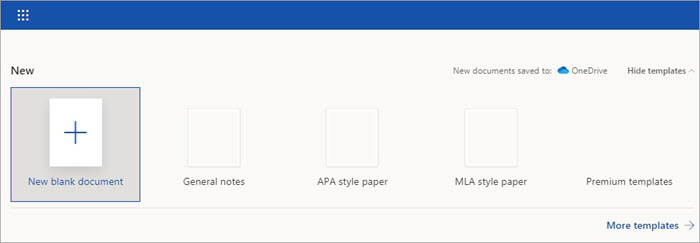
Office Word Online is a free word-processing application. The app allows you to compose documents online. You can use the software to compose not just Word documents but also spreadsheets and PowerPoint presentations.
Features:
- APA/MPA style templates
- General notes
- Premium templates
Verdict: Office Word Online supports basic word processing functionalities. If you want advanced features, buy Office 365 Premium which is a paid alternative to Office Word Online.
Price: Free
Website: https://office.live.com/start/word.aspx
#5) Dropbox Paper
Best for writing and editing Word documents for free.

Dropbox Paper allows you to create and edit documents stored in Dropbox. You will need to create an account on the cloud storage platform to view and edit document files. You can share document files and folders with other users.
Features:
- View and edit Word documents online
- Share documents
Verdict: Dropbox Paper is a basic Word document application. You can use the free word processor when you sign up for a Dropbox account.
Price: Free
Website: https://www.dropbox.com/paper
#6) Apache OpenOffice
Best for composing Word documents, spreadsheets, databases, graphics, and presentations in different languages for free.

Apache OpenOffice is open source word processing software. The application saves documents in international Open Document Format (ODF). The free desktop application can be installed in many systems and used for commercial and non-commercial purposes.
Features:
- Supports Windows XP+, MS OS X (64-bit only), Linux
- Clipart and templates
- Comprehensive online help
Verdict: Apache OpenOffice has an easy-to-use interface that makes it easy to compose and edit documents. The free word processing software is used by many non-profits, corporations, education, and government institutes all over the world.
Price: Free
Website: https://www.openoffice.org/
#7) FocusWriter
Best for writers and digital content marketers to compose blogs, eBooks, and guides for free.

Focus Writer is one of the best free word processors for Windows and Linux operating systems. The application has a simple, distract-free interface so that you can remain focused on composing documents. It also displays live statistics regarding the Word document.
Features:
- Compatible with Windows 7+ (64 bit only) and Linux (Debian, Fedora, OpenSUSE, and Ubuntu)
- TXT, RTF, and ODT format
- Customizable templates
- Sound effects
- Timers, goals, and alarms
Verdict: Focus Writer is a nifty application for composing Word documents. The application supports basic Word document composing and editing.
Price: Free
Website: https://focuswriter.com
#8) Etherpad
Best for composing and collaborating on word documents for free.

Etherpad is a free basic Word document application for Windows, Linux, and Mac applications. The software supports advanced word documents including custom styles, colors, and fonts. It also supports online collaboration and commenting on Word documents.
Verdict: Etherpad has a simple user interface that makes it great for creative stories and novel writing. Small businesses can also use the application for document composing and collaboration.
Price: Free
Website: https://etherpad.org/
#9) SoftMaker FreeOffice
Best for personal and business users to create Word, PowerPoint, and spreadsheet documents for free.

SoftMaker FreeOffice is a full-featured and free word-processing application. The software allows you to compose Word documents, spreadsheets, and presentations. It is compatible with MS Office applications and suitable for personal and business use.
Features:
- Supports Windows 7+, macOS 10.10+, Linux
- Compatible with MS Office Word, PowerPoint, and Excel
- Ribbons and Classic menus
- Optimized for touch devices
Verdict: SoftMaker FreeOffice is one of the best free office suites. The application is optimized for touchscreens allowing you to seemingly create documents on touch devices.
Price: Free
Website: https://www.freeoffice.com/en/
#10) Writemonkey
Best for developers who want to write codes in document format on Windows for free.

Writemonkey is a lightweight application that supports basic word document processing. The free word-processing software supports different languages and plugins.
Features:
- Fast and stable
- Customizable UI
- Supports UTF-8, ANSI, and Unicodes
Verdict: SoftMaker FreeOffice is a good overall software that allows basic word processing. It supports multiple languages and plugins but only once you make a small donation.
Price: Free
Website: http://writemonkey.com/
#11) ONLYOFFICE
Best for individual users and businesses whose priority is security and data privacy when collaboratively editing documents, spreadsheets, presentations and PDFs.
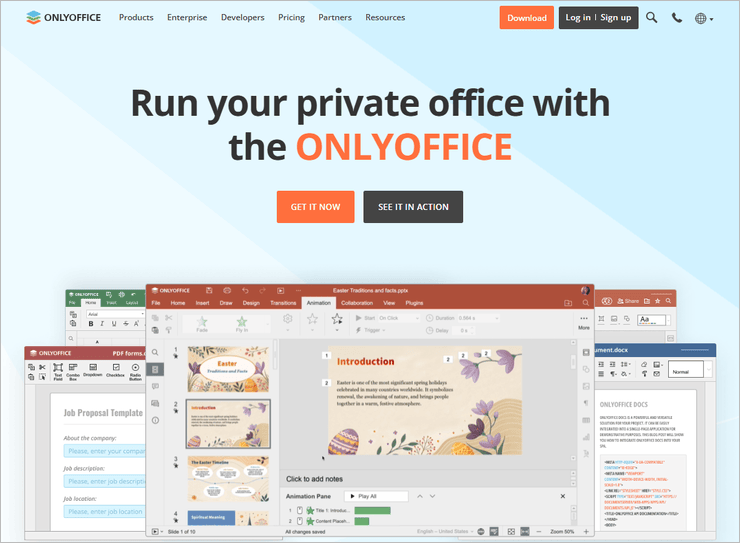
ONLYOFFICE Docs is a free and open-source collaborative office suite. Unlike many popular office packages, it allows you to create a local collaborative environment on your server by integrating its editors with your favourite platform, like WordPress, Drupal, ownCloud, Moodle, Redmine and more. The suite also comes with free desktop apps for Linux, Windows and macOS for offline document editing and lets you access and edit your docs on the go on your Android or iOS device.
ONLYOFFICE Docs provides all the required tools for word processing and additionally offers editors for spreadsheets, presentations, fillable forms and PDF files. Thus, one suite effectively deals with the whole range of popular office files, not only documents.
Features:
- Open-source code
- Self-hosted and cloud-based deployment
- Support for more than 50+ file formats
- Native compatibility with Word, Excel and PowerPoint files
- Real-time document co-authoring
- AI integration compatible with popular AI tools, such as ChatGPT, Google Gemini, DeepSeek and more
- Free desktop and mobile apps
Verdict: ONLYOFFICE Docs is one of the best open-source office suites for collaborative work. Its flexible AI integration and compatibility with all popular file formats make it an ideal choice for those who look for a secure alternative to MS Office and Google Docs and want to remain productive.
Price: Free
Website: https://www.onlyoffice.com/document-editor.aspx
Other Noteworthy Free Word Processor Apps
#12) OpenOffice Writer
Best for composing Word documents for free.
OpenOffice Writer is a dedicated word processing software. You can use the free word processor for composing and editing Word documents. It supports both Doc and ODT formats.
Price: Free
Website: https://www.openoffice.org/product/writer.html
#13) Apple Pages
Best for composing documents on Mac devices for free.
Apple Pages is the Mac word processing document that lets you create documents online on Mac devices. The app supports live collaboration between remote team members. You can select different free templates to create professional-looking documents for free.
Price: Free
Website: https://www.apple.com/pages/
#14) Office Online
Best for composing Word, PowerPoint, Excel, and email documents and sharing online.
Office Online is a paid version of MS Office that supports advanced functionalities. Purchase an annual subscription to use the program. The premium office app includes Word document, Excel, Powerpoint, OneNote, Outlook, and 1TB cloud storage.
Price: Starts at $7 per month
Website: https://www.office.com/
#15) AbiWord
Best for composing word documents on Linux devices.
AbiWord is a free word processor for Linux devices. It supports advanced word editing features such as tables, bullets, footnotes, endnotes, and images. The best thing about the software is the interoperability allowing it to open MS word documents, WordPerfect documents, RTF, HTML, OpenOffice, and many other formats.
Price: Free
Website: http://www.abisource.com/
#16) SSuite WordGraph Editor
Best for composing documents on Windows, Mac, and Linux devices for free.
WordGraph is another free word-processing document supporting current and legacy operating systems such as Windows NT, 2000, and XP. The app can open RTF, DOC, TXT, RTC, and SSP files. You can also create PDF documents without installing a plugin.
Price: Free
Website: https://www.ssuiteoffice.com/software/wordgraph.htm
#17) Zoho Writer
Best for creating and collaborating on word documents for free.
Zoho Writer has a crisp, elegant workspace that allows you to focus on writing documents. The application has lots of value-added features, such as a free Writing Assistant for grammar and readability suggestions, feedback review, WordPress, and CRM integration.
Price: Free
Website: https://www.zoho.com/writer/
#18) AbleWord
Best for composing word documents for free on Windows.
AbleWord is a free word processor for Windows operating systems. The user interface of the software is similar to the free Wordpad Windows software. But the app supports more formats, including MS doc, Docx, Pdf, and Html files.
Price: Free
Website: http://www.ableword.net/downloads.html
#19) Jarte
Best for composing documents with basic formatting for free.
Jarte is another free word processing application for Windows operating system. The software does not require installation. You can download and start using the app for composing word documents.
Price: Free
Website: http://www.jarte.com/download.html
#20) SmartEdit
Best for composing research articles, novels, and short stories for free.
SmartEdit Writer is a basic word processing application that you can use to compose documents for free on Windows. The application is useful for researchers and creative writers. It supports saving research notes to store all the references. It allows writing scenes and chapters of novels.
Price: Free
Website: https://www.smart-edit.com/Writer/
Frequently Asked Questions
1. What is Word processing software?
It is an application that you can use to type and edit word documents.
2. What are the applications of Word processing?
Word processing app can create almost any type of Word document. You can use the word processor to write an eBook, blog post, journal, letter, memo, resume, marketing/business plan, and much more.
3. What are the four functions of Word processing?
The four primary functions include composing, saving, editing, and printing. Composing refers to the activity of typing directly into the word processor.
4. What are the advantages of Word processing software?
Word processing program offers various benefits as compared to its alternatives. It is much easier to type in a word processor than typing on paper by hand. You have more formatting options with a word-processing document as compared to typing on a typewriter or writing by hand.
5. Does Windows 10 come with any free word processing program?
Yes. Windows 10 has a word-processing application called WordPad. However the free word processor app has limited functionality. It does not support advanced functionalities such as footnotes, endnotes, and a spelling and grammar checker.
Conclusion
WPS Office and LibreOffice are the best office software that can be used for composing Word, PowerPoint, and Excel documents. If you want an office suite with cloud sharing, select WPS Office, Google Docs, and Office Online Writer.
Also Read =>> BEST PDF to Word Converter tools
For composing and sharing word documents only, you can select Dropbox Paper. The best word processing apps for writing stories and novels include SmartEdit, Focus Writer, and Etherpad.
Research Process:
- Time taken to research this article: Writing and researching the article on free word processing programs took about 9 hours so that you can select the best one that meets your requirements.
- Total tools researched: 35
- Top tools shortlisted: 20
Was this helpful?
Recommended Reading
-

List and comparison of the BEST PDF to Word Converter tools. Select an online, free, or commercial tool to convert PDF to Word document: Portable Document Format, commonly known as 0PDF, was invented with the intention of making the sharing of documents and files across multiple devices easier. The idea…
-
Review this step-by-step guide to transfer files from Dropbox to Google drive. Also, explore the top tools to save and transfer data: The need for storage services has grown by leaps and bounds in the last few years. With the growing demand for storage services, services like Dropbox, Google Drive,…
-
Comprehensive List & Comparison of Dropbox Alternatives With Description, Features, and Pricing to Help you Select the Best Dropbox Competitor for your need: Dropbox is a hosting service that helps you to keep all of the important data in the cloud. This software helps individuals and companies store important files…
-
Here we review and compare the most popular Free Office Software to help you select the best Office Suite as per your requirement: Office software plays an important role in all types of professional settings. The average office suite consists of a Word processor, spreadsheets program, and presentation program. Each…
-
Explore the list of Top Document Management Software with features and comparisons to help you find the best DMS Software: Data forms a vital part of thriving businesses today as they venture further into the digital space. Enterprises have to deal with oodles of data, all of which are compiled…
-

Most Frequently used Document Management System: With the ongoing process of Digitization, people wish to reduce their paper-based work and expect to have access to their important documents from anywhere and at any time. Document Management Systems are the best solution to make this task a much easier one. PDF…
-
In this step-by-step guide on how to combine PDF files we will learn to merge PDF files using various tools in Windows and Mac: What is PDF? PDF stands for Portable Display Format. It is the biggest revolution in the world of electronic documentation. When the world was confused and…


