Make your Instagram story go viral by adding trending music or your original audio to it. Learn how to add music to Instagram story or post on any device from our step-by-step guide:
Instagram Stories are a great and interactive way to share photos, videos, and any other updates instantly. Incorporating music into these stories makes the content more engaging by adding a specific mood to each post, ranging from upbeat, relaxing, emotional, and much more.
Instagram employs certain ways by which the end-user can add music to their content and customize it according to their choice. However, if you are unaware of Instagram’s Story feature, finding the right option can sometimes feel daunting.
Steps to Add Your Own Audio to Instagram Story: Quick Guide
In this blog, we will help you understand the various ways to add music, where to find the feature, and much more so that you can easily add music to Instagram Story and make them more engaging.
Can You Add Music On Instagram Story: Quick Answer
You can add music on Instagram Stories through the app’s built-in voice-over feature, or by using the music sticker.
Simultaneously, you can also use streaming apps to add music and can even use third-party apps to merge the video and audio before uploading it as a Story on Instagram.
Here is the video on how to add music to Instagram Story:
How To Add Music To Instagram Story?
Mentioned below are various ways by which you can add music to your Instagram Story quickly and with no hassles:
Method 1: Instagram’s Music Sticker Feature
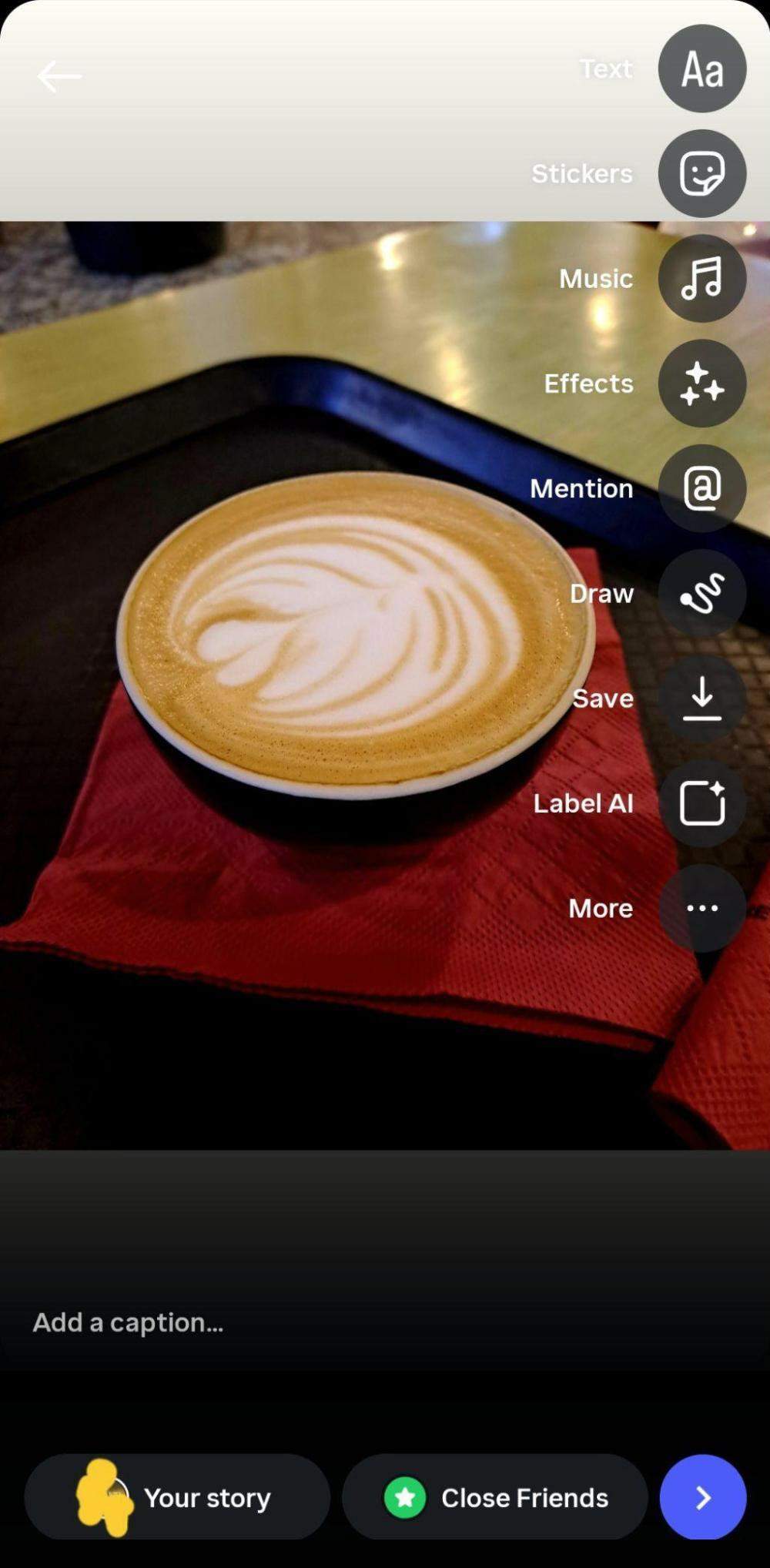
- Open the app and create your Story by adding a video, photo, or any clip of your choice.
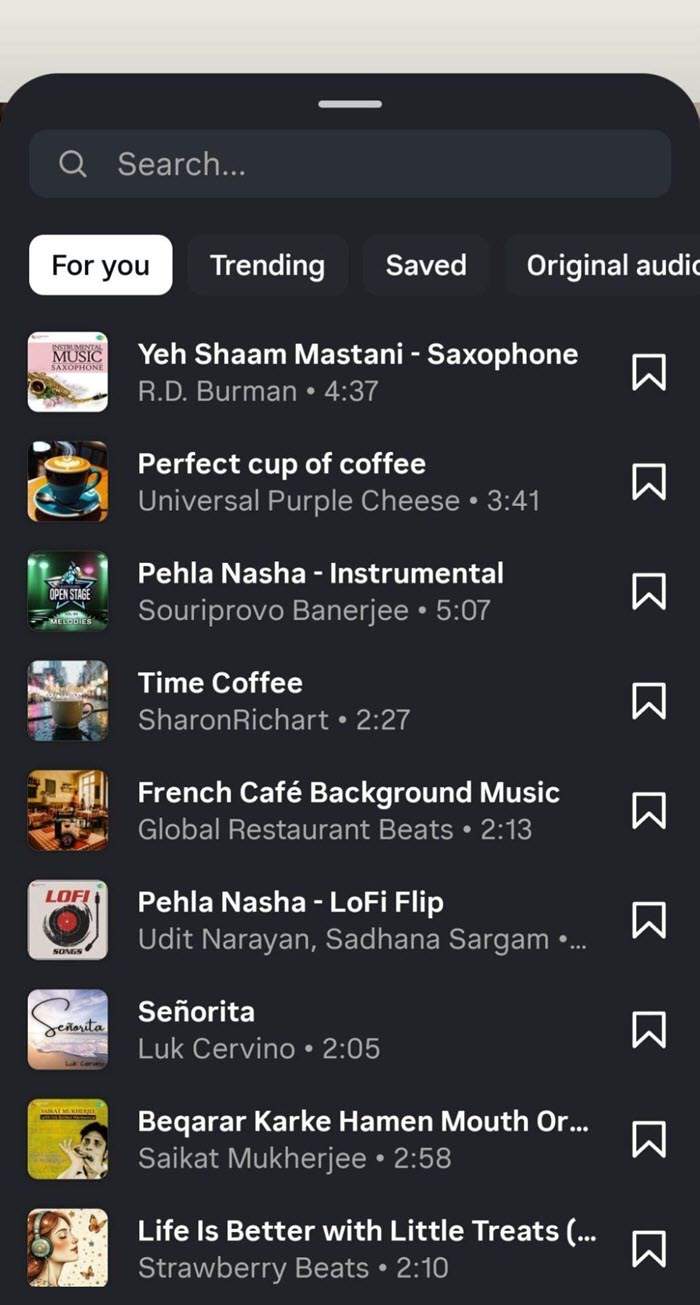
- Click on the Stickers icon or the Music icon directly and add music. Use the Search bar to find specific songs or artists, and Trending to explore popular songs or albums. You can also add music that you have saved with the Saved icon or use the Original Audio icon to add music from available original sounds.
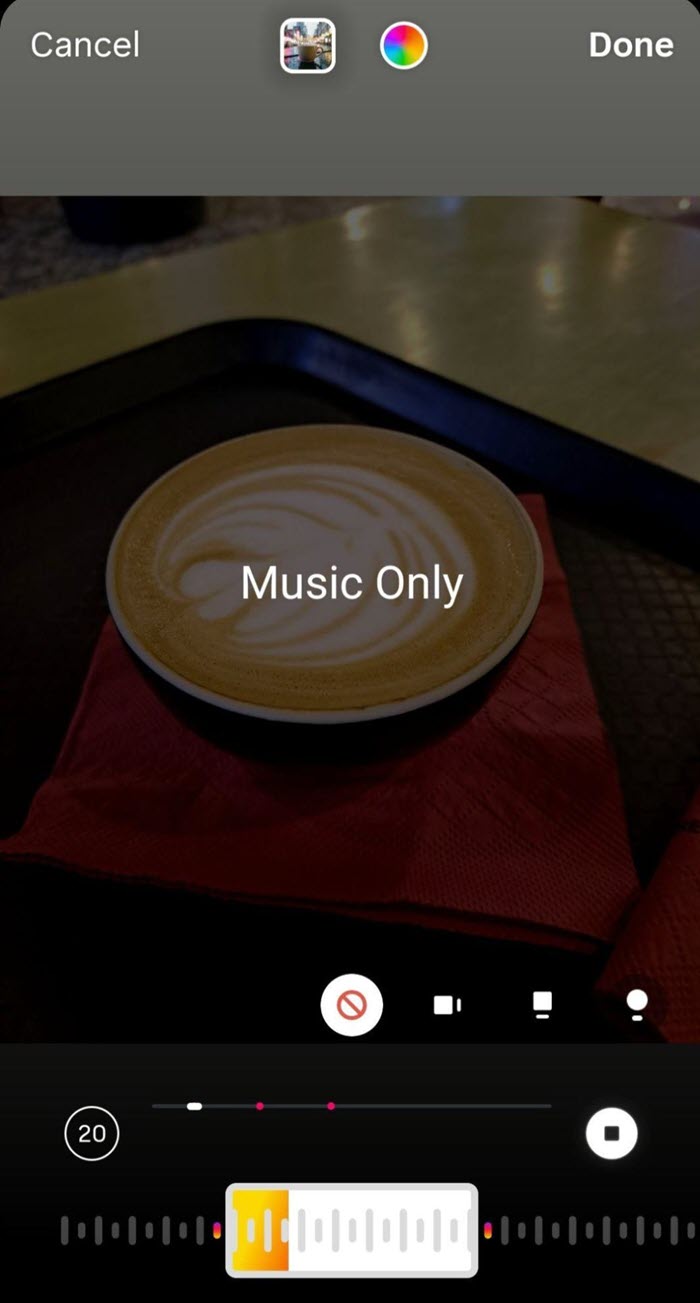
- To choose a song, click on the Add option. If you wish to trim or edit the song, you can use the slider to choose the part of the song you want to keep. You can also adjust the duration of the song (5 to 15 seconds) and choose a display style at this point. You can adjust audio levels at this stage with the audio control option and volume sliders. Adjust both sliders to set the right volume.
- If you have multiple photos, you can use photo mode and add music stickers while choosing the song of your choice. Here too, you can adjust the music segment and display styles per your needs.
- Finally, tap Done and share.
- It is important to know that once the story is posted, you cannot make edits to the photos, clips, or music you have added.
Method 2: Using Streaming Apps
Here is how to add music to an IG story using streaming apps. We have taken the example of Spotify and Apple Music. You can use other streaming apps too, at your convenience.
i) Adding Music Through Spotify
- In the Spotify app, find the song you want to use.
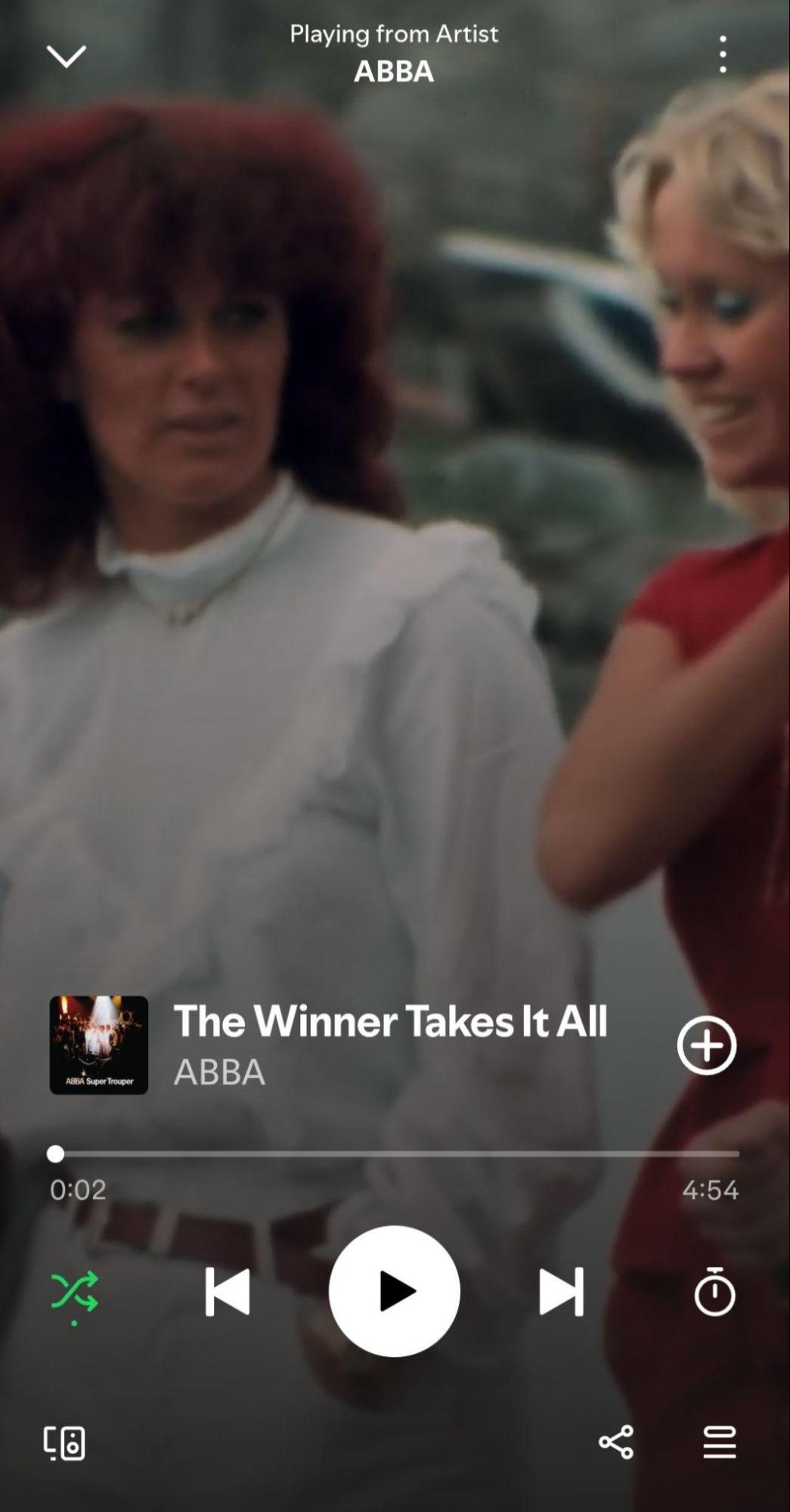
- Next to the song title, click on the three dots or on the share icon present at the bottom right side.
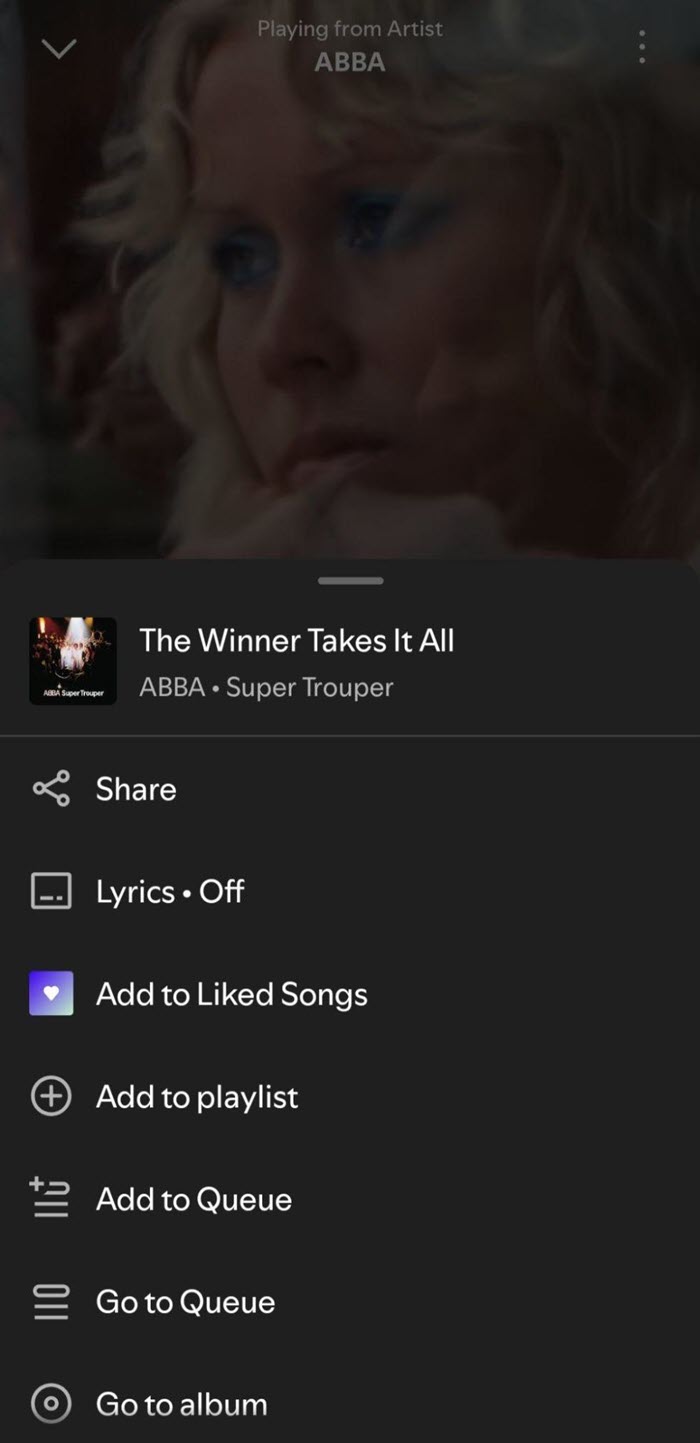
- From the list of share options, choose Instagram Stories.
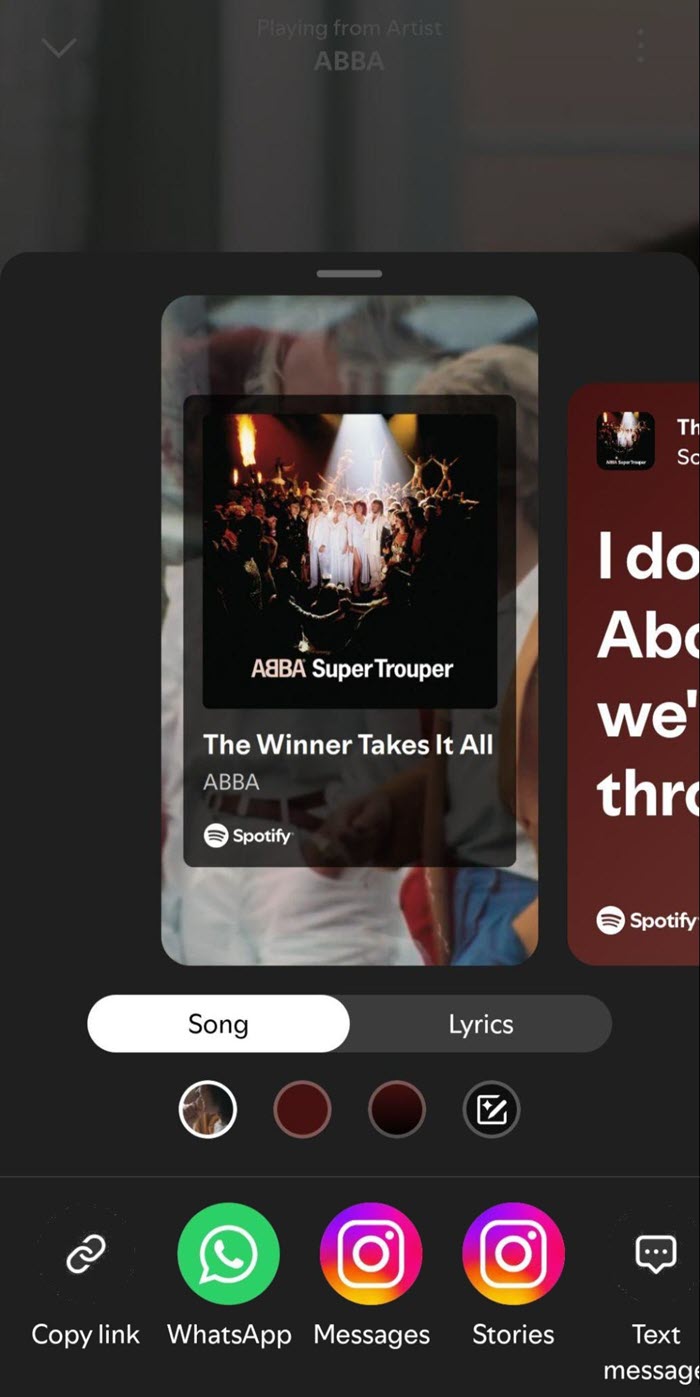
- It will open the Instagram app along with your track and audio preview.
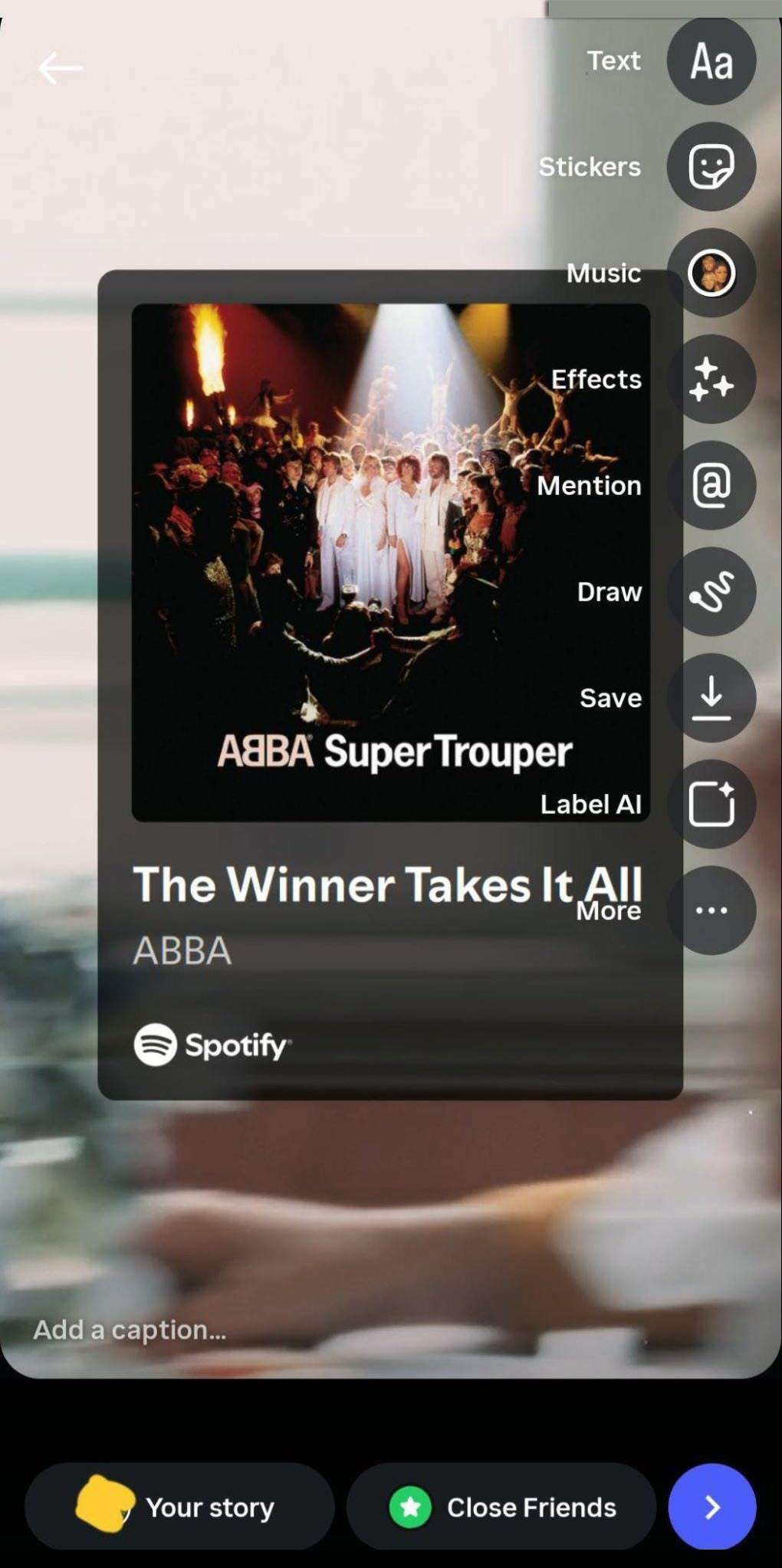
- Finally, tap on Your Story to share your content.
ii) Adding Music Through Apple Music
- Open the Apple Music app and choose the song or album you wish to share.
- Tap the three dots icon and then share a song present in the menu.
- From the app icons, choose the Instagram option.
- This will open Instagram with a custom story slide along with the “Play on Apple Music” link.
- Finally, select the Your Story icon to share the content.
Method 3: Using a Third-Party App
Another way to add music without the sticker is through a third-party app like InShot. You can use any other app of your choice.
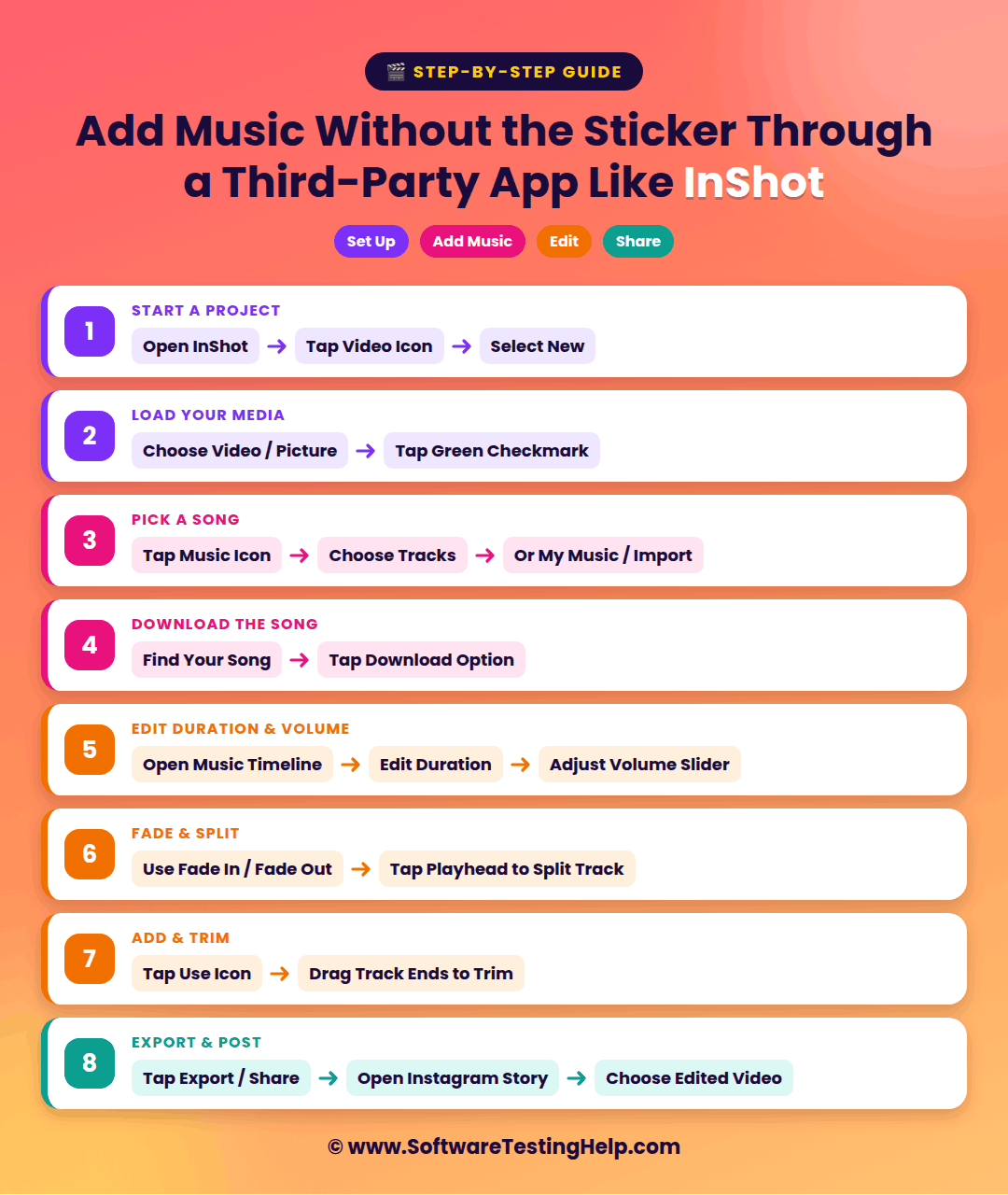
- Go to the InShot app, click on the Video icon, and select New to start a project.
- Choose your video or picture and click on the green checkmark to load it into the app’s timeline.
- On the bottom toolbar, find the Music icon and tap on it.
- Choose Tracks and browse the music you want to add. You can also tap My Music/Import to upload a song of your choice.
- Next to the song of your choice, click on the download song option.
- At this point, you can edit the song and its duration by accessing the music timeline. You can adjust the volume slider to change the song volume.
- You can use the Fade in and Fade out options to smoothly start and end the song. You can even split the track by clicking on the vertical playhead line. It will separate the song into two independent clips.
- Now, click on the Use icon to keep it on your timeline as a green audio bar.
- You can trim the song by dragging the ends of the audio track.
- Once you have done and aligned the music, tap on the Export/Share option.
- Open Instagram, swipe to the right to open the Story camera and choose the video you have edited in InShot.
Add Music to Instagram Story With Lyrics
After you have chosen the music for your Instagram Story, you can also add music lyrics to your draft.
- Click on the Music sticker to see various display styles.
- Choose your lyrics style given on the screen and select album art/title to display the track information.
- You can even select a minimal or text-only style to keep your chosen music details less prominent while the song plays.
Tips to Add Music to IG Story
Once you know how to add audio to an Instagram story, it is also imperative to keep certain tips in mind.
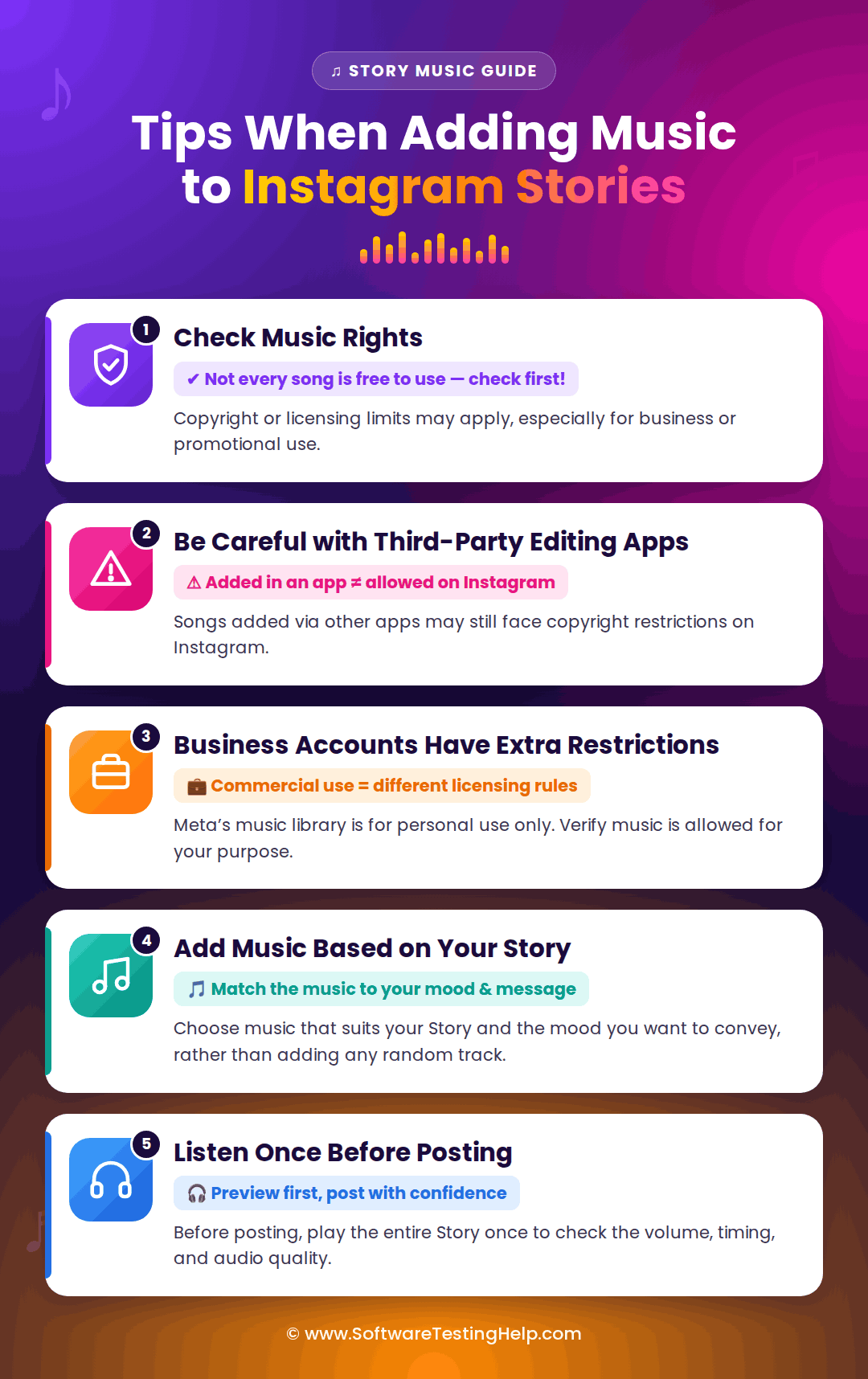
Here are some of the important tips:
- Check Music Rights: Not every song can be used freely on Instagram. This can be because of copyright or licensing restrictions, particularly when the music is being used for commercial purposes like business or promotion.
- Be Careful with Third-party Editing Apps: Adding a copyrighted song through third-party apps does not give immediate permission to use that music on Instagram. A song that can be added in a video may still lead to copyright restrictions.
- Business Accounts have Additional Restrictions: Music being used for commercial purposes tends to have different licensing rules. This means Meta’s licensed music library is intended for personal, non-commercial purposes only. So before choosing the music, verify if it is permitted to be used for the given purposes.
- Add Music Based on Your Story: Choose music that suits your Story and the mood you wish to convey rather than adding any random music.
- Listen to the Music once Before Posting: Before posting the Story, run the entire content once to check the volume, timing, and audio quality.
Add Audio To Instagram Story: Troubleshooting Guide
Here is what you can do if you come across any of the following issues while adding music to your Instagram Story.
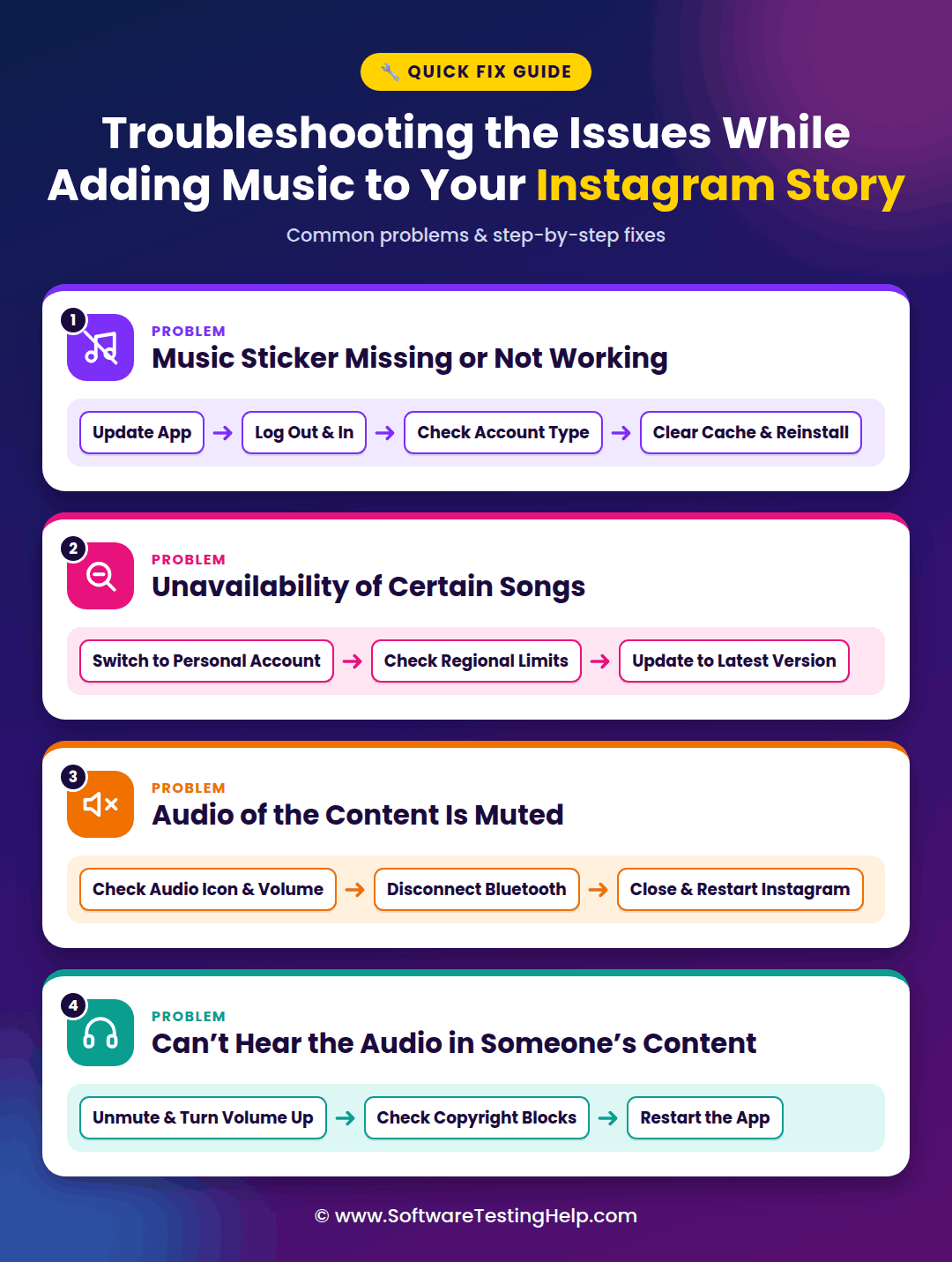
#1) Music Sticker Missing or Not Working
- If the music sticker is missing, update Instagram, ensuring you use the latest version.
- You can also log in and log out to see your available features.
- Check the type of account you are using, as Business accounts do not get access to music stickers because of licensing issues.
- Try clearing your app’s cache and reinstalling Instagram again.
- There are strict copyright limits for business accounts, because of which certain songs may be unavailable. You can switch to a personal account to avail the feature.
- Regional licensing limits can also make certain songs unavailable in a particular region. In that case, you won’t be able to use the music.
- The outdated app version also restricts song availability. Try switching to the current version.
#3) Audio of the Content is Muted
- While adding music to the Story, check the audio icon at the top of your screen and adjust the device volume.
- You should also try disconnecting Bluetooth to ensure that the audio is not going to a wireless headset.
- Close the app and restart Instagram again.
#4) Can’t Hear Audio in Someone’s Content
There may be times when you’re not able to hear the audio in someone else’s Story.
In that case, you can:
- Try unmuting the video and turn the volume up.
- Check for copyright blocks.
- Restart the app again.
Frequently Asked Questions
1. Can I add my own music to an Instagram Story?
Yes, you can add your own music to an Instagram Story by directly using Instagram’s music sticker option or by combining the photos or videos with the song of your choice on a third-party app like InShot.
For third-party apps like the InShot app, click on the Video icon and select New to start a project. Choose your video or picture and click on the green checkmark to load that into the app’s timeline. Now, locate the Music icon and tap on it.
Choose Tracks and browse the music you want to add. You can also tap My Music/ Import to upload a song of your choice. Next to the song of your choice, click on the download song option. Once you have done and aligned the music, tap on the Export/ Share option. Open Instagram, swipe to the right to open the Story camera, and choose the video you have edited in InShot.
2. How do I add songs that aren’t on Instagram?
If you wish to add a song to your Story or posts on Instagram that is not on the app, you can use a video editing app to merge the audio and video before you upload them. You can also utilize streaming apps like Spotify or Apple Music to add music beforehand.
3. Why can’t I find certain songs on Instagram for my Story?
If you cannot find certain songs on Instagram, it may be because of the type of account you’re using, with Business accounts having fewer music options. It may also be that the regional licensing limits make the songs unavailable in a particular region.
4. Why can’t I hear any sound in Instagram stories?
If you cannot hear any sound in Instagram stories, try unmuting the video and turning the volume up. You can also check for copyright blocks and restart the app again.
Conclusion
Adding music to any of your Instagram Stories makes it more expressive and engaging while terrifically showcasing your moods. Whether you’re posting a photo, video, or a simple update, adding the right track not just complements the content but also beautifies the overall essence of the Story.
With the different options available, you can add music to Instagram Story quickly to give a personal touch to your content while making your media stand out.
Research Process: The total time involved to complete and publish this article is approximately 36 hours. This content was created through a structured research approach to ensure accuracy and reliability.
For more-related guides, you can explore our range of tutorials below:
- How To Repost A Story On Instagram: Quick Step-by-Step Guide
- Quick Steps to Retrieve Deleted Messages on Instagram
- Instagram Reel To MP3 Converter to Save as MP3 Audio
- Best Online Instagram to MP4 HD Video Downloader [Free]
- The Perfect Instagram Story Size & Dimensions
- How to Turn Off Quiet Mode on Instagram
- Quick Ways to Fix Instagram Stories Not Showing
- How to Turn Off Active Status on Instagram
- How to See Who Does Not Follow You Back on Instagram
- Best Time to Post on Instagram for More Likes
Was this helpful?
Recommended Reading
-

Explore the top effective methods and learn How to Post on Instagram From Your PC through this tutorial: Sometimes, it can be annoying to look for your phone to make an Instagram post when you have your PC at hand. Also, it can be a tiring and irritating process to…
-

Are you looking for the top Instagram video downloading app Regardless of whether you own an Android phone or an iPhone? In this guide, we have tested 15 Instagram video downloaders and the right app is going to come in handy for downloading your Instagram videos and Reels offline. The…
-
Review of the best Private Instagram Viewer to View Account and profiles. A private Instagram account viewer tool will allow you to view private profiles on Instagram easily. The Instagram private profile viewer will be invaluable to parents as they make sure their children don’t indulge in dangerous activities to…
-
The 4K Stogram is an Instagram Photo, Video Viewer and Downloader for Windows, Mac, and Linux. Read this Comprehensive Hands-on 4K Stogram Review with Features and Installation Steps and learn how to use it: Wherever you choose to spend the holidays, the pictures you take always turn out to be…