


Quick Guide on How To Access Tor Web Browser and What Is It About, How to Install Tor and Get Access to the Dark Web safely.
Most individuals know that Tor Browser is the means to get access to the Dark Web; however, there is much more to it than that which we will discuss in the following section.
In case you are going to browse online using Tor Browser for anonymous surfing, avoiding any censorship or just learn how it works, you can find all the information below starting with download and installation and finishing with security and legality aspects of Tor browser, its search engines and privacy protection.
Online privacy concerns are rising. Studies show that 92% of Americans worry about their online privacy, while another research shows that searches for “data privacy” have increased by over 35% year over year.
What is Tor Browser?
Tor Browser, which stands for “The Onion Router,” is an open-source web browser meant to be used for surfing the Internet anonymously. The way in which Tor works is that it ensures all your network traffic is encrypted and routed through three randomly selected servers/nodes controlled by volunteers. The Tor browser is the major tool used for accessing the dark web. Tor web browser sends your computer traffic through a chain of secure encrypted servers run by volunteers (onion routing), thus concealing your IP address and enabling you to visit sites that use the .onion extension.
How to download Tor Browser Step-by-Step
I would like to use this little article to explain just why I believe that to be the case.
Overview of Tor Browser and How it Protects Your Privacy
First introduced to the general public in 2008, the Tor Browser provides you with access to a network that anonymizes web traffic.
Also known as The Onion Router, the browser specifically caters to users who want a private browsing experience. It is open-source and accessible to anyone. Plus, volunteers completely operate the platform.
The Tor Network masks your browser activity and IP address whenever you are online by employing an encryption technique developed by the US Navy itself. The web browser redirects traffic through various nodes placed across the internet to successfully anonymize one’s digital footprint.
Despite being a browser that has today become synonymous with “online privacy”, Tor is also known for the onion services it offers via the onion network. For instance, you can rely on Tor to get a {dot} onion web address. This address is exclusively accessible via the Tor Browser and helps both websites and their visitors hide their identity via solid encryption.
How Does the Tor Browser Work
Now that you know what the Tor Browser is, allow me to explain how it works. Normally, when one visits a website, a direct connection is established between that website and the visitor’s computer. Hence, the website being visited is privy to the visitor’s IP address. They know exactly where the traffic is coming from.
Similarly, your ISP can also track your online activity and is well aware of the websites you are visiting. You are basically under the surveillance of multiple entities. The Tor Browser basically puts a stop to this kind of snooping by employing a series of routers, aka relay nodes, across the internet.
[Via OSINTCOMBINE]
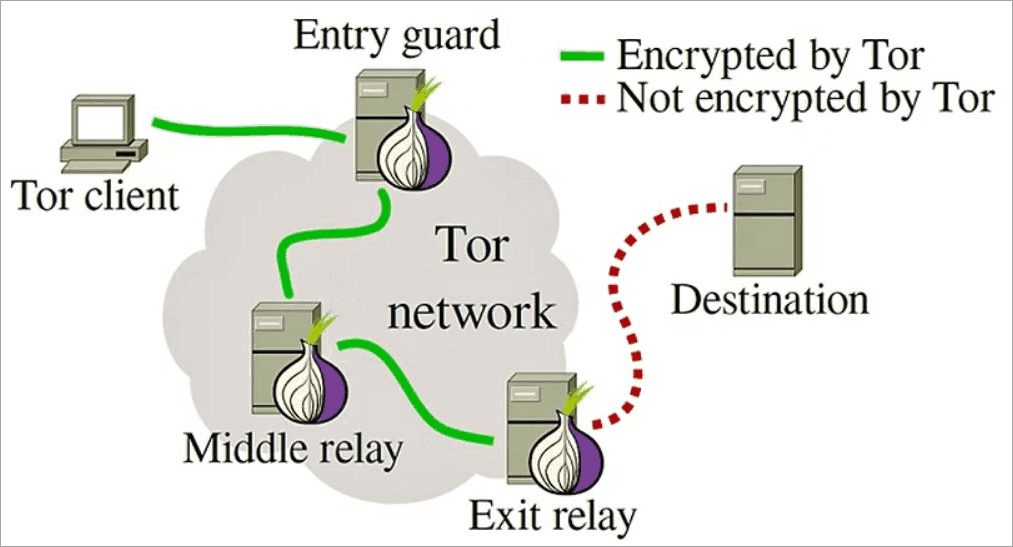
When you visit a website through the Tor Browser, your data is bounced across these relay nodes before it ultimately reaches the destination website. The Tor network encrypts all your data three times, thus successfully masking your browsing activity and identity.
Here’s a brief breakdown of how data flows across the Tor network:
- Entry Node: Data is introduced via the entry node to the Tor network. This is also where the first layer of encryption is peeled to reveal the middle node, where this data is forwarded.
- Middle Node: The data received from the entry node decrypts the next packet to reveal the next node in the circuit. The final destination of the request and the content itself remain anonymous.
- Exit Node: The last packet is decrypted here to reveal the final destination. The decrypted data will leave the network and make its way to the final destination as soon as the final layer of encryption is peeled.
Furthermore, it isolates each visited website in an attempt to thwart ads or third-party trackers from following you. The browser also automatically deletes all cookies and browsing history once you are off the website.
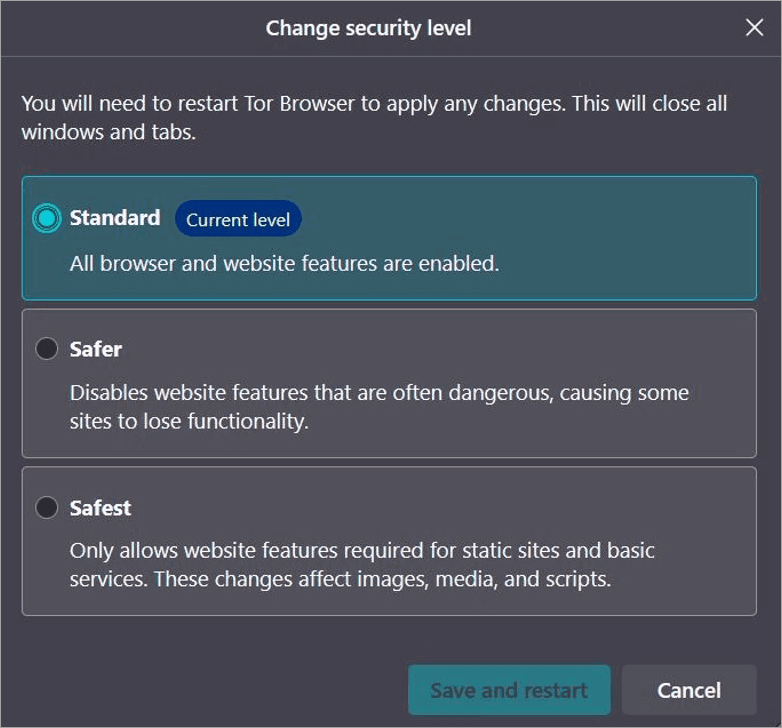
You can also configure Tor against three distinct security levels.
They are as follows:
- Standard: All features enabled by default.
- Safer: Dangerous website features are disabled.
- Safest: Only features for static websites are enabled.
Tor can also stop all fingerprinting attempts and can help you disable certain web features that can make you susceptible to online attacks from malicious entities.
What is a Tor Browser Used For?
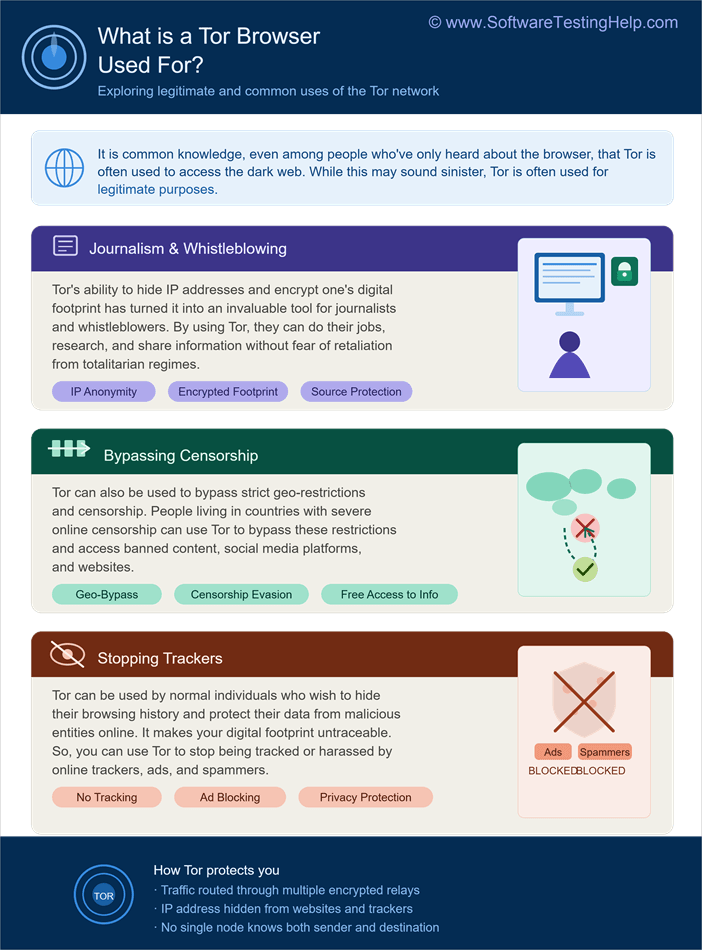
It is common knowledge, even among people who’ve only heard about the browser, that Tor is often used to access the dark web. While this is true and may sound sinister, Tor is often used for legitimate purposes.
#1) Journalism and Whistleblowing
Tor’s ability to hide IP addresses and encrypt one’s digital footprint has turned it into an invaluable tool for journalists and whistleblowers.
By using Tor, journalists and whistleblowers can do their jobs, research, and share information without the fear of immediate retaliation from totalitarian regimes.
#2) Bypassing Censorship
Tor can also bypass strict geo-restrictions and censorship.
People living in countries with severe online censorship can use Tor to bypass these restrictions and access banned content, social media platforms, and websites.
#3) Browse More Privately & Prevent Tracking
Finally, Tor can be used by normal individuals who wish to hide their browsing history and protect their data from malicious entities online.
It basically makes your digital footprint untraceable. So, you can use Tor to stop being tracked or harassed by online trackers, ads, and spammers.
Is Tor Browser Safe?
Whether or not the Tor Browser is safe to use, I believe answering this question is more complicated than one might assume. Whether the Tor Browser is safe to use or not will completely depend on what you use it for and how strong your cybersecurity knowledge is.
As I mentioned before, Tor can be used to access the dark web. The Dark Web is a place where one can partake in the trade of all sorts of illicit goods and services, including drugs, criminal sexual content, hacking, etc. I don’t think one can be safe, no matter how cautious they are, if Tor is being used for illegal activities.
Speaking of data safety or privacy alone, sure, the browser does a phenomenal job of offering you strong online privacy. That said, the platform also has its fair share of blind spots. Tor cannot prevent tracking at the entry and exit nodes of its network. Third parties can take advantage of this to track your web traffic.
Like other browsers, Tor is also susceptible to security bugs. You’ll also be in trouble if the Tor Browser you are using is an older version.
Simply put, Tor isn’t innately safe. However, there are some measures you can take to ensure robust safety whenever you are using the browser.
- Use anti-virus software
- Use Tor with an active VPN connection.
- Make sure the Tor Browser is up-to-date.
- Use a firewall.
- Do not use Tor to log into your personal accounts.
- Configure your Tor Browser to the highest level of security.
- Use extensions that automatically rewrite URLs to employ HTTPS instead of HTTP.
What Tor Browser Protects You From and What It Cannot
It does provide you anonymity but that’s not all Tor is concerned with. Here is what Tor shields you from and here is what it doesn’t protect you from:
What Tor Protects You From
- ISP/Network Sniffing: Your ISP or any nearby Wi-Fi sniffer will be able to know that you use Tor, but not your actual activity.
- Website tracking: Websites will not see your actual IP address and physical location; instead, they will see the IP address of a randomly selected Tor node.
- Browser fingerprinting: It changes your browser settings to look like any other Tor user’s.
- Censorship: It helps you bypass censorship and website blocking.
What Tor Does Not Protect You From
- Malware and Viruses: If you download and run a malware or a virus file on your computer, it will infect it.
- Self-Identification: If you connect to Facebook, Gmail, or Amazon accounts using Tor, your anonymity for that particular session is compromised.
- Exit Node Sniffing: The data that passes through the Tor network is encrypted, but it becomes clear-text once it exits the last node and goes to the website (non-https).
How to Download and Install Tor Browser (Step by Step)
Downloading and using the Tor Browser is simple. It is open-source. As such, you can download the browser without charge. Simply make sure you download the browser from the only genuine URL for Tor out there, which will be: torproject.org.
Here is the video guide on how to download and install Tor Browser on MacOS
Quick Steps to Download and Install Tor Browser on Windows
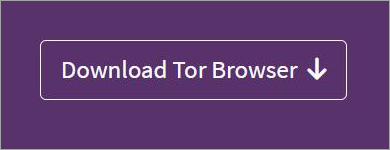
1. So, go to the official website and hit the “Download Tor Browser” button.
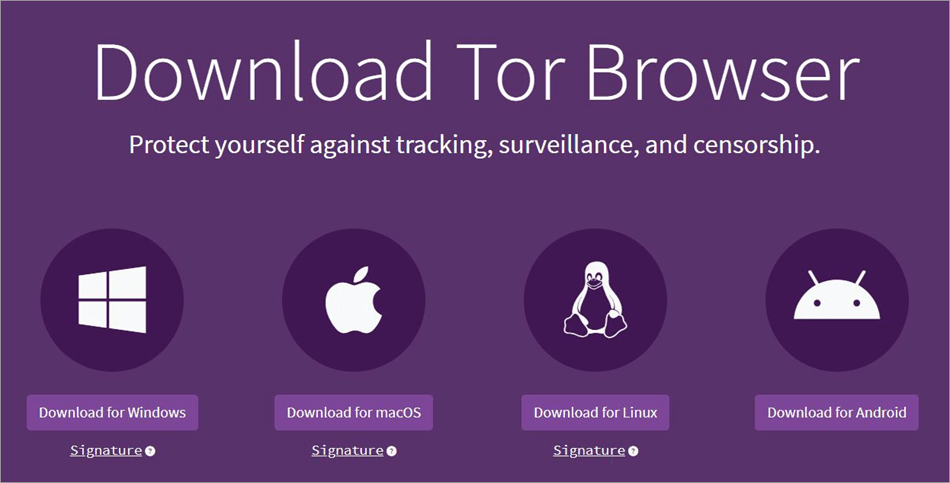
2. You’ll now see the option to download Tor for Windows, MacOS, Linux, and Android. As I am using a Windows system, I’ll choose the first option.
3. Open the installer file and follow the on-screen instructions to begin installing the browser.
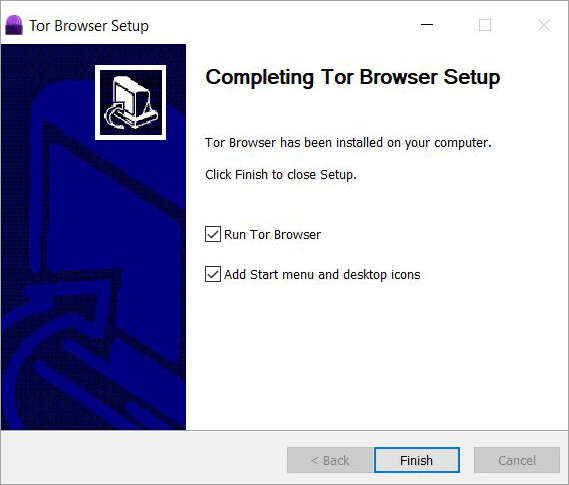
4. Hit the “Finish” button to conclude the installation and automatically launch the browser on your system.
5. On the main page, you’ll see the options to either configure or connect. My advice to you would be to leave that configure button alone. The Tor Browser’s default settings give you the best privacy on the platform. Simply hit the “Connect” button to open the search engine.
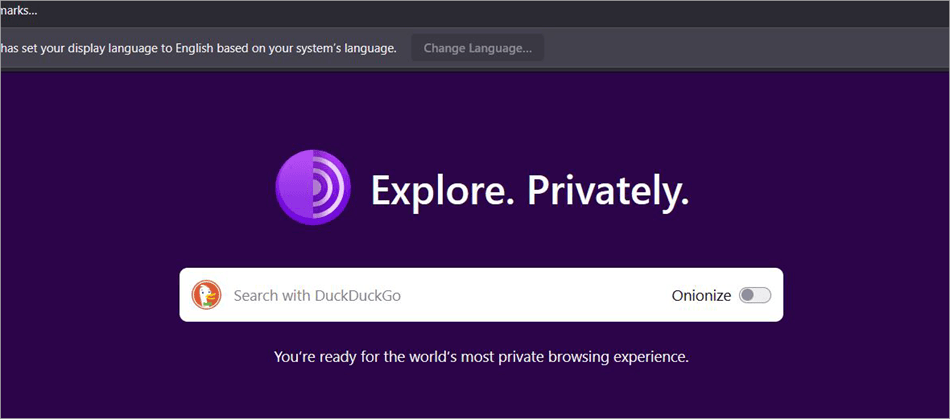
6. On the main search engine, you’ll also find the “Onionize” button. I suggest you click on it and switch to the .onion version of DuckDuckGo. This version will provide you with better security.
7. Now, simply use the search engine as you would use Google to surf online.
8. If you are using a Linux system, I suggest you refer to the video below for a comprehensive guide on installing the Tor Browser on Linux devices.
Here is the video guide on how to download and install Tor Browser on Linux
It is also very simple to download Tor on your Android device. You can install the browser from the official Tor project website or get it from the Google Play Store. Once installed, all you have to do is tap on the Tor icon on your phone to launch it.
Is Tor Web Browser Legal
Yes, it is perfectly legal for you to download and use Tor in America and many other countries in the world. That said, you may land yourself in hot water if the browser is used in a country that has explicitly banned its use.
As of early 2026, the following countries have banned the use of the Tor Browser:
- China
- Belarus
- North Korea
- Iran
- Iraq
- Oman
- Russia
These countries use advanced firewalls and deep packet inspection to uncover the use of such tools. If caught, you may face heavy fines and even a jail term. You can bypass these restrictions with the help of tools like pluggable transports and Tor Bridges.
Tor Bridges are private volunteer relays with IP addresses that aren’t publicly disclosed, thus making it easier for them to bypass censors. Pluggable Transports are tools you can use to mask Tor’s traffic.
You can use them both to conceal network traffic on Tor, as many journalists do the same to do their jobs in totalitarian regions.
It is also illegal to use the Tor Browser to access parts of the dark web with the intent to participate in criminal activity. The government or law enforcement agencies may end up taking a special interest in your online activity if you are found using Tor.
Tor can be used legitimately for anonymous browsing, research, and journalism in democratic parts of the world. I suggest you do the same to avoid dire consequences.
Can Tor Browser Access the Dark Web?
Yes, the Tor Browser is the main one that allows you to access the Dark Web, but having it installed on your device doesn’t put you directly into the Dark Web. It can access regular web pages as well as .onion web pages (websites on the dark web) that are only available via the Tor network.
How Does it Work ?
- Self-Enclosed Security: If you open any .onion web page, all of your requests stay within the Tor encrypted network. That means there’s no possibility for any external interceptions.
- Mutual Anonymity: The web page cannot see your real physical location or IP address, and vice versa, you cannot see them either.
- Searching For Web Pages: The dark web web pages are not indexed by Google; therefore, people have to use special search engines (such as Ahmia) to find hidden web pages. Important: The usage of Tor Browser is allowed by the legislation of many states, but whether you’re using it legally or not is determined by your usage of it.
Tor Browser vs. VPN
Although both Tor and VPN are used for hiding one’s browsing activity and IP address, they are not one and the same. As I said before, Tor is operated by volunteers, and its network is decentralized. A VPN, on the other hand, is operated by a central service provider.
A VPN works by pushing web traffic to a server, which then transmits it back to the internet. Tor has your traffic bounce through a series of relay nodes across the internet before reaching the intended website.
Furthermore, Tor is much slower than a VPN, as it involves rerouting data across multiple nodes. However, this is also what makes Tor much more effective than a VPN in anonymizing one’s digital footprint.
The table below will give you a better idea of what distinguishes a Tor search engine from a VPN.
| Tor | VPN | |
| Best for | Complete Online Anonymity | Privacy |
| Speed | Slow | Fast |
| Operation | Controlled by volunteers | Centrally operated |
| Cost | Free and Open Source | Both free and premium options are available. |
| Suitable for | Accessing the dark web, journalism, whistleblowing, and bypassing geo-restrictions | Bypassing geo-restrictions, everyday browsing. |
Common Tor Browser Problems and Fixes
This is the list of Tor Browser errors that people encounter often and their solutions:
| Problem | Fix |
| Tor Browser won’t connect to the Tor network | Make sure that you have a working internet connection, use a Tor Bridge, update Tor Browser or change firewall/proxy settings. |
| Tor Browser works very slowly | It is natural since there are several relays. You may refresh the circuit, close extra tabs, or stop downloading. |
| Some websites do not allow Tor users | There are some websites that do not allow Tor exit nodes. Try a New Tor Circuit, use a bridge or try again later. |
| CAPTCHA shows up repeated | User can clear the CAPTCHA, refresh the circuit, or try another exit node. |
| Tor Browser crashed or does not start | Restart the TOR web browser or install the newest version of Tor Browser, or you can also try deactivating antivirus or firewall software. |
| Download/installation does not go well | Install Tor Browser only on the official website of Tor Project and check the downloaded file. |
| .onion websites will not load | Check whether your onion website address is correct, make sure the website works now and you are on Tor network. |
| JavaScript or other elements on the website do not work | Lower your Security Level if needed, but just for trusted websites because it lowers your privacy level. |
| Audio/video will not play | There are some limitations and blockages to provide you better privacy. Refresh the page or open trusted media files. |
| Tor Browser is blocked by the network | Use Tor bridges and Snowflake to bypass censorship. |
Best Practices for Using Tor Browser Safely
It is very important to keep discipline in order to be absolutely anonymous when working with Tor. Tor camouflages the path, but the behavior of the user defines the degree of anonymity.
1. Computer and Browser Discipline:
• Don’t change the window size: Use the default size of the browser window. By changing the size you create unique browser fingerprint that allows trackers to distinguish your computer among millions of other computers.
• Don’t use browser extensions: Don’t install any add-ons and don’t block ads. Tor has all the necessary options for your protection and additional extension may show your IP.
• Set the security level settings: Click on the shield icon beside the address bar and set the security level from standard to safer or safest. It will help to stop the automatic execution of potentially dangerous code and some media files.
2. Behavioral Rules (Operational Security):
• Never log into your actual account: After logging into services based on names, like Google, Facebook or banks, your anonymous surfing session is tied to your real identity.
• Disconnect from the Internet during downloading: If you are downloading files through Tor, disconnect from the Internet before you open them. The downloaded file may have a malware that can show your IP.
• Don’t use P2P over Tor: Almost all the peer-to-peer programs ignore proxy settings and make a connection directly showing your actual IP.
What are the Myths of Tor Browser
Since Tor Browser is often associated with the Dark Web, there are numerous misconceptions about it. Below follows the truths behind some of the most popular myths.
Myth #1: Using Tor Equals Doing Something Illegal
Fact: Tor Browser is legal in the majority of countries around the world and is widely used by journalists, researchers, activists, and people interested in privacy. Some countries, however, make using the Tor network either prohibited or restricted. In addition, any illegal activity performed via Tor is still considered illegal.
Myth #2: Tor is Used Only to Browse Dark Web Sites
Fact: This is not true. The Tor Browser can be used to browse ordinary webpages as well as .onion sites. There are many users of the Tor Browser who use it only for the purpose of browsing more privately or evading censorship.
Myth #3: Tor Provides Full Security of Your Computer
Fact: All the traffic that flows through the Tor Browser is protected, but other programs running on your computer (e.g., emails and messengers) will work as before and will use normal internet access until you configure it otherwise.
Myth #4: Tor Browser Offers Total Anonymity
Fact: Even though the Tor Browser provides a high level of online privacy because it hides your IP, it still does not make you anonymous. Your actions such as downloading dangerous files, revealing your personal information or signing into accounts can still give you away.
Frequently Asked Questions
1. Is Tor dark web?
Although Tor is associated with the dark web, it isn’t one. Tor is a web browser that can be used to access the dark web. While there have been instances in the past of people using Tor for the dark web, examples of such situations today are very rare. The dark web itself isn’t a place only meant for malice.
You can use Tor to access the dark web for research or satiate your curiosity, provided you don’t participate in the illegal activities that this unindexed part of the internet is known for.
2. Is Tor 100% private?
No, Tor isn’t 100% private. For instance, malicious entities can still track your traffic at entry and exit nodes. Tor itself is susceptible to security bugs and malware attacks. Furthermore, torrenting with Tor can also expose your real IP address.
That said, there are certain measures you can take to ensure foolproof security when using Tor. For instance, use a VPN with Tor, install anti-virus software on your system, avoid logging into your personal account, and employ a strong firewall system.
3. Why do hackers use Tor?
Tor can be used to mask one’s online activity and IP address. It is almost impossible for ISPs or other entities online to track traffic that is flowing through the Tor browser. This is the advantage most hackers seek, to make sure law-enforcement agencies can trace them.
4. What are the disadvantages of using Tor?
Although great for anonymous browsing, Tor isn’t without its flaws. Some of its most prominent disadvantages are as follows:
• It is slower compared to a VPN
• You may become a target of suspicion because of the browser association with the dark web.
• Tor is blocked in some countries.
• The Tor network is vulnerable at the entry and exit nodes.
• Some websites won’t work on Tor.
5. Does the government track Tor?
Tor anonymizes your digital footprint. As such, the government or your ISP may suspect that you are using Tor. However, they won’t know what you are using Tor for.
6. What is the difference between Tor and I2P?
Both Tor and I2P (Invisible Internet Project) are popular networks for online anonymity. However, there are differences with regard to the purpose each serves. Tor is known as the online router and is best suited for anonymous browsing on the general World Wide Web.
On the other hand, I2P is known as the “garlic router” as you surf on a decentralized peer-to-peer network, ideal for secure file sharing and hosting hidden websites.
7. Can Tor be hacked?
As I said before, Tor’s security isn’t foolproof. Traffic in Tor is vulnerable at the entry and exit nodes. Tor is also susceptible to browser vulnerabilities and security bugs. There is also a chance of Tor being hacked if you, as a user, have deliberately enabled JavaScript, which the Tor Browser disables by default.
8. Does Tor hide from your ISP?
No, Tor doesn’t hide from your ISP. Your ISP will know that you are using Tor. However, your browsing activity on the Tor Browser will be hidden from them.
Conclusion
For those of us who are concerned about our privacy or worry that our data isn’t exactly secure, we should consider using the Tor Browser.
It is open source and perfectly legal to use. The platform does a very good job of keeping your browsing activity and IP addresses shrouded in mystery.
This is perhaps why many prominent journalists and whistleblowers swear by the platform and rely on it to do their jobs. That isn’t to say the platform is perfect.
It has its flaws, and your privacy on the platform isn’t 100% guaranteed. That is a problem you can easily solve by using Tor alongside a reliable anti-virus tool and VPN connection.
So, give the platform a try if you are curious or wish to remain anonymous every time you go online.
Research Process: The total time involved to complete and publish this article is approximately 40 hours. This content was created through a structured research approach to ensure accuracy and reliability.
For more-related guides, you can explore our range of tutorials below:
- The Top 10 Browsers For PC (Web Browser Ranking)
- Most Secure Browsers to Look For
- The 10 Best Browsers for Android
- Why does Yahoo Keep Opening in Chrome
- How to Check Browsing History on Safari
- What is Shift Browser: Is It Safe to Download
- Understanding Leaf Browser: Review With Alternatives
- The Top 8 Browser Security Solutions for Enterprises
- Best 6 Enterprise Browser Solutions (TOP SELECTIVE)
- Top 10 Private Browsers for iOS & Android [SECURE]
Was this helpful?
Recommended Reading
-

List of the latest and best Cross Browser Testing Tools for your website Browser Compatibility Testing on different browsers and Operating Systems: Cross Browser Testing can be the biggest pain for any Software Tester. But thanks to all the cross-browser testing tools available online to help in minimizing the testing…
-
Review and comparison of the Best Ad Blocker for Safari. Put an end to the content being blocked because of ad placement by websites on the landing page with these Safari Ad Blockers: Are constant ads getting on your nerves? Too many ads can frustrate and a simple solution is…
-

This tutorial explains why do we need to clear browser cache and different methods to Clear Cache in browsers like Chrome, Firefox, etc.: A few decades back no one would have ever imagined that a connection of numerous computers can lead to an evolution of the world's largest network, which…
-
Review this tutorial to learn all about Incognito mode. Learn to Open Incognito Tab on various browsers and different operating systems: Private browsing, or going Incognito, as we know it today, is not a new concept. It has been around since 2005. But it took some time for every browser…


