


Is your Instagram Stories Not Showing to followers or on your feed? This step-by-step guide will help you fix it instantly.
If you are looking to fix why is someone’s Instagram story not showing on my feed or why your followers can’t see yours, then this post is for you.
Whether you can’t see someone’s Instagram Story on your feed, or Stories are not loading, or your followers say your Story isn’t appearing for them, this issue is more common than you think. It usually happens due to app glitches, outdated versions, cache errors, account restrictions, or temporary Instagram outages.
In this guide, you’ll learn 5 proven fixes you can use to fix why Instagram Stories are not showing to get Stories appearing normally again.
Why is Instagram Not Showing Stories? (Fix Feed & Visibility Errors)
If Instagram stories are not showing, then there could be issues with a corrupt cache from the app, slow internet, or muted profiles. If you face a “Security Policy” issue, then this implies that the creator of the content has restricted the information, or the user is accessing the app in Incognito mode.

[Via screenrant]
Most people often have the following queries regarding their Instagram stories:
- Why can’t I see someone’s story on Instagram?
- Why are my Instagram stories not loading?
- Why can’t I see stories on Instagram?
- Instagram stories haven’t shown since an update on my iPhone
- Why is Instagram not showing my story to my followers?
In the following section, I will cover quick and easy ways to fix your Instagram Stories are not showing or loading properly. So, let’s begin.
How to Fix Instagram Stories Not Showing Issue (5 Proven Fixes)
If you are also facing the problem of ‘Instagram not showing stories’, we have got solutions for you! You can simply restart your phone or check for system or app updates to check if the problem lies there. If it still doesn’t work, just have a look at the solutions based on different problems listed here.
1) If your Instagram stories are taking too long to load: Since Instagram runs online only, slow internet may cause the Instagram stories to load slowly. So, try fixing your internet or restarting your phone to see a difference.
2) Instagram not showing stories: If you have a good internet connection and you still face the problem of Instagram stories not loading, then check whether or not Instagram has access to your mobile data. Disabling the data saver will improve your internet speed.
3) If you are unable to see a specific person’s story: You can see any person’s stories on Instagram if their account is public. But in case you want to see someone’s stories whose account is private, you must FOLLOW their account first.
If you are following the person and still can not see their stories, then check if you have muted their account in the past, intentionally or accidentally.
If you want to unmute an account on Instagram, follow these steps:
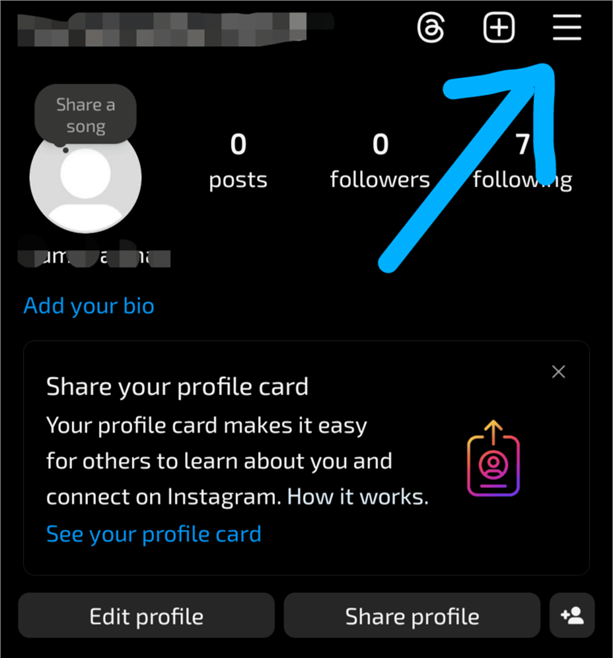
- Go to your profile on Instagram and click on the Menu icon located in the upper right corner of the page.
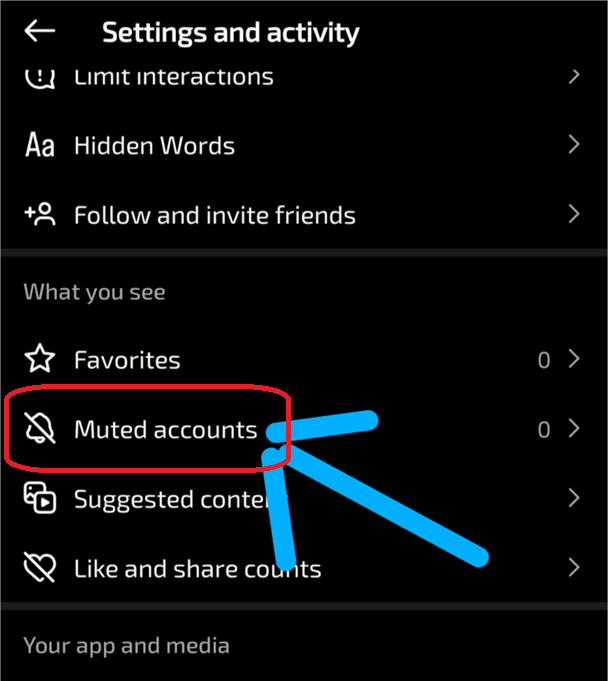
- Now scroll down to find the option ‘Muted Accounts’.
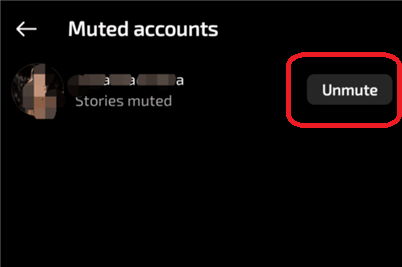
- From here, you will see the accounts you have muted. Just click on the ‘Unmute’ button to restart watching their stories.
If you still can not see the stories of a specific person, then there are several other possibilities:
- The person has deleted their Instagram account or deactivated it temporarily.
- They may have blocked you.
- They may be showing their stories to a specific group of people only, which makes their stories hidden from you, and there is no way to find out if someone is hiding their stories from you.
4) If Instagram stories are not showing up since you have updated your iPhone or Android:
If this is the case, you can try restarting your phone and checking your internet. If the problem persists, you can uninstall Instagram and then reinstall it, or report the problem if nothing works.
5) If nothing works: When you have tried everything and still can’t see your Insta stories and feeds, then the Instagram server may be down. In this case, your friends must also be facing the same problem, so ask them about it. You can also get information regarding such issues on Twitter (X platform), Facebook, or Google.
To check the status of the Instagram server, you can use ‘Downdetector’. Just go to your browser and open the Downdetector website. Then click on the Instagram icon, and the site will give you a report about the Instagram server status.
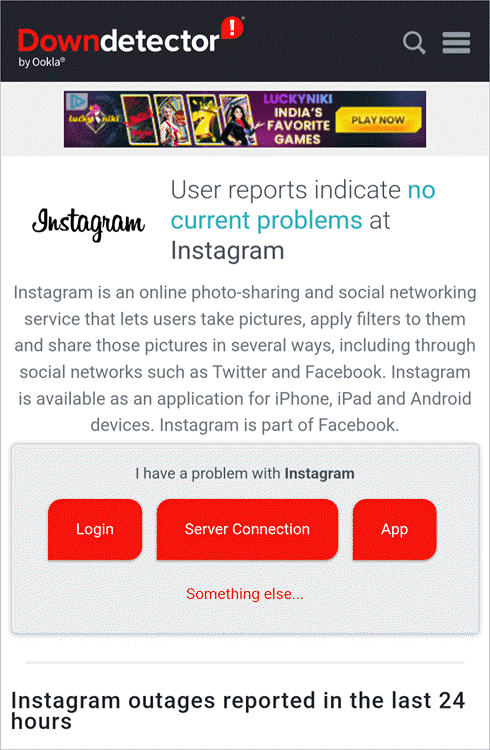
Below are a few other quick methods you can use to fix the Instagram Stories Not Showing
- Force-stop Instagram, then restart it
- Clear the app cache.
- Many applications do not work if the date and time on a mobile device are not correct. So check this also.
- Log out and then log in.
- Restart/update your phone.
- Check whether you have the latest version of the app.
Contact Instagram support if the issue persists: If your issues do not get solved even after trying everything, you can access Instagram support. Follow these steps for reporting a problem on Instagram:
- Go to your Instagram profile.
- Click on the
 menu icon.
 - Scroll down to find the option ‘Help’ and click on it.
- Now you will see the option to report a problem. Follow the instructions and state the issue you are facing.
Watch this YouTube video to get a quick guide if you cannot see Instagram story views.
Why is Instagram Not Showing My Story to My Followers?
It can be a very disheartening experience when, after putting effort into creating your story, you find out that after some hours, the number of views on it is still not more than ten. This may seem like a glitch in the app, but there are five common reasons your story is not being seen.
1. Instagram Algorithm & Story Visibility: In 2026, the algorithm used by Instagram in displaying its stories will be based on the “share-first” principle.
- First Sample: The story is initially shared with a sample of your most active followers (5–10%)
- Signal Test: If there is no response from them, the algorithm displays it lower down
2. Muted Stories or Hidden Accounts: Sometimes it is a setting, and not a bug.
- Muted by followers: When followers mute your stories, they won’t see them on their timeline
- Hidden by you: When you add people under “Hide Story From,” they won’t be able to see your story
3. Story Privacy Settings (Close Friends, Block): Privacy settings may often cause stories not to show up at all.
- Close Friends (circle icon): If you post to close friends, only your close friends can see the story
- Limitations of your account: If the content is marked inappropriate, story visibility might be restricted
4. App Bugs & Server Issues: If you notice your views dropping to zero overnight, it means a technical error.
- Instagram servers offline: Instagram may experience server downtime
- Failed upload due to bad internet connection: This will leave the story stuck at “posting…”
5. Shadowban or Reach Drop: Instagram might block you if it notices spammy behavior.
- Fake interactions: Bot interactions may lead to low visibility
- Filtered hashtags: Limited hashtags may prevent your story from appearing in the feed
Even when your account is doing well, there’s a chance you’ll notice your story’s reach slowing down.
As of 2026, Instagram no longer just displays stories in chronological order in the story tray. They use what’s called a Relationship-First Ranking System to hide stories that it thinks the user wouldn’t be interested in watching.
Impact of Low Engagement: The first hour after posting is key.
- Signal of low engagement: If users skip or swipe by your stories, Instagram sees it as a low interest story
- Consequence: Your stories get shown lower down on other users’ stories feed
- Benchmark: Good view rate should be about 4-15%; less than 3% can affect visibility
Algorithm Ranking Criteria: How Instagram ranks your stories depends not only on whether you have followers but also on their interactions with you.
- Interaction with the account: DMs, views, searches increase ranking weight
- Watching time: Those followers who start watching your story right away rank higher
- Consume your full story sequence: Watching your complete story sequence means your content is valuable
Optimizing Story Visibility: Employ these strategies for maximum impact to get your story seen again by followers:
- Engage with stickers: Poll, slider, or “Add Yours” encourages immediate user interaction
- Post consistently: Share 1 to 3 stories in one day, rather than posting everything at once
- Caption the content: The appropriate wording helps Instagram categorize your content
- Answer DMs promptly: Conversations significantly improve your ranking among followers
Why Can’t I See Someone’s Instagram Story
If the bubble of a certain friend’s story has disappeared from your top story tab, then there’s no way it could be a coincidence. Instagram Privacy 2026 provides many options for users to “go away” from your feed without even blocking you.
You Are Muted: It is the most common reason why one’s story disappears.
- The impact: You will not see their story on your home screen
- The location: Look at the end of the story tab (grayed-out icons)
They Hid Story from You: On Instagram, users have the ability to hide their stories from certain followers.
- Consequences: You will be able to view posts, but no story will show up
- Indication: Other people can access their story, but you cannot
You Are Not in Close Friends: With time, Instagram users can now choose whom to share stories with.
- Consequences: If you don’t belong to their close friends, you will not see any story
- No notification: The story does not exist for you
Account Restrictions: At times, the problem could be that there is a restriction set to the account.
- Restrict: You can see the stories, but the replies will show up as requests
- Block: You will not see their profile page or any post/story
- Expiring of story: Stories are visible only for 24 hours
FAQs on Instagram Not Showing Stories
You may find an answer to your queries in these FAQs.
1. Why is Instagram not showing my story to my followers?
This is usually due to a low “Initial Engagement” score. In 2026, Instagram tests your story with a small group of your most active followers. If they don’t interact (tap, reply, or share) within the first hour, the algorithm de-prioritizes the story for the rest of your audience. Other factors include using “banned” hashtags, account status violations, or a simple app cache glitch.
2. Why is someone’s Instagram story not showing on my feed?
The most common reason is that you have muted their stories. Muted stories are moved to the very end of your story bar and grayed out. Additionally, the user may have added you to their “Hide Story From” list, or they may be posting exclusively to a “Close Friends” list that you aren’t a part of.
3. Can you hide Instagram stories from someone?
Yes. There is no need to block a particular person to hide your stories from them. Navigate to Settings>Privacy>Story>Hide Story From and add the desired users. Although your profile and grid posts will remain accessible to them, your story bubble will never be visible.
4. Does Instagram algorithm affect story visibility?
Definitely. The algorithm implemented in 2026 is powered by artificial intelligence and includes relationship ranking, interest, and freshness parameters. The algorithm prefers stories sent from accounts that you message, search for, or engage with often. Completion rate (watching your story to the end) and sharing are now the main signals of increased visibility.
5. Why is the story visible on the profile but not the feed?
This will most likely be a syncing issue. The reason for this could be that your application has correctly synced your profile data but has not refreshed the primary feed “tray.” To resolve this, you can perform a hard refresh by swiping downwards on your home feed, or else clearing your Instagram application’s cache from your phone’s settings. This can also be caused by a case where the user has just updated his or her story.
Conclusion
This article gives solutions to several issues related to Instagram stories. If you have a complaint stating ‘Why can’t I see Instagram stories on iPhone?’, or ‘Instagram stories not showing up on top’, ‘Why is an Instagram story not showing’, ‘Why can’t I see story preview on Instagram?’, etc., then there would most probably be one of the following reasons:
- You can only watch someone’s story when you follow their account. To follow someone’s account, you’ll have to send a follow request. Once they accept it, then only you will be able to see their stories in the future. And if their account is public, then you can instantly start following them by tapping on the Follow button; there is no need to get approval for the same.
- There is a possibility that you are following only a few people and none of them has posted a story in a while.
- Your Instagram application is not updated to the latest version.
- Your mobile phone needs a software update.
- The data and time on your phone are not correct.
- Your internet connection may have some issues.
- Instagram may have some technical issues going on.
- If you are not seeing story previews (suggested reels) on Instagram, you might just need to update the app. Plus, check your internet connection.
Instagram is quite an easy-to-use platform. Changing any setting on Instagram becomes quite effortless with the help of the option they provide for finding a setting. You can just go to your profile, then click on the Menu icon and type in the name of the setting you want to change in the ‘ Search’ bar, instead of scrolling through the long list of options.
For example, you want to know about the ‘Device Permissions’ given to the app. You can type in ‘Device Permissions’ in the Search bar, and you will be directed to your desired setting.
Research process:
Total time taken to research and publish this post: 40 hours (Approx)
This article is written by going through a structured research methodology that includes reviewing Instagram’s official help center and recent platform updates, analyzing common user-reported issues across forums and social media, and testing the problem across different devices, apps, and network conditions.
All solutions mentioned in this post were validated through hands-on troubleshooting to ensure accuracy and relevance.
For more Instagram-related guides, you can explore our range of tutorials below:
- 5 Quick Ways to Fix the Instagram Stories Not Showing
- How to Clear Instagram Cache on iPhone and Android Phones
- How to Turn Off Active Status on Instagram In 2026
- How to Hide My Followers on Instagram: Quick Steps
- What is Quiet Mode on Instagram and How to Turn it On or Off
Was this helpful?
Recommended Reading
-

Express the words in your heart with these Top captions for instagram for girls. Enhance and complement your photos with these unique Instagram Captions for Girls to reflect yourself perfectly: As far as social media is concerned, I doubt anyone would argue when I say that Instagram has never been…
-

Are you looking for any compelling caption descriptions that can go along with your post? Here you will find 300+ BEST Instagram Captions to draw attention to: They say a picture is worth a thousand words and I couldn’t agree more. This is perhaps why Instagram has emerged as one…
-
Review and comparison of the the top Instagram Story Viewers with features and pricing to help you select the best Instagram Viewer: Launched exactly a decade ago, Instagram quickly became a new favorite online hangout spot for people across the globe. The online photo and video sharing platform has only…
-
Be it Reels, Videos, Instagram Stories, or If You Want to Go Live, here you will get to know about the Best Time to Post on Instagram for More Likes: It's no secret that you need to create and populate your Instagram feed with intriguing content to gain more followers…


