


Here we will review the top Mobile Printers and compare their features and technical specifications to find the best phone printer:
Are you planning to get a new printer to print pictures or documents instantly?
Connecting it to your mobile phone could help you a lot. The best mobile printer is here to help you get immediate printing assistance using cloud printing, voice assistance, and multiple other methods.
The best printer will immediately get paired up with several devices in your home or office. If you want the best quality photo printing with enhanced colors, opting for a phone printer will solve your problems.
Choosing the best one amongst hundreds of models available is always a daunting task at hand. If you are looking for the best phone photo printer, we’ve got you covered. Scroll down below and pick your favorite one!
Mobile Printer Review

Market Trends: According to Google Trends, the daily searches for mobile printers are relatively much higher than that of any regular portable printer. This search rate is expected to increase further because of the work-from-home culture after the pandemic.
For regions with the most interest in searches, the South-East Asian countries definitely have a prime market for printers. Countries like the USA and UK also have significant searches.
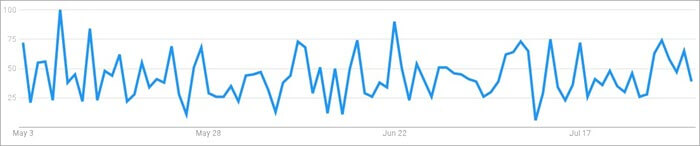
Expert Advice: While choosing the best mobile printer, the first thing that you need to keep in mind is the ability to print bigger sheet sizes. You can choose a printer according to your preference. A bigger sheet size will allow you to print in multiple formats.
The next thing is the option of having good connectivity. Even if most printers use Bluetooth, some of them have USB, WiFi, and NFC technology. Make sure that you choose the one that matches your mobile phone.
The most important thing is the option of the printing technology being used. You need to pick up a product with low ink usage that gives you a great output. There are a few options to choose from, including InkJet, Thermal, Zink, and Dye Sublimation.
Frequently Asked Questions
Q #1) Which printer is widely used as a portable printer?
Answer: The concept of a portable printer is simple. It is a printing device that is easy to carry and you can travel with. Usually, portable printers are small and compact, allowing you to connect to your phone or smartphone in your home easily. To establish secure connectivity, it uses NFC, USB, or Bluetooth connectivity.
If you want to use a printer that is widely used by people from all over the world, you can pick from below:
- Fujifilm Instax Mini Link Smartphone Printer
- Kodak Dock Plus 4×6” Portable Instant Photo Printer
- Canon Pixma TR150 Wireless Printer
- HP OfficeJet 250 All-in-One Portable Printer
- Phomemo M02 Pocket Printer
Q #2) Is there such a thing as a portable printer?
Answer: Of course, there is a portable printer device. Any printer that can print out everything from a simple to a complex document, and you can easily carry this, is known to be such a printer. They help you get large and small sheets of paper, which allow you to attain a faster speed. Usually, people use such printers for printing photos, labels, or stickers.
Q #3) Can I connect a printer to my mobile phone?
Answer: There are several ways by which you will know how to connect the phone to a printer. However, the most common type of them would be to connect it with the help of a Wi-Fi network or Bluetooth.
You can follow the steps below:
- Step 1: Make sure that the printer and the mobile device are connected to the same Wi-Fi network.
- Step 2: You can now download the printer mobile application on your phone and then tap to open it.
- Step 3: Wait for the application to search for your printer, and it will pop up. You can verify the printer using a code displayed, and it will get paired up.
Q #4) How do I print from my phone to my printer?
Answer: If you want to print pictures from your phone, you can do it in two ways. Either get them connected wirelessly, or you can use a wired option. For wireless connectivity, you can print through the official compatible application from your phone.
The alternative way is to get connected with the help of a USB Cable. You can use the cable to get connected and then print directly.
Q #5) How do I connect my phone to my printer via USB?
Answer: Usually, most printers do come with a USB receiver port. You need to connect it to your phone. For immediate results, you can even use an OTG cable. Simply plug in the connector to the cable, and you will print from your phone. If not, you can also get a direct USB Type C cable for faster connectivity.
List Of The Top Mobile Printers
Here is the list of remarkable and top-rated phone photo printers:
- Fujifilm Instax Mini Link Smartphone Printer
- Kodak Dock Plus 4×6” Portable Instant Photo Printer
- Canon Pixma TR150 Wireless Printer
- HP OfficeJet 250 All-in-One Portable Printer
- Phomemo M02 Pocket Printer
- Kodak Step Wireless Mobile Photo Mini Printer
- HP Sprocket Portable Photo Printer
- Polaroid Originals Hi-Print
- Workforce WF-110 Wireless
- Polaroid WiFi Wireless 3×4 Portable Mobile Photo Printer
- HPRT MT800 Portable A4 Thermal Printer
Comparing Top Phone Printer
| Tool Name | Best For | Sheet Size | Price | Ratings |
|---|---|---|---|---|
| Fujifilm Instax Mini Link Smartphone Printer | Quick Printing | 2 x 3 Inches | $99.95 | 5.0/5 (12,070 ratings) |
| Kodak Dock Plus 4×6” Portable Instant Photo Printer | Full Color Real Photo | 4 x 6 Inches | $134.99 | 4.9/5 (4,974 ratings) |
| Canon Pixma TR150 Wireless Printer | Fast Printing | 8.5 x 11 Inches | $249.99 | 4.8/5 (2,051 ratings) |
| HP OfficeJet 250 All-in-One Portable Printer | Cloud Printing | 8.5 x 11 Inches | $419.99 | 4.7/5 (2,009 ratings) |
| Phomemo M02 Pocket Printer | Postcard Printing | 2 x 3 Inches | $52.99 | 4.6/5 (2,796 ratings) |
Top Mobile Printers review:
#1) Fujifilm Instax Mini Link Smartphone Printer
Best for quick printing.
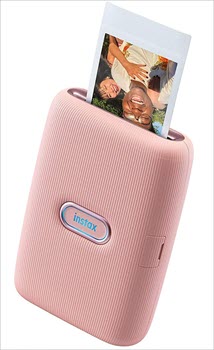
The Fujifilm Instax Mini Link Smartphone Printer comes with an Instax printing feature ideal for instant printing. Your printer can easily get connected to the Fujifilm Camera Remote app. This application is supported on almost all smartphones, which makes printing and editing features easier.
Another amazing feature is the fun mode, where you can instantly creatively edit your pictures and print them.
Features:
- Print together in Fun Mode.
- Includes Reprint option.
- You can continuously print.
Technical Specifications:
| Printing Technology | Laser |
| Connectivity Technology | Bluetooth |
| Color | Dusky Pink |
| Dimensions | 6 x 4.2 x 2.1 inches |
Verdict: While reviewing, we found that the Fujifilm Instax Mini Link Smartphone Printer gives a quick printing speed of 12 pages per minute. After printing, this product seems to take very little time for developing the image.
Since it gets completed in around 90 seconds, this instant photo printer is a top choice for people. Another interesting feature is that it can automatically erase the last photo printed when your printer is turned off.
Price: $99.95
Website: https://www.fujifilm.com/us/en/consumer/instax/printers
#2) Kodak Dock Plus 4×6” Portable Instant Photo Printer
Best for the full-color real photos.

The Kodak Dock Plus 4×6” Portable Instant Photo Printer comes with an instant printing option. It can be compatible with the free Kodak application, which includes multiple modes while printing. You can use multiple frames, stickers, and filters on or picture before printing any picture.
A decent speed of around 50 seconds to print is one of the best things that you can get. If you are looking for a postcard size print, the Kodak Dock Plus 4×6” Portable Instant Photo Printer is a top choice.
Features:
- Compatible with iOS and Android devices.
- It uses a USB-C pre-installed docking pin.
- Simple and intuitive app.
Technical Specifications:
| Printing Technology | Dye Sublimation |
| Connectivity Technology | Bluetooth |
| Color | White |
| Dimensions | 13.3 x 8.82 x 5.16 inches |
Verdict: Most people like the Kodak Dock Plus 4×6” Portable Instant Photo Printer because it has a dye-sublimation technology while printing. It allows you to get enhanced colors which can help in developing the product.
As a result, you can always attain an impressive picture while printing. This device does not use the PictBridge function anymore and thus printing has become much easier than it used to be.
Price: $134.99
Website: https://www.kodak.com/en/consumer/product/printing-scanning/photo-printers/mini-photo-printers
#3) Canon Pixma TR150 Wireless Printer
Best for fast printing.
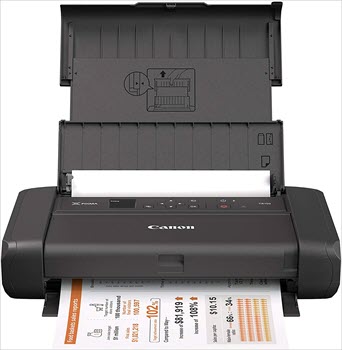
The Canon Pixma TR150 Wireless Printer is one of the signature products from the brand. The lightweight body and the compact design of this printer allow you to carry it and make this device portable. Apart from this, the product comes with an OLED display screen that is easy to control and change the settings. You can get multiple buttons around the screen which help to print in different modes and settings.
Features:
- 44-inch OLED display.
- Includes Apple AirPrint.
- It comes with an optional battery.
Technical Specifications:
| Printing Technology | InkJet |
| Connectivity Technology | USB; Cloud Printing |
| Color | Black |
| Dimensions | 12.7 x 7.3 x 2.6 inches |
Verdict: According to consumers, the Canon Pixma TR150 Wireless Printer takes very little time to print and set up. However, while reviewing the product, we had the same feelings as well.
Since the Canon Pixma TR150 Wireless Printer comes with Apple AirPrint and Mopria print services, setup is much faster. The interface is simple and also easy to use, which makes printing to be quick. Apart from this, you can also get the Canon Print app for quick setup.
Price: $249.99
Website: https://www.usa.canon.com/internet/portal/us/home/products/details/printers/mobile-compact-printer/pixma-tr150
#4) HP OfficeJet 250 All-in-One Portable Printer
Best for Cloud printing.
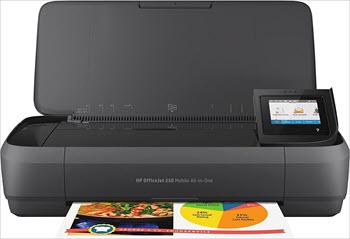
The HP OfficeJet 250 All-in-One Portable Printer is definitely a top choice for printing from cloud applications. This device supports both AirPrint and Alexa so that you can get hands-free printing. Using original HP62 Ink and HP62 cartridges supports the printer to get a limitless print.
It comes with a 2.65-inch touchscreen that helps you print, scan, and copy documents easily. This product appears with a 10-page document feeder, which prints multiple documents without any help.
Features:
- Optional HP High-Yield Cartridges.
- Includes auto document feeder.
- Free HP ePrint app.
Technical Specifications:
| Printing Technology | InkJet |
| Connectivity Technology | Bluetooth, Wi-Fi |
| Color | Black |
| Dimensions | 7.8 x 14.96 x 3.6 inches |
Verdict: As per customer views, we found that the HP OfficeJet 250 All-in-One Portable Printer has a long-lasting battery. It takes around 90 minutes to get the device fully charged, and you can get a great run time. This will always reduce the charging interruptions and make printing fluent. To connect with your phone devices, you can use a Wi-Fi direct option and a Bluetooth pairing mode.
Price: $419.99
Website: https://www.hp.com/us-en/shop/mlp/printers/officejet
#5) Phomemo M02 Pocket Printer
Best for Postcard printing.
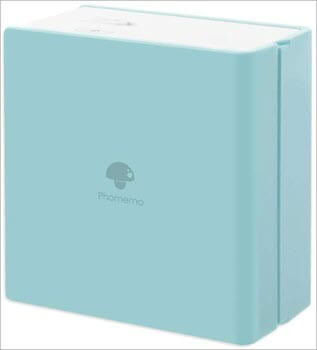
Phomemo M02 Pocket Printer is a preferable choice for many people who would like to print regularly. The ability to print even on transparent paper is unique, and it also helps on multiple occasions. The one-click printing option helps you save time.
This product can come with a 1000 mAh battery, which reduces the charging time and problems. The full charge can also have a week of standby time.
Features:
- Portable size and fashion design.
- HD black and white printout.
- Long continuously working time
Technical Specifications:
| Printing Technology | Thermal |
| Connectivity Technology | Bluetooth |
| Color | Ice Cream Green |
| Dimensions | 3.3 x 3.2 x 1.6 inches |
Verdict: According to reviews, the Phomemo M02 Pocket Printer has a quick printing setup and use. Compared with other mini portable printers, this product has a decent printing speed that can be effective for journals.
Since it only has thermal ink developing technology, we can only use the printer for black and white prints. But the most important thing that people like is the compact body and the budget-friendly price.
Price: $52.99
Website: https://phomemo.com/
#6) Kodak Step Wireless Mobile Photo Mini Printer
Best for bulk printing.

The Kodak Step Wireless Mobile Photo Mini Printer is more like a document printer rather than any picture printer. The black and white printing option with a decent printing mode will help you a lot. Built-in with a sleek design and is also light in weight.
So if you want to carry the mobile printer to different places, you can easily do it. The product has decent lithium batteries, which can provide printing for 25 photos on a full charge.
Features:
- Prints 25 photos on a full charge.
- Embedded dye crystals deliver high quality.
- Sets up fast & delivers gorgeous prints.
Technical Specifications:
| Printing Technology | Zink Technology |
| Connectivity Technology | Bluetooth, NFC |
| Color | White |
| Dimensions | 3 x 5 x 1 inches |
Verdict: While reviewing, we found the Kodak Step Wireless Mobile Photo Mini Printer comes with inkless technology. The Zink printing technology does not use any liquid ink, which improves the print quality. We compared it to different types of papers, and it performed well on almost all flat surfaces.
Printing on the premium papers is smooth and effective to use. One thing that we noticed is that Bluetooth does not work exquisitely well with Mac. You can try out the NFC connectivity option for a quick connection for all devices.
Price: It is available for $69.99 on Amazon.
#7) HP Sprocket Portable Photo Printer
Best for Sticky-Backed photos.
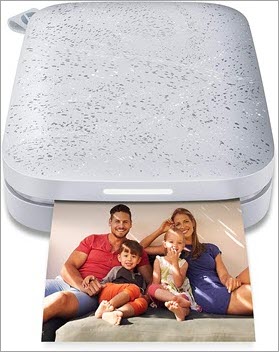
The HP Sprocket Portable Photo Printer appears with a personalized LED light that shows you which pictures are currently being printed. Coming over to the design of the printer, it is extremely compact and light in weight. The HP printer is also compatible with both Android and iOS devices.
Features:
- 10 sheets of 2×3-inch paper.
- One-year limited hardware warranty.
- Create smudge-proof prints.
Technical Specifications:
| Printing Technology | Zink Technology |
| Connectivity Technology | Bluetooth |
| Color | Luna Pearl |
| Dimensions | 4.63 x 3.15 x 0.98 inches |
Verdict: According to people, the HP Sprocket Portable Photo Printer is a superb choice for sticky-backed photos. If you want to create stickers using print labels, this device can bring up smudge-free prints. It comes with a color-enhanced printing option. The best feature of having this product is sleep mode which can conserve battery when you are not using it.
Price: It is available for $79.99 on Amazon.
#8) Polaroid Originals Hi-Print
Best for photo printing.
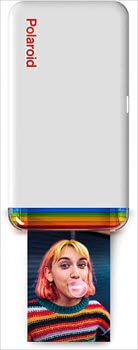
The Polaroid Originals Hi-Print is a decent Polaroid Hi-Print application for complete access to the printer while printing. This product has a 50-second development time, which is quite fast compared to other printed photos. It comes with a customized option in the application to edit the frames, filters, and other emoticons before printing.
Features:
- Print photos in under 50 seconds.
- Includes Polaroid Hi-Print mobile app
- Includes Rechargeable lithium-ion battery.
Technical Specifications:
| Printing Technology | Dye Sublimation |
| Connectivity Technology | Bluetooth |
| Color | White |
| Dimensions | 3.13 x 5.9 x 1.06 inches |
Verdict: While reviewing, the Polaroid Originals Hi-Print seems to be a top product if you need a 2 x 3-inch photo printer. Using dye-sublimation technology enhances the colors, which makes photos realistic.
The reason most people like this product is that it comes with decent 2 x 3-inch prints. They seemed to be more professional while printing and they are naturally vibrant. You can always enjoy these prints for both personal and commercial uses.
Price: $99.99
Website: https://us.polaroid.com/collections/polaroid-printers
#9) Workforce WF-110 Wireless
Best for high print volume.
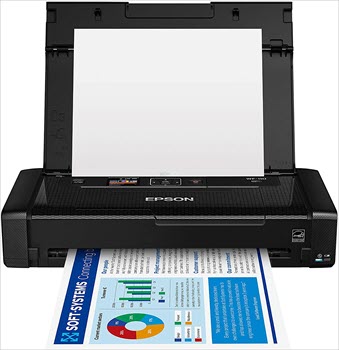
The Workforce WF-110 Wireless comes in a small package that can easily print 4 x 6-inch pictures. The option of having a 1.4-inch color LCD Plus gets intuitive control. You can also get a simple setup and operation. It has multiple buttons that allow you to edit the settings while printing quickly.
Features:
- Flexible battery charging.
- External accessory battery is available.
- Easy, intuitive operation.
Technical Specifications:
| Printing Technology | InkJet |
| Connectivity Technology | WiFi |
| Color | Black |
| Dimensions | 9.1 x 12.2 x 8.5 inches |
Verdict: While reviewing, we found that the Workforce WF-110 Wireless has a direct plug-and-play mechanism. We’ve tried this mechanism with multiple devices, and it worked well. Flexible battery charging mode print with no interruption.
Price: It is available for $289.99 on Amazon.
#10) Polaroid WiFi Wireless 3×4 Portable Mobile Photo Printer
Best for Android devices.

The Polaroid WiFi Wireless 3×4 Portable Mobile Photo Printer is a complete touch control panel to get a fast printing option. You can adjust the screen size and continue printing in different sets of paper and different sizes.
Features:
- Record 1080p HD video.
- Share Your Shots Directly to Facebook.
- Original Polaroid Border Prints.
Technical Specifications:
| Printing Technology | Zink |
| Connectivity Technology | WiFi |
| Color | White Snow |
| Dimensions | 8.78 x 6.57 x 2.83 inches |
Verdict: Everyone knows that the use of the Polaroid phone printer is advanced, and it has multiple features included. These products have a photo editing studio to configure your pictures before printing. You can print from the videos as well.
Price: It is available for $59.99 on Amazon.
#11) HPRT MT800 Portable A4 Thermal Printer
Best for office printing.
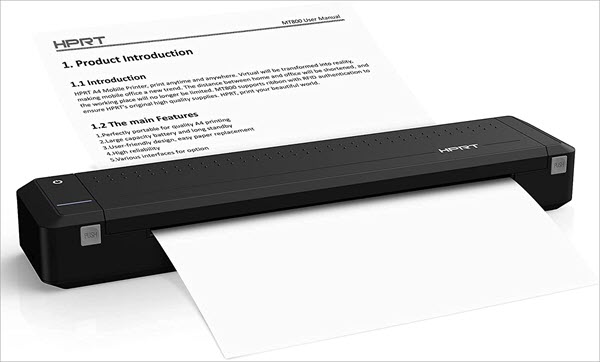
The HPRT MT800 Portable A4 Thermal Printer comes with an amazing application that gets immediate printing needs. The product comes with a 300 dpi high-resolution support, which improves the print quality of each document. This device comes with a piece of thermal ribbon which can enhance the printing quality.
Features:
- The printer supports IOS, Linux, and Android.
- No liquid ink was used while printing.
- Support HPRT‘s RFID thermal ribbon.
Technical Specifications:
| Printing Technology | Thermal |
| Connectivity Technology | Bluetooth |
| Color | Black |
| Dimensions | 12.22 x 2.5 x 1.56 inches |
Verdict: As per customer reviews, we found that the HPRT MT800 Portable A4 Thermal Printer comes with high compatibility and great use. This product has a thermal ink transfer which allows you to print easily with premium paper and on any flat surface. It can support 26 hours of operation.
Price: It is available for $239.99 on Amazon.
Conclusion
In this tutorial, we have seen multiple mobile printers that print pictures or documents instantly at our own comfort to guide you in selecting the best photo phone printer as per your need. A mobile printer can also connect with multiple devices and can provide the best output with enhanced colors. You can use this printer to print from cloud storage as well.
Further Reading =>> Compare Bluetooth photo or label printer
While reviewing, we found that the Fujifilm Instax Mini Link Smartphone Printer is the best mobile printer available in the market. It comes with laser printing technology and can print 2 x 3 photos.
If you are looking for the best inkjet printing options, you can also pick HP OfficeJet 250 mobile all-in-one Printer. Other alternatives are HP OfficeJet 200 mobile Printer, HP OfficeJet 100 mobile printer, and Polaroid zip mobile printer.
Research Process:
- Time is taken to research this article: 25 Hours.
- Total tools researched: 25
- Top tools shortlisted: 11
Was this helpful?
Recommended Reading
-

Explore and compare the top Home Office Printers with features, and pricing to select the best Home Printer per your requirements: Home printers are quite effective in helping you with your printing requirements. You may need to print a picture, or an important paper, or even 150 pages of research.…
-
Review this article to explore the top Inkjet Printers with comparison to find the best Inkjet Printer for cost-effective printing: Are you planning to get a new printer for your home or office use? Do you require bulk printing often, and costs are becoming a factor? Switch to having the…
-
Review and comparison of the Best Thermal Shipping Label Printer considering factors like printing needs, printing workload, and performance: Shipping Label Printers are the printers with specific capabilities to print shipping labels that contain a name, address, weight, tracking barcode, etc. It can be used for office, industry, and home…
-
Complete review and comparison of the best Sticker Printers. Select the ideal paper or vinyl sticker printer machine for DIY labels, stickers, and photos: Hobbyists, small business owners, or even company owners must print labels, for various reasons. To do this, though, you need the finest sticker printer on the…
-
Review and compare the top Bluetooth Printers with features and technical specs to select the suitable Bluetooth photo or label printer: Are you planning to print wirelessly at home or commercial place? Gone are the days where every setup would require a long cable. Now a Bluetooth Printer could be…
-
In-depth review and comparison of the top Photo Printers with technical specifications. Select the best Photo Printer for professional photos: Are you looking to print the best professional quality pictures? It's all about the printer that you choose. The best printer for photos can provide you color-enhanced pictures for professional…
-
Review and comparison of the Best Barcode Label Printers considering factors like printing technology, print resolution, printing speed, and connectivity: A barcode printer is used to print the barcodes, labels, and tags on parcels, envelopes, food items, clothes, jewelry, etc. Barcodes are the machine-readable codes used in global trades to…


