


Are you an Apple CarPlay user who often asks “Why is my Apple Carplay not working”. Here is a guide that revolves around the carplay not working issue along with the possible solutions to fix it:
Before CarPlay, Apple had developed its smaller version, ‘iOS in car’, in June 2013. With their car screen, it allowed car users to access maps, messages, and more.
CarPlay application was then launched in March 2014 at the Geneva Motor Show, and in September 2014, the Ferrari FF was the first car to have the full version of CarPlay installed in it.
Table of Contents:
Why isn’t Carplay Working: Causes & Solutions

What is Apple CarPlay
Apple CarPlay is an application that comes installed in most of the modern cars. It enables car owners to use the car’s display unit as their iPhone. With this application, you can use many of the features of your phone while traveling in your car, without having to touch your phone, but only the car’s screen.
Apple CarPlay feature turns your car screen into your iPhone. After you connect the CarPlay app to your phone, you can just ask Siri or tap the car screen to make a call, receive incoming calls, read text messages, play music, ask for directions, and more.
Another plus point of CarPlay is that it is quite intuitive and can be very easily connected to your iPhone by following certain very simple steps.
Watch this short YouTube video to learn how to connect and use CarPlay.
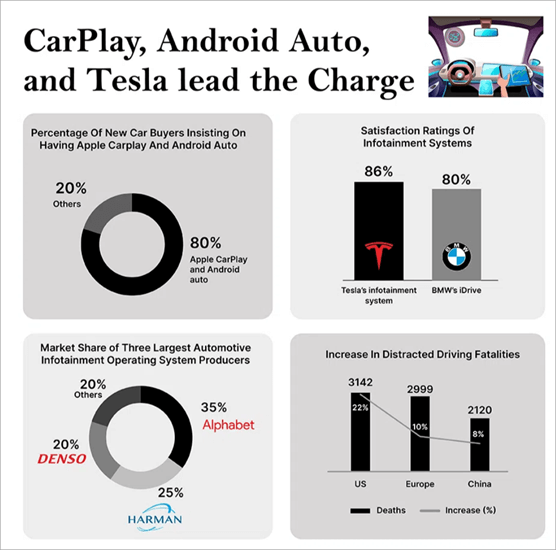
The huge number of benefits that this application delivers is the reason that it has become so popular around the world. As per a report by CNBC, the Apple Engineering Manager, Emily Schubert had said in an interview that 98% of new cars in America come with CarPlay already installed in them, and 79% of the US car buyers have stated that they would buy the vehicle if they get this feature in it.
A report by Straits Research states that in April 2023, about 98% of the new cars were either Apple CarPlay or Android Auto compatible. But, another very important point to be noted is that in 2022, the USA saw a 22% increment in fatalities due to distracted driving, followed by Europe, where the rate of increase was 10%, and then 8% in China.
Even when the application is quite easy to use, it may get stuck sometimes. So read the article to find solutions to problems related to CarPlay.
Quick Checks if Apple CarPlay is not working:
Please make sure that:
- CarPlay is supported in your country or region
- Your car supports CarPlay (Contact the vehicle manufacturer if unsure)
- Your iPhone has the latest iOS version
Why is My Apple Carplay Not Working
If you are a new user, you may find it difficult to get CarPlay working at once. And even if you are a regular user, due to some reasons, it is possible that Apple CarPlay won’t work sometimes. CarPlay users are often spotted asking, ‘Why is my CarPlay not working?’
Some of the possible reasons for this issue are as follows:
- Your application or phone needs an update
- CarPlay is not compatible with your car
- The app does not work in your region
- There is some connection problem between your phone and the vehicle
- There can be some issues with the Settings in your iPhone.
- There is some glitch
- If you have connected your phone to the Car through a USB cable, there can be some issue with the cable or the port in your car.
Also Read => How do Apple AirTags Work
How to Fix if Your Apple CarPlay Not Working
You can try different methods to get the problem of ‘Why isn’t CarPlay working’ fixed. We have listed all the possible solutions for this issue here-
#1) Restart your phone: First, try restarting your phone. This fixes the issues with your phone most of the time.
#2) Reconnect your vehicle with CarPlay: Try disconnecting and reconnecting the vehicle with CarPlay. If there is a bug, it will most probably get fixed.
For disconnecting your vehicle with CarPlay, follow these steps:
- Go to Settings
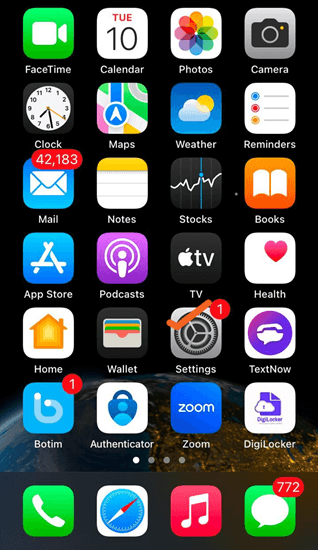
- Click on General
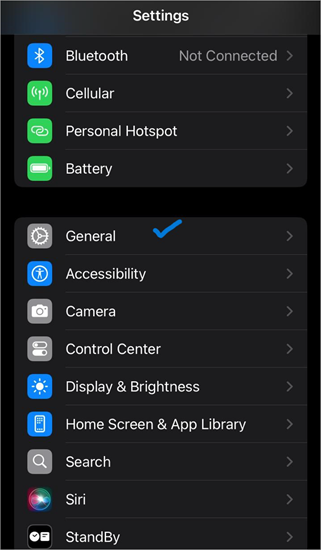
- Tap on CarPlay
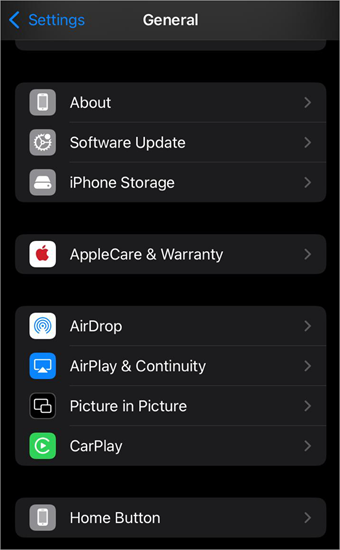
- Now select your vehicle
- Tap on Forget This Car.
Now you can restart your phone, and reconnect CarPlay with your vehicle.
To reconnect, you’ll have to do as following:
- Go to Settings
- Select General
- Now click on CarPlay
- The screen will then show you a list of Available Cars.
- Select your vehicle and the connection will be recreated.
#3) Check for updates: Check for system updates on your phone.
To check system updates on an iPhone, you’ll have to follow these steps:
- Go to Settings
- Tap on General
- Now select Software Update
If an update is available, your phone will give you the details. Follow the instructions for installing the latest updates.
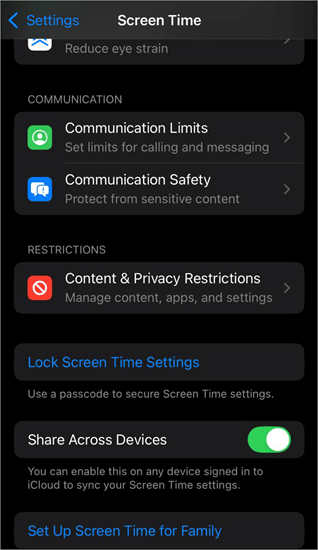
#4) Check if you have given permissions for Screen Time: You may have turned off the Screen Time permissions for CarPlay on your phone.
To check this setting, follow these steps:
- Go to Settings
- Tap on Screen Time
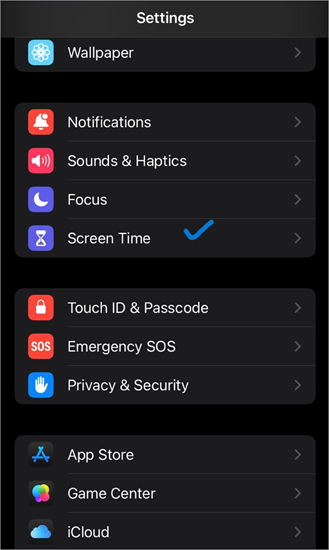
- Select Content & Privacy Restrictions
- Go to Allowed Apps & Features
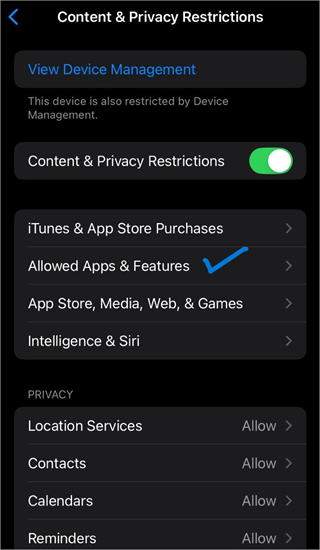
- Permit CarPlay
#5) Enable Siri: If Siri is not enabled, CarPlay won’t listen to your voice instructions. So check whether or not you have enabled Siri on your iPhone. To enable Siri on iPhone, do as stated under.
- Go to Settings
- Select Siri
- Now enable Allow Siri when locked.
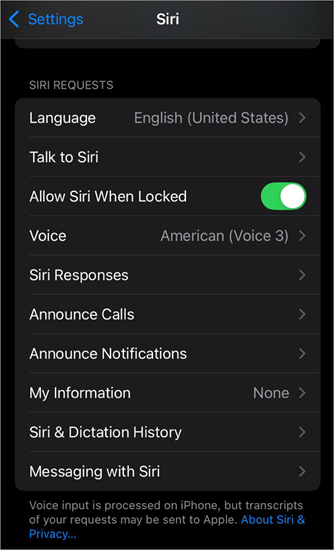
Note: It is quite common that the ‘Allow Siri when locked’ feature is disabled and Siri doesn’t work when the phone gets locked. So remember to turn this feature on.
#6) Enable CarPlay to run while your phone is locked. This is another answer to the question, “Why isn’t Apple CarPlay working?”.
Personal Experience:
When my CarPlay is not working, I look for ways to fix it and try different things. I realized that in my phone settings; I have not enabled CarPlay to work while the phone is locked. After the option is enabled, it works.
So many settings can hinder CarPlay’s functioning.
To enable CarPlay when locked, follow these steps:
- Go to Settings
- Click on General
- Select CarPlay
- Now select your vehicle from the list of available connections shown on your iPhone screen
- Tap on Allow CarPlay While Locked.
#7) Check your USB cable: If you have connected your iPhone to the vehicle through a USB cable, maybe:
- The wire is worn out
- The cable is not inserted into the vehicle port properly
- You are inserting the USB cable into the wrong port.
You can try
- Re-inserting the USB cable,
- or plugging it into another port,
- or using another USB cable.
The USB port for CarPlay in your vehicle would most probably have iOS written on it, so plug your USB cable in the right port.
#8) Turn off USB restricted mode. There are chances that you would have enabled the USB restricted mode in your iPhone, by turning OFF USB Accessories. This feature is built to protect the phone’s data from being exposed through an unwanted USB connection.
So if you are connecting your phone to the car’s screen through a USB and this feature is enabled in your iPhone, you would be wondering why won’t my apple CarPlay work.
Further Reading => Why is my Face ID not Working
Follow these steps for turning the USB restricted mode OFF:
- In your phone, go to Settings
- Tap on Face ID & Passcode or Touch ID & Passcode
- Enter your Passcode
- Find the option Accessories or USB Accessories
- Now turn it ON
Suggested Reading => Best USB-C Hubs For Your Laptops
#9) Make sure your phone is not in Airplane mode: Airplane mode often prevents the phone from connecting to other devices wirelessly. So, switch off the Airplane mode if it is enabled.
#10) Turn on Bluetooth in your phone: You would need to turn the Bluetooth function ON in your iPhone, to connect your vehicle CarPlay to your iPhone. You can also try removing other Bluetooth connections from your phone or vehicle if the other solutions don’t work.
#11) It is possible that your vehicle is not compatible with CarPlay. In that case, no solution will work. You can have a look at the list of vehicles compatible with CarPlay before buying a new one.
#12) It is possible that Apple CarPlay does not work in the region you are using it. To check if Apple CarPlay is supported in your region or not, go through this link.
#13) Your phone may have been switched OFF. It is possible that, due to continued usage for long hours, your phone may have been switched off, that’s why CarPlay stopped working instantly. If that is the case, charge your phone first, then only you would be able to use CarPlay.
Further Reading => Quick Fixes for iPhone Not Charging Issue
#14) If your iPhone is not detected by CarPlay, there are chances for:
- Your iPhone isn’t updated to its latest version
- If you are using a wired CarPlay connection, your USB cable may have some issues. Try using a different USB cable.
- If you are using a wireless CarPlay connection, make sure your Bluetooth and Wi-Fi and turned on.
- CarPlay may be restricted to your iPhone. To allow CarPlay, follow these steps:
- Go to Settings
- Tap on Screen Time
- Now select Content & Privacy Restrictions
- Tap on Allowed apps
- Enable CarPlay.
#15) There is a chance that the audio in your car is muted. If that is the case, even if CarPlay were working, you won’t be able to hear anything and would keep wondering why isn’t my Apple CarPlay working.
#16) Contact Apple Support. If your phone is updated to the latest version, your vehicle is compatible with CarPlay and you have tried all the solutions and still can’t get CarPlay to work, then you must contact the iPhone support.
Suggested Reading => Compare Top Apple Watch Apps
FAQ’s on Car Play Not Working
1. Why is my Apple CarPlay not working but my phone is charging?
There are chances that when you connect your phone to your car’s USB port, it starts charging, but your CarPlay does not work. It can happen due to several reasons:
• You haven’t enabled Siri
• You haven’t allowed CarPlay to work when locked
• Your phone may be in Airplane mode
• Your vehicle may not be compatible with the CarPlay app
• You haven’t enabled Screen Time
• Your phone may need an update.
2. Why has my Apple CarPlay suddenly stopped working?
If the Apple CarPlay suddenly stops working, there would most probably be one of the following reasons:
• Your phone’s battery is gone
• You haven’t enabled CarPlay to work when the phone is locked. To allow CarPlay to work when locked, follow these steps:
1. Go to Settings
2. Select General
3. Now select CarPlay
4. Now find your vehicle from the list of available connections shown on your iPhone screen and tap on it.
5. Then click on Allow CarPlay While Locked.
• The connection may have been disrupted somehow. Try reconnecting the vehicle with CarPlay.
• There may be some glitches. Try restarting your phone.
• There can be a pending software update. Check for updates in your iPhone.
• If you have connected the app through a USB cable, there are chances that the cable has got frayed. Try using a new cable.
3. How do you reboot Apple CarPlay?
You can re-establish the connection between your vehicle and your phone. For this purpose, you’ll have to disconnect them first, then restart your phone and your vehicle, and then reconnect them.
For disconnecting CarPlay from your vehicle-
• Go to Settings
• Select General
• Tap on CarPlay
• Now select your vehicle
• Click on Forget This Car
Now restart your phone and your vehicle and then reconnect. For reconnecting, you’ll have to follow these steps-
• Go to Settings
• Select General
• Now click on CarPlay
• Your phone screen will show you the list of Available Cars
• Select your vehicle.
The connection will be recreated.
4. How do I activate Apple CarPlay on my car?
To activate Apple CarPlay, you’ll need to connect it with your iPhone. Follow these steps to establish the connection:
• Click on the Home icon on your car’s touchscreen
• Now tap on Smartphone Connection
• Now select Connect New Device
• Follow the instructions for pairing.
After you finish pairing, you can start using the car’s screen to dial numbers, read messages, navigate on maps, and more.
5. Can you change the Apple CarPlay background?
Yes. It is quite easy to change CarPlay wallpaper. You’ll just have to do as follows:
• In your car’s display screen, open Settings in CarPlay.
• Tap on Wallpaper
• Now scroll through the available wallpapers and then tap on the one you like
• Tap on Set.
6. Does CarPlay cost monthly?
No. CarPlay is free to use. But it can only be used in your car if it is compatible with the app.
7. Can you use CarPlay without USB?
CarPlay can be used without USB only if your vehicle has the feature to connect with devices wirelessly. If your vehicle has this feature, you can easily connect CarPlay to your iPhone using these steps:
• In your iPhone, go to Settings
• Select General
• Now click on CarPlay
• Go through the list of Available Cars
• Select your vehicle and the connection will be recreated.
8. How to watch Netflix on CarPlay?
Please note that CarPlay does not offer the feature to run Netflix, because watching a movie while driving can be too distracting and very dangerous.
But if you still want to run movies on your CarPlay screen, you can try downloading a screen mirroring application on your iPhone and then cast a movie to the CarPlay screen.
9. Does CarPlay work with Android?
No. The CarPlay app is built for Apple users only. If you are an Android user, then don’t worry, Android Auto is a quite similar app built for Android users.
10. Does CarPlay track your car?
Yes. CarPlay does keep a record of where your car is. You can use your iPhone to check the exact location of your car at the moment.
11. Can CarPlay play YouTube?
You can only use the YouTube Music app with CarPlay. You are not allowed to play YouTube videos.
12. What apps are available on Apple CarPlay?
Apple CarPlay gives you access to music apps, navigation apps, messaging apps, voice apps, food-ordering apps, parking apps, calendars, and more. You can even download several third-party apps on CarPlay and arrange them in the way you like. Have a look at the list of apps supported by Apple CarPlay from here.
Conclusion
We explored the solutions to the question often asked by CarPlay users – ‘why isn’t my Apple CarPlay working’. You can find a detailed list of all the possible solutions to fix this issue in the article.
CarPlay was launched in the year 2014. Today it is considered one of the top features that people look for while buying a new car. Even if CarPlay is not provided in your model, you can get it installed at additional charges. The charges vary depending on the complexity of the car model, ranging from $200 to $700.
Though CarPlay is an extremely useful and popular app around the world, it does have certain drawbacks too, which I want to bring to the readers’ attention. I must say that doing anything while driving can be extremely dangerous, even for professional drivers. So the driver must focus on driving only.
Talking to Siri and getting voice directions for your desired location is a commendable feature. And, you can even get your messages read up without having to use the phone! So, the app is a great invention, but must be used with caution.
Was this helpful?
Recommended Reading
-

This tutorial is a complete step-by-step guide that explains the top 3 useful methods to find ways on how to Unlock a Disabled iPhone: Security is the best part of having an iPhone. No one can unlock your phone and access your data unless they know the password. As much…
-
Did you accidentally trigger the iPhone's SOS Mode? Discover how to turn off SOS mode on your iPhone in seconds. Get to know the main reasons to remove SOS from iPhone and how to overcome when SOS is stuck: Your iPhone can make emergency or SOS calls when in and…
-
Elevate your listening experience with the top podcast apps on the market. Pick the right podcast player with ample features and see which app works best for you: Millions of people worldwide listen to podcasts using their favorite online podcast app or player. The best podcast player on the market…
-
Is your iPhone update to iOS 15 stuck and you are unable to install the iOS 15 update? Read this guide to fix it with one of the best iPhone repair toolkits, Wondershare Dr.Fone: iPhone users have been anticipating the new iOS 15 updates for iPhone 6s and newer devices…


![[FIXED] Unable to install iOS 15 update Quick Fix in 2021](https://www.softwaretestinghelp.com/wp-content/qa/uploads/2021/10/FIXED-Unable-to-install-iOS-15-update-Quick-Fix-in-2021-2-1.png)