Is Adobe Firefly AI really worth the hype? Read our exclusive review of Adobe Firefly to unveil all about its safety, usage, features and pricing along with a list of its alternatives to see if it is the right tool for you:
Adobe is a globally renowned brand that offers different products like Photoshop (for image editing), Illustrator (for creating logos and icons), Premiere Pro (for video editing), Adobe Express (for editing short videos, photos, etc.), and more.
In March 2023, Adobe launched a new product – Adobe Firefly. It is a generative AI model widely used to convert an image into a video, text into a video, text into an image, and more. Since Adobe is a popular, reliable, and trusted name, Adobe Firefly gained huge popularity within a very short time.
Adobe Firefly AI: A Complete Hands-on Review
Due to the huge demand for image and video editing tools in today’s time, you can find a number of products in the market for this purpose. I must say, users can create breathtaking videos within minutes using such AI-powered image and video creation tools.
What is Adobe Firefly?
Adobe Firefly is an advanced, powerful tool used for creating images, videos, vectors, and audio files. It is highly used by small businesses and individuals for creating marketing materials on their own. According to a report by RTT News, Adobe Firefly has created over 22 billion assets within a very short span of time.
Here is the video that introduces Adobe Firefly:
The application offers several cool features that will compel the artist in you to buy a subscription.
Features include generating images/videos/speech/music/sound effects/characters/stickers/vectors/faces/drawings/anime art from text, generative fill, image expansion, image/video upscaling, background removal, cartooning an image, audio translation, and more.
Adobe Firefly Models
Adobe Firefly has 5 models:
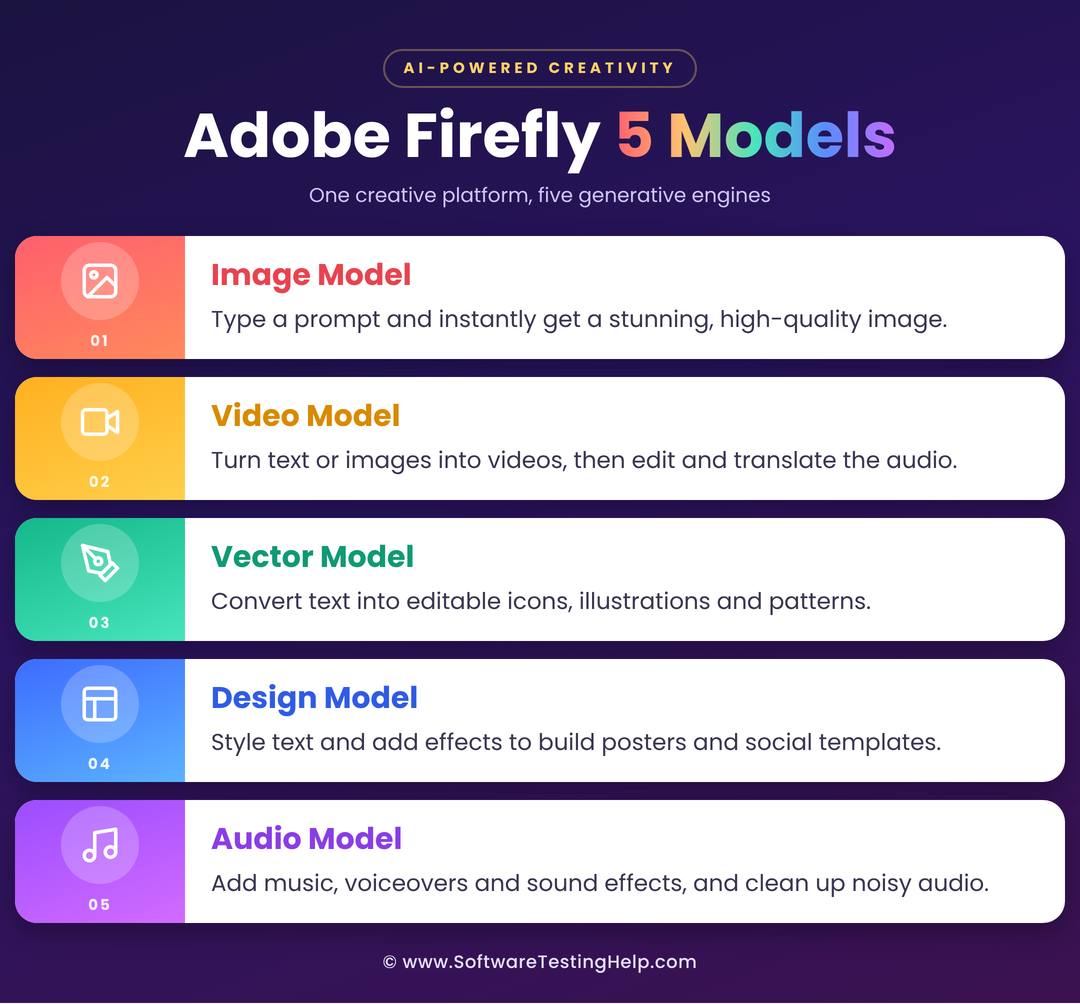
- Image Model: Firefly has a text-to-image conversion tool. You can enter prompts, and the AI-powered tool will generate a high-quality image for you.
- Video Model: With this platform, you can generate a video from text or from an image. Plus, you get video editing tools, audio translation, and much more.
- Vector Model: Adobe Firefly allows you to enter text and get it converted into editable vector graphics like icons, illustrations, or patterns.
- Design Model: This includes designing tools including text styling, effects and more, that can be used for creating posters or social media templates.
- Audio Model: This includes many tools like adding music to the video, generating speech from text, creating sound effects, enhancing the voice track by cleaning the background voices, and more.
Where Does Adobe Firefly Work
Adobe Firefly works with:
- Your website browsers – including Chrome, Edge, Firefox and Safari.
- As a mobile app on your iOS or Android device.
- Inside Adobe products like Photoshop, Illustrator, Premiere Pro, Adobe Express, Lightroom, and InDesign.
Adobe Firefly Pricing & Plans in 2026
| Plan | Price | Credits | No. of 5-second clips that can be generated at 1080p | Translation allowed with each plan | Sound effects | Best for |
|---|---|---|---|---|---|---|
| Free Plan | $0 per month | 25 credits per month | A 5-second video needs at least 100 credits. So no video clip can be generated with the free plan. | None | 2 | Trying Adobe Firefly, or those who want to create just one image. |
| Firefly Standard | $8.49 per month, billed annually | 2,000 credits per month | Around 20 | 6 minutes | 200 | Hobbyists, Beginners who are new to AI based video generation |
| Firefly Pro | $16.99 per month, billed annually | 4,000 credits per month | Around 40 | 13 minutes | 400 | Freelancers, Social media creators |
| Firefly Pro Plus | $29.39 per month, billed annually | 10,000 credits per month | Around 100 | 33 minutes | 1000 | Youtubers, Small video agencies |
| Firefly Premium | $118.93 per month, billed annually | 50,000 credits per month | Unlimited | 166 minutes | 5000 | High volume video producers |
How to Use Adobe Firefly
The free credits offered by Adobe Firefly every month can be used to create an image. To create a video, you need at least 100 credits, so you would need to buy a subscription first.
Here are the steps for creating a free image within seconds using the Adobe Firefly AI Image Generator:
- Open the Adobe Firefly web page
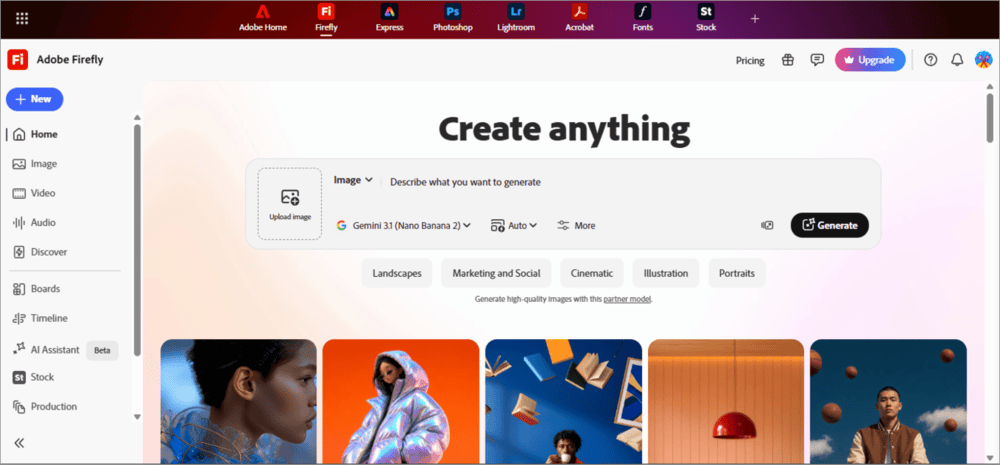
- Under the heading Create anything, type in the prompts for the image you want.
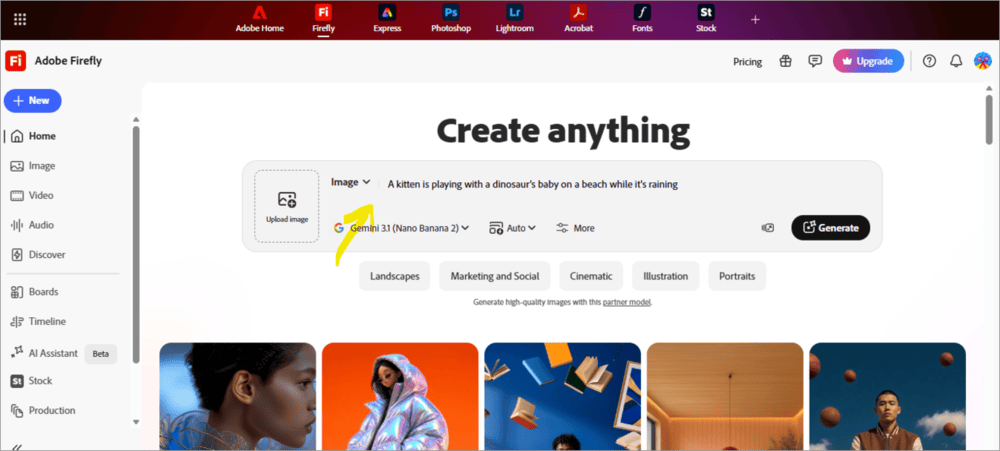
- Now click on Generate
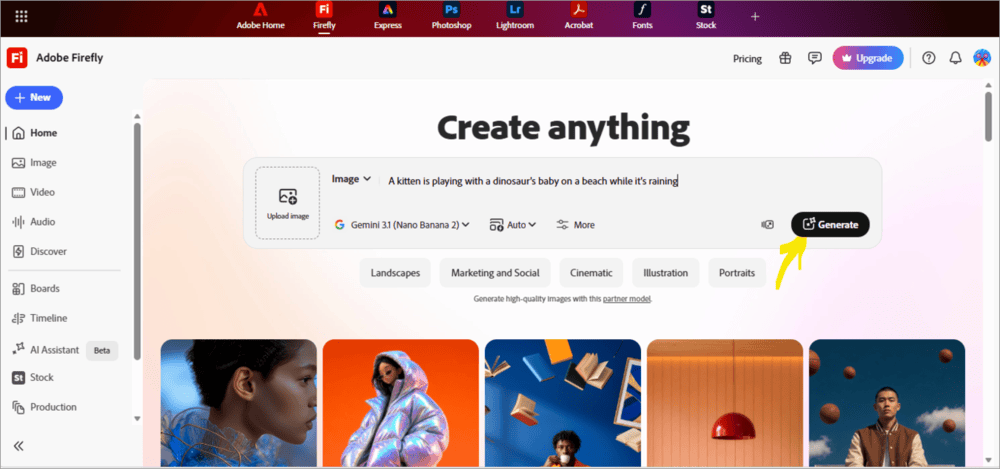
- In about 10 seconds, the system will create your image.
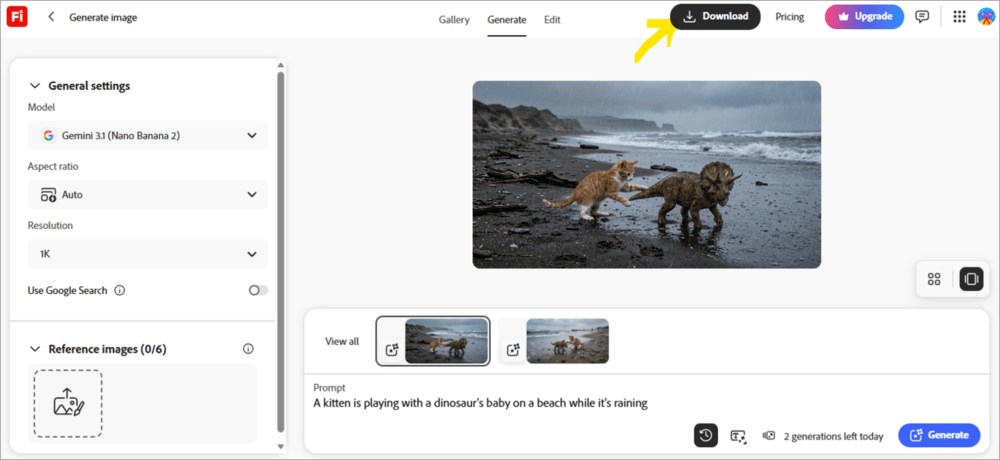
- Click on Download to save the free image to your device.
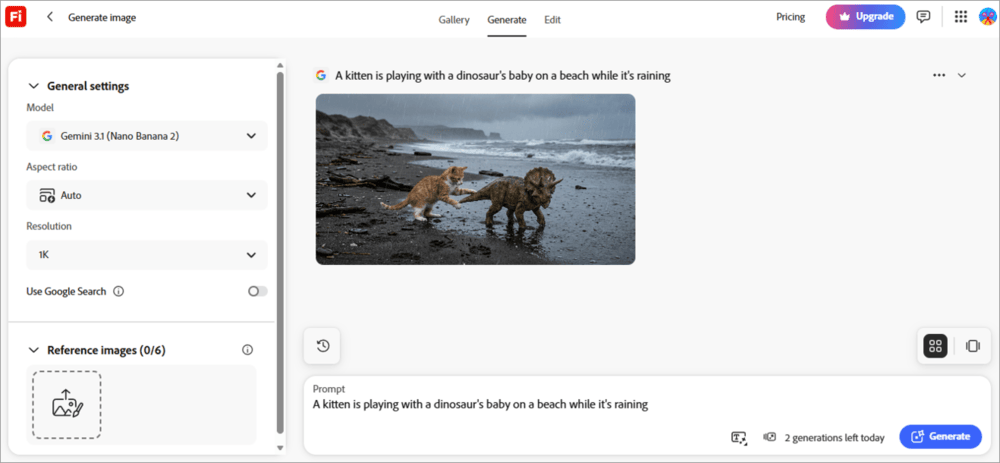
Here is a step-by-step guide for creating a video with text prompts
- First of all, get a subscription plan to use the text-to-video generator.
- Once you’ve got a plan, go to Adobe Firefly’s home page.
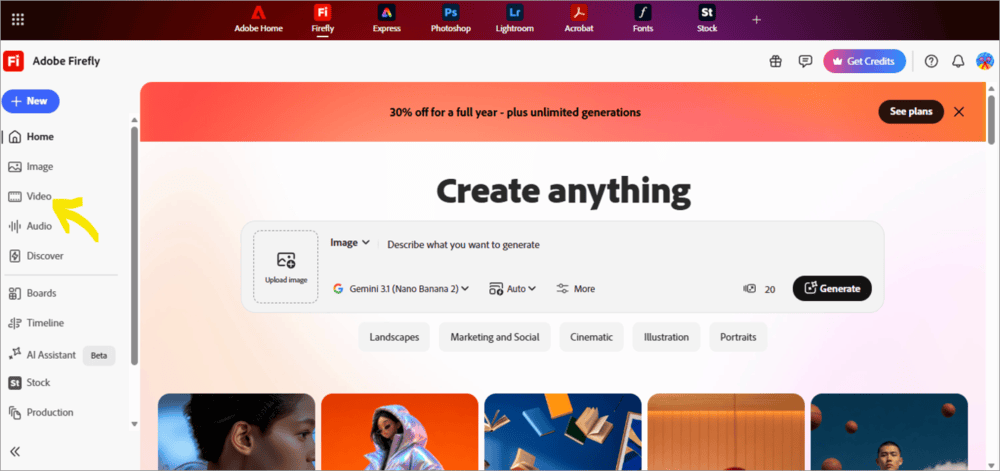
- Now click on the Video option located in the left panel.
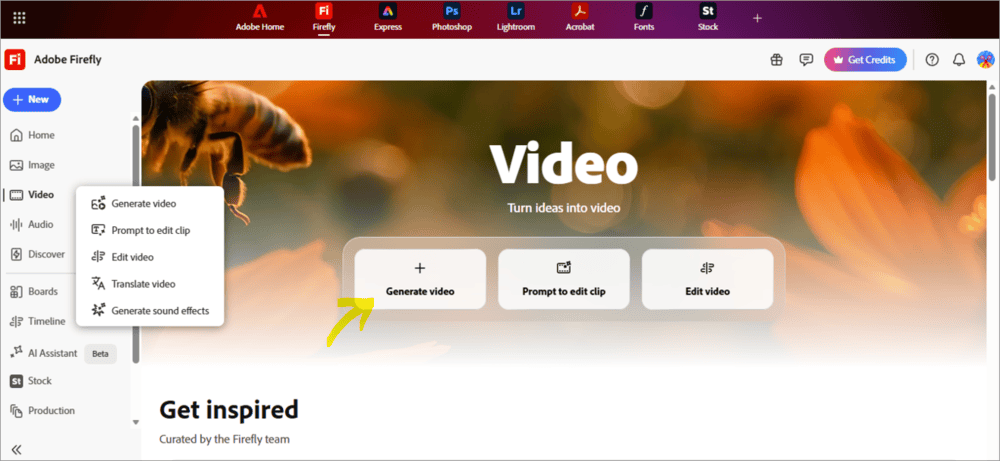
- Select the option: Generate video
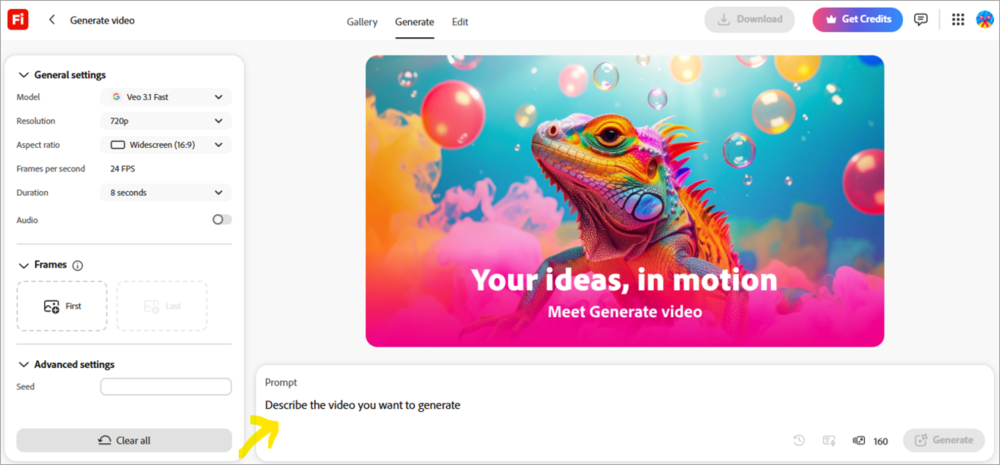
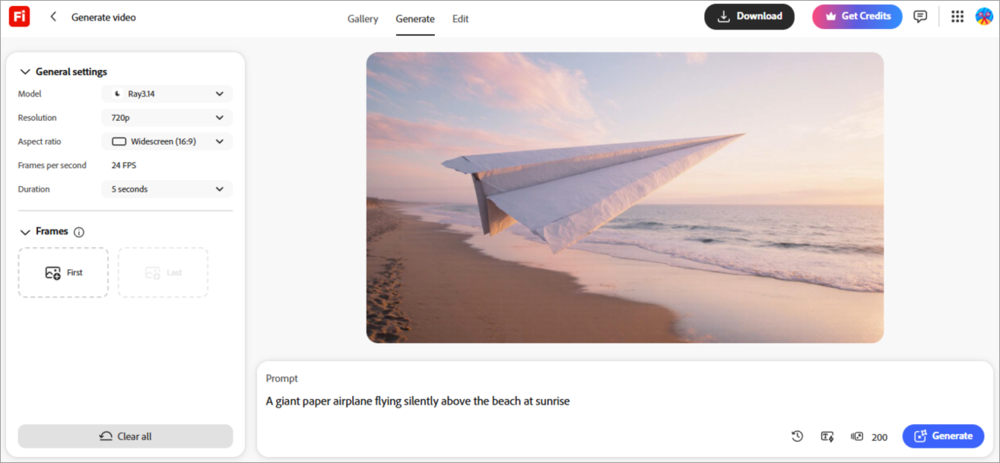
- Describe the video exactly how you want it to be, by inserting text in the Prompt box. (You can edit general settings for the video, like video resolution, aspect ratio, duration, FPS, and more, from the left panel. You can even add images for reference to get the desired results.)
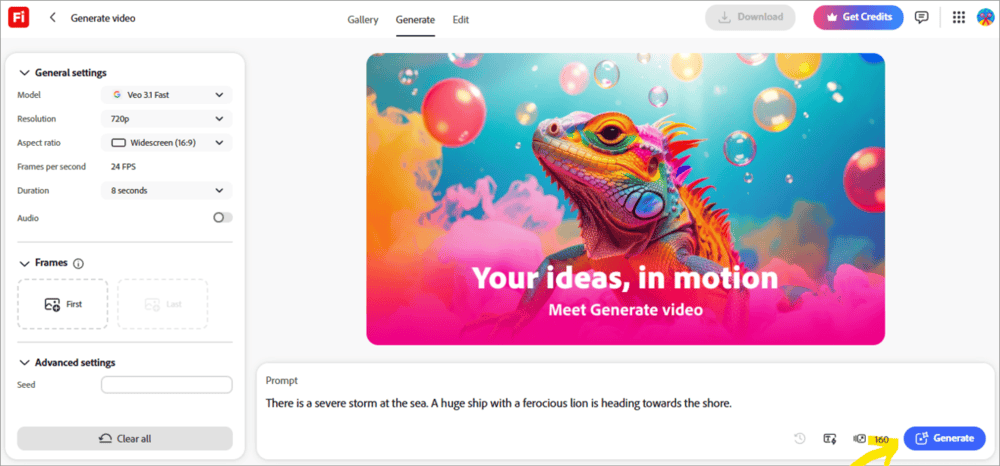
- Once you have entered the text in the box, click on Generate.
- Once the video is generated, click on the Download option to save it on your device.
Key Features of Adobe Firefly
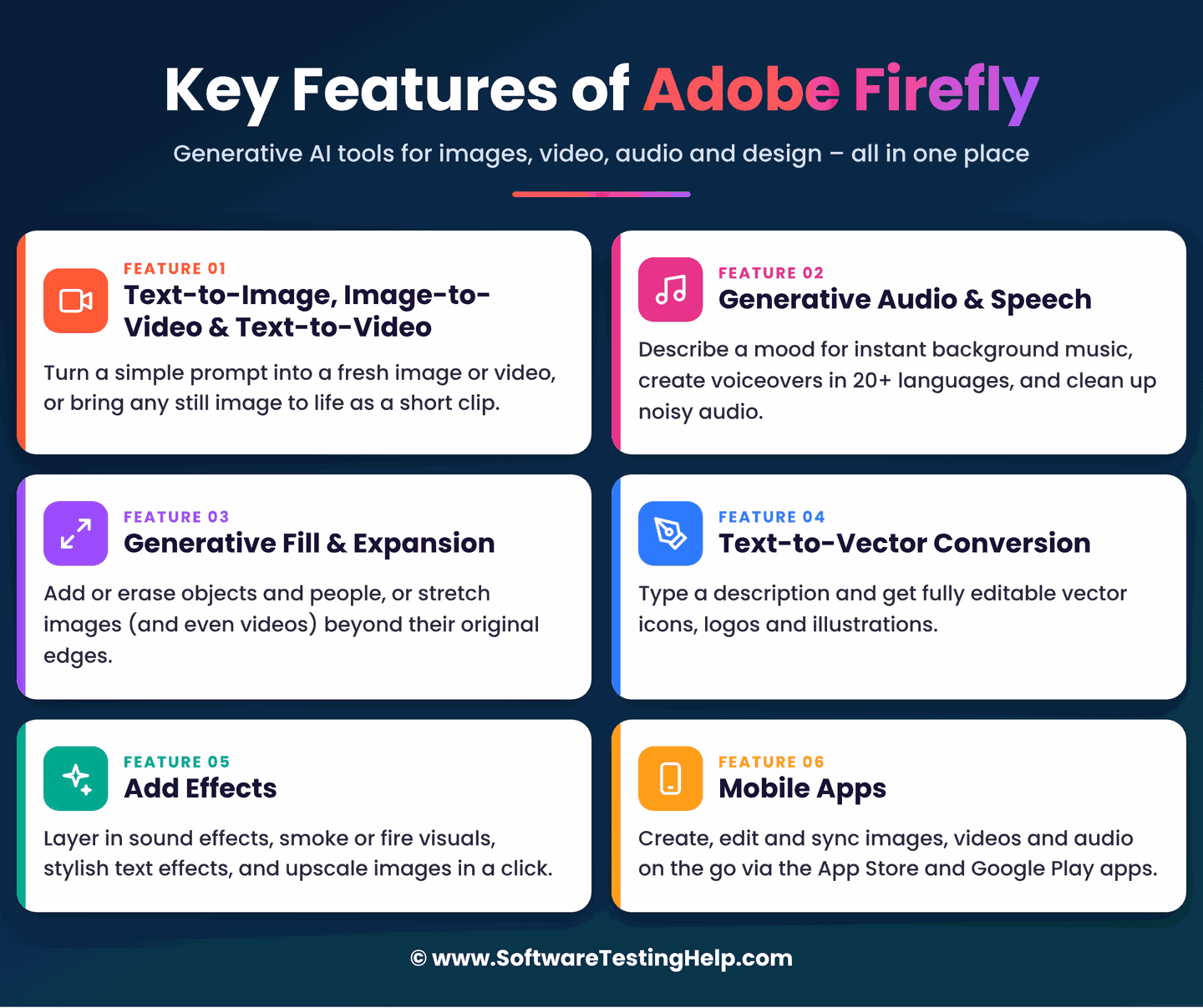
The top features of Adobe Firefly are listed below.
#1) Text-to-image, Image-to-video, and Text-to-video
With Adobe Firefly, you can generate an image or a video by giving prompts. Or convert any image into a short video.
Here are some examples of prompts for text-to-image generation:
- The dinosaur is eating an apple, while a baby is watching it in awe.
- There is a severe storm at sea, while a ship is heading towards the shore.
Some examples of prompts that can be given for generating a 5-minute video clip:
- A small boy is friends with a tiger cub, and they are playing in the forest.
- A big aeroplane is flying in the city, while trying its best not to touch the tall buildings.
#2) Generative Audio and Speech
Users can get the background music created for their video within seconds, just by describing the mood of the video.
Plus, they get access to the text-to-speech feature that creates voiceovers with apt sound effects in over 20 languages. Users can even enhance their audio files by removing the background noise.
#3) Generative Fill and Expansion
With Firefly, users can add or remove any object or a person from an image, or they can expand any image beyond its borders. This feature is available in Photoshop, but is powered by Firefly. Users can even expand an already created video using Firefly.
#4) Text-to-vector Conversion
Users can give prompts to create editable vector graphics from text; for example, icons, logos, and illustrations.
#5) Add Effects
Users can add audio effects (like the sound of thunder or birds chirping), visual effects (like smoke or fire), text effects (this includes text styling), upscale an image, and more.
#6) Mobile Apps
The Adobe Firefly mobile app is available on the App Store and the Google Play Store, with all the features like image, video, audio generation, image and video editing, and cloud sync.
My Experience: Their mobile app is easy to use, quick, and has all the features. Plus, it syncs with the web version, so that you can work on both devices simultaneously.
Is Adobe Firefly Safe for Commercial Use?
Yes, Adobe Firefly has every feature you look for in an app to be used for commercial purposes. The main merit it has over its alternatives is its seamless integration with Adobe products like Photoshop, Illustrator, Premiere Pro, etc.
If you are using Adobe Firefly for commercial use, these are the benefits you will get:
- Adobe Stock gives you access to over 400 million images. You can use them without having to worry about copyright infringement.
- Adobe has its own stock of millions of images. It trains the models on public domain content where copyright has expired and licensed content such as Adobe Stock.
- Adobe Firefly users get IP indemnity. This means that if you are being sued for copyright infringement on content created by Adobe Firefly, then Adobe will defend you and will cover your losses. (This feature is available for select Enterprise customers only. Adobe’s terms also exclude capabilities powered by non-Adobe models from indemnification by default.)
- The content created with Adobe Firefly does not have a visible watermark, but invisible C2PA Content Credentials (so secure metadata stating that the file is created with Adobe Firefly is embedded with the files created by Adobe Firefly) and can be used to detect whether or not the document is made with Firefly AI. Plus, you can also trace when and where the document was created, which proves that the content is original and not copied from somewhere. This makes Firefly a highly trusted application for commercial use.
Adobe Firefly Vs. Alternatives
The top 2 alternatives to Adobe Firefly are:
#1) Midjourney
This platform is praised for delivering the most cinematic images. It is best suitable for Brand Designers, Social Media managers, AI artists, and Book Cover artists.
Pricing:
- Basic Plan: $10 per month
- Standard Plan: $30 per month
- Pro Plan: $60 per month
- Mega Plan: $120 per month
Website: https://www.midjourney.com/home
#2) Leonardo AI
Leonardo AI is known for delivering character consistency across images and for creating high volumes of content at lower costs. The platform is most suitable for Game developers, Etsy sellers, beginners, and production teams.
Pricing:
Solo Plans:
- Free
- Essential: $12 per month
- Premium: $30 per month
- Ultimate: $60 per month
Team Plans:
- Starter: Starts at $72 per month (for 3 seats)
- Growth: Starts at $144 per month (for 3 seats)
API Plans:
- Pay as you go
- Custom pricing as per your needs.
Website: https://leonardo.ai/
Adobe Firefly – Performance and Quality
I used Adobe Firefly to check its performance and the quality of files generated with it. Trust me, I got some breathtaking results with the app.
- It was my child’s birthday, and he loves Sonic, so I just opened Adobe Firefly and gave a prompt to create a cinematic photo of my child with Sonic (which is his favorite cartoon character), and added my child’s photo to be used in the final image. I wanted the image to be used on his birthday cake, and trust me, I got very nice results, and it took only 2-3 seconds to generate the desired image.
- I also tried the text-to-video generator. This time I got the results within 8-10 seconds, and the quality of the video was very nice.
- When I tried giving some complex instructions for my video, the app responded with an error. But it worked well with simple prompts.
Frequently Asked Questions
1. What’s the difference between Adobe Firefly and Photoshop?
Photoshop is a very old, renowned, and trusted image editing tool. Firefly is a fairly new application that is used for image editing, image generation, video generation, sound effects creation, and much more. Both of them are trusted Adobe products. Some features of Firefly, including Generative Fill and Image Expansion, work inside Photoshop.
2. Is Firefly AI safe to use?
Yes. Adobe Firefly is a safe, trusted, and powerful tool for image, video, sound and vector generation. Firefly AI is safe because it doesn’t ever get its images randomly from other platforms, as other AI apps do. Plus, the IP indemnity feature is highly useful for enterprises and makes the platform stand apart from all of its competitors.
3. Is Adobe Firefly AI free?
Adobe Firefly AI gives you 25 free credits per month, which can be used for using the Text-to-image generation feature, Generative Expand, Generative Fill, and Text-to-vector graphic feature. Apart from this, you can use their 7-day free trial for the Standard and the Pro plan to test the application for free.
4. Does Adobe Firefly work with multiple AI models?
Yes. Multiple AI models work inside Adobe Firefly, to give you the best results. Users can take advantage of Adobe Firefly models (best for commercial safety), Gemini Nano Banana models, Google models, OpenAI models, GPT Image, Runway, Luma AI, Kling AI, and more.
5. Can the Firefly app generate AI images?
Yes, that’s the core feature of Adobe Firefly. It can generate text-to-image, text-to-video, text-to-vector, and text-to-sound effects within seconds. The AI image generation feature can even be used with the 25 free credits you get every month.
6. Is Adobe Firefly any good?
Adobe Firefly is a feature-packed, safe, trusted, easy-to-use, and affordable platform for artists and creators. It is called commercially safe because of the IP indemnity it offers – which ensures the users of covering all losses they would incur if they are being sued for any copyright infringements for products created with Adobe Firefly. This feature is available for Enterprise users only.
Plus, all the products generated with Adobe Firefly have an invisible watermark that gives information about when and where the file is created, which is a sign of authenticity of the product. All of these merits make Firefly a good platform for content creation.
Conclusion
In the article, we discussed the features, pricing, alternatives, benefits, and everything about Adobe Firefly.
Here are some questions:
- Should you subscribe to it?
- Who is the platform most suitable for?
- Who should avoid Adobe Firefly?
I would suggest that users subscribe to Adobe Firefly for the reasons that it is commercially safe, offers seamless integration with other Adobe products, and has a good set of features.
The platform has flexible pricing options that make it suitable for beginners, hobbyists, freelancers, social media creators, YouTubers, small video agencies, and even high-volume video producers.
But if you want a forever free plan, then Firefly won’t work for you. Leonardo AI wins here with 150 free credits per day, while Firefly gives only 25 free credits per month.
Another thing to note is that the products generated with Adobe Firefly contain a C2PA watermark, and fake, realistic images of real people are blocked by Firefly. This means that you can’t make viral memes with fake images of a popular celebrity using Adobe Firefly.
So memers, as well as the people who want to use illegally obtained images for content creation, won’t find the platform any useful.
Research Process: The total time involved to complete and publish this article is approximately 42 hours. This content was created through a structured research approach to ensure accuracy and reliability.
For more related guides, you can explore our range of tutorials below:
- How To Download Adobe Photoshop Free: Windows Android & iOS
- How to Use Adobe Illustrator: Complete Guide
- Adobe Express to Animate Your Voice for Free
- How To Use Adobe Lightroom: Beginner’s Guide
- How to Resize an Image in Photoshop (A Complete Guide)
Was this helpful?
Recommended Reading
-

Review the best and affordable Adobe Acrobat Alternatives along with comparisons to guide you in selecting the best alternative to Adobe Acrobat: When it comes to creativity, Adobe has been a number one application for a long time. And if you can afford its creative cloud, you get the industry’s…
-
Dominate the animation world with Adobe Express audio animation. Discover how to use Adobe Express to animate your voice and create animated voice videos of your favourite character for free Imagine creating a character and then animating it with your voice-over. The best part is, you don’t need to be…
-
Learn about vector-based software Adobe Illustrator, and how to use Adobe Illustrator for vector arts in the creative industry: The following topics will be covered: what Adobe Illustrator is, why we need it, what are the core components of the illustrator, and how to use adobe illustrator to create an…
-
Photoshop is the best photo editing app useful for graphic designers & photographers. In this article, you will learn how to download photoshop for free and install it on Windows, Android, or iOS devices.: Photoshop is one of the best photo editing apps you will ever come across. It appeals…