Do you get tempted to share impressive content of your friend’s Instagram story on your profile? Read this quick guide to explore how to Repost a Story on Instagram in simple steps:
Becoming popular on Instagram isn’t child’s play. You need to be diligent and consistently create content daily. This content ultimately yields the engagement an account needs to become prominent on the platform. Now, creating high-quality content for Instagram every once in a while shouldn’t be difficult.
However, the challenge lies in regularly developing original content to keep your audience hooked. When you have ideas for original content to post, why not repost a story or content from another account instead?
Reposting a Story on Instagram

Cross-posting is a great way to keep audience engagement alive on days when you are light on original content.
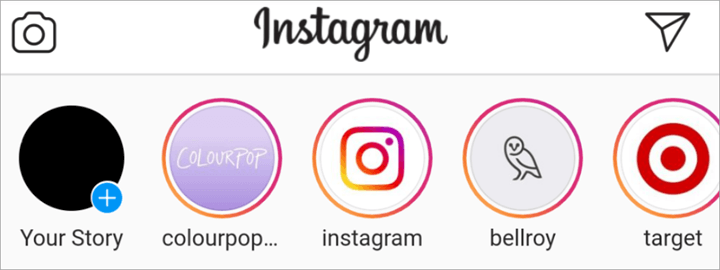
[image source]
This repost could be anything. It could be a reel that’s trending and red-hot right now or a simple post from your buddy on the platform.
Consider this article as your guide on how to repost a story on Instagram. I’ll also be touching on issues you might face while reposting and how to get the most out of your reposts.
So, without much further ado, let’s begin.
Recommended Reading => How to Post on Instagram From Your PC – Beginner’s Guide
Legal and Ethical Implications of Reposting on Instagram
Many people are apprehensive about sharing somebody else’s story or any form of content on Instagram. While you shouldn’t have any issues reposting, whether that would be legally or ethically acceptable is a completely different story. Instagram’s guidelines clearly state that you should only post content that you own or have the right to share.
If you wish to post someone else’s story, I suggest you ask for their permission. You can tag the original creator in the report to ensure they are getting their due credit.
You can reach out to the creator via direct messages. Try to be persuasive without being pushy. Start by greeting them, express how much you liked their story, and your desire to re-publish it. If the permission is denied, move on.
With that out of the way, let’s now dive into the meat of this article.
Step-By-Step Guide to Repost on Instagram
Before I begin, please note that only people who’ve been tagged in an Insta-story will be able to share it. If you are unable to share a story, it’s because you haven’t been tagged in it. You will receive a notification of the story tag via your DMs.
If you’ve been tagged, follow the below steps:
#1) Go to your DM and select the message, which contains the tagged story.

#2) Tap on the “Add post to your story” option
#3) You will now enter the story editing screen.
#4) You can personalize the story here by adding GIFs, text, stickers, emojis, etc.
#5) Once you are satisfied with the customization, simply tap on the “Your Story” button.
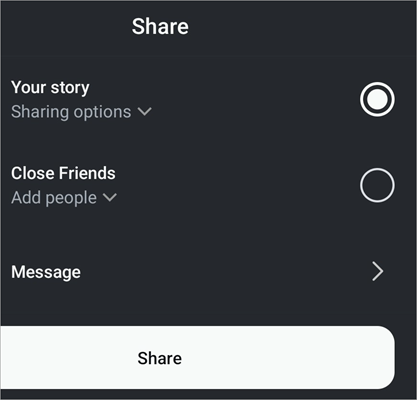
This story has now successfully been reposted as your own.
If you cannot share the story even after being tagged in it, this would mean that the Instagram user has kept their stories private. Many users on the platform do so to ensure their stories belong to their accounts alone and nowhere else.
Just remember that the story will only last for 24 hours since it was posted. You’ll need to hurry if you wish to repost and yield some engagement out of it.
Also Read => Free Instagram Scheduler To Schedule Instagram Post
How to Repost a Story That You are Not Tagged in
If you’ve found a story that you desperately wish to repost but haven’t been tagged in, there are certain measures you can take. These measures are:
#1) Screen Recording or Screenshots
This is by far the easiest thing you can do to repost a story that you haven’t been tagged in. Take a screenshot or record the screen, save it on your phone or desktop, and then re-upload it to your Instagram.
Before you do this, however, I would again remind you to seek permission from the Instagram user to whom the story belongs. Also, make sure you are giving the original creator their due credit in the repost.
#2) Using Special Apps

There are a plethora of apps on both Google and Apple stores that can help you repost an Instagram story. Some examples of such apps include “Story Reposter”, “Repost” or the iPhone exclusive “Regram”.

You can download these apps on your phone, give them the permissions they seek, and follow the instructions. Reposting on these apps is simple and is usually done within 2-3 simple steps.
How to Repost a Post on Instagram Story
Unlike “Story”, reposting somebody else’s post is extremely simple. It doesn’t matter if you’ve been tagged into those posts or not, you can still share it as your own story in a couple of simple steps. So here’s how to repost a feed post on your Instagram story.
#1) Go to the post on Instagram you wish to share as your “Story”.
#2) Find the share button at the bottom of the post. It will be in the shape of an arrow.

#3) Hitting on this arrow will lead to a small menu popping up. Choose “Add to Story”

#4) Edit the story, resize, add stickers, GIFs, etc.
#5) Once you are satisfied, hit “Share”.
When you share a post as your story, the username to whom the post belonged automatically shows up in your story. I suggest you do not edit this username out and let them have the credit.
Remember, this will only work on posts that have been made public or accounts that aren’t private.
How to Repost an Instagram Post to Your Feed
Instagram doesn’t allow you to repost an Instagram post directly to your feed. That said, you can still repost a post you like by snapping a screenshot of it. This is how you do it:
- Open the post you wish to repost.
- Take a screenshot of that post.
- Now resize the screenshot, crop out any unwanted details, and let the focus be on the post alone.
- Upload the screenshot to your Instagram by tapping on the “plus” icon at the bottom of your profile page.
- Add a caption and publish the post.
If the post isn’t yours, credit the original creator when reposting.
Further Reading => Guide to Instagram Story Sizes & Dimensions
How to Repost a Comment on Instagram Story
Besides a reel or a post on your feed, Instagram now allows its users to repost a comment on their Story as well. This comment could be one published by you or your followers. If you find the comment interesting, you now have the privilege to repost it to your story. This is how you do it:
- Find the comment you wish to share.
- Swipe left on the comment (if you are using an iPhone) or tap and hold the comment (if you are using an Android device).
- Tap “Add to Story+”.
- Your reposted comment will now appear as a sticker on top of your published Story Reel or post.
- You can further customize the sticker comment by resizing it. I suggest adding filters, text, and other effects to make your Story pop before you share it.
- If satisfied, tap the “Your Story” button to share with your followers.
You’ll be able to share any comment published on a public post or reel to your story using the above simple steps. The feature is quite similar to the one you’ll find on YouTube Shorts or TikTok and could help you boost engagement.
How to Repost a Comment on Instagram Feed
Let’s say you’ve posted a comment on an Instagram post and are having second thoughts about it. Edit and repost the comment. Unfortunately, Instagram does not allow you to edit an already published comment. If you wish to repost a comment, you’ll need to first delete the original version and type in a new one to replace it.
To delete a comment, you simply have to hold the comment you’ve published and then select “Delete” from the prompted options. Once your original comment has been deleted, compose a new one and post it.
Pro Tip on Maximizing Engagement on Instagram Story

You now know how to repost a post or Instagram story. However, it won’t do you any good if you cannot capitalize on them.
Here are some tips I suggest you employ to boost engagement on your “Story”.
#1) Using Hashtags: Hashtags have proven effective in garnering engagement on social media and have the same effect on Instagram as well. I would suggest using text with targeted hashtags in your Story. Alternatively, you can make use of the hashtag stickers Instagram provides.
#2) Using Stickers: There are a plethora of stickers on Instagram that trigger action. I suggest you use a sticker that’s appropriate to the “Story” you’ve posted to farm engagement.
#3) Using GIFs: It is estimated that a GIF or animation of any kind can get you considerably more engagement than any traditional tactic ever could. There are a ton of GIFs on Instagram that you can post alongside your Story to get it more eyeballs.
#4) Using Music: This is one of my favorite features on Instagram. You can add beats of music from almost any song to your Story to make it considerably more interesting. Go with music that gels well with the vibe of your Story.
#5) Using Text: Sometimes a simple text is all a Story needs to intrigue and engage its audience. Just modify this text with the right font and color in a bid to make it more presentable.
Using one or a combination of all these elements can do a lot to make your Story post attractive. Just make sure you aren’t over-personalizing the Story. Make sure it complements the nature and theme of your Story perfectly and you will see the engagement on your account skyrocket.
Recommended Reading => Know the BEST Time to Post on Instagram and Get More Likes
Immense Benefits of Reposting a Story
As I mentioned before, fostering engagement for your Instagram account is a crucial benefit of reposting a story. However, that isn’t the only benefit you stand to reap by doing so. Here are all the other advantages you can expect from simply reposting an Instagram story.
#1) Promoting Collaborations
Collaborations and partnerships play an instrumental role in the growth of an Instagram account. When you share someone else’s post, you essentially give that account the boost they need. They might return this favor by sharing your posts and giving your account the exposure it needs.
This way, reposting a story helps in building and nurturing relationships on the platform that can be lucrative.
#2) Content Diversification
There is a limit to how much original content one can pump out. People can also get tired of consuming the same content from your profile. Reposting somebody else’s story allows you to spice things up a little bit.
They let you diversify your content by serving something that your audience isn’t used to. As such, reposting is a useful tactic that you can employ to maintain the interest of your audience every once in a while.
#3) Boosting Company Goodwill
If you own a business account on Instagram, it will do you good to often share stories or posts of customers using your products and sharing their opinions on them. This user-generated content can prove effective in building trust among your audience and strengthening the image of your brand.
#4) Leveraging User Interactions
Reposting user-generated content can also lead to a snowball effect that encourages more and more folks to create stories that feature them using the products made by your brand. The idea of being featured on your official page’s Story is enticing enough of a prospect for many followers to pursue.
This can result in your brand’s visibility boosting significantly and also promote stronger brand loyalty among your customers.
Frequently Asked Questions
1. Why can’t I repost an Instagram Story?
There are many reasons why one wouldn’t be able to repost an Instagram story. You won’t be able to share a story that you haven’t tagged in. If you have been tagged and still find it impossible to repost the story, that could be because the original account has restricted the sharing of their content.
2. How to repost an Instagram story again?
After being posted, stories only remain available for about 24 hours. If you wish to repose the story again, you can do so by following the below steps.
Select the three lines at the top of your Instagram profile and select Archive.
In the Archive section, go to the Story Archive.
Select the Story you wish to repose and hit “Share”.
3. Can someone see if you repost their story?
If the account in question doesn’t have a business profile or access to analytics, they won’t know if their story was reposted. They can still know if somebody notified them of this or if they’ve been tagged. I suggest you tag the original Story owner or seek permission before you repost anybody’s story.
4. Can I see who has seen my reposted Instagram story?
Yes, it is possible to see who has seen your Instagram story. You’ll need to open your story and at the bottom, you’ll see an option that lets you check who has seen your story. Tap on it to see all the usernames that have already seen the story.
5. Can you see If someone screenshots your Instagram story?
No, you won’t be notified if someone takes a screenshot of your Instagram story. You’ll be notified if someone has seen your story.
Further Reading => List of the TOP Private Instagram Viewer
Conclusion
So there you have it, a complete guide on how you can repost a story or post as your own Instagram Story. You now know how to repost a story as well as how to repost an Instagram photo or video post as a story.
As you can see, the process is simple and quick. It is the easiest way to ensure your Instagram account is active to incite enough engagement. I suggest you partake in reposting to keep the content cycle on your account spinning.
Just ask for permission when you are posting somebody else’s story. With that taken care of, you can rely on this tactic to build your Instagram following effortlessly. Reposting could boost your Instagram account’s growth.
Was this helpful?
Recommended Reading
-

Get to know about The Perfect Instagram Story Sizes & Dimensions. Follow these tips, dos, and don'ts, and explore some of the most creative Instagram stories: Instagram is growing every day. It keeps adding new features and altering algorithms. Regular updates make it hard to stay ahead of its best…
-

Express the words in your heart with these Top captions for instagram for girls. Enhance and complement your photos with these unique Instagram Captions for Girls to reflect yourself perfectly: As far as social media is concerned, I doubt anyone would argue when I say that Instagram has never been…
-
List of the Best Free Instagram Scheduler To Schedule Instagram Posts And Hashtag Suggestions: What is Instagram Scheduler? The Instagram Scheduler is an application that will allow you to schedule the posts and will automatically post the content. It will provide hashtag suggestions and analytics. These tools are used as an…
-
Review of the best Private Instagram Viewer to View Account and profiles. A private Instagram account viewer tool will allow you to view private profiles on Instagram easily. The Instagram private profile viewer will be invaluable to parents as they make sure their children don’t indulge in dangerous activities to…
-
Are you looking for any compelling caption descriptions that can go along with your post? Here you will find 300+ BEST Instagram Captions to draw attention to: They say a picture is worth a thousand words and I couldn’t agree more. This is perhaps why Instagram has emerged as one…
-
Review and comparison of the the top Instagram Story Viewers with features and pricing to help you select the best Instagram Viewer: Launched exactly a decade ago, Instagram quickly became a new favorite online hangout spot for people across the globe. The online photo and video sharing platform has only…
-

Ever wondered, “How to Hide Followers on Instagram?” If yes, you’re not alone. Explore the settings on Instagram for hiding followers and protect your privacy without quitting social media: The Statista report shows that there were around 62.6% (5.07 billion) of social media users worldwide as of April 2024, and…
-
Want to make a great first impression on Instagram? Learn how to make your own Custom Instagram Highlight Covers free through PicMonkey and Canva: Well, you might have to up your game when it comes to your account’s highlight covers. Instagram Highlight Covers, also known as story covers, refer to…