Evaluate and compare the Top Neural Network Tools with Pros & Cons. Pick the best Neural Network Software of your choice to simplify your decision-making process:
A neural network comprises software and hardware processing elements (neurons). These elements interconnect with each other and possess a high level of simplicity. For implementing the functionalities of a human brain, the neural network designs a process leveraging deep learning technologies.
For solving complex pattern recognition, signal processing, weather prediction, facial recognition, speech-to-text transcription, handwriting recognition, or data analysis, neural networks have a wide number of applications.
Artificial Neural Network Software: Top-Rated

Based on region, industry vertical, and component, the neural network market is segmented. With the advancement of artificial intelligence and cloud disruption, the growth of the neural network market has been boosted.

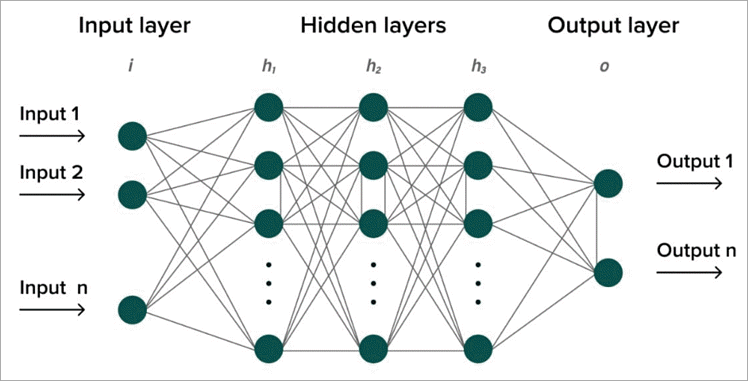
[image source]
Due to the impact of Covid-19, many IT companies are doing work from home. With the rapid increase of this culture, the demand for cloud-based solutions, analytical tools, and neural networks has increased.
The demand for managing large volumes of data generated by distinct industries has dynamically raised after the post-pandemic.
This article is written for the researchers, developers, testers, and project managers who are working on neural network projects. People who are interested in learning about distinct neural networks available in the market can learn the advantages and disadvantages of using neural networks.
It is highly useful for cybersecurity persons, as it tells the features, pros, and cons of every neural network. Even small, medium, and large size organizations, will get to know about neural network safety, security, and how to protect the data from unknown users or hackers.
What is a Neural Network
Neural network is a part of artificial intelligence that allows computers to process data in a certain way. It is a type of process in which neurons are connected in a layered structure. Leveraging algorithms, the correlation between data and hidden patterns can be recognized. The data can be classified and clustered for learning and analytics purposes.
There are three different artificial neural networks:
- Artificial Neural Network: Artificial neural networks are algorithms for forecasting issues and understanding complicated patterns.
- Convolution Neural Network: It is a type of deep learning neural network. Commonly it is used in computer vision. The architectures are considering using convolution neural networks for identifying and recognizing objects.
- Recurrent Neural Network: It is commonly used in speech recognition and natural language processing. Using patterns and data sequential characteristics, the next scenario can be predicted.
What is Artificial Neural Network Software?
Artificial neural network software is a model based on neural networks. It works in the same way as the human brain does to react and adapt the information. The decisions are made, based on the information. The artificial neural network requires a bulk quantity of data for learning. Leveraging more data, more connections can be made in the neural network.
Why use Neural Network Software?
For understanding non-linear and complex relationships, neural networks provide assistance to make intelligent decisions. Using limited assistance, the models can be trained to predict accurate data. The ability to store information on a network with the least chance of any fault is the most important capability of a neural network.
How much does Neural Network Tool cost?
Neural networks are expensive when compared to traditional algorithms. Depending upon the number of resources used in training or interference, the cost does vary. The involvement of convolutions and transformations makes it costly due to multiple operations.
Risks with Neural Network Software Tools
Compared to traditional algorithms, neural networks require a lot of data for learning and training. Training of neural networks can take upto several weeks or months and it is more expensive than the algorithms. It takes a lot of time for the engineers, to develop the neural network. Engineers can develop the neural network in a simple, easy, and fast way using algorithms.
List of the Best Neural Network Software
Enlisted below are the popular neural network tools:
- Neural Designer
- Viso Suite
- Darknet
- Keras
- TFLearn
- Caffe
- H2O.ai
- Microsoft Cognitive Toolkit
- Gensim
- Torch
- Nvidia Digits
Comparison of the Top Deep Learning Software
| Tools | Best For | Features | Price |
|---|---|---|---|
| Neural Designer | For building predictive models | Customizable Reports, Charting, Data Import / Export, Data Mapping, Data Discovery, Data Capture and Transfer | 2495 USD dollars per user per year |
| Viso Suite | Fortune 500 and government organisations | Event Monitoring, BI dashboard builder, Real-time analytics | On a monthly subscription, the Viso Suite can be access |
| Darknet | Small and medium enterprises | DarkGo, Nightmare, ImageNet Classification, Tiny Darknet, Real Time Object Detection | On the basis of subscription the pricing is decided. |
| Keras | For researchers and e-commerce businesses | Highly flexible, fast computations and APIs designed for humans | -- |
| TFLearn | For the financial companies | Visualisation, Fast prototyping | Subscription based pricing model. |
| Caffe | Deep learning framework for speed | Flexible Platform, Extensible Code, Distinct Architecture | The free version of Caffe is available at free cost. |
| H2O.ai | For building artificial intelligence applications and models | Automatic Label Assignment, feature encoding, model validation, model ensembling | With a subscription ranging from USD dollars 3,00,000 for 3 years to USD dollars 5,00,000 for 8 years |
| Microsoft Cognitive Toolkit | For building commercial applications | Evaluation of models, User Defined Core Components, Full APIs | Depending upon the features, the pricing does vary. |
| Gensim | Natural language processing tasks | Independent Platform, Superfast, Ready to use models and corpora | Standard, Professional and Enterprise are three pricing categories. |
| Torch | For research and prototyping | Efficient, Flexible and Versatile Platform | On the basis of the subscription model, the pricing is decided. |
| Nvidia Digits | For healthcare, robotics, financial, telecommunication and public sector | Unified Platform for Deployment and Development, Accelerated AI Framework | For the members of the Nvidia Digits program, it can be downloaded for free. |
Detailed reviews:
#1) Neural Designer
Best for powerful machine learning technique for discovering relationships, and recognizing patterns.

Neural designer networks are one of the most powerful machine learning techniques. This is a very good tool to develop and deploy machine learning models. Without any extensive programming knowledge, it can build, train, and evaluate neural networks.
For predicting trends, recognizing patterns, and discovering relationships, Neural Designer is a user-friendly application. AI-powered applications can be developed without coding or building block diagrams with its assistance.
Only English and Japanese language are supportable on the Neural Designer application. Only the web platform is supportable by the Neural Designer.
Quick guide on how to use Neural Designer tool:
- Function Regression: With the help of the data set, the function regression problem can be solved. For detecting outliers, spurious data distinct utilities of neural networks are used.
- Pattern Recognition: For the attributes, the correct class must be predicted. As per the data, classification needs to be done to create a model.
- Time-series Prediction: Based on the historical time-stamped data, scientific predictions can be made.
Features:
- Text Classification: As per the patterns of data, the classification can be done as per categories.
- Classification: The dataset can be classified as per the categories.
- Forecasting: Predictions can be made for the future by analyzing the data.
- Approximation: As per the inputs, the AI models give the output.
Pros:
- Number of tutorials are available on YouTube for learning every part of analytics.
- For handling big data, a Neural Designer application is the best one.
- The speed of the Neural Designer application is perfect and robust.
- The UI is straightforward and it is easy to use.
Cons:
- The Neural Designer application is not cloud-integrated. Cloud platforms do not support its usage.
- A single license can be used for a single device. The license can’t be made to float on other devices.
Why did I choose this tool?
It is one of the fastest Machine Learning platforms. Without leveraging the code or building block diagrams, it allows you to build AI-powered applications. By effectively using the resources, data can be easily analyzed.
Through Neural Designer, the performance can be optimized, innovation can be driven and churns can be prevented.
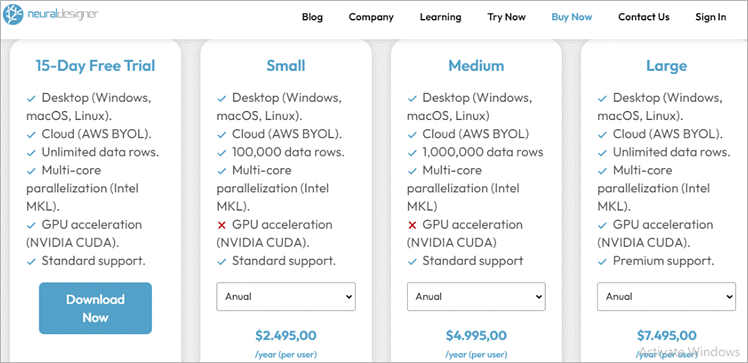
Free Trial: The free trial is offered for the customers. There are three pricing tiers available for the users i.e. small, medium, and pay-per-use. Each trial includes a different capacity and performance.
Ratings: IT employees give 4.9 out of 5 for leveraging the tool.
Price:
- An annual price of 2495 USD is charged yearly.
- Neural Designer offers small, medium, and large-sized packages. All the packages have different costs and features. As per the suitability, the user can choose any plan.
#2) Viso Suite
Best for computer vision platform for delivering applications without any code.
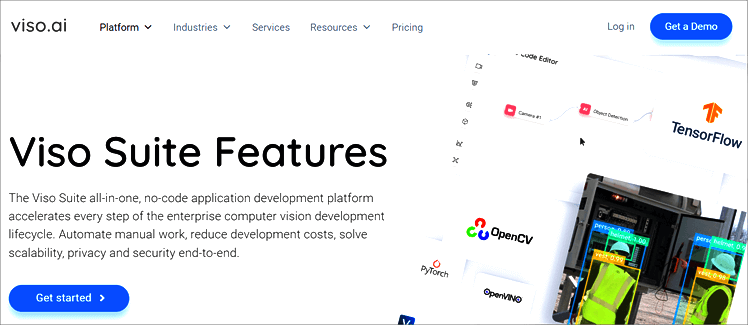
It is an end-to-end computer vision application platform for building, deploying, scaling, and operating real-world artificial intelligence vision applications. Viso Suite enables real-time object detection, behavior analysis, object tracking, animal recognition, and people detection.
For the visual inspection and analysis of the quality of an object also Viso Suite can be used. Visio Suite enables the automation of workload, increases scalability, and provides full security from end to end.
Quick guide on how to use the Viso Suite tool:
- Build: The software modules can be dragged and dropped into a computer vision workflow.
- Deploy: With the computer vision hardware, Viso Suite integrates seamlessly. The workflows can be easily enrolled and deployed to edge devices.
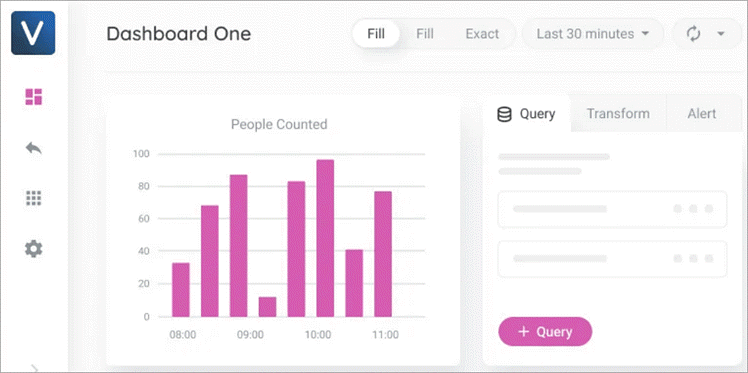
- Monitor: You can gather insights from real-time metrics and dashboards to make decisions.
- Manage: The users, locations, devices, security, access, and data can be easily added or removed from one place.
- Browse: Leveraging the Viso marketplace, the platform capabilities can be expanded using prebuilt extensions.
Features:
- Event Monitoring: For identifying events across data, drill-down filters can be used. On all devices, the data can be aggregated.
- BI Dashboard Builder: Leveraging 40 + ready-made charts, a customized BI dashboard can be created.
- Real-time Analytics: From your applications, real-time metrics and historical data can be visualized.
Pros:
- Passwords and sessions can be controlled through security policies.
- Using high-security algorithms, data throughout the lifecycle can be protected.
- With multi-layered authentication and authorization, the computer vision systems can be protected.
- For whitelisting and auto wiping, the Edge Defender can fully lock down edge devices.
Cons:
- The licensing cost of tools is highly expensive.
- New development is very slow as Viso follows convolutional methods.
- Difficult to understand the complexity of systems.
Why did we select this tool?
For the fast delivery of computer vision applications, through an integrated set of tools, the Viso suite is used. Without downloading or installing any software, the cloud workspace provides everything in one unified solution. For saving time and cost, Viso.ai is most preferred by customers. It gives the users access to scale the infrastructure without using any code.
Price: Viso offers flexible solutions that match the requirements of every organization.
- Viso Suite Standard: In this package complete building solutions, deploying and operating computer vision applications are provided to the users.
- Viso Suite Production: In this package, advanced solutions for scaling and securing multiple computer vision applications are provided.
- Viso Suite Enterprise: In this package, all the needs of enterprise computer vision are taken care of.
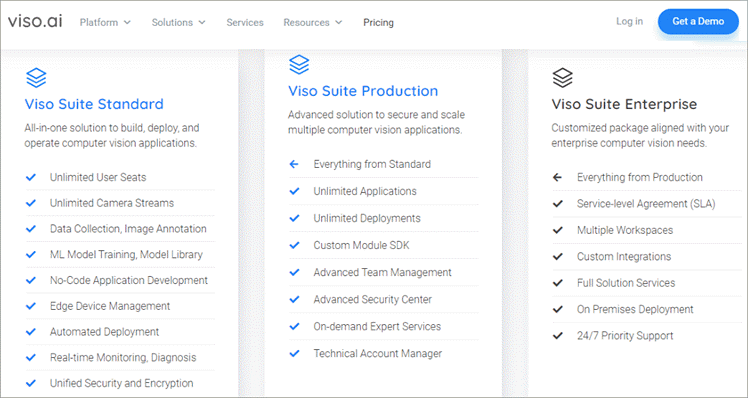
Ratings: 4.6 out of 5 rating is given by the users.
#3) Darknet
Best for high-performance open source framework for implementing neural networks.

Leveraging Darknet, real-time object detection and image classification can be done. For illegal activities such as weapon sales, hacking, and drug trafficking it is often used. Written in C and Cuda, it is an open-source neural network framework. Supporting CPU and GPU computation it is fast and hassle-free to install.
Darknet is a network of encrypted and private websites that requires special software and configuration to access. Recent examples of Darknet are Dream Market, AlphaBay, and Silk Road.
The law enforcement agencies shut all of them down because of illegal goods and services selling. It includes drugs, hacking tools, counterfeit documents, etc.
Quick guide on how to use the Darknet tool:
- Installation: First, Darknet needs to be installed. It supports both GPU and CPU computation.
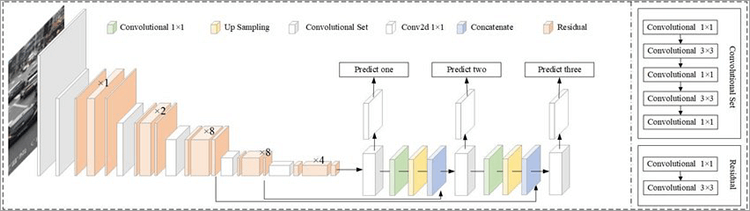
- Real-time Object Detection: With the state-of-the-art YOLO, real-time objects can be detected.
- ImageNet Classification: With the popular models of ResNET and ResNeXt, the images can be classified.
[image source]
Features:
- Secured Communication: The darknet sites are encrypted. The users keep all the communication between them private. Neither of the third parties can intercept the information.
- Anonymity: The users can transact and communicate with each other by becoming anonymous. By maintaining privacy, the users can avoid getting tracked through law enforcement agencies and entities.
- Freedom of Speech: For free speech, the darknet platform can be used. For expressing ideas and opinions without any fear of censorship or retribution it can be used by users.
Pros:
- The darknet makes all the sensitive information that is not censored on the regular internet available.
- The access is given to custom roles and limited content as per the security compliance.
Cons:
- Lack of regulation and oversight leads to leakage of personal information and cryptocurrency while doing transactions.
- Users face vulnerability to hacking and phishing attacks due to the inadequate security and monitoring of the sites.
- Darknet sites’ association with illegal activities leads to attracting criminals, which often may turn into a serious risk to the users.
Why did we choose this tool?
Mainly for object detection, the darknet neural network is used. Apart from other neural networks, it is faster and highly accurate. Darknet supports both CPU and GPU computation. Installing it is very easy, and it is written in C and CUDA, making it an open-source neural network framework. Darknet can handle the models that represent data changes frequently over time.
Price: Subscription-based pricing on a monthly and yearly basis.
Ratings: 4.8 rating out of 5 is given by small and medium-sized enterprises.
#4) Keras
Best for neural network application programming interface for Python integrated with TensorFlow.
For reducing cognitive loads, Keras is an API designed for human beings. Leveraging simple and consistent APIs, the number of user actions can be reduced. Using Keras, users can see clear and actionable error messages. Keras focuses on the entire machine learning workflow, including data management, hyperparameter training, and solution deployment.
The Keras models are easy to deploy on every surface, i.e. browser, embedded, mobile, or server. Even though the Kera models run faster due to Autograph optimization and XLA compilation. With a smaller codebase, easy to iterate, and in a more readable format, Keras gives super power to developers for shipping machine learning applications.
Features:
- Highly Flexible: By integrating with low-level deep learning languages such as TensorFlow and Theano, Keras provides high flexibility to the developers.
- API Designed for Humans: Leveraging simple APIs, the cognitive loads can be decreased and consistency of models can be maintained.
- Fast Computations: As it is an open-source deep learning library, it is equipped with single or multiple GPUs for fast computations.
Pros:
- For facilitating faster experimentation, it is user-friendly, extensible, and modular.
- It supports convolutional and recurrent networks and a combination of both.
- It is a multi-platform with a multi-backend that assists all encoders to do coding altogether.
Cons:
- With low-level APIs, it gives backend errors continuously. Sometimes, it is very difficult to debug as finding error logs is very difficult.
- The data pre-processing tools need improvement in the features.
- Dynamic charts cannot be created using Keras.
Why did we shortlist this tool?
Keras is a deep-learning API, written in Python. To give the user a faster experience, it was designed. With the features of extensibility, modularity, and nativeness, Python nativeness is very easy to use.
Leveraging simple and consistent APIs, the number of user actions for common use cases can be minimized. Upon every user error, clear and actionable feedback is provided by the Keras tool.
Ratings: 4.6 rating out of 5 is given by the scientists, data analysts, researchers, and software developers.
Price: Based on monthly and yearly subscriptions, the pricing is decided.
#5) TFLearn
Best for easy-to-use and high-level understanding API for implementing a deep neural network

TFLearn is a transparent and modular deep-learning library. Most of the deep learning models, such as Residual networks, Generative networks, BatchNorm, LSTM, BiRNN, PReLU, and Convolutions are supported by high-level API.
With less amount of coding and built-in functions, through Tflearn the tasks can be easily done. The other architectures of neural networks such as CNN, LSTM, etc are also supportable by Tflearn. For building fast deep learning models, it is one of the best rapid prototyping tools.
The Google team handled the entire matrix operations and normal GPU/CPU operations are also supportable.
Features:
- Visualization: Tflearn provides beautiful graph visualization that depicts names, weights, gradients, activations, and many more things. The TensorFlow graphs can be trained with the help of multiple inputs, outputs, optimizers, and powerful helper functions.
- Fast Prototyping: Leveraging highly modular built-in like neural network layers, optimizers, regularizers, and metrics fast prototyping can be done.
- High-Level APIs: Easy-to-use and highly understandable APIs are used. Through the tutorials and examples, it is very easy to understand how the APIs work.
Pros:
- Visualization is good and syntax is easy to use.
- As compared to other deep learning tools, it is easy to understand.
- Most of the deep learning models are supported by TFLearn
- Simpler process to do abstraction and all the solutions are easily provided
Cons:
- Have limited functionalities and it is not very powerful.
- Integrations with third-party applications is difficult.
- Does not provide support for Windows. The speed and usage are less as compared to its competitors.
Why did we choose this tool?
With the help of pre-defined layers and functions, building and training neural networks can be simplified. For the developers, it is very easy to create and experiment with distinct neural network architectures. The code written in TFLearn can be switched to Tensorflow code at any point in time. Effective graph visualization using the TFLearn tool.
Price: Subscription-based pricing model.
Ratings: 4 out of 5 rating is given by financial institutions.
#6) Caffe
Best for Deep learning framework composed with speed, modularity, and expression.
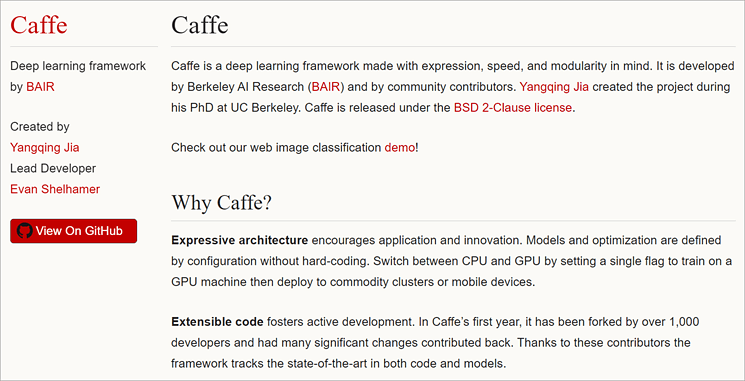
Having expressive architecture, extensible code, large community support, and speed, Caffe provides innovation. For the industry deployment and research experiments, Caffe gives a good speed. Having a processing speed of 60M images per day, Caffe provides the fastest convnet implementations.
Without doing any hard coding, the models and optimization can be configured. Through a single flag to train, switching between CPU and GPU can be done. It is one of the earliest deep-learning frameworks for classification, image recognition, and vision.
Features:
- Flexible Platform: For building, training, and deploying deep neural networks, Caffe provides an efficient and flexible platform.
- Extensible Code: A lot of contribution is given by the developers. Due to the huge contribution, state-of-the-art in both code and models can be achieved.
- Distinct Architecture: Caffe supports distinct types of deep learning architectures for image classification and segmentation. It supports CNN, RCNN, LSTM, and fully-connected neural network designs.
Pros:
- For the traditional images, it is one of the best CNN.
- Lots of inbuilt code helps in classifying and does not require much code to write.
- Leveraging component modularity the new models can be expanded very easily.
Cons:
- The deployment for production is not an easy process.
- Apart from vision and imagination, Caffe also supports neural network architecture. It leads to a variety of complications.
- Maintaining large and static configuration files with several parameters is a difficult task.
Why did we select this tool?
For building, training, and deploying neural networks, Caffe provides an efficient and flexible platform. It is one of the fastest convolutional networks. Over 60 million images per day can be processed through NVIDIA K40 GPU. For research experiments and deployment, it is one of the most preferred tool.
Price: The free version of Caffe is available at free cost.
Ratings: 4 out of 5 rating is given by a consumer using Caffe.
#7) H2O.ai
Best for preserving data ownership and owning large language models, H2O.ai offers open-source generative AI.
For the video, text, and image, build no-code deep learning models using H2O.ai. The insights can be extracted from a large volume of unstructured data. Automating the labeling process of data leveraging H2O.ai. Among all the ML models, H2O provides the highest accuracy. For building end-to-end auto pipelines H2O is used in machine learning models.
Leveraging advanced auto ML capabilities, the workflow can be optimized. It overall increases the quality and quantity of data delivered to the business stakeholders. With these robust features, faster adaptations, higher accuracy, and increased transparency are achievable.
Features:
- Automatic Label Assignment: For every scored record, through automatic labeling, the class is predicted.
- Feature Encoding: Leveraging machine learning algorithms, all types of data (image, time/date, numeric, categorical, text) can be converted into a single dataset.
- Model Validation: By performing various degradation tests, the weaknesses and vulnerabilities in the dataset and models can be done.
- Model Ensembling: For increasing accuracy and ROI, fully automatic and customizable ensembling at multiple levels is done.
Pros:
- Big Data supports H2O.ai
- Excellent analytical and prediction tool.
- It supports JAVA as well as Python language.
- Already available algorithms can be leveraged in analytical projects.
Cons:
- Containerization facilities like Docker should be given.
- The visual presentations can be improved.
- More state-of-the-art algorithms can be added.
Why did we choose this tool?
The time-consuming tasks of data science such as hyperparameter tuning, model stacking, and model selection can be automated using H2O.ai. The most widely used machine learning algorithms and statistics including generalized linear models, deep learning, and gradient-boosted machines are supportable by H2O.
Price: With a subscription ranging from USD dollars 3,00,000 for 3 years to USD dollars 5,00,000 for 8 years
Ratings: 3.4 out of 5 rating is given by users on the Glassdoor platform.
#8) Microsoft Cognitive Toolkit
Best for free, easy-to-use, open-source, and commercial-grade toolkit.
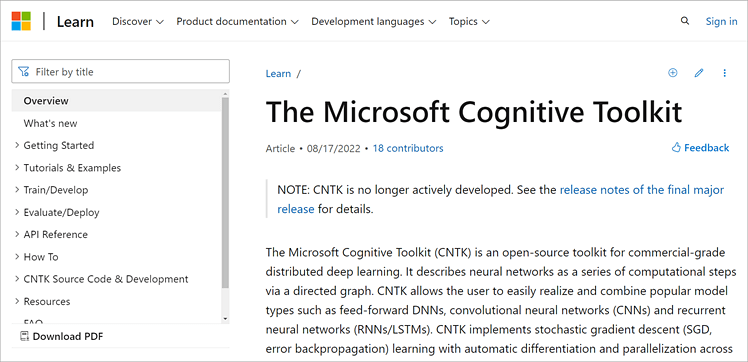
Leveraging the Cognitive toolkit, the most popular models can be combined and realized, i.e. feed-forward DNNs, recurrent neural networks, and convolutional neural networks. It is an open-source toolkit for commercial-grade distributed deep learning.
With the help of a graph, CNTK describes neural networks as a series of computational steps.
Both 64-bit Linux and Windows operating systems are supportable by CNTK. Implementing stochastic gradient descent (SGD), parallelization across multiple GPUs and servers, and learning with automatic differentiation can be easily done with the help of CNTK. CNTK can be included as a library in the C, C++, and Python programming languages.
Features:
- Evaluation of models: Using CNTK the models can be evaluated with the Python, C, C++, or Brainscript programming languages.
- Full APIs: CNTK provides both low and high-level APIs for defining their network. Readers and learners can use the network for training and evaluating the models.
- User-Defined Core Component: The new user-defined core component can be added to the GPU from Python.
Pros:
- With the help of components, the performance of a build neural network can be measured.
- For monitoring the training process, logs are generated from the model and associated optimizer.
- The ONNX format allows for exporting models larger than 2GB. Full support is provided for ONNX 1.4.1.
Cons:
- A smaller community of developers is working on it.
- The models are very difficult to deploy on other platforms and portability is also not so easy.
Why did we select this tool?
With the help of Python, C, C++, or BrainScript, the models can be easily evaluated. CNTK has a fully optimized symbolic Recurrent Neural Network. Scaling can be easily done over thousands of GPUs. Having a .NET, C, and Java inference, it is very easy to integrate with user applications.
Ratings: 4.2 rating out of 5 is given by the users on the G2 platform.
Price: Depending upon the features, the pricing does vary.
#9) Gensim
Best for training large-scale NLP models.

Gensim is the best Python library. For topic modeling, retrieval by similarity, document indexing, and other natural language processing functionalities, it is the best modeling open-source library. Being one of the most mature ML libraries, every week there are more than 1M downloads.
On all the platforms supporting NumPy and Python, Gensim runs. The Gensim source code is hosted under the GNU LGPL license. Leveraging incremental online algorithms and data streaming, large text collections can be handled.
For building documents and word vectors, Gensim provides top academic models and modern statistical machine learning to execute the tasks. Gensim offers an intuitive interface that is easy to plugin with its own input corpus or data stream.
Features:
- Independent Platform: All the supporting platforms like Linux, Windows, OS X. NumPy, and Python languages are supportable on these platforms.
- Superfast: Highly optimized, parallelized, and battle-hardened C routines are used.
- Ready-to-use Models and Corpora: For specific domains like health and legal, the Gensim community publishes pre-trained models.
Pros:
- Large-scale NLP models can be trained using Gensim.
- Quick installation can be done.
- Large text files can be loaded without loading the entire file into memory.
- For text processing, Gensim offers good packages and ease of convenience.
Cons:
- It is designed for unsupervised text modeling.
- It can’t be integrated with other libraries like Spacy and NLTK.
Why did we choose this tool?
For handling large amounts of documents and for extracting semantic topics from the documents, it is the best machine learning software tool. Gensim also offers efficient multicore implementations for increasing the processing speed.
Ratings: 4.4 rating out of 5 is given by users on StackShare.
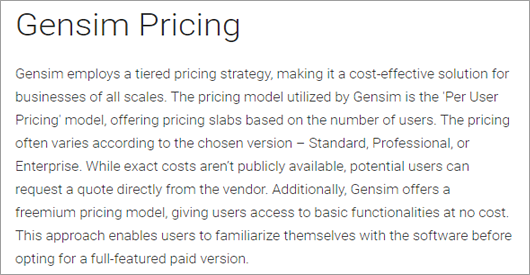
Price: Standard, Professional, and Enterprise are three pricing categories Gensim offers.
#10) Torch
Best for open-source deep learning framework developed and maintained by Facebook.
It is a powerful n-dimensional array having numeric optimization routines for slicing, transposing, and indexing. To provide maximum flexibility and speed in building scientific algorithms, Torch provides a very simple process.
Torch provides popular neural network and optimization libraries for implementing complex neural network topologies. Users can create arbitrary graphs of neural networks and efficiently parallelize them over CPU and GPU. It can be embedded with iOS and Android backends. Leveraging LuaJIT scripting language, it is easy and efficient to use.
Features:
- Efficient: By automating deep learning algorithms and neural networks, end-to-end processes can be made efficient.
- Versatile Platform: Leveraging compatible scripts such as C, Torch provides solutions for domains spanning across the medical field to automate processes.
- Flexibility: With the ease of flexibility, rapid prototyping of components and faster research can be done. By leveraging pre-trained models and image augmentation tools, developers can make neural network development faster.
Pros:
- It is an efficient and effective open-source framework for deep learning models.
- Torch provides an abundance of packages for machine learning, audio, video, signal, and parallel processing.
- Users can easily make dynamic prints with a suitable interface.
Cons:
- Lack of compatibility with other libraries like Scikit-Learn.
- Dependency on the LuaJIT environment makes it difficult to use for large-scale production.
- Difficult to learn a new programming language.
Why did we select this Neural Network Software?
For building deep learning models, PyTorch offers a powerful Python library. For defining and training a neural network, PyTorch provides everything. It also supports dynamic computational graphs.
Ratings: 4.2 out of 5 rating is given by the users on the TrustRadius platform.
Price: Based on the subscription model, pricing is decided.
Free Trial: The free trial is not available for the users.
#11) Nvidia Digits
Best for web application for training deep learning models.

Leveraging Nvidia Digits, common deep learning tasks such as defining networks, training several models, managing data, and monitoring training performance in real-time can be done. Nvidia Digits is completely interactive. Therefore, the user can focus on training and designing networks rather than on programming and debugging.
Features :
- Unified Platform for Development and Deployment: For image classification, segmentation, and object detection designing, training, and visualizing the neural network using Nvidia digits can be done.
- Accelerated AI – Framework: Deep-learning frameworks like PyTorch, TensorFlow, and JAX rely on deep learning SDK libraries for high performance of multi-GPU accelerated training.
- Scaling training jobs: Scheduling, managing, and monitoring the neural network training jobs can be done. In real-time, the accuracy and loss can be analyzed. Across multiple GPUs, scaling of training jobs can be automatically done.
Pros:
- Leveraging flexible architecture, the predictive accuracy can be increased.
- A wide variety of image formats and sources can be imported using the DIGITS plug-in
- Neural network training jobs can be scheduled, monitored, and managed. Across multiple GPUs, the training jobs can be automatically scaled.
Cons:
- A lot of optimization is required.
- Frequent updates are required.
- For starting, it needs some time and the pricing is costly too.
Why did we choose this tool?
Nvidia digits simplifies deep learning tasks like designing and training neural networks and managing data. Monitoring the performance in real-time using advanced visualizations and selecting the best performance model for deployment are some of the best features that the Nvidia digits neural network delivers.
Price: There are three types of versions available:
- Standard: The deployment is on-premises and it is good for individual persons.
- Enterprise: The deployment can be done on-premises and it is good for enterprises.
- Cloud: The deployment can be done on the cloud and it is good for teams.
Ratings: 4.5 rating is given by the users on Slashdot.
How We Have Selected These Tools?
The most important thing for testing the neural network is accuracy. For a given pair of inputs, the output predicted is correct or not needs to be tested. Apart from that, whether the neural network model is learning through the different aspects of data also needs to be verified.
There are different parameters for choosing the neural network software. For example, the type of data, the complexity of the task, availability of labelled data, the quantity of training data, transferring techniques, and security layers. After carefully reviewing all these factors, the one that best fits your requirements must be chosen.
Frequently Asked Questions
1. What is the biggest challenge in dealing with neural networks?
Large amounts of data and computational resources are one of the biggest challenges with neural networks. Through the data itself, the neural networks learn and adjust their parameters.
Most of the problems with the neural network models are whether the model is overfitted, underfitted, the type of algorithm, algorithm evaluation criteria, and learning complexity.
2. What is the major benefit of neural networks?
As the neural network is working on deep learning technology. It can do unsupervised learning. From the unseen data also, nonlinear and complex relationships can be understood by the models. The unorganized data can be processed, segregated, and categorized with the help of neural networks.
With the help of adaptive structure, the cognitive abilities of a machine can be developed as well as complex applications can also perform well.
3. What are the applications of Nvidia digits?
For developing integrated circuits used in personal computers and electronic game consoles, the Nvidia digits are used. For manufacturing high-end graphics processing units, it is one of the best manufacturers.
4. What is the major difference between Tensorflow and Caffe?
The interference of Caffe is of C++. Users need to perform the tasks manually such as configuration file creation. While on the other hand, TensorFlow is easy to deploy as users need to install python-pip manager.
5. What is the use of PyTorch in deep learning?
Based on the Torch library and Python programming language, PyTorch is an open-source machine learning framework. Written in Lua scripting language, for creating deep neural networks it is an open-source machine learning library. For deep learning research, it is one of the most preferred platforms.
Conclusion
Neural networks work with the same functionality as our brain does. It takes the input, processes the information, and delivers the output. Leveraging tools and applications, the neural networks can be trained to get accurate, reliable, and modifiable results.
In the fields of medicine, defense, agriculture, banking, finance, and security neural networks play a wide role.
Among all the neural network software shared, Neural Designer is the best one as it can analyze large sets of data. Apart from this, by leveraging high-performance computing techniques, the usage of memory can be optimized as well as GPU acceleration can also be done.
Was this helpful?
Recommended Reading
-

Read, review, and compare the best Network Segmentation Software to select the right one as per your requirement: Network segmentation is quickly emerging as the hottest trend when it comes to methods we can adopt today to keep our data, OS, and cloud environments secure. Network Segmentation is basically a…
-
Are you looking for a solution that can protect your network from threats and malicious activities? Just go through this article to explore Network Detection and Response (NDR) Vendors: With the increasing number of cyber crimes all over the globe and the emerging need for security platforms, Network Detection and…
-
Here you will find a complete review and comparison of top Network Management Software for network management, administration, and troubleshooting: In the world of LAN (Local Area Network), WAN (Wide Area Network), and WWW (World Wide Web), the biggest challenge for IT professionals or network administrators is keeping the network…
-
This tutorial explains the best Network Security Policy Management NSPM tools that will perfectly cater to your specific requirements: Network Security Policy Management tools are nothing short of a godsend for system administrators. These tools empower admins with the ability to enforce and manage device settings as well as configurations…
-
Are You Looking For The Right Network Security Software To Protect Your System And Network? Select the best tool based on this review, which includes the features, pricing, and comparison of the top network security tools. Network security monitoring software refers to the tools designed to ensure the protection, usability,…
-
Select the Best Network Traffic Analyzer based on this review of popular Network Analysis tools to analyze traffic at your home or business: Network Traffic Analyzer is an application to record and analyze the traffic on your network. It can break down the traffic by application, user, or IP address.…
-
Select the Network tools for your home or business based on this review of the Best Network Administrator Tools: Network administration is the process of tracking and monitoring all your network resources, like network switches, hubs, routers, servers, and many other network devices. We cannot underestimate the need for a…
-

Best Network Scanning Tools (Top Network and IP Scanner) For Top-Notch Network Security: The network is a vast term in the world of technology. The network is known as the backbone of the telecommunication system which is used to share data and resources using data links. The next term that…