


Learn how to integrate Amazon ECR with GitHub to automate the workflow of Docker images. This step-by-step tutorial will cover Docker image security and GitHub Actions integration for efficient container management:
With the integration of Amazon ECR and GitHub, you can automate the entire container life cycle, from building a Docker image to vulnerability scanning and pushing the image to Amazon ECR.
In this tutorial, you will learn how to set up GitHub Actions, securely store AWS credentials, and automate the build and deployment of Docker images with complete security checks. At the end of this tutorial, your GitHub repository will be integrated with AWS ECR.
This is the third part of our Amazon Elastic Container Registry (ECR) series.
If you want to check out the other parts, you can visit the links below.
Tutorial #1: Amazon Elastic Container Registry (Amazon ECR) Guide
Tutorial #2: Amazon ECR Public and Private Repositories
=> Check ALL Tutorials in Amazon ECR Series Here
Table of Contents:
Amazon ECR and GitHub Integration: Detailed Guide
In this part of the series, we will also explore integration with GitHub Actions to automate image build/pull/push operations using the workflow generated from Amazon Q. This GenAI-powered assistant provides fast responses to users’ queries.
What Is Amazon ECR and GitHub Integration?
Amazon ECR and GitHub integration refers to the use of GitHub Actions, a CI/CD solution that is native to GitHub, to automate the process of building, scanning, and pushing Docker container images from a GitHub repository to Amazon Elastic Container Registry, a fully managed container image registry within AWS.
This integration helps streamline the Continuous Integration/Delivery process, as container images are updated automatically in ECR whenever code is pushed to the GitHub repository.
Benefits of Integrating Amazon ECR with GitHub
Automation: It eliminates manual steps, and the outcome of every code push is a consistent and deployable container image.
Security: ECR provides secure and private repositories with fine-grained access control through AWS IAM, and with this integration, secure credentials management is also available on GitHub.
Efficiency: Images are made quickly available for deployment to container orchestration services such as Amazon ECS or Amazon EKS, with low latency through integration with AWS services.
Scalability: The solution takes advantage of the scalability and high availability offered by GitHub Actions and Amazon ECR’s infrastructure.
Setting Up Amazon ECR Private Repository
Note: This section is covered in Part 2 of this series.
Visit here to learn how to set up an Amazon ECR Private Repository.
What is GitHub Actions Amazon ECR Workflow?
A GitHub Actions Amazon ECR workflow is an automated process that uses GitHub Actions to build, test, and deploy Docker container images directly into Amazon Elastic Container Registry (ECR).
Whenever you push code to your GitHub repository, the workflow automatically:
- Builds the Docker image
- Runs tests or security scans
- Authenticates with AWS using stored credentials
- Pushes the image to an ECR repository
This workflow helps create a CI/CD pipeline for containerized applications, ensuring fast and consistent deployments without manual steps.
Push Docker Image to Amazon ECR Private Repository Using GitHub Actions
GitHub Actions is a built-in CI/CD platform in GitHub, with the help of which you can automate building, testing, and deploying applications.
GitHub Actions are typically event-driven, which means you can run a series of commands after an event has occurred. For example, when a pull request or a GitHub issue is created.
With GitHub Actions, you can create workflows that will build and test every pull request to your repository, which are triggered automatically when an event occurs. A workflow contains a job.
The job then includes and uses steps to control the order in which actions are run. Each job will run on a runner, which is a virtual machine or even inside a container.
GitHub Actions provides support for Linux, Windows, and macOS virtual machines. These runners can be self-hosted in your data centers or on the cloud.
A prerequisite to push Docker images to an Amazon ECR private repository is to have at least basic knowledge of GitHub Actions syntax and access to the Amazon ECR private repository.
I have the following Amazon ECR private repository, which I will use through GitHub Actions.

Create the GitHub Actions Workflow
Let’s create a custom workflow for the repository inside the “.github/workflows” directory to build and push the Docker image to the Amazon ECR private repository.

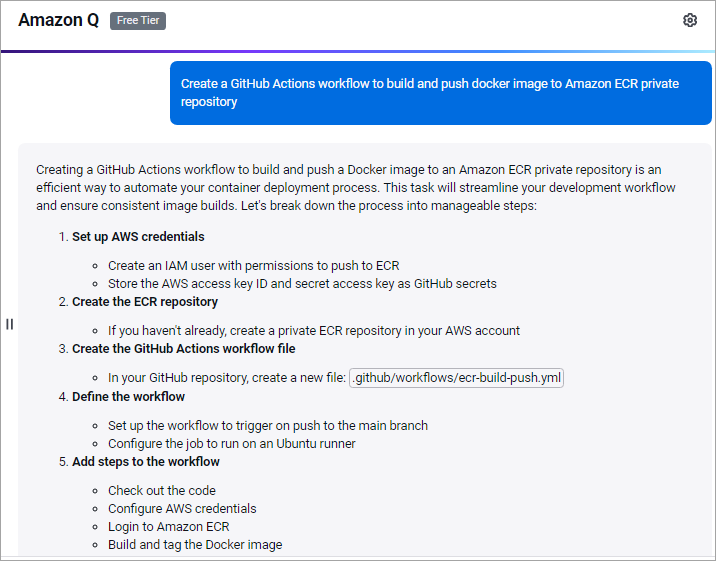
Now, to get the complete workflow, I asked Amazon Q, which is a GenAI assistant that helps to generate the code content for my needs and also accelerates software development. It is available as part of the AWS cloud platform.
I launched Amazon Q from my AWS account by clicking on the right-hand corner icon.

I entered the following prompt.
Create a GitHub Actions workflow to build and push a Docker image to an Amazon ECR private repository:
I got the following response with the code.
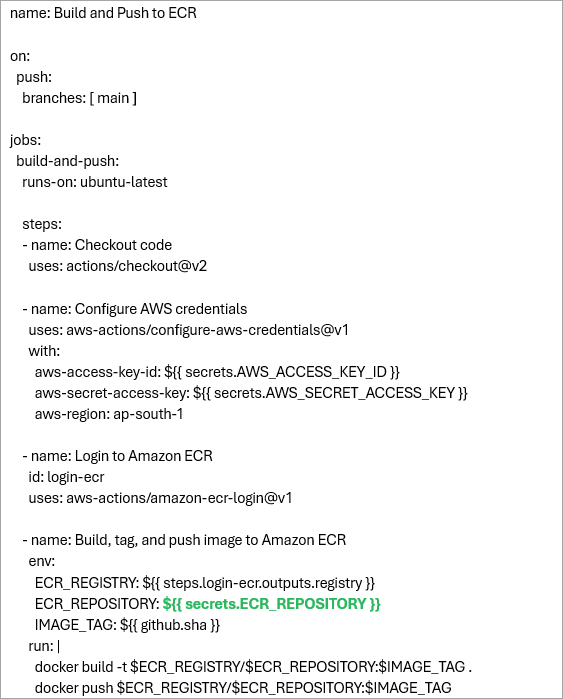
Here is the complete code added to the .github/workflows/build-push-ecr.yml file, which helped me deploy quickly with only making a small change in GREEN. The workflow will start the run once the code is committed to the main branch and will build, tag, and push the Docker image to the Amazon ECR private repository.
name: Build and Push to ECR

on:
  push:
    branches: [ main ]

jobs:
  build-and-push:
    runs-on: ubuntu-latest

    steps:
    - name: Checkout code
      uses: actions/checkout@v2

    - name: Configure AWS credentials
      uses: aws-actions/configure-aws-credentials@v1
      with:
        aws-access-key-id: ${{ secrets.AWS_ACCESS_KEY_ID }}
        aws-secret-access-key: ${{ secrets.AWS_SECRET_ACCESS_KEY }}
        aws-region: ap-south-1

    - name: Login to Amazon ECR
      id: login-ecr
      uses: aws-actions/amazon-ecr-login@v1

    - name: Build, tag, and push image to Amazon ECR
      env:
        ECR_REGISTRY: ${{ steps.login-ecr.outputs.registry }}
        ECR_REPOSITORY: ${{ secrets.ECR_REPOSITORY }}
        IMAGE_TAG: ${{ github.sha }}
      run: |
        docker build -t $ECR_REGISTRY/$ECR_REPOSITORY:$IMAGE_TAG .
        docker push $ECR_REGISTRY/$ECR_REPOSITORY:$IMAGE_TAG
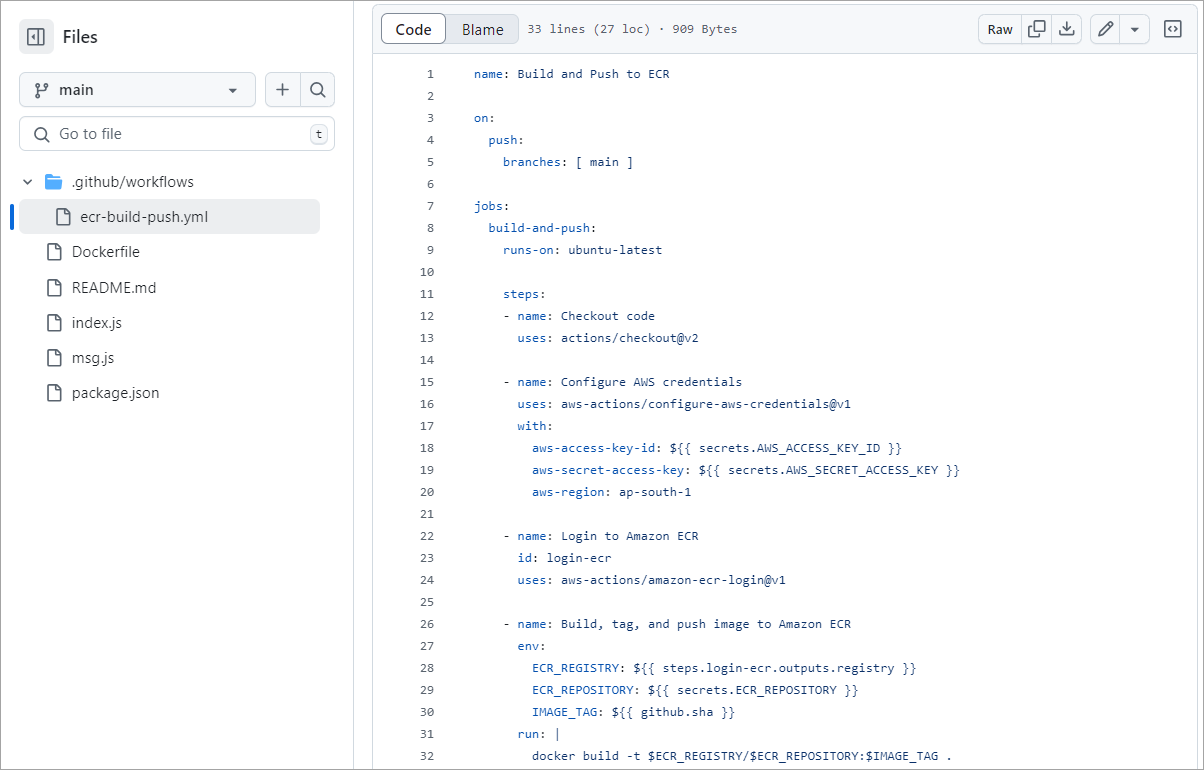
Copy the code to the YAML file and commit the code to the GitHub repository.
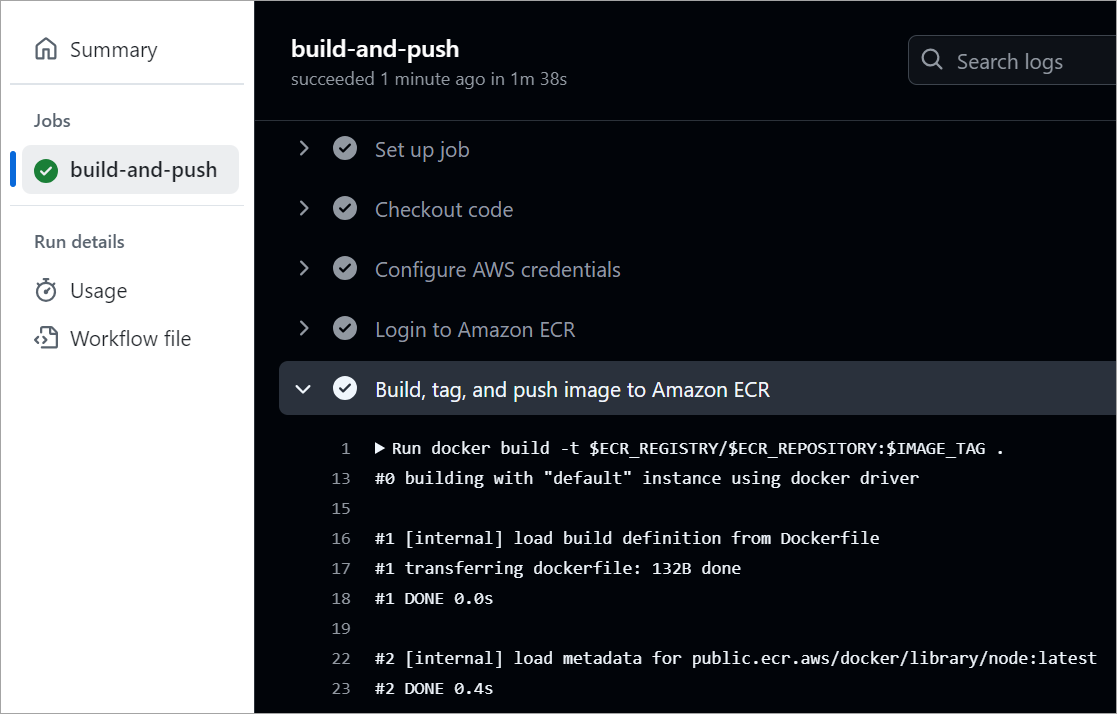
The workflow is run successfully and can be seen from the Actions TAB.
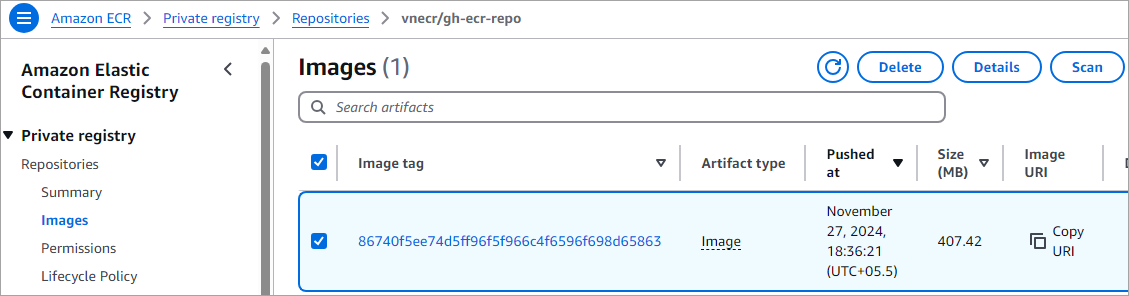
View the image pushed to the Amazon ECR private repository.
Securely Configuring AWS Credentials in GitHub
The most secure method of configuring AWS credentials in GitHub Actions is to use OpenID Connect federation, which removes the need to store long-term AWS access keys as secrets in the first place. OIDC federation enables GitHub Actions to assume an IAM role in your AWS account using a short-lived token-based authentication mechanism.
Secure Configuration with OIDC (Recommended)
This involves configuration on both the AWS and GitHub sides. The official aws-actions/configure-aws-credentials action is used in your workflow for the authentication process.
OIDC is the preferred method because it eliminates the use of long-lived credentials that do not need to be manually rotated and minimize the security risk in case the GitHub repository is compromised.
Scan Docker Container Images for Vulnerabilities
Typically, we focus on the functionality, ignoring security, which is a major concern these days. To resolve this aspect, Amazon ECR can be set up to automatically scan on push and view the vulnerabilities that need to be addressed.
Amazon ECR uses the Common Vulnerabilities and Exposures (CVEs) database from the open-source Clair project. Static scanning of Docker container images happens before deployment, as opposed to dynamic scanning, which normally happens at runtime.
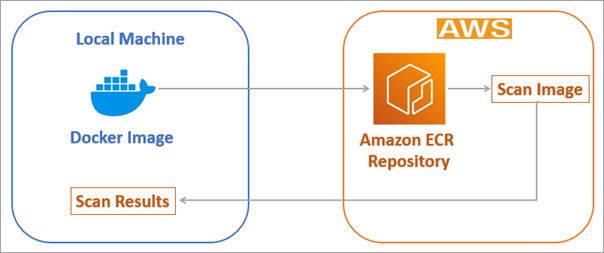
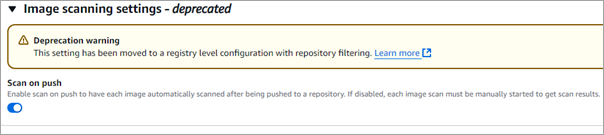
The vulnerabilities are shown in the console, or they can also be fetched from the AWS CLI. To enable Scan on push for the Amazon ECR private repository, select the repository and select Actions -> Edit -> Repository
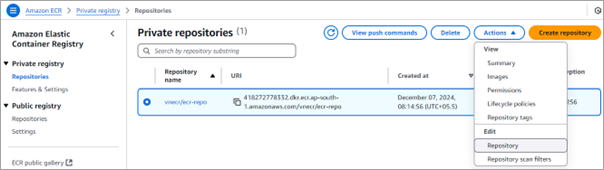
Scroll to the bottom and toggle the Scan on push option.
Run the above Jenkins pipeline configured in the previous section. As the Docker image is pushed to the private repository, click on the version in the private repository in the Amazon ECR console.

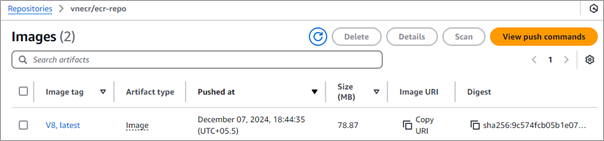
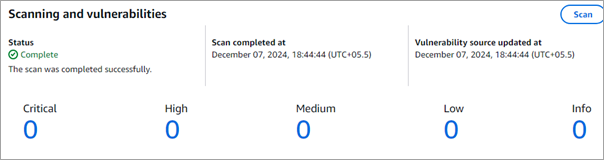
Click on V8, the latest image tag. Any vulnerabilities found will be shown. In this case, there are no vulnerabilities.
Setup Amazon Access Keys Secretly in GitHub Repository
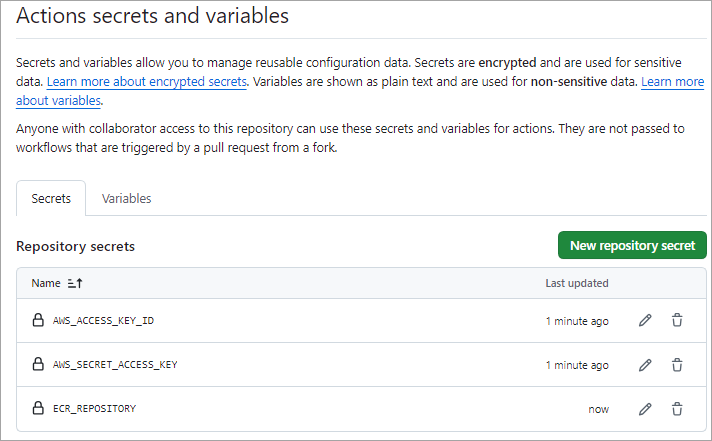
In our GitHub Actions workflow, I will need to reference the below Amazon Access Keys as secrets in our GitHub repository.
- AWS_ACCESS_KEY_ID -> The AWS Access Key ID
- AWS_SECRET_ACCESS_KEY -> The AWS Secret Access Key
- ECR_REPOSITORY -> The name of the private Amazon ECR repository created as shown above. Here, the value would be vnecr/gh-ecr-repo as shown in the above screenshot
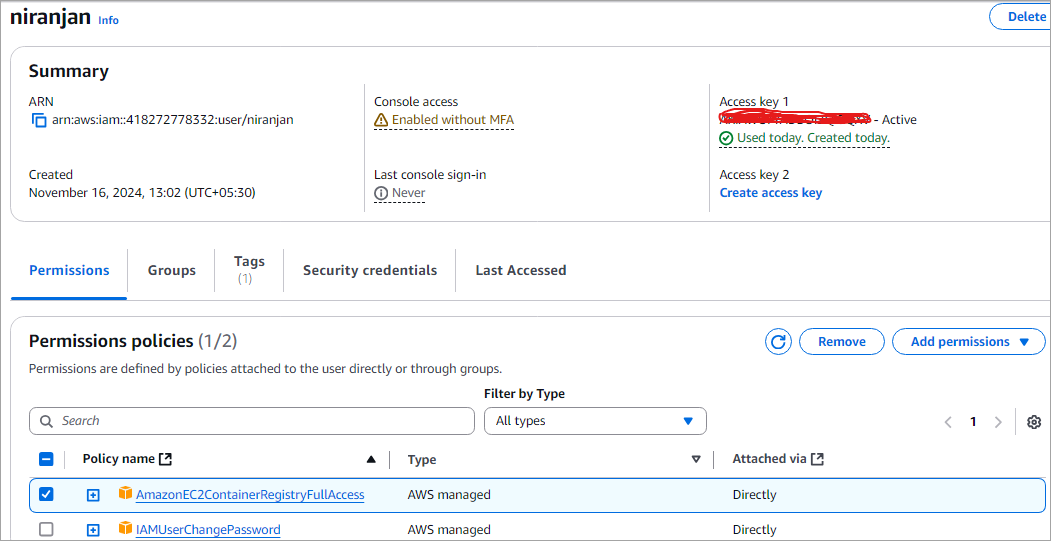
To get the AWS_ACCESS_KEY_ID and AWS_SECRET_ACCESS_KEY, go to the IAM service and CREATE a user, or for any existing user, modify the same and click on Create access key. Remember to save the values for the same.
For the user, edit the properties and ensure to attach the following policy AmazonEC2ContainerRegistryFullAccess by selecting Add permissions -> Attach policies directly.
Next, add the above secrets to your GitHub repository. Go to the repository Settings tab -> Security -> Secrets and variables -> Actions. Click on New Repository secret.
Amazon ECR Automation with GitHub Actions
As discussed above, an ECR GitHub CI/CD pipeline automates the process of building, scanning, and pushing Docker images from a GitHub repository to Amazon Elastic Container Registry (ECR) using GitHub Actions.
This setup reduces manual effort, ensures consistent builds, improves security through automated scanning, and enables faster, reliable deployments in modern container-based workflows.
Let’s sum up the key components and pipeline steps:
Key Components Required:
- GitHub Repository: This will hold your source code, Dockerfile, and the GitHub Actions workflow file (.github/workflows/ci-cd.yml).
- GitHub Actions: This is the CI/CD platform used for orchestrating the entire workflow, which is triggered upon receiving an event, such as a Git push.
- Amazon ECR: The AWS-managed container registry where your built Docker images will be stored securely.
- AWS IAM: This service is used to manage permissions, allowing GitHub Actions to authenticate and interact with AWS.
- GitHub Secrets: It is used to securely store sensitive data, such as AWS access keys and secret keys.
Pipeline Steps (CI/CD Workflow)
A typical workflow defined in a YAML file in your repository consists of the following stages:
1. Source/Checkout: The pipeline begins with the identification of a specified event, such as a push to the main branch, after which the code is checked out from the repository.
2. Configure AWS Credentials: The aws-actions/configure-aws-credentials action is used to configure the AWS credentials and region, where OpenID Connect (OIDC) is often utilized to provide better security.
3. Login to ECR: The aws-actions/amazon-ecr-login action logs the local Docker client into the Amazon ECR registry provided.
4. Build and Tag Docker Image: The application is built into a Docker image using the Dockerfile provided in the repository, and then it is tagged (using the test or commit SHA, etc.).
5. Push to ECR: The built Docker image is pushed to the designated ECR repository.
6. Deployment (Optional but common CD step): The pipeline can continue with the deployment of the newly pushed image to a container orchestration service, such as AWS ECS (using actions like aws-actions/amazon-ecs-deploy-task-definition) or an EC2 instance.
Key Use Cases of Amazon ECR
As we have seen, Amazon ECR is a fully managed Docker Container Registry as a service offered by AWS. It is a very essential component of container-based application deployment by providing a secure, reliable, and scalable repository for storing and, of course, distributing container images.
Some of the key use cases of Amazon ECR are:
- Provide a central repository for storing and distributing container images.
- Seamless integration with popular CI/CD tools like Jenkins, GitHub Actions, and AWS CodePipeline.
- Support for Docker Hub and other third-party registries to pull container images.
- Access control for container images controls who can push or pull images from the registry.
- Private repository support to ensure that critical and sensitive images are not exposed and are securely stored.
- Automatic image scanning helps find vulnerabilities, maintain, and deploy clean image versions.
Summary and Benefits of Amazon ECR
In this 3-part series, we have seen how Amazon ECR is easy to implement to push container images and pull images without using any tools or utilities. It shares and downloads images securely using the HTTPS protocol with encryption, and is fast and reliable for accessing/distributing your images.
Amazon ECR is also integrated with Amazon Inspector for image scanning of known software vulnerabilities, so the images are secure before you deploy them.
We also look at how to automate the Docker Build and Publish of the images to Amazon ECR public and private repositories using Jenkins and GitHub Actions, which is probably the way developers should work with, or for that matter, use any other CI/CD tool to automate manual steps, which is very much essential for modern-day development and deployment.
So, with Amazon ECR, developers can host their Docker container images in a highly available and scalable architecture without really worrying about the underlying infrastructure. Developers can then use the Amazon ECR Docker container images and seamlessly deploy to an Amazon Elastic Kubernetes Service (EKS) cluster.
Research Process:
This content is based on a mix of official AWS and GitHub documentation and hands-on workflow experience. Common tasks like setting up an ECR private repository, securely storing AWS credentials in GitHub, creating GitHub Actions workflows, building and pushing Docker images, and reviewing image security and vulnerability checks were considered to keep the guidance practical and easy to follow.
Total Time taken to research and publish this Guide: 30 Hours (Approx)
For more quick GitHub & Docker-related guides, you can explore our range of tutorials below:
- GitHub REST API Tutorial – REST API Support In GitHub
- Docker Tutorial: Installation And Introduction To Docker
- Comparison Between Kubernetes Vs Docker
- Project Planning with GitHub Projects
- What is Docker Compose? Installation and Volumes with Examples
PREV Tutorial | FIRST Tutorial
Was this helpful?
Recommended Reading
-

Only a GitHub repository is needed to create & run a GitHub Actions workflow. This tutorial explores the use of GitHub Actions for managing encrypted environment variables known as secrets: During deployments, you would often need certain keys (AWS, Azure, etc.), passwords, or tokens to authenticate to various systems. These…
-
This GitHub Advanced Security tutorial explains all about quickly building a secure code using its features - GitHub Secret Scanning & GitHub Code Scanning to maintain the code quality. GitHub is a web-based service for Software Development and Version Control using Git. It provides features like issues, Project Planning, CI/CD,…
-

GitHub Copilot is an AI-powered coding assistant that acts as your personal pair programmer, providing suggestions and helping you write code more efficiently: GitHub Copilot is your AI Pair Programmer that offers autocomplete code suggestions. It can receive suggestions as you start writing code or by providing a natural language…
-
A complete study of the usage and administration of a GitHub Private Repository along with its features. Learn to quickly manage Private Repositories from here: About GitHub Repository: A repository in GitHub contains your project's source code and its revision history. You can collaborate on the project's work within the…


