Discover the top apps like Aroma IPTV from this exclusive review. Compare their features and pricing to pick the best Aroma IPTV alternative of your choice for unlimited entertainment:
IPTV services are considered more affordable, flexible, and provide access to international channels compared to traditional cable TV. IPTV, as the name suggests, uses the Internet Protocol to deliver TV channels and on-demand video to devices.
However, there is more: users can leverage multi-device support to stream content on a variety of devices and enjoy on-the-go streaming and/or simultaneous streaming, for instance, in multiple-room environments. Besides, you get more flexible subscriptions and commitments, including pay-per-view programs.
Top-Rated Alternatives to Aroma IPTV

Aroma IPTV is one of the common IPTV services from which you can access 90,000+ live channels, 20,000+ on-demand videos, and m3u content on a variety of devices: iOS, Android, FireStick, Windows, Linux, Mac, smart TVs, and Android TVs. For code cutters, you can switch between devices without losing progress or content preferences.
Aroma IPTV has an APK available on the official website or trusted ass stores for a variety of devices. There is also a download for PC and Mac device users. It also supports Chromecast and AirPlay for those who like to cast content from their mobile devices to their TVs. Refer to our other IPTV review on the best IPTV service providers.
Aroma supports 4 K, HD, and SD streaming quality (and Ultra High Definition on the Aroma 4K apk) and features an EPG for easy navigation through the list of channels, 24/7 technical support from the team, and APKs available for installation on a variety of devices, including those that need side-loading.
The available content will please a wide range of audiences, including those looking for sporting, entertainment, family, news, and other content types on international and local channels.
Users also get parental controls to ensure safe watching for their families. Furthermore, using the proprietary Aroma Player enables additional features like subtitles, multi-language audio tracks, and playback speed adjustments. The Aroma Red Player features a distinct user interface and enhanced playback options and is more suitable for those who want more control over their viewing experience.
With it, you get custom playlists, personalized settings, and optimized streaming for lower bandwidth connections. It also supports Picture-in-Picture mode and background audio playback.
Aroma TV IPTV service costs from just $10/mo for streaming on a single device. With current offers, you can pay $50 for 15 months of streaming and $130 per 24 months for 2 devices.
How to Install Apps Like Aroma IPTV on Firestick TV & Android TV
- For apps that are available on Amazon and Android app stores, the installation process is simple: simply search and download the app on the relevant app stores.
- For apps that are not available on official app stores for Firestick and other devices, side loading is the solution.
Step 1: From the Home screen of the FireStick, click the Search icon and into the search box, type Downloader to download and install the Downloader app.
Step 2: Go back to the FireStick home screen and select the Settings gear on the far right. Open My Fire TV, select Developer Options, and then go to Install Unknown Apps, and from here turn on the toggle to allow Downloader to install unknown or unverified apps (apps that do not appear on the official Amazon app store are known as unverified apps).
Further Reading => Top-Rated IPTV for FireStick
You may need to turn on Developer Options if it does not appear from the My Fire TV menu. To do so, navigate to Settings => My Fire TV => About and select Fire TV Stick and click/tap it seven times, which enables the Developer Options. Again, depending on your FireStick device version, you may see Apps from Unknown Sources as the menu instead of Install Unknown Apps. If so, tap/click on this menu and turn on to install apps from unknown sources as prompted.
Step 3: Open Downloader and enter a URL or search term to search for the app you want to install. You can search for those URLs for respective IPTV services from the Internet or on the installation guides or manuals for the respective IPTV services.
Once opened, proceed to install the IPTV service.
Why Aroma IPTV Alternatives?
Aroma IPTV service is hard to beat, even by alternatives, considering the low price point starting at just $10 per month. Most IPTV services will be more costly.
However, there are reasons for alternatives, e.g., for those looking for more live channels and VOD content unavailable on Aroma, those looking for a wider range of content and a better viewing experience, and better quality streaming, such as 8K streaming.
Market Trends
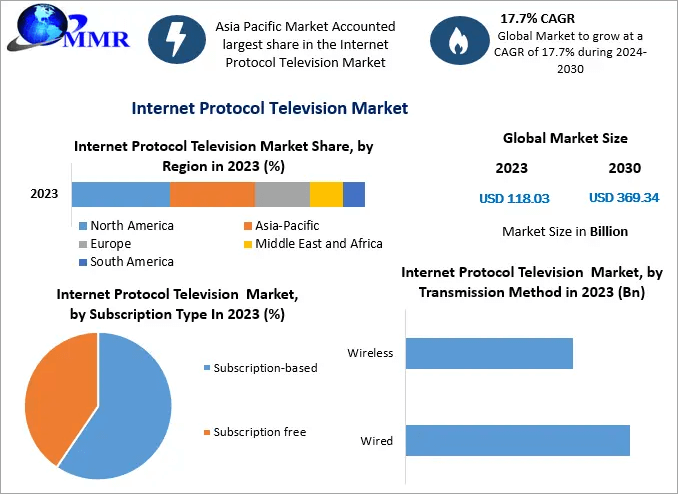
via Maximize Market Research
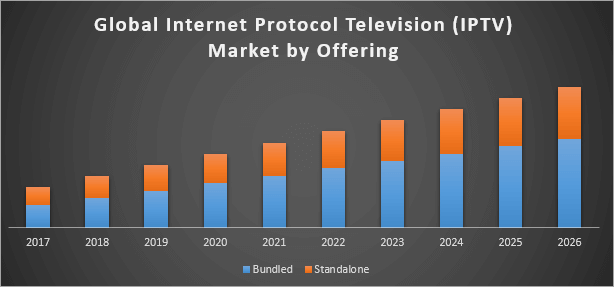
via DibVisions
Expert Advice
List of the Best Aroma IPTV Alternatives
- Krooz TV
- FuboTV
- Kemo IPTV
- XtremeHD IPTV
- Apollo Group TV
- BunnyStream
- Trendyscreen IPTV
- IPTV The Fox
- CatchON TV
Comparing the Top Aroma IPTV Competitors
| Name | Live stations | Streaming quality | Max devices | Pricing |
|---|---|---|---|---|
| Krooz TV | 16,000 | 4K/HD/FHD/SD | 10 | $15/month |
| Fubo | 400 | HD/4K, most videos 720 p | 10 | Starting from $74.99 per month for no contract plan |
| Kemo IPTV | 15,000 | HD and 4K | 10 | From $12 for 3-Month |
| XtremeHD | 20,000 | 4k ultra HD | 5 | $15.99/mo for one device subscription |
| Apollo Group | 1,000+ | HD/8K | 10 | $51.99 for 3 months for 1 device access |
Best Aroma IPTV Alternatives On All Devices
#1) Krooz TV
Best for low-cost monthly subscriptions; worldwide IPTV service.
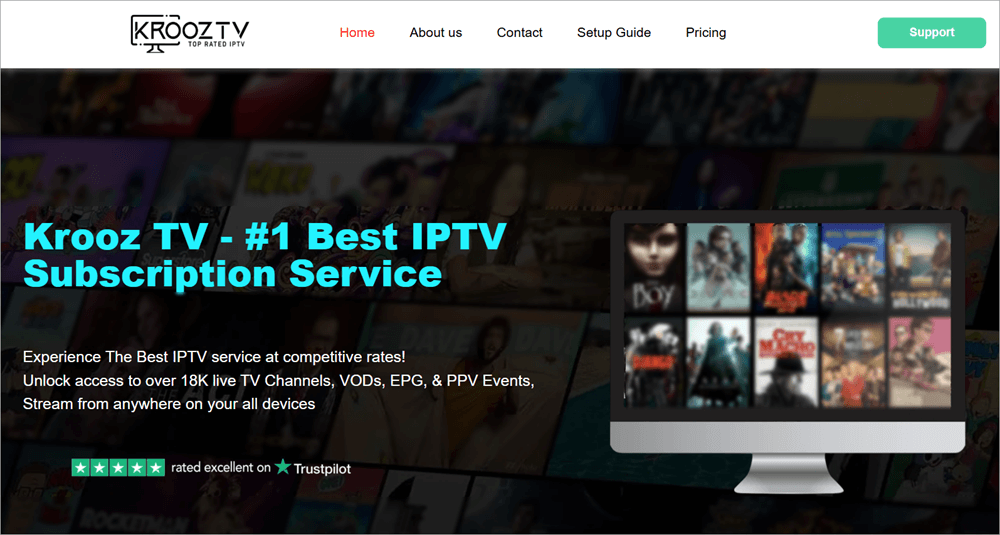
Krooz TV IPTV service hosts more than 16,000 live channels, 40,000 movies and other on-demand content, and 6,000 TV shows for just $15 per month. It supports diverse devices, including Amazon Firestick, Android TV/Google TV, Smart TVs, PC, Android & iOS devices, and tablets.
Users can also access the service through a standalone APK installed on their devices instead of through the above devices. Although packages are sold with one connection, users can purchase additional devices.
Once you subscribe, content is available in multiple categories and genre options. These categories include International Sports, News, Entertainment, Movies, PPV events, and many others.
Features:
- Supports streaming in 4K/HD/FHD/SD quality.
- Customers can pay using Bitcoin cryptocurrency.
- Customer support is provided via email, live chat, and contact forms.
- A user can do and manage up to 5 simultaneous connections.
How to install and use Krooz IPTV:
Download the Krooz TV APK and side-load it on the Firestick, Fire TV, Android Box, Google TV, and other devices running the Android-powered Operating System.
Step 1: Install the Downloader app on your Firestick or Fire TV by searching for it on the Amazon App Store.

Return to the Home Screen of your device.
Step 2: Allow the device to install apps from Unknown Sources. Hover to the Settings and select My Fire TV. Check whether you see the Developer Options menu on this window, and if not, click or tap the About menu option. Click or tap your device name 7 times to become a developer.
The other option is to go to About => Firestick TV Stick 4k Max => Click the middle button of your remote seven times if the developer option is not shown on the list under My Fire TV.

Go to Developer options and turn on ADB debugging.

Return to Settings and select Developer Options. Select Install Unknown Apps. Click Downloader and turn on to install apps from unknown sources using Downloader.
For older devices, toggle on the Apps from Unknown Sources.
At this point, you might want to connect to a VPN before proceeding to enjoy a more private connection. You can subscribe to a paid VPN or use one of the many free VPN apps available on the App Store.
Step 3: Open the Downloader app, click the URL Menu bar, type 504969, which is the short code for the Krooz TV app, or simply browse. Download the apk and installation will start. Alternatively, on the Downloader type 250931 and click Go. This takes you to the Troypoint Toolbox page from where you can search the Krooz TV IPTV app, download, and install it.
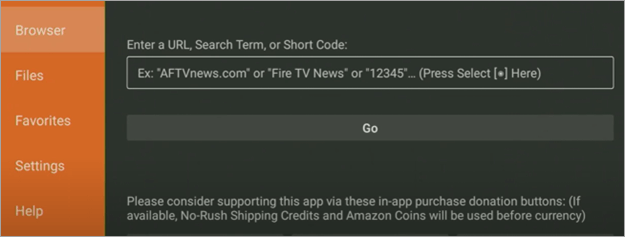
Step 4: Open the Krooz TV, accept the Terms of Use, and proceed to add IPTV channels. Enter your login credentials to do so.
The other way to use Krooz TV, install IPTV players. On IPTV players, Krooz IPTV can be accessed using M3U URL or Xtream Codes API login.
What we liked:
- Worldwide channels are available. Service is available with no country restrictions.
- Anti-freeze technology, which makes it available for 99.9% of the time.
- Latest releases provided without delay.
What we didn’t like:
- No free version available.
- Short trial period.
Pricing:
| Monthly | 3 months | 6 months | yearly |
| $15 | $30 | $55 | $85 |
Website: https://krooztv.tv/
#2) FuboTV
Best for unlimited DVR and local/regional sports streaming.
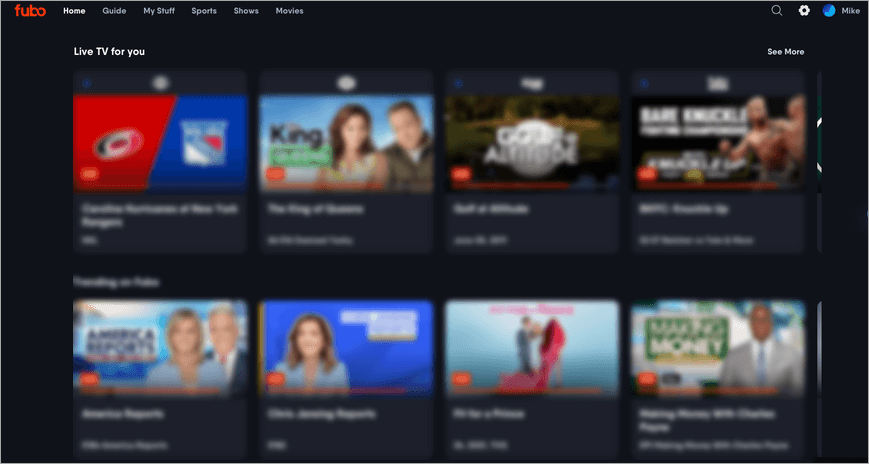
FuboTV was launched in 2015, and its main focus is soccer, but it will appeal to other tastes, such as entertainment and news. For football fans, you get sports from international channels such as beIN Sports, GOL TV, and TUDN; domestic sports channels (BTN, CBS Sports Network, FS1, FS2, Fubo Sports Network, NBA TV, NBC Sports Network, NFL Network, and The Golf Channel; as well as national and local sports channels like FOX, CBS, ABC, and NBC.
FuboTV customers get over 200 channels on the base tier Essential, which is more than what you get even on more popular IPTV services like DirecTV, YouTube TV.
Features:
- Regional sports networks RSNs are availed on the Pro plan.
- Supports add-on programs that can be purchased on top of your plans.
- A minimum of 1,000 hours of cloud DVR storage and recordings do not expire. This applies to all plans.
- Compatible with PC, and Chromecast with Google TV, as well as some smart TVs. It means you can stream on the phone, computer, or TV set and compatible devices. It can also be watched on game consoles, though these are not supported.
- Unlimited Streams on all plans: 10 screens at home.
- There is a web interface.
How to install and use Fubo TV
The easiest way is through the web interface, which requires no installation. You will need a subscription after signing up, or simply choose to trial the service.
Step 1: Open the web app and choose Live TV or Live Sports to watch live events. From the Sports tab, you find a list of sports events that you can watch and record to your DVR. You also find a list of past content up to 72 hours back.
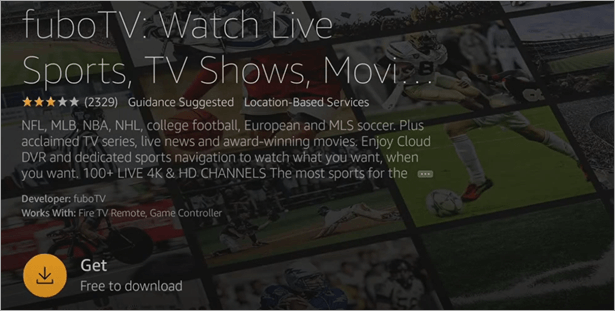
Alternatively, sign in on the Amazon website, open the fuboTV app page, select your Fire TV Stick from the drop-down menu on the right, and click Get App. Turn your Firestick on to confirm download. You get a notification alerting you to the app installation. Open the app by pressing the three horizontal lines button on the Fire Stick remote while the notification is still on.
Otherwise, search for the FuboTV app on the Home screen of your device and open it.

Click or tap on it and select Get to download it on the device.
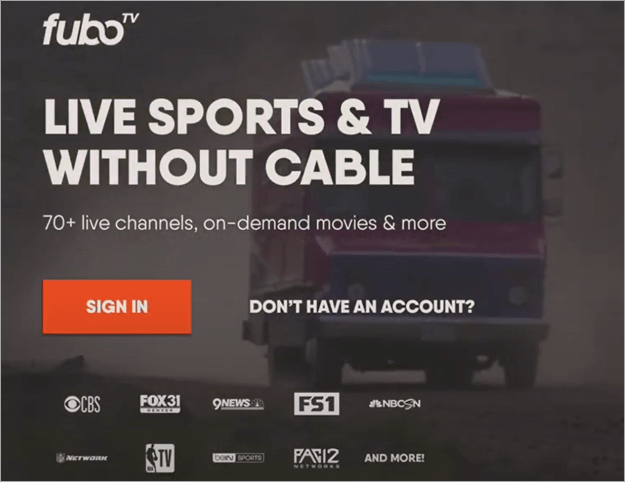
Click open. Create an account, log in with your Fubo account, and click Start Free Trial.
What we liked:
- More channels than many more popular competitors.
- Unlimited DVR
- Easy to navigate UI.
What we didn’t like:
- No PBS and major Tuner networks.
- Banner ads are sometimes displayed on the channel guide.
- No parental controls.
- A few interface quirks, mostly on the Google TV version.
- Excludes sport programs on TBS and TNT because it doesn’t include those channels, as well as CNN, or any channels owned by Warner Bros, A&E, as well as content by Turner.
- Most live streams are limited to 720p.
Pricing:
| No Contract Plan | Elite, Essential, and Pro Plans will each cost | Premier Plan |
| $74.99 (Monthly) | $84.99 (Monthly) | $94.99 (Monthly) |
Website: https://www.fubo.tv/welcome
#3) Kemo IPTV
Best for low-cost monthly to yearly subscriptions; 4k streaming.
Kemo IPTV offers a competitive list of 15,000 premium channels and 40,000 on-demand content comprising local and international program tastes and niches. Mostly content is 1080 streaming, but there is 4K quality.
Kemo offers streaming in standard definition, HD, and even 4K. Customers with a faster internet connection can get better quality – 10 Mbps is recommended for HD, while 25Mbps is recommended for 4K streaming.
Features:
- Electronic Program Guide (EPG) for easy navigation to channels.
- Supports antifreeze technology for near zero downtime. Also, VPN are friendly to make it easier to watch international content.
- The company offers a 7-day money-back guarantee.
- One of the features is the Favorites channels manager
- It is compatible with multiple devices, including Android, iOS, Linux, and Windows.
How to install and use Kemo IPTV
Kemo IPTV channels can be watched on the Kemo IPTV player or another IPTV player.
Step 1: Navigate to Kemo web page, click or tap Shop, select a plan, then select New Customer tab, choose your device type, channel bouquet, and VOD, and click Add to Cart, enter required information, click the Place Order Now tab at the bottom, then sign up for a subscription or use the free trial
You can only side-load the app since it is not available on the official Amazon Firestick store. It can, however, be found on Android and iOS app stores.
To side load the app, use the Downloader app, which you download on the Amazon appstore (From your Firestick homepage, click Find => Search and search for Downloader app, and download and install. Navigate to Settings => My Fire TV => Developer Options => Install Unknown Apps and tweak the settings. Developer Options can be turned on by navigating to Settings => My Fire TV => About.
Now, select Fire TV Stick and click it 7 times.
Step 2: Back to Home screen, search for Downloader app and open it, enter kemoiptv.tv in the URL field, and click Go. Click the three stacked lines menu and scroll to find the Kemo IPTV app, click, and download to install it. Click Done and tap Delete in the pop-up menu that appears. Open the app and log in with your subscription credentials or enter the details sent to your email to use the app.
What we liked:
- Vast selection of IPTV channels.
- Vpn friendly and no geo restrictions. Also offers antifreeze technology.
- Cost-friendly.
- Streaming is offered in multiple resolutions.
What we didn’t like:
- Occasional buffering during peak times, especially during major sporting events.
- EPG may be incomplete for certain channels.
Pricing:
| Monthly | 3 months | 6 months | yearly |
| $12 | $25 | $42 | $75 |
Website: https://kemoiptv.io/
#4) XtremeHD IPTV
Best for low cost monthly to yearly subscriptions for single and multiple devices like those used in hotels and arenas with multiple rooms.
XtremeHD features a huge number of channels (2,000+), a rich categorized VOD library (330,000+ titles including 9,000+ series), premium offerings, buffer-free technology, and many other features for just $3-worth 3-day trial period or starting at just $15.99/month.
It works with its own APK or through IPTV players, as well as on Android TV, Smart TVs, iOS, and Android through a dedicated APK, Windows/Mac, IPTV Smarters, NVDIA, Google Android Box with unlocking capabilities, as well as devices that support M3U or portals.
The subscription comes with one connection, but there is an option to add more. The service was started in 2013, hence delivering a 10-year experience in IPTV operation around the globe, including in the US, UK, and Canada.
Further Reading => Top IPTV Services in the USA
Features:
- Provides access to premium sports, standard channels such as NBC, ABC, CBS, CNN, BBC, Fox, etc; premium channels such as Cinemax, ESPN, etc; international channels such as Univision, Bloomberg TV, CNN International etc; PPV packages; whole family; kids; and adult channels; movie channels in addition to categorized VOD movies.
- It has a built-in TV guide (EPG)
- Customer support is provided via email, tickets, and live chat.
- Crypto can be used for payment in addition to other methods.
- Supports streaming in 4K Ultra HD quality.
- Built-in anti-freeze technology for 99.99% availability.
- Live recording of programs is also supported.
What we liked:
- Affordable.
- Extremely wide range of live channels and VOD content.
- Unlock other OTT channels without an additional payment over the Xtreme subscription.
- Unblock shows unavailable in your region.
What we didn’t like:
- Difficult to set up on some devices where the app is not available on official app stores.
- Buffering.
- First-time payment supports only cryptocurrency, which is a significant barrier for the majority of people not using crypto and/or those who may not want to deal with the hustle.
Pricing:
| 36 hours trial period | Monthly | yearly | lifetime |
| $3 | $15.99 for 1 device $26.98 for 2 devices $56.98 for up to 4 devices $66.98 for up to five devices | $140.99 for one device up to 1 device $241.98 for five devices. | $500 for one device, up to $900 for five devices. |
Website: https://xtremehdiptv.io/uhd/
#5) Apollo Group TV
Best for lifetime subscriptions with multiple devices and simultaneous streaming.
Apollo Group stands out when compared to Aroma IPTV due to its focus on 8K streaming quality, robust content library of 24,000+ live channels and 95,000+ VOD titles in various categories, and 24/7 customer support.
Apollo also features an in-built anti-freeze technology for 99.99% availability. It also accepts cryptocurrency payments. You would have to search far and wide when looking for IPTVs that provide true 8K quality streaming because there are not many, all with affordability and flexibility compared to Apollo Group.
Features:
- Supports local and international content.
- Customers can stream to 10 devices max simultaneously. This makes it suitable for use in large households and accommodations with multiple rooms. It supports multi-screen streaming on PCs, tablets, smart TVs, and phones.
- Cross platform compatibility on iOS, Android, Windows, macOS, FireStick, Xbox.
- 24/7 customer support.
- EPG & DVR functionality for recording live TV or saving episodes to an external drive or internal memory.
What we liked:
- Access to other OTT channels without an additional separate subscription.
- 8K streaming is incomparable to most IPTVs. Also HD, and 4K streaming.
- Inexpensive monthly, yearly, and lifetime subscriptions.
What we didn’t like:
- Accepts only Bitcoin payment, which can be a hustle for those willing to convert fiat to crypto.
- No single monthly subscriptions.
Also Read => Bitcoin Vs Bitcoin Cash
Pricing:
| 3 months | 6 months | yearly | lifetime |
| $51 for 1 device | $71.99 for 1 device- | $159.99 for up to 5 devices simultaneously | $299 for up to 10 devices simultaneously. |
Website: https://apollogrouptvs.com/home/
#6) BunnyStream
Best for low-cost single to multiple device simultaneous streaming.
BunnyStream offer of $11/mo is one of the cheapest you can get in the IPTV market, in addition to the fact that you can trial the service for just $1 for up to 48 hours. It costs $22/mo for five connections. It features over 15,000 live channels and categorizes 60,000 VOD content, which can be limited considering the leader IPTVs at the top of the list.
It is compatible with all devices, including Android, iOS, Smarters TV, and other IPTV players. You can use it on TV, phone, tablet, and other devices.
Features:
- Subscription can be paid with Credit/Debit or with cryptocurrency.
- It has a built-in EPG for easy navigation of channels.
- Has in-built support for anti-freeze technology to make it possible for 99.99% availability.
- Supports live streaming in a mix of HD, FHD, and 4K quality.
- No regional limitations or IP locks.
What we liked:
- User-friendly interface. A simple interface makes it quick to find channels, shows, and movies.
- Affordable compared to most IPTVs, especially for multiple connections.
What we didn’t like:
- Cannot download shows for offline watching.
Pricing: Free trial for up to 12 hours of activation.
| 1 Device Connection (Monthly) | 2 Devices (Monthly) | 3 Connections (Monthly) | 4 Connections (Monthly) | 5 Connections (Monthly) |
| $11 | $15 | $17 | $19 | $22 |
Website: https://bunny.net/stream/
#7) Trendyscreen IPTV
Best for multi-device sync.
Trendyscreen is also one of the most affordable IPTV services, except that there is a limited number of channels and VOD content. You can get it at just $15/mo, $95 per year, $165 for two years, and $365 for a lifetime subscription.
It has 20,000+ TV channels covering various categories such as sports, news, movies, TV shows, and children’s programming. It also provides 15,000+ VOD content; catch-up TV, which allows watching of previously aired content; 500+ adult TV channels,
Features:
- Playback controls such as fast forward, rewind, etc, on VOD and catchup TV.
- 4K, FHD, HD, and SD streaming.
- Supports all devices: smart TVs including LG, Samsung, and Sony using native apps; web browsers on laptops and PCs; streaming devices; mobile devices such as iOS and Android.
- Anti-freeze technology for up to 99.99% uptime.
- 7-day money-back guarantee.
- Payment is through credit cards, PayPal, and Bitcoin.
What we liked:
- A free trial is as some other IPTV services do not offer it.
- 7-day money-back guarantee.
- Affordable pricing plans.
What we didn’t like:
- Certain channels are available only in some regions.
- The user interface is not beginner-friendly.
- Buffering issues with slower Internet connections.
Pricing: Free trial.
| Monthly | 3 months | 6 months |
| $15 | $35 | $65 |
Website: https://trendyscreeniptv.com/
#8) IPTV The Fox
Best for streaming over the web on any device.
IPTV The Fox has 18,000+ live TV channels from 115+ countries, including the USA, U.K., and Canada. The VOD service includes 180,000+ movies and TV shows.
The list includes NFL, NBA, UFC, EPL, WWE, and other sports channels, including premium sports packages and PPV events. The service has multi-device compatibility iPhones, smart TVs, iPads, and Android TV.
Features:
- Supports 4K Ultra HD, HD, and SD quality options.
- Supports multi-device streaming on up to 5 devices simultaneously.
- A free online IPTV web player is provided.
- Web player allows streaming through any device.
- Customizable layout, external players, stream formats, subtitles, sorting, parental controls, and other settings.
What we liked:
- Money-back guarantee.
- Low-cost IPTV service.
What we didn’t like:
- Mixed user reviews with some claiming of been scammed and never getting their money back after paying for their services.
Suggested Read => Top IPTV Service Providers in Canada
Pricing: Free trial, with option for a 36-hour paid trial.
| Monthly | 6 months | yearly |
| $19 $67 for up to 4 connections | $56 $129 for up to 6 connections | $79 $250 for up to 4 connections |
Website: https://iptvthefox.com/
#9) CatchON TV
Best for Windows and PC streaming.
CatchON TV features over 6,000 channels and 90,000+ VOD content of movies and series. The lineup of live channels features premium sports and PPV events. Live IPTV content also includes music and radio. It also includes news channels such as CNN, MSNBC, Fox News, Cheddar, Newsy, BBC World News, and more.
It supports any Android-powered devices, including Amazon Firestick, Fire TV, Fire TV Cube, NVIDIA Shield, Windows/Mac, iOS, Android, and more.
One problem is that the service does not support external IPTV players or video players.
Features:
- Built-in EPG guide for ease of navigation.
- Anti-freeze technology is supported, enabling a 99.99% uptime.
- Subscription comes with one connection, but users can add up to 6.
- Bouquets are available for various locations including the USA, UK, Canada, Belgium, and Scandinavia.
- Support is provided through email, a support ticket, and a WhatsApp number.
What we liked:
- 3-day trial to test all features.
- Month-to-month flexible payments.
What we didn’t like:
- It cannot be used on some IPTV players since it requires using the official APK to stream the service.
- Technical issues occur during peak hours and maintenance hours.
Pricing:
| Monthly | 3 months | 6 months | yearly |
| $20 | $40 | $70 | $80 |
| $30 for 2 streams | $300 for 2 streams | ||
| $40 for 4 streams | $400 for 4 streams |
#10) TiVistation
Best for family-friendly account sharing and streaming.
TiviStation features 23,000+ live TV channels, 80,000+ movies, and 14,000+ TV series. This includes live sports and pay-per-view events that appeal to sports fans. One advantage of using the service is multiple user management, such that during peak times, a user can deactivate others to allocate bandwidth efficiently and improve the quality of streaming.
Features:
- Pause and resume feature to manage buffering and enhance stability.
- Adaptive streaming technology optimizes the quality of video based on the speed of the Internet.
- Multi-device support, including smart TVs, Android TV, Google TV, phones, and laptops.
What we liked:
- Option to filter out adult channels, which can benefit family-friendly account sharing. These channels, for instance, can be excluded optionally during subscription.
- A comprehensive installation guide is provided.
What we didn’t like:
- Only cryptocurrency payments are accepted, hence limiting options for paying for the service.
- Occasional buffering issues.
Pricing:
| Monthly | 6 months | yearly | lifetime |
| $15 | – | $95 | $365 |
Also features a 24-hour free trial.
Website: https://tivistation.com/
FAQs on Replacements for Aroma IPTV
1. Is there anything better than IPTV?
Over-The-Top (OTT) services are more cost-effective since they require less investment and infrastructure and are more flexible compared to IPTVs. Nevertheless, they use the Internet to deliver content.
By over-the-top, we mean services that deliver content over the Internet after bypassing traditional cable or satellite TV platforms.
They can be provided on IPTV platforms alongside other content, especially live and on-demand TV content. Unlike OTT, IPTV services require a subscription, and a special set-top box is used to connect the television or streaming device to the Internet connection.
2. Which app is better for IPTV?
Krooz, Fubo, and Kemo are rated as some of the best IPTV services overall. Tivimate ranks as a top choice for many especially Android TV, Smart TV users.
The same IPTV app is favorite among Google TV users including capability to watch four channels side by side from the same screen and its recording capabilities. GSE Smart IPTV, MyIPTV Player are some of the top choices for iOS users, while the IPTV Smarters Player is considered best for LG WebOS & Samsung Tizen devices.
3. Is there a totally free IPTV app?
There are many free IPTV apps in almost all streaming OS categories (for Windows, Android TV, Google TV OS, Smart TV, iOS, Mac, Linux and others). Examples include the Xtream IPTV – Smart TV, IPTV Extreme, IPTV Xtream Pro, Insta IPTV, IPTV Smart Player, among others.
4. Can I watch IPTV without a VPN?
IPTVs can be watched with or without a VPN. Many people choose a VPN connection because it will unblock channels that may not be accessible in their geo-location.
Others may prefer the privacy of viewing channels without their devices broadcasting their locations, and yet others want to ensure uninterrupted Internet connectivity, for instance, when they connect to faster servers.
5. Where can I watch all TV channels for free?
Those using Google TV, Android TV, and Smart TV can consider streaming free channels from Google TV Freeplay, among many other free streaming IPTV services. Some will incline local channels, others international, and yet others a mixture of the two.
It is rare to find a single IPTV streaming all channels possible, even on a paid subscription; hence the option may be to find one that has most of the channels or one that captures your genres or category interests.
Conclusion
We delved deep into the various Aroma IPTV alternatives in the market, along with their exclusive features.
Krooz is one of the best IPTV service providers that offers up to 16,000 live channels (in addition to an extended VOD library) at 4K/HD/FHD/SD content quality, when you consider the pricing of just $15/month. In terms of pricing, it is comparable to the likes of Kemo IPTV service.
Like most IPTV players and streaming services in the market, you can side-load apps and IPTV services. For football fans, the most suitable would be the Fubo IPTV, except that it comes with hefty geographical restrictions.
Research Process
- Time taken to research this article: We have spent 26 hours researching and writing this article, so you can get a useful, summarised list of Aroma IPTV Alternatives.
- Total services researched online: 34
- Top alternatives shortlisted for review: 10
Was this helpful?
Recommended Reading
-

Review of the best IPTV services available worldwide, compare the features and pricing of the top-rated IPTV providers, and select the best IPTV subscription. Picking an IPTV service in 2026 gives you choices from all kinds of live sports to big on-demand libraries. But it's not easy to find a…
-

Are you searching for a legal IPTV subscription service in the USA? Here is a detailed Review of the best legal IPTV Services in the USA that adhere to laws and regulations. A reliable and legal IPTV service can be difficult to locate among so many unverified options in the…
-
Are you looking for globally serving IPTV service providers? In this guide, I’ve reviewed the Best 14 IPTV service providers serving worldwide. Identifying a reliable IPTV supplier in 2026 is no easy feat, given the number of IPTV services that are being provided by various companies with their distinct offerings…
-
Are you a sports freak who is looking for IPTV services to watch your favorite sport? Check this list of the best IPTV for Sports that offer a wide range of sports channels with live coverage across the globe: The internet has forever changed how we watch sports. If you…