


Searching for the best video downloader for Google Chrome? In this guide, we will compare the best video downloaders for Chrome with their features.
We have tested the video downloaders for chrome to check their ability to detect videos on a web page, the number of supported websites and formats, convenience of using, video download quality, streaming capabilities, features, and usability.
This article contains the list of top video downloader Chrome extensions, and desktop and online alternatives for those who need a little bit more from video downloading services.
Which Is the Best Video Downloader Chrome Extension?
Video DownloadHelper is the best Chrome video download extension that offers compatibility with various video formats and streaming technologies. Video DownloadHelper has support for HLS, DASH, and MPD streaming formats, live streaming, and video formats like MP4, MKV, and WebM, though it does not allow downloading of YouTube videos via the Chrome extension.
- Best Chrome Extension: Video DownloadHelper finds and downloads web media from inside Chrome itself.
- Best for YouTube Videos: 4K Video Downloader circumvents Chrome Web Store limitations to easily download YouTube videos.
- Best for HLS/M3U8 Streams: Video DownloadHelper can detect and download complicated .m3u8 streams into one single MP4 file.
- Best for 4K/8K Videos: 4K Video Downloader is capable of downloading complete 4K and 8K videos without compromising quality.
15 Best Chrome Video Downloaders in 2026 (Free & Paid)
Downloading videos directly from your browser has become easier than ever, due to the availability of advanced Chrome video downloaders, extensions and tools.
It is important to ensure that the right Chrome video downloader is chosen. Whether you want to save tutorials for offline viewing, archive educational content, or download videos from supported platforms, choosing the right downloader is crucial, which will make downloading videos an easy, fast, and reliable process.
I have listed below the top Chrome video downloaders that will ensure smooth functionality and a friendly interface for users, making them excellent for professional and personal use.
Refer to the following review and choose the best video downloader or extension for Google Chrome according to your requirements.
Pro–Tip: The different Chrome extensions for downloading videos may greatly differ in their website support, file formats, permissions, and whether they are regularly updated. Prior to downloading such an extension, it is important to make sure that it is updated regularly and can be found on the Chrome Web Store. For instance, Video DownloadHelper was updated in August 2026 and supports more than 1,000 websites..
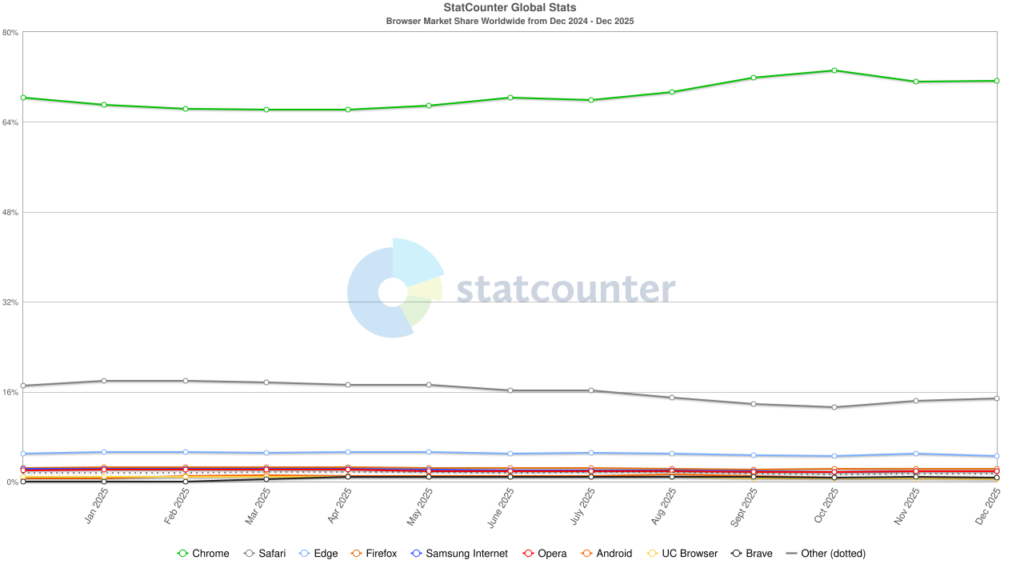
According to StatCounter’s global browser market share data, Google Chrome holds roughly 70–71% of worldwide browser usage, far ahead of competitors like Safari, Edge, and Firefox. This dominance explains why Chrome-compatible tools, including video downloader extensions, remain highly relevant and popular among internet users.
.
[image source]
How We Tested These Chrome Video Downloader Extensions
In order to review all tools thoroughly and offer reliable recommendations, each Chrome video downloader was tested using the following standard criteria.
Our team examined all solutions based on the following five criteria:
| Criteria | What We Tested & Measured | Why It Matters |
| Download Speed & Efficiency | The download time was measured for a common 1080p video of 10 minutes length in a steady 100 Mbps internet connection. | This checks if the software is able to handle big media files without delays due to throttling and buffering issues. |
| Format & Quality Versatility | The capability of output resolution for 720p to 4K and even 8K were verified, along with output format choices like MP4, WebM, and MP3 audio conversion. | This checks whether the file quality and media type of your choice are extracted easily by the software. |
| Media Stream Detection | The compatibility of the tool was checked for various platforms including YouTube, Vimeo, Facebook, X (formerly Twitter) and live HLS/m3u8 stream on the web. | This checks whether the software can capture the embedded media or not, especially from complicated websites. |
| User Safety & Bloatware Check | All setup files were virus-checked on VirusTotal to see if the tool contained any intrusive ad popup, adware, and additional permissions. | This checks if the software recommended does not cause any harm to the browser performance and security. |
| Policy Compliance & Reliability | The behavior of the browser extensions was observed according to Google Chrome Store developer guidelines. | This checks which software can be used in chrome and which one cannot. |
List of the Best Video Downloader for Chrome in 2026
Below is a list of the best video downloaders for Chrome, selected based on download speed, video quality options, ease of use, and overall reliability. Each tool has been evaluated for real-world performance, security, and compatibility with the latest Chrome updates, which will help you to quickly identify the option that best fits your downloading needs.
Best Desktop Video Downloaders for Chrome Users in 2026
- YouTube By Click Downloader
- 4K Video Downloader
- YT Saver Video Downloader
- Leawo Video Downloader
- CleverGet
- MiniTool uTube Downloader
- SaveFrom.net
- FBDOWN.net
- Catchvideo
Best Video Downloader Extensions for Chrome in 2026
- Video Downloader Professional
- Video Downloader Plus
- Video Downloader Pro
- SaveTheVideo
- Flash Video Downloader
All-in-one AI Video Converter & Enhancer in 2026
- Winxvideo AI
- HitPaw Video Converter
- FlexClip
Compare the Best Video Downloader for Chrome
| Name | Best For | Operating System | Key Features / Limitation | Fees |
|---|---|---|---|---|
| YouTube ByClick Downloader | Easy to use YouTube Downloader for Chrome, Firefox, and IE. | Windows | Desktop downloader; not a native Chrome extension | Premium version: $19.99. Free download available. |
| 4K Video Downloader | Downloading videos from multiple platforms in 4K and 8K resolutions. | Windows, Mac, Linux, Android | Advanced desktop downloading and playlist support | $15-$45 in one-time fee. A forever free plan is also available. |
| YT Saver Video Downloader | Excellent video downloader supports downloading HD video from 10000+ sites on Chrome with 8K, 4K, 1080p resolution. | Windows 11/10/8/7, MacOS 10.10 and above, Android | Desktop downloader with format conversion | Free trail with 3 Songs download 1-month for $9.95 1-year for $19.95 Lifetime for $29.95 |
| Leawo Video Downloader | 6X faster online video downloading. | Windows & Mac | Desktop downloader with accelerated downloads | $29.95/year & $39.95/lifetime. |
| Winxvideo AI | Download videos from 1000+ sites | Windows | Desktop video downloader/converter | It starts at $19.95 per year |
| CleverGet | In-Built Browser | Windows & Mac | Built-in browser; advanced downloading | Windows starts at $149.95/year. Mac starts at $139.95/year |
| Video Downloader Professional | Chrome Exclusive Video Download Integration | Windows, Mac | Simple browser-based downloading | Free |
| FBDOWN.net | Downloading Videos exclusively from Facebook | Windows, Mac, iOS, Android | Web-based downloader focused on Facebook | Free |
| Video Downloader Plus | Downloading Videos in multiple format outputs | Windows and Mac | Simple Chrome-based downloading; compatibility varies | Free |
| Video Downloader Pro | Easy Video Downloading Across the Web | Windows and Mac | Simple browser-based downloading | Free |
| MiniTool uTube Downloader | Full-Service Video Processing Online | Windows, MAC, iOS, Android | Desktop downloader with additional processing features | Free |
Let’s review the tools listed above in detail:
Best Desktop Video Downloaders for Chrome Users in 2026
Whereas Chrome extensions might be quite useful, desktop applications, on the other hand, will offer more in terms of website support, high-resolution downloading, format conversion, playlist downloading, and much more.
YouTube ByClick Downloader
Best easy-to-use YouTube Downloader for Chrome, Firefox, and IE.

YouTube ByClick Downloader is an easy-to-use software for downloading videos from any site. It lets you download the videos in various formats such as MP3, MP4, etc. It supports Google Chrome, Firefox, and Internet Explorer. YouTube ByClick Downloader can be used for downloading long videos even longer than 20 minutes.
Suggested read => How to solve the Youtube Not Loading error
Features:
- YouTube ByClick Downloader will let you download the complete YouTube Playlist.
- It also supports the downloading of YouTube channels.
- It has the feature of automatic editing of the MP3 tags of song name and artist name.
- It supports the downloading of private videos.
- You will be able to transfer downloads to iTunes easily.
Verdict: YouTube ByClick Downloader supports downloading of videos from multiple sites. It will let you download the videos in HD or other formats. It provides the facility of downloading videos through proxy servers.
Price: YouTube ByClick Downloader is available to download for free. Its premium version is available for $19.99.
4K Video Downloader
Best for Downloading videos from multiple platforms in 4K and 8K resolutions.

4K Video Downloader is a simple tool that works phenomenally well with Chrome and almost all other browsers active today. As the name suggests, the software allows you to download videos with qualities that surpass the traditional high-definition spectrum. To download videos using this tool, you must copy the link from the browser and paste the link into the application.
The software will start downloading the video without compromising its original quality. You can also use the 4K Video Downloader to download entire playlists and channels in a single go. The software can also be used to download subtitles and annotations directly from the online video. The subtitles can be downloaded in SRT format with an option to select from 50 different languages.
Features:
- Automatic Full Playlist Download
- In-App Proxy Setup
- 360 Video Download
- 3D Video Download Support
- Download Private YouTube videos
Verdict: With its ability to download videos in both 4K and 8K resolution, the 4K Video Downloader is software built for the future. In its current state, it is considerably more advanced than many of its contemporaries in the market. This is a top-tier video downloader that you can use to save audio and videos from platforms like YouTube, Vimeo, TikTok, Instagram, etc.
Price:
- Starter: Forever Free
- Personal: $15
- Pro: $45
YT Saver Video Downloader
Best for Excellent video downloader supports downloading HD video from 10000+ sites on Chrome with 8K, 4K, and 1080p resolution.
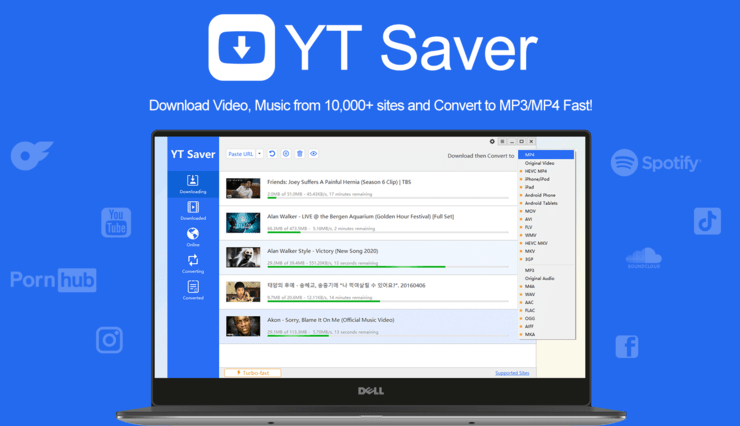
YT Saver Video Downloader is a user-friendly software designed for downloading videos from 10000+ popular sites like YouTube, offering the flexibility to save videos in multiple formats like MP4, MOV, MKV, and AVI. Compatible with Google Chrome, Firefox, and Internet Explorer, this downloader also supports downloading videos, playlists, and channels in bulk.
Features:
- Supports 10,000+ video and music websites, such as YouTube, Facebook, Instagram, Dailymotion, SoundCloud, Vevo, Vimeo, TikTok, Niconico, Bilibili, etc.
- Supports more than 20 output formats, such as MP3, MP4, MOV, WMV, M4A, MKA, WAV, AAC, etc.
- Supports all HD video qualities, such as 480p, 360p, 720p, 1080p, 2K, 4K, 8K
- Supports one-click download of YouTube playlists, channels, etc.
- 10x faster download and conversion speeds.
- Supports editing clips of different lengths from YouTube and saving them in different output formats such as mp4 and mp3.
- Supports downloading subtitles and lyrics.
Verdict: The YT Saver Video Downloader is designed for the future with its capacity to download videos in 4K and 8K resolutions. Currently, it surpasses many competitors in terms of advancement, establishing itself as a top-tier video downloader. This tool is excellent for preserving audio and videos from platforms such as YouTube, Vimeo, TikTok, Instagram, and more.
Price: YT Saver offers 3 free file downloading. The premium version starts $9.95.
Leawo Video Downloader
Best for 6X faster online video downloading.

Leawo Video Downloader is a tool for downloading 720P/1080P videos, music videos, etc. It has functionalities for downloading live-streaming videos. It will let you download videos from more than 1000 sites. It provides 6X higher speed. The tool is compatible with Windows and Mac OS.
Features:
- Leawo Video Downloader can download most of the videos available on the internet.
- It can provide precise video information so that you will download the video with the right parameters.
- It has a built-in video player to play the downloaded videos.
Verdict: Leawo Video Downloader provides a better user experience through smarter downloading settings. It uses advanced video loading technology and hardware acceleration technology to provide 6X higher speed.
Price: Leawo Video Downloader is available with a 1-year license for $29.95/year and a lifetime license for $39.95. You can try the platform for free.
CleverGet
Best for: In-Built Browser
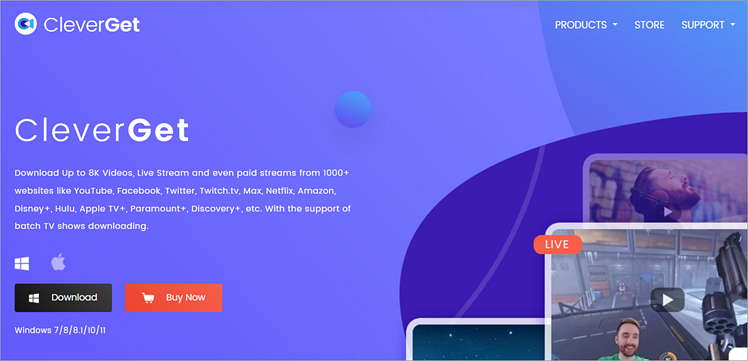
CleverGet makes it to my list because of its ability to download videos from over 1000 sites. From Facebook to Vimeo and YouTube, this software can download videos of all types from multiple online content platforms. You can use the software to download playlists, channels, and even live streams without any loss in quality.
Features:
- Lossless 8K Video Download
- Lossless 320 KBPS Audio Download
- Playlist and channel downloader
- Save metadata info
- Batch processing
- Remove ads from the video
Verdict: With CleverGet, you get a video downloader that is easy to use and lets you capture videos from over 1000 sites online. The tool shines because of its built-in browser and ability to download videos that go as high as 8K in resolution.
Price: CleverGet’s Windows version can be purchased at $149.95 for one year while its lifetime plan will cost you $229.95. The Mac alternative will cost you $139.95 whereas its lifetime plan will cost you $219.95.
MiniTool uTube Downloader
Best for full-service video processing online.

MiniTool is first and foremost a powerful video processing tool that is primarily known for its robust editing and video conversion feature. However, it is a rather fantastic Chrome video downloader as well, exclusively for YouTube.
It offers the online tried and tested downloading procedure to make sure you can download any video you desire from YouTube. You simply have to copy the URL of the video you would like captured, paste it into MiniTool’s dashboard, select the resolution and output format, and simply press ‘download’.
You also get the ability to download videos in batches, extract audio from YouTube videos, and download subtitles as well for a remarkable user experience.
Further Reading => List of the BEST YouTube Downloaders for Mac
Features:
- Batch conversion
- Free and ad-free user experience
- Extract audio
- Download subtitles
Verdict: MiniTool is a simple video downloader. It is free, fast, and easy to use on that special occasion you decide to download a YouTube video you like. What more could one ask for?
Price: Free
Website: https://youtubedownload.minitool.com/youtube/
SaveFrom.net
Best for automated YouTube video downloaders.

SaveFrom.net is a fascinating video downloader wherein you get the option to simply copy-paste a URL on its dashboard for quick downloading. However, you also get the option to download the tool which enables you to directly capture a video from the source website itself.
SaveFrom.net works phenomenally well for YouTube. Once added to Chrome, you will always find a download button below every YouTube video you play. You simply have to click the button, choose the resolution and output format from the mini scroll bar that appears, and click download.
Those who are cynical about downloading the entire software can simply choose to copy and paste the URL link of the YouTube video they would like to install instead.
Features:
- Free to use
- Clean interface
- Download in mp3 and mp4 format
- Automated video identification for YouTube.
Verdict: SaveFrom is a great platform to capture videos from YouTube, but the software doesn’t integrate well with other similar content platforms online. However, its free use and the clean interface can muster enough appeal for occasional use now and then.
Price: Free
FBDOWN.net
Best for downloading videos exclusively from Facebook.

FBDOWN.net solves the monumental problem posed by Facebook by helping you download the videos playing on its timeline without any issue. Yes! it is one of those tools that enable downloading content from social media platforms, which would have otherwise been impossible.
It is also very simple to use. You simply copy the URL of the Facebook video you would like to download, paste it in the concerned text box available on FBDOWN, and hit the download button. The video will start downloading and will eventually find its way to your destination folder on the device.
Further Reading => Step-by-Step Guide to Recover Facebook Video Watch History
It also comes with a Chrome extension, which makes the download process on the browser considerably easier. Once integrated, the extension will automatically detect videos on Facebook, thus bypassing the entire copy-paste process to skip right ahead to the downloading.
Features:
- Free to use
- Works exclusively for Facebook video download
- Chrome browser extension
- Choose between normal and HD-quality options
Verdict: FBDOWN.net is a great tool for users who want to do nothing more than download videos from Facebook. It doesn’t offer much of anything else and should be skipped by users who want a downloading tool that exhibits universal compatibility with online content platforms.
Price: Free
Website: https://fbdown.net/index.php?error=no_url
Catchvideo.net
Best for downloading HD videos online.

As the name suggests, Catchvideo is quite a useful online tool to capture videos you desire from literally any content platform available on the web. As such, YouTube, Dailymotion, TikTok, and Facebook are all fair game.
Suggested reading =>> Best tools to download TikTok videos
The process of downloading is also very familiar, and thus very simple. You simply copy the URL and paste it into the platform’s text box. The tool will do the rest. The tool also allows users to download videos in 4K and 1080p quality, which is a huge plus in our book.
The tool also offers a Chrome browser extension that makes the downloading process more intuitive and considerably faster.
Features:
- Free and easy downloading
- Ad-free
- Download from multiple content platforms online
- Download in 4K and 1080p
Verdict: As a downloading tool for Chrome, Catchvideo.net is incredibly simple. It is free to use and does not assault its users with pointless ads. Its simplicity may disappoint those who like more features with their video downloading tools. However, the downloading experience is still pretty satisfying.
Price: Free
Best Video Downloader Extensions for Chrome in 2026
These are the tools that work directly from Chrome as browser extensions. Rankings are based on compatibility, ease of use, supported video types, features, maintenance, and safety.
Video Downloader Professional
Best for Chrome exclusive video download integration.

Video Downloader Professional is just one in a line of smart tools that easily integrate with the Chrome browser to make the entire video downloading process fairly intuitive and simple. The videos playing on any website are automatically detected by this ingenious software.
You simply have to click the green arrow available on the top of your browser right beside the address bar, upon which a professional video downloading menu will open. You then have the option to choose the video you would like to download, and what resolution you would like to download it in.
There are some glaring limitations of using this tool, mainly the fact that it does not allow you to capture site-protected content. Apart from this, the tool works just fine to download videos from sites like Vimeo, and also helps you play videos via Google Chromecast.
Further Reading => Most Popular Vimeo Video Downloaders
Features:
- Free and easy to use
- Automated downloading
- Supports almost all online content platform
- Seamless browser integration
Verdict: As far as simplicity goes, Video Downloader Professional hits it out of the park. However, it still leaves a lot to desire when it comes to extra features. It is still worth a try, as it is free to use.
Price: Free
Website: https://chrome.google.com/webstore/detail/video-downloader-professi/elicpjhcidhpjomhibiffojpinpmmpil
Video Downloader Plus
Best for downloading videos in multiple format outputs.

Video Downloader Plus is an amazing Chrome-exclusive extension that helps download videos from almost all content platforms available online. From Facebook to YouTube and Vimeo, this tool can easily identify the videos playing on the browser and help you download the video with just one click.
Plus, you can also download videos in multiple compatible output formats. The tool also offers users the ability to download videos in batches to save time. Other features like recording live video streams and automatic video detection make it one of the most intuitive video downloaders to grace Chrome in recent memory.
Features:
- Download videos in multiple video outputs
- Supports downloading from multiple content platforms online
- Free and Ad-free
- Records live streams
Verdict: Video Downloader Plus is a smart Chrome extension that can perform several tasks with phenomenal ease. Its live recording function is a huge plus for Twitch streamers, and as such earns a high recommendation from us.
Price: Free
Website: https://chrome.google.com/webstore/detail/video-downloader-plus/njgehaondchbmjmajphnhlojfnbfokng
Video Downloader Pro
Best for easy video download across the web.

Video Downloader Pro is a very smart tool that easily passes as a robust Chrome extension for downloading videos. The tool easily identifies videos on any content platform and prompts the user to download videos in the format in which it is present online.
The tool helps you by automatically identifying the format output and does away with any manual striving from the user. This can be both a good and bad thing depending on who you ask. Plus, it can download videos from almost all content platforms online, with the notable exception of YouTube. This can stick out like a sore thumb, considering YouTube is a giant platform.
Features:
- Free to use
- Chrome extension
- Identify videos to download automatically
- Ad-free
Verdict: Video Downloader Pro is free and makes the entire downloading process incredibly simple. However, the fact that it does not work with YouTube is a bit disappointing, yet it can download content from almost all other platforms without an issue.
Price: Free
Website: https://chrome.google.com/webstore/detail/video-downloader-pro/klfbfknakjcihehkmalfgphojkhgmfcb
SaveTheVideo
Best for full-service high-quality video processing.

Out of all the video downloaders, Chrome has to offer, SaveTheVideo is perhaps the most divisive of them. At first glance, the tool isn’t blessed with a good look. Add to that, the constant advertisements on its platform are sure to turn people away from it.
However, it is still quite spectacular in the features it offers, and its overall performance. SaveTheVideo allows you to edit and convert videos apart from downloading videos. It is fairly simple and superfast in its execution.
Its video downloading earns it extra brownie points solely due to its ability to download 1080p and 4K quality videos without any issue. You simply copy the URL of the video you would like to download, paste it into SaveTheVideo’s text box, and select the resolution. If the video you chose allows 4K downloads, you will have the opportunity to download it in that format.
Features:
- Download videos in 4K and 1080p
- Video editing
- Video conversion
- Free to use
- Download in multiple output formats
Verdict: SaveTheVideo has a lot going on for it and a lot working against it simultaneously. However, we believe the merits far outweigh the cons. SaveTheVideo should satisfy users who are looking for a tool that helps them download HD videos with ease.
Price: Free
Flash Video Downloader
Best for smart Chrome extension.

As far as browser extensions go, Flash Video Downloader offers the best one on the whole World Wide Web. Flash Video Downloader, as the name suggests, is great for downloading videos in Flash format, but it is also quite good at downloading videos in other popular formats as well.
Flash Video Downloader is exclusively a Chrome browser extension and a clever one at that. Once you’ve installed the extension, you simply have to browse through the website in search of the video you would like to download. Once you have what you are looking for, click the extension icon on top of your browser.
Here you will be greeted with the option to download your video and resolutions in which you would like to download it. Just click on download, and the video will find its place on your device.
Features:
- Smart Chrome Extension
- Automatically identify video to download
- Download in multiple output formats
- Twitch stream recording
Verdict: There is simply so much to love in Flash Video Downloader, with quick and simple video downloading just being the cherry on top. Twitch streamers can also use this tool to record their live streams. The tool is incredibly smart to ignore as a Chrome extension.
Price: Free
Website: https://play.google.com/store/apps/details?id=com.flash.save.video.downloader&hl=en_IN
All-in-one AI Video Converter & Enhancer in 2026
Winxvideo AI
Best for downloading videos from 1000+ sites.
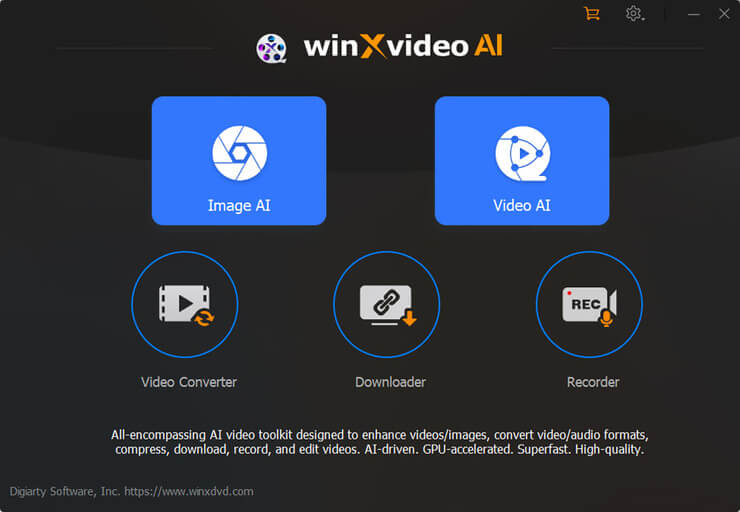
Winxvideo AI is a fantastic Windows video downloader that you can use to download videos from more than 1000 websites online. To download videos, you just have to copy and paste the URL of the video you wish to download. It makes use of AI and GPU acceleration technology to provide high-quality video and images @ a very fast speed.
It is an all-in-one Windows video processing toolkit that contains a video/image enhancer, video converter, compressor, editor, recorder, etc.
Features:
- Lossless video compression. It can reduce file size by 90%
- MP3 Audio extraction
- 3 AI mode to enhance the video
- Video converter with GPU acceleration that provides 47X faster video conversion.
Verdict: With Winxvideo AI, you get a good all-in-one video processing tool that does a lot more than just download videos. In just a few easy steps, you’ll be able to download videos from a site of your choice.
Price: You can use the tool for free with limited capabilities. The Full version will cost you $19.95 per year. There is a lifetime plan as well, please check the prices as mentioned below:
- Lifetime License / 1 PC $69.95
- 1 Year License / 3 PCs $39.95
- Family License / 5 PCs $109.90
Exclusive Discounts for Software Testing Help
1. Winxvideo AI Lifetime license
- Discounted Price: $29.95
- Coupon Code: WXVLF40
2. Winxvideo AI 1 Year license
- Discounted Price: $19.95
- Coupon Code: WXV1Y20
HitPaw Video Converter
Best for downloading multiple YouTube videos for Chrome, Firefox, and IE.
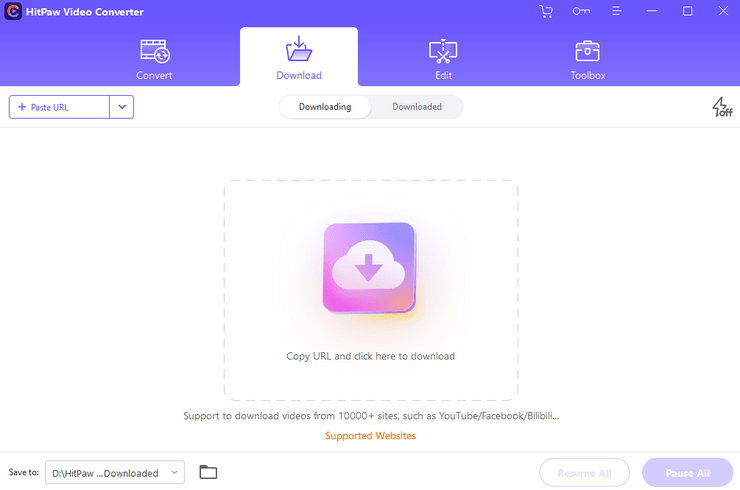
HitPaw Video Converter enables you to save videos/audio/subtitles from 10000+ popular websites and convert them to MP4/WebM in 8K/4K/HD, and MP3/WAV up to 320kbps. Batch download videos/playlists/channels with a link only.
Features:
- Lossless video converter and downloader.
- Download from more than 900 websites including Facebook.
- Save Time with Batch Processing.
- A host of video-editing options.
- User-friendly interface.
Verdict: HitPaw Video Converter, which is the 3 in 1 video tool software that allows users to Convert, Download, and Edit videos most efficiently.
In the latest version, HitPaw Video Converter brings the YouTube playlist download, Apple Music download, and TikTok download without watermark. Apart from these huge updates for video downloaders, HitPaw Video Converter also optimized the functions of the converter and editor.
Price: Free Trial available for converting and downloading. Starting Price for $19.95 and 1-Year Update License for $39.95 per year and a Single-user Lifetime Update License for $79.95.
FlexClip
Best for downloading royalty-free videos for editing.

FlexClip is an easy-on-the-eyes, full-service video editor that goes out of its way to create videos to serve a variety of purposes. Although it doesn’t qualify as a video downloader in the conventional sense, it does offer a huge gallery of royalty-free videos that you can download to help with the editing of your videos.
Not only do you get a gallery of video footage to play with, but FlexClip is also home to thousands of royalty-free audio clips, stickers, images, and video transition effects that all work together to offer a personalized experience missing from all the other tools on this list.
Apart from this, FlexClip is still a standard video editor that showcases a slew of exciting features to quickly edit and create videos of your own.
Features:
- Thousands of royalty-free video and audio clips to download
- Easy video editing with robust features
- Colorful and attractive user interface
- Readymade templates available for quick editing
Verdict: With FlexClip you are not getting a traditional Chrome video downloader, but it can be argued that you are getting something unique and fantastic. You get access to a vast library of videos that you can freely use without having to worry about getting sued with a copyright strike.
Price: Free
FAQs About Chrome Video Downloader
1) Are video downloader Chrome extensions safe?
Extensions available at the official Chrome Web Store are safe. Do not install any standalone .crx file extensions downloaded from other websites because they typically contain adware or tracking malware.
2) Are Chrome video downloaders free?
Most video downloaders are in fact free. Some offer premium plans with added features while some offer a tool that is free for use only for a limited period.
3) Can Chrome extensions download YouTube videos?
No, because all extensions available on the Chrome Web Store are prohibited from doing it. It is necessary to employ either desktop or web solutions or get YouTube Premium.
Also check =>> YouTube Video Downloaders for iPhone and iPad
4) Can a Chrome video downloader download HLS or M3U8 videos?
Yes, but only some advanced extensions do it. For example, the Stream Recorder and FetchV can identify the .m3u8 playlist, retrieve video chunks, and convert them into an MP4 file.
5) Why does a Chrome video downloader detect some videos but not others?
If a website uses HLS/DASH streaming, DRM encryption, or embeds players using restricted iframes, then the extension will not be able to detect them.
6) Can Chrome video downloader extensions download 1080p or 4K videos?
Only if they are offered on the website. Video downloader extensions can only download the video stream opened in your browser window.
7) Can Chrome extensions download live-streaming videos?
Yes, using stream recorders. Software like Stream Recorder detects active streaming in real-time, buffers it in the browser and saves the session as MP4 after you have stopped watching it.
8) Can Chrome video downloader extensions download DRM-protected videos?
No. The content offered on such platforms as Netflix, Disney+ and Hulu is encrypted with DRM technology and is not accessible for downloading by video downloader extensions.
Conclusion
The best video downloader for Chrome depends on your needs in terms of the type of video you intend to download, as well as the frequency of your video downloading activities. In case you require fast and easy download of supported videos, using the video downloader extension for Chrome will be more practical, since it will perform its function directly in the browser. A general video downloader will work for most embedded videos, while a specific video downloader will work better for HLS/M3U8 video and live video downloading.
In case you often download 4K or 8K videos, playlists, or more than one video at a time, it will be better to use a desktop video downloader rather than a browser extension. The desktop software will offer more options compared to the browser extensions when it comes to control over the quality, format, and batch downloading/conversion.
In case of downloading videos only on occasion and without installing any extension or program, it may be easier to use an online video downloader. However, before using it, you should pay attention to the privacy policy of the site, ads, redirects and websites which it supports. In addition, you should not think that any downloader will allow you to download videos from any site because it may be protected by DRM technologies, limited streams, change in website, or incompatibility with Chrome.
When it comes to YouTube, you should not select a Chrome extension just because of its ability to download videos from various sites. Video downloading from YouTube is regulated by some limitations of the platform, and there are many Chrome extensions that cannot offer unlimited YouTube downloading.
Research Process:
- The content for this guide was created through a structured review of Chrome video downloader tools available on the Chrome Web Store and reputable tech sources. Each video downloader and extension was evaluated based on its features, ease of use, supported platforms, user ratings, update frequency, and overall reliability.
- Total time taken to research and publish the guide: 80 hours (Approx)
- Total Chrome video downloaders reviewed: 30
- Top Chrome video downloaders shortlisted: 15
Was this helpful?
Recommended Reading
-

List and comparison of the top Twitter Video Downloader. Select the Twitter Media Downloader software from this list per your requirements: Twitter has come a long way since its humble yet spectacular beginning back in 2006. What began as a simple platform to share one’s thoughts and feelings, has now…
-

Review of Top YouTube Video Downloader Apps with Features, Pricing & Comparison. Select the Best Free Online YouTube Ripper for PCs to Download YouTube Videos: YouTube is the most-watched video streaming website. Launched in 2005, the online video platform features a wide variety of content, including TV clips, educational videos,…
-
Are you looking for the top Instagram video downloading app Regardless of whether you own an Android phone or an iPhone? In this guide, we have tested 15 Instagram video downloaders and the right app is going to come in handy for downloading your Instagram videos and Reels offline. The…
-
List and comparison of the top Facebook Video Downloader with features and pricing. Select the FB Video Downloader software from this list per your requirements: You have to be living under a rock to not know what Facebook is. It is after all a behemoth amongst social media platforms. From…
-
Read this Review of Free & Commercial Pop Up Blockers along with their Features, Pricing, and Comparison to Select the Best Ad Blocker for your needs: We will review and rate the top 8 ad blockers that are available on the market today. Pop-up blockers are software products that block…


Those crap extensions doesn’t work at all ! Its god damn google policy that interfere ! All those chrome based browser are copy of google chrome that’s why that doesn’t work !!! Use Firefox instead ! Chrome browser is highly censored browser ! 2 face amis think they can rule the world !