Is your Firestick randomly rebooting or turning off? Here is a breakdown of the steps to fix Fire Stick Keeps Restarting Issue. Delve deep into the reasons for Firestick keeps rebooting issues and solve them like an expert:
Firesticks have become quite popular in recent years. And the rate of increase in their popularity does not seem to go down in the coming years. With a Firestick, you can even turn a normal TV into a smart TV, if the TV has an HDMI port to insert the Firestick. This makes it easy for people with a normal TV to access applications like Netflix, Amazon Prime, and more without buying a new smart TV.
The increased popularity of online streaming platforms like Netflix, Hulu, Amazon Prime, etc. is anticipating the increase in the smart TV sticks market. These devices give users quick access to online streaming platforms, games, live channels, and more.
Table of Contents:
Firestick Keeps Rebooting: Reasons & Solutions

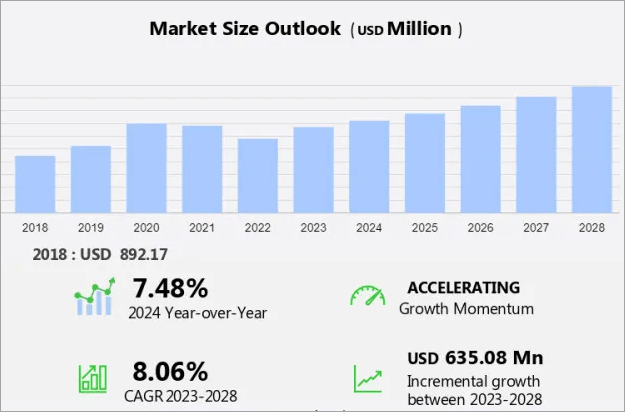
A report by Technavio states that the global smart TV sticks market is expected to see an expansion in its net revenue by about $635.08 million by growing at a Compound Annual Growth Rate (CAGR) of 8.06% over the years from 2023 to 2028.
The Firesticks come with an easy and quick installation process.
Watch this short YouTube video for step-by-step instructions on setting up Amazon Fire Stick.
And, if any issue arises with the Firestick, it can usually be resolved by following simple steps. If you are a Firestick user and you have this question, ‘Why does my Firestick keep restarting?’, this article will give you tips on what to do in such a situation.
Why Does My Firestick Keep Restarting?
Some Firestick users have quoted this issue, saying that their Firestick keeps restarting. There can be one of the following reasons why the fire stick keeps on restarting or rebooting on its own:
- Insufficient power: The top reason that causes the Firesticks or any device to keep on restarting is insufficient or unstable power supply. When a cable wire is loosely connected to the power supply, this can cause the Firestick to keep switching off and on. Connecting the Firestick USB to the TV for power, instead of a wall socket, can cause an insufficient power supply. Plus, if you are using an extension wire, there is a possibility that the extension wire is defective and is causing the power supply to fluctuate.
- Your Firestick needs a software update: Firesticks need to be updated from time to time. You must check for updates whenever you face any issues like Firestick keeps rebooting or restarting, etc.
- A software update is going on: A Firestick performs updates in the background. So you may face issues like this when you use the device during an update.
- Any other device connected to your TV’s HDMI port may cause the issue: If there is some other device connected to your TV’s HDMI port, then it can also cause the issue.
- There can be some issues with the TV.
- Your Firestick may be too old and defective.
- Your TV may not be compatible with an HDCP-compliant display, which is required to run a Firestick.
- There can be a bug in the Firestick.
Steps to Follow When Fire Stick Keeps Restarting
We have compiled a list of actions that can be taken to solve this issue. You can try one at a time and most probably could solve the problem within minutes.
Solutions:
#1) Make sure the Firestick gets enough power: Remove the extension wire if there is any. Plus, make sure the Firestick is connected directly to the wall socket for power supply. If you connect the Firestick USB to the TV, there are chances it won’t get enough power and will keep on switching off on its own.
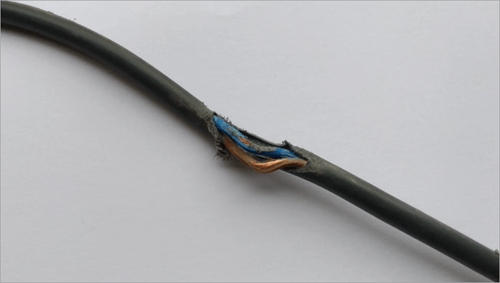
#2) Check the cable wire: There are chances that your power cable may have frayed. If that is the case, you’ll need to change the cable wire.
[image source]
#3) Remove other devices from the HDMI port: When other devices are also connected to the TV, they can cause problems. Ensure only the Firestick is connected to your TV.
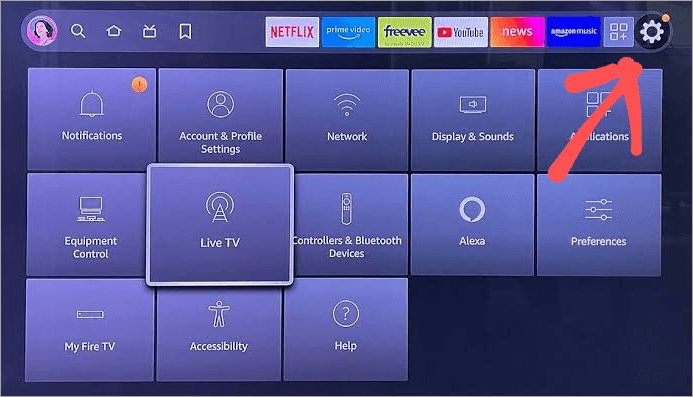
#4) Check for updates: Check for Firestick updates. You’ll have to follow these steps to check for updates-
- Go to Settings
[image source]
- Click on My Fire TV or Device & Software (whichever option is there).
- Now click on About
- Now select Check for Updates.
#5) Reconnect the Firestick: Try disconnecting the Firestick from the TV, then reconnect it. If there is a bug, it will most probably get fixed this way. You can also try restarting the Firestick to remove bugs. Watch this YouTube reel to learn how to restart a Firestick using the remote.
#6) Factory Reset: Another way to fix any bugs or glitches is doing a factory reset on the Firestick. Follow these steps for resetting your Firestick-
- Press the Back and Right Navigation buttons on your remote simultaneously for 2-3 seconds.
- Now Select Reset.
#7) Connect the Firestick to another TV: There may be some problem with your TV. You can try connecting the Firestick to another TV to check whether the TV has some issue.
Suggested Read =>> Best Firestick Apps with comparisons
#8) Check whether your TV has an HDCP-compliant display or not. The Amazon Firesticks run only on TVs with an HDCP-compliant display. Most of the TVs today come with this feature. But if the TV is not HDCP compliant, then the Firestick won’t be able to run.
#9) Turn the HDMI CEC function off: The HDMI CEC function in the Amazon Firesticks lets you use the TV remote as the Firestick remote. There are chances that this feature is turned on and you may have pressed some TV remote button by mistake, due to which you are facing the issue. To disable the HDMI CEC function, follow the steps as stated under:
Also Read => How to Connect Firestick Remote to TV
- Go to Settings
- Click on Display & Sounds
- Now select HDMI CEC Device Control
- Turn it off.
Also Read =>> Most popular and top IPTV for FireStick
FAQs on My Firestick Keeps Restarting
1. Why does my Firestick keep rebooting and optimizing?
There would most probably be one of the following reasons your Firestick keeps on rebooting and optimizing:
• The plug is not properly attached to the socket, which is causing fluctuations in the power supply
• If you have attached an extension wire, it may have some issues.
• The power cable may have worn out.
• The TV can have some defect
• There are chances that the TV is not compatible with your Firestick.
• There can be a glitch or bug, which can be fixed by restarting the Firestick. If that doesn’t work, try resetting the Firestick.
If none of these is the case, then there are good chances that your Firestick would have been defective.
2. Why is my Firestick stuck on the loading screen after reboot?
If your Firestick is stuck on the loading screen after reboot and doesn’t load even after waiting for 5 minutes, there are chances that:
• The HDMI cable is not properly inserted
• The HDMI port may have got corrupt
• The internet connection is lost
• The TV is not getting enough power supply.
• Your device may be too loaded with cache and other files.
3. How much does it cost monthly for a Fire Stick?
You do not need to pay any monthly fee for the use of a Fire Stick. You can buy them with a one-time payment. The cost of a Firestick ranges from around $18 to $100.
But if you use online streaming apps like Netflix and Amazon Prime or paid games, then you’ll have to pay their monthly subscription fees.
4. How to get the best out of a Firestick?
Here are some tips and tricks that will help you in getting the best out of your Firestick:
• Clear cache every week. Follow these steps to clear the cache:
a. Go to Settings
b. Go to Applications
c. Select Manage Installed Applications
d. Now select an app
• Click on Clear cache.
• Do not fill the Firestick with useless apps. If the storage space gets filled up, the Firestick will not run smoothly.
• Do not give the Firestick permission to track app usage. To turn off tracking, go to Settings, then select Preferences, then Privacy Settings, and then Internet-based Ads. Now turn this OFF.
• You can use voice search for a quick and easy search process.
• You can use the Parental Control feature to control access to certain apps.
5. Can I use someone else’s Fire Stick on my TV?
Yes. A Firestick can be used with any TV. You can just take out the Firestick from one TV and plug it into another TV. There would be no issue, as long as the other TV has an HDMI port for connecting the Firestick. A Firestick turns any normal TV into a smart TV.
6. Will a Fire Stick work without internet?
The Fire Stick will still work without an internet connection. You can play offline Android games or play downloaded movies or music files. Some apps like Kodi allow you to download movies and play them offline. So you can keep some movies downloaded for watching offline when you don’t have internet.
7. Can you run a Fire Stick on a hotspot?
Yes, your Firestick will work with a mobile hotspot. But, it consumes a lot of data, so make sure that you have an unlimited data pack on your mobile, before giving a hotspot for online movie streaming. Plus, the connection should be fast, otherwise it will keep on buffering again and again.
8. How do I stop my Firestick Stick from glitching?
You can take these measures to remove glitches from your Firestick and get the best experience:
• Clear cache now and then
• Be cautious while downloading third-party apps
• Be cautious while using public WiFi
• Factory Reset the Firestick if you face problems even after clearing the cache.
Conclusion
Screen buffering, blacking out, or restarting the Firestick while watching your favorite movie or show can be very irritating. So this article aims to throw some light on finding the reasons and solutions for when a Firestick keeps restarting.
This issue can usually be fixed by taking simple measures like fixing the cord, wire, socket, or HDMI cable. Sometimes when another device is connected to the HDMI port, that also causes issues with Firestick streaming. So make sure that only the Firestick is connected to the TV at a time.
Plus, ensure that your Firestick does not get too heated up because of using it for a long period. If you find your Firestick is overheated, switch it off for about 10 minutes, then restart it.
If your issue does get resolved even after doing everything, there are chances that your Firestick may have got defective. It is said that the Firesticks usually have a lifespan of 3 to 6 years.
Was this helpful?
Recommended Reading
-

Are you looking for solutions to why my Firestick so slow? Then this expert guide provides you with effective solutions that will help you to fix it easily and quickly. If your Amazon Firestick operates slowly or shows buffering or lag in your stream, this will surely cause frustration for…
-
Discover the most popular IPTV Free Trial Services and dive into the world of premium channels of high-quality. Pick the best IPTV Services that offers free trial before you buy the services. Choosing the right IPTV service can be confusing, especially with so many providers claiming to offer high-quality streams…
-
Take a look at the top IPTV reseller services available and pick the right IPTV reseller program, and start building a steady income with strong earning potential in the IPTV reselling program. If you’re looking for the best IPTV reseller programs, you’re in the right place. This guide helps you…
-

In this IPTV Tutorial, we will explore all about Internet Protocol Television including its Definition, Features, Architecture, Protocols, Advantages, etc.: The conventional television content distribution uses satellite, cable and terrestrial broadcast system formats. But the Internet Protocol TV or IPTV provisions the broadcast of the television series by using the…
-
Here we will review and compare the most popular and top IPTV for FireStick and guide you to select the best IPTV service for FireStick: Internet Protocol Television or IPTV is quickly taking the online content streaming domain by storm. This advanced technology allows you to stream your favorite TV…
-
To keep you entertained in your comfort, here we have listed the Best Firestick Apps with comparisons, features, installation steps, etc: Firestick has taken entertainment up by a few levels. All your favorite channels, movies, sports, series, everything at one place at your fingertips. It comes with a massive library…
-

Review of the best IPTV services available worldwide, compare the features and pricing of the top-rated IPTV providers, and select the best IPTV subscription. Picking an IPTV service in 2026 gives you choices from all kinds of live sports to big on-demand libraries. But it's not easy to find a…