Discover the major differences between Gradio and Streamlit frameworks. This article on Gradio vs. Streamlit will let you compare their features and pick the right tool to design Python-based data apps:
The most popular frameworks for building Python data apps are Gradio and Streamlit. Both have a user-friendly interface requiring minimal coding and less effort. The data visualization tool and machine learning models provide seamless integration.
The use cases for both of them are entirely different, as through Gradio the shareable machine learning demos can be easily created. Leveraging Streamlit is good for full-fledged data-driven applications.
Table of Contents:
Difference Between Gradio and Streamlit: Explore Now
Through the Python dashboards, interactive analysis can be done, which gives the users the ability to comprehend easily and in a hassle-free way. With the features of dropdowns, buttons, and sliders, the dashboard can be created dynamically and engagingly for the viewers.
Further Reading => Check ALL Python Tutorials Here
For selecting the tool, various factors can be considered, such as flexibility of deployment, the process of creating a dashboard, and how quickly the development can occur.

Gradio vs Streamlit: Detailed Comparison
In the table below, the key aspects of both tools are compared. With the help of this table, the strengths and weaknesses of both tools can be considered.
| Features | Gradio | Streamlit |
| Ease of Use | Through Hugging Face spaces, it provides instantaneous shareable links | Needs customization of code for complex applications |
| Integration | For the machine learning models, it is designed | For the dashboards and data visualization, it works well apart from the machine learning models. |
| Customization | Provides customized options related to layout, widgets, and styling | For sharing research, quick prototypes, and for AI/ML models, it is the best one. |
| Deployment | Limited options for customization | Through Streamlit Community Cloud, AWS, GCP or any other platform, the deployment can be done. |
| Performance | For a simple interface, it can be used | For handling complex applications with real-time updates, it is the most robust and well-suited. |
| Best For | With pre-defined input and output components, it auto-generates the user interface | For interactive data applications, dashboards and data analytics it can be used. |
| UI Generation | With several layout options, it provides flexibility to auto-generate the user interface. | For interactive data applications, dashboards, and data analytics, it can be used. |
| Purpose | For creating quick interactive machine learning demos | For building full-fledged data-driven applications |
| Available Resources | Have a large documentation but extremely small community members to support. | Smaller number of users, but not growing as compared to Streamlit. |
| User Base | Smaller size of users, but not growing as compared to Streamlit. | With a diversified pool of expertise and collaboration, it has a large community. |
Gradio Framework
For the machine learning models, computational tools, and data visualization, Gradio is an open-source Python library that allows developers to quickly create and share interactive web applications. With the help of an easy-to-use interface, users can input the data in the form of images, audio, and text.
The users can receive the real-time output that can assist in demonstrating the AI models, sharing research with non-technical users, and building prototypes.
Gradio generates a web-based user interface that can be hosted through a public link or can be locally hosted.
Here is the video on Introduction to Gradio:
Why Choose Gradio?
- Quick Deployment: Gradio offers seamless integration with existing frameworks and offers the option to deploy the application as a standalone server. With the ease of this flexibility, the models can be easily shared and accessed by the users.
- Ease of Use: Leveraging the API, Gradio enables to creation of web-based applications. With minimal effort, interactive interfaces can be created for machine learning models.
Top Features of Gradio
- Simple APIs: The APIs used in Gradio are easy to learn and use. For the UI/UX designers, it is very easy to use, even if they don’t have vast experience.
- Multiple Data Types: A wide variety of data in the form of video, audio, images, text, and files is supported by Gradio.
- Queuing System: The apps built on Gradio have an in-built queuing system. For thousands of concurrent users, it can be easily scaled.
- Theming Engine: Leveraging the built-in theming engine, Gradio offers a wide variety of colors, elements, and fonts as per the requirements of the users.
- Chatbot Specific Event: For creating engaging and interactive interfaces, Gradio offers specific events for building a chatbot.
Further Reading => Best AI Chatbots to Look For
Community and Support
Gradio has a huge, active, and vibrant community that provides support in the form of documentation, Hugging Face spaces for hosting the applications, a growing library and tools, guides, and open-source Python packages.
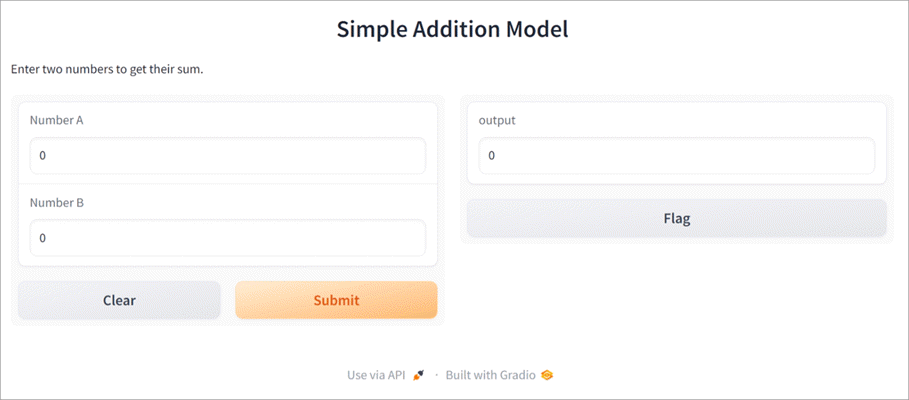
Example: Here with an example of code through which we can create a simple interface for a machine learning model:
import gradio as gr

#Defining a simple function
def add_numbers (a, b):
return a+b

#Creating a Gradio Interface with the updated syntax
interface = gr.interface(
fn=add_numbers,
input = [gr.Number (label = “Number A”), gr.number (label = “Number B”)],
output = “number”,
title = “Simplified Addition Model”,
description = “Enter any two numbers for getting the sum”
)

#Launching of Interface
interface.launch ()
Here is the output of the above code:
Here are the Tips on Web Design:
Streamlit Framework
For building and deploying interactive data applications, Streamlit provides an open-source Python framework. With minimal effort and for creating an interactive application, Streamlit allows developers to create a web-based application.
Leveraging simple Python scripts, it assists in data visualization, analytics, and machine learning models. With the enhanced features of seamless integration with libraries such as Tensorflow, Matplotlib, and Pandas, it provides real-time updates and automatic UI generation.
For sharing interactive applications and quickly prototyping, Streamlit is a powerful tool for data scientists and analysts.
Here is the YouTube video on What is Streamlit:
Why Choose Streamlit?
- Deployment: On the local server or the cloud platform, it provides simplified sharing options.
- Community Support: Streamlit has strong community support as it has a wealth of resources that include documentation, examples, and tutorials, as well as it has an active forum of developers.
- User Management: It provides user management capabilities and allows developers to access the level and permissions in a very easy and hassle-free way.
- Advanced Customization: Leverages the flexibility to build engaging and customized dashboards that meet the requirements of the project.
- Quick Dashboard Creation: With just a few lines of code, the developers can create interactive web applications by writing Python scripts. The prototyping process can be sped up, and it reduces the time required for bringing the dashboard from the concept to deployment.
Top Features of Streamlit
- Support for Multiple Pages: Using st.Page and st.navigation multiple pages can be created using Streamlit. For a user to navigate, it becomes easy to manage multiple pages as a developer by leveraging Streamlit.
- Pythonic Syntax: Without learning JavaScript, CSS, or HTML, the entire coding of an application can be written in a few lines using Python.
- Rapid Prototyping: Without thinking too much about the web infrastructure, the ideas can be quickly turned around into functional applications leveraging Streamlit.
- Application Testing: With the help of the built-in testing framework, the Streamlit application can be tested. While testing the Streamlit application, a simulation is done while running the app, user inputs are declared, and the results are inspected.
- Static File Serving: Access to only limited files is given under the directory name static. Under the correct configuration and after placing the hosted files, access to the hosted files can be given to the users. Access to the local files can’t be given to a user directly due to security reasons.
Community and Support
Streamlit has a dedicated community support for deploying the applications. Streamlit Community Cloud and resources for handling multiple avenues. Through the Streamlit Community form, users can ask questions, discuss ideas, and share applications.
Example: Through the below example of code, the dashboard can be created through Streamlit:
import streamlit as st
import pandas as pd
import numpy as np

#The title of dashboard
st title (‘Simplified Dashboard’)

# For creating a dataframe
df = pd.dataframe ({
‘Line 1’: np.random.randn (200),
‘Line 2’: np.random.randn (200),
‘Line 3’: np.random.randn (200),
})

# Displaying the dataframe
st.write (“Sample Dataframe”, df)

# Addition of Line graph
st.line_chart (df)
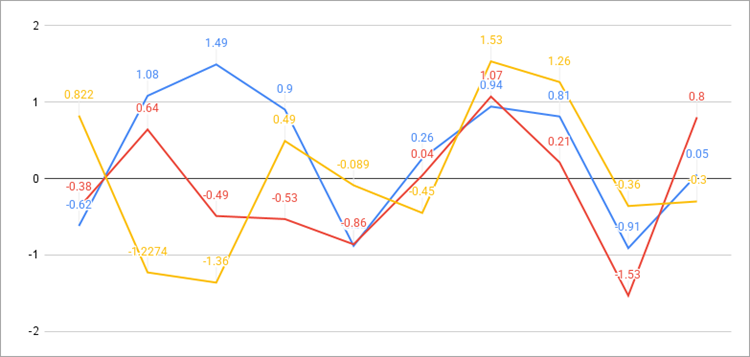
Here are the input values:
| S.No | Column A | Column B | Column C |
| 1 | 0.822 | -0.62 | -0.38 |
| 2 | -1.2274 | 1.08 | 0.64 |
| 3 | -1.36 | 1.49 | -0.49 |
| 4 | 0.49 | 0.9 | -0.53 |
| 5 | -0.089 | -0.88 | -0.86 |
| 6 | -0.45 | 0.26 | 0.04 |
| 7 | 1.53 | 0.94 | 1.07 |
| 8 | 1.26 | 0.81 | 0.21 |
| 9 | -0.36 | -0.91 | -1.53 |
| 10 | -0.3 | 0.05 | 0.8 |
Here is the output of the above-written code for creating the dashboard:
How to Choose the Right Framework?
While choosing any framework, a few things should be kept in mind before going ahead with designing. Firstly, the framework must be able to handle a large database, and it must have a robust ecosystem. Frameworks that are actively maintained and scalable should be given priority.
The frameworks can be used for different things, such as defining strategies, generating insights, analyzing, or framing. Depending upon the project, an appropriate framework can be selected.
Gradio and Streamlit Alternatives
For building interactive web applications specifically for data visualization and machine learning, Gradio and Streamlit are the most popular web application tools for creating the user interface. Each of the tools has unique strengths, and depending on the functionality and complexity, the alternative tool can be chosen.
Depending upon the requirements, Gradio alternatives and Streamlit alternatives are mentioned below for creating the UIs for machine learning models.
| Alternatives of Gradio and Streamlit | Best For | Framework Used | Integration |
|---|---|---|---|
| Dash | Data visualization and analytics | Built on React, Plotly and Flask | Suitable for customized and complex dashboards |
| Fast API | Building APIs with Python | Lightweight web frameworks | Leverages manual UI designs i.e. HTML, JS any other frontend frameworks |
| Panel | For building analytical and scientific applications | Framework developed by HoloViz | Integration with Matplotlib, Plotly and Bokeh |
| Shiny | Interactive applications for statistics and ML | Framework built in R. | Supports Python and builds completely built on R. |
| PyWebIO | Interactive Web Applications | Low code Python Web Framework | Requires minimal HTML knowledge. |
FAQs on Streamlit vs Gradio
1. How to deploy the applications built with Gradio and Streamlit?
On the framework platforms such as AWS, Google Colab, Hugging Face Spaces, and Streamlit Community Cloud, the deployment can be done. Through Gradio, instant sharable links can be generated, while through Streamlit, additional setup for API integration is required.
2: Which framework is good for beginners?
With the knowledge of data manipulation and visualization, Streamlit is good for beginners. For people interested in doing less coding and are excited to create machine learning demos quickly, Gradio is the best one.
3. For deploying machine learning models, which one is better?
Through the ease of sharing public links and supporting API integration, Gradio is the best one for machine learning model deployment. With the additional service required for API setup, Streamlit can also deploy the machine learning models.
4. Can we use Gradio and Streamlit for free?
Both of them have an open framework and are easy to use. Through the cloud hosting options, the UI can be deployed through both tools.
5. What is the major difference between Gradio and Streamlit?
For quickly creating and sharing ML model demos, Gradio can be primarily used. Streamlit can be used for building interactive dashboards and data applications. Streamlit supports multiple libraries such as Plotly, Matplotlib, and Altair, while going with Gradio supports limited options.
6. What are the limitations of Gradio?
Gradio is designed for machine learning applications, and limited customization can be done in the design. Sometimes, to make the interface load, there is a need to restart the Jupyter notebooks. For quick prototyping, it is a good one to use.
7. What is the downside of Streamlit?
For large and big-sized projects, Streamlit is not a good choice due to its limited scalability. Streamlit is designed for quick prototyping and rapid development. For the small and medium-sized projects, Streamlit is good.
8. Is Gradio good for production?
For the quick deployment of machine learning models, Gradio is used for rapid development of an environment. Mostly, Gradio is used by machine learning engineers and data scientists for creating demos related to deep learning models. For non-technical users, Gradio is a good one due to its friendly interface. For production, Gradio provides production-ready applications that are efficient, beautifully designed, can be written up in only a few lines in Python, and have the best security.
9. Can Streamlit handle large data?
The maximum size of Streamlit is 200 MB, and due to the synchronous nature of Streamlit, it becomes difficult to in complex tasks to are resource-intensive. Thousands and hundreds of rows in an enterprise setting processing data frames in the enterprise, but the grouping of data in Streamlit is a difficult and expensive option.
Conclusion: Which is Better – Gradio or Streamlit?
Both frameworks help in simplifying web development in Python. For the ease of sharing with an entire focus on the machine learning model deployment, Gradio is a good one to go. On the other hand, for developing interactive data-driven applications, Streamlit is the best option to choose from.
For deploying and sharing the machine learning models in a quick and hassle-free way, Gradio is the best one to go with a simple UI. With minimal efforts and for building interactive applications, Streamlit offers the flexibility for dashboard creation and data visualization.
Was this helpful?
Recommended Reading
-

This Tutorial Explains How Python can be used for Test Programming and Lists the Features and Comparison of the Top Python Testing Frameworks: With the widespread application of Artificial Intelligence, Python has become a popular programming language. This tutorial will cover how Python can be used for test programming along…
-
Level up your programming game with the top-notch AI coding tools. Compare the prominent AI code generators to pick the right AI tool for coding to boost code quality: With the revolutionary change of artificial intelligence, the way software developers and engineers work has completely changed. Writing code, debugging, interacting…
-
Gain insights into the powerful visualization capabilities of the Top AI Data Visualization Tools. Pick the right AI tool for data visualization to handle complex queries & revolutionize data interaction: Lately, Data Analysis has been revolutionizing research powered by GPT-4 AI-driven tools. Data analysis and data visualization have become much…
-
This Tutorial Explains What is Machine Learning, How Does It Work, Applications of ML and The Comparison of Machine Learning Vs Artificial Intelligence: Machine Learning is a field in computer science that learns from experience without being programmed. It is a part of Artificial Intelligence, or we can say that…