


An in-depth Cloudways Copilot review with pricing, pros & cons. Explore how this AI-Powered assistant can potentially save 15+ hours monthly by managing 180 WordPress sites:
Running a digital agency is no child’s play. You’ll run into several problems while managing a boatload of websites.
With so many things happening at once, something is bound to go wrong. Websites plagued with performance issues, complete breakdowns, plugin conflicts, and servers running out of memory are just common occurrences.
To maintain client satisfaction, agencies must remain proactive and think strategically to address website problems swiftly.
Cloudways Copilot Review: Perfect AI Hosting Assistant
We are living in an era of AI and automation. What digital agencies desperately need today is a tool that heeds the times we are living in, one that employs AI to help them deal with performance issues, security incidents, and uptime threats.
This is where Cloudways Copilot comes into play. I first heard about this AI hosting assistant when I came across a video of Mint Media CEO, Jonathan Sokol, speaking glowingly about the positive impact it has had on his business.
Naturally, I was intrigued enough to check out Cloudways Copilot myself. So, consider this article a comprehensive Cloudways Copilot review.
What is Cloudways AI Copilot?
Not to be mistaken for Microsoft’s AI assistant that also goes by the moniker Copilot, Cloudways Copilot is an AI-powered toolset specifically designed to help agencies manage web servers.
Launched in early 2025 by Cloudways, this AI tool’s primary purpose is to monitor a server’s critical components round-the-clock, detect issues, and suggest actions to remediate those problems before it is too late.
The tool employs AI-powered diagnostics to tackle some of the most notorious culprits responsible for website downtime. I am about complex issues plaguing one’s servers, like aggressive bot traffic, disk space issues, unoptimized data queries, and unexpected DoS/DDoS attacks.
The tool can help agencies resolve this issue in a single click, thus cutting resolution time considerably. Cloudways claims that Copilot can resolve some of the most complex web-stack issues 4 times faster than traditionally used methods.
Initially, this claim was a tough pill to swallow for me. That was until I heard what Mint Media’s CEO, Jonathan Sokol, had to say about his experience with Cloudways Copilot.
Who Should Use Cloudways Copilot
Cloudways Copilot is a godsend for agencies managing numerous hosting environments and servers. It can help agencies of all sizes understand a security incident or performance issue and provide you with AI-generated insights on how to best resolve them.
The platform excels at rapid server issue troubleshooting. Both developers and non-technical users will have an easier time employing this AI toolset to meet their ends. In hindsight, I believe Cloudways Copilot is a great AI assistant for agencies, freelancers, and businesses that seek impeccable AI-powered server monitoring capabilities.
How Cloudways Copilot Helped Mint Media Manage 180+ Sites
Mint Media is a digital agency that provides B2B clients with full-scale design and development support. The agency currently manages over 180 websites. According to Mint Media’s CEO, Jonathan Sokol, Copilot has proved invaluable in helping them manage these sites, saving his team 15 hours a month.
Speaking on Cloudways Copilot, Jonathan Sokol had this to say:
“Copilot not only summarises the issue but also makes it easier for us to troubleshoot the issue by providing potential solutions. If you work in the design and development space, managing multiple hosted environments or multiple hosted servers, I highly recommend checking out Cloudways Copilot, as it has been a game-changer for us.”
Basically, Mint Media found Copilot to be extremely efficient at not only detecting the issue but also providing suggestions on how to best resolve specific issues associated with an application or the environment.
From the testimony by Jonathan Sokol, it becomes more than apparent that Mint Media attributes a lot of its recent success in managing multiple WordPress sites to Cloudways Copilot’s AI-powered intervention.
How Cloudways Copilot Works?
Having learned the essence and impact of Cloudways Copilot, let’s explore its functionality.
A Brief Overview of Cloudways Copilot’s UI
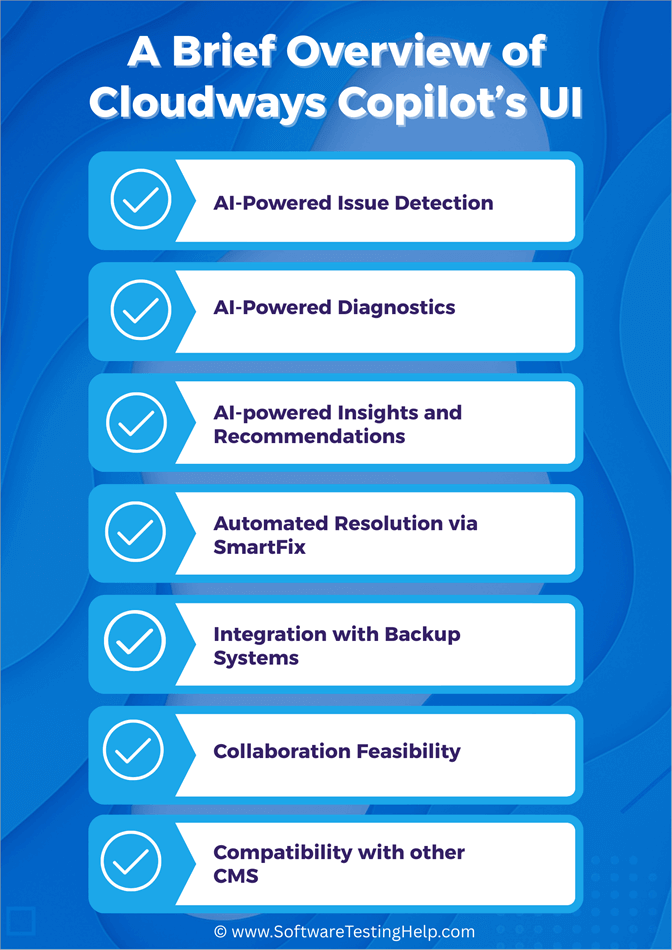
Getting started with Cloudways Copilot is easy. You sign up and register to create your account, after which you’ll be taken to Copilot’s main dashboard. It is well-organised with features and options neatly laid out. This makes the navigation feel as easy as a walk in the park.
Here is the dashboard image of Cloudways Copilot for your reference:
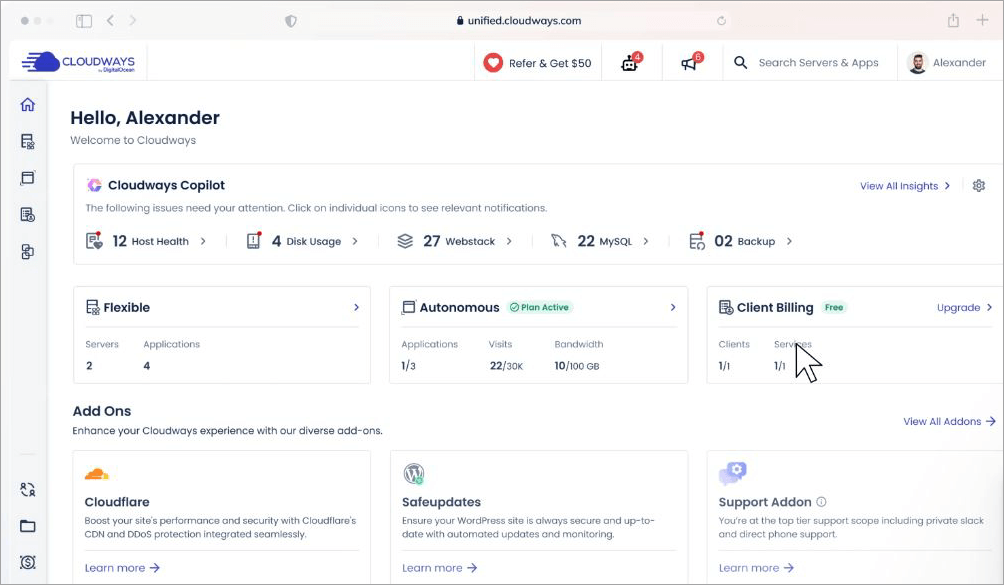
As for its main capabilities, almost everything is automated. Copilot’s AI will do all the heavy lifting. This includes 24/7 server monitoring, insight generation, and remediation suggestions. As such, everyone from developers to non-technical users will have an easy time employing it for server maintenance and issue resolution.
AI-Powered Issue Detection
Copilot is running in the background, monitoring all of your server’s critical components as soon as it is launched. Copilot scans everything, including your webstack, disk, host, and disk inodes, constantly.
Take a look at the image below on AI-Powered Issue Detection:
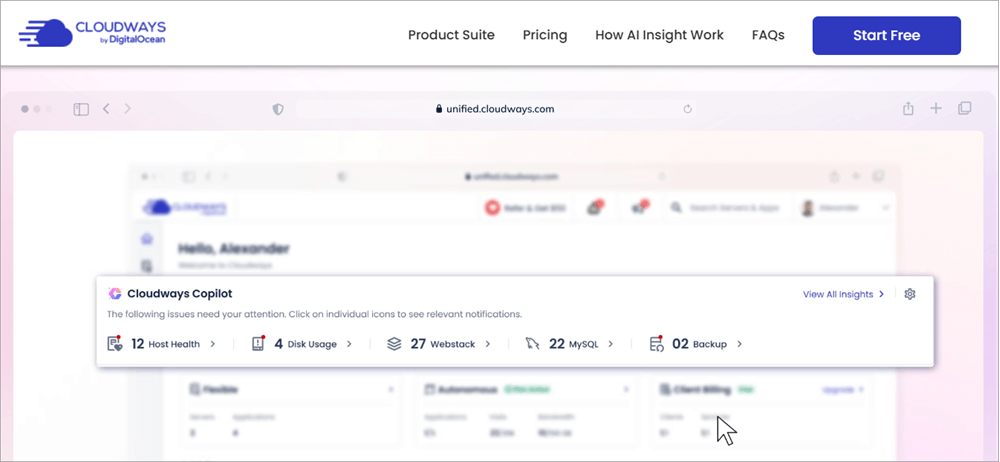
This ever-vigilant nature helps Copilot detect any issues that can cause significant harm to your applications and servers. As soon as Copilot detects the problem, it immediately alerts you.
AI-Powered Diagnostics
Here is the image on Cloudways Copilot AI-Powered Diagnostics:
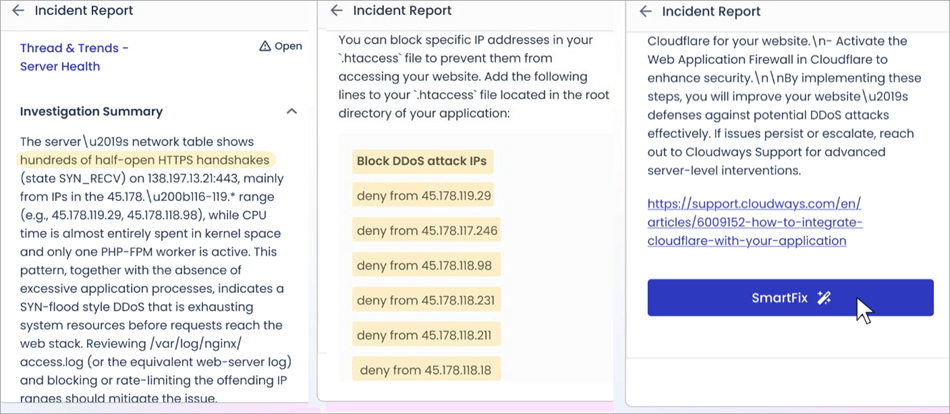
I also like how Copilot doesn’t waste any time and immediately gets to work by diagnosing the problem at hand. All issues detected are analyzed to understand their root cause.
The diagnosis is instantaneous, thus saving your team a lot of time and cutting down resolution time considerably as well.
AI-powered Insights & Recommendations
The tool excels at drawing out clear, concise, actionable insights from the performed diagnosis. These insights can entail a step-by-step guide on how to resolve a specific issue in the best way possible.
The platform provides you with these insights and recommendations quickly after a diagnosis, either via email or platform notifications.
Automated Resolution via SmartFix
After a diagnosis, you’ll have the option of using the suggestions provided to fix the issue yourself or letting Copilot’s SmartFix capability take over. The latter option will obviously save you a lot of time and effort.
Copilot’s SmartFix lets you resolve almost all issues automatically, from reboots to disk cleanup. SmartFix resolves problems with a single click.
You can count on Copilot’s SmartFix to decipher AI insights and employ the best practices to resolve each server issue detected.
Integration with Backup Systems
Cloudways Copilot monitors the health and function of the platform’s backup systems and other storage components. Copilot constantly monitors server health, disk space, and disk inodes, which are critical for successful backups.
Copilot can spot potential backup system failures or disk space problems before they cause an issue.
Collaboration Feasibility
Copilot easily collaborates with the Cloudways team management. If multiple team members have access, then all will see the same Copilot insights. This makes it ideal for collaborative projects such as agency-managed sites, multiple developers, etc
The main benefit of Copilot’s team collaboration is that it provides instant, actionable insights, which eliminates the need for team members to spend hours on manual troubleshooting. Agencies managing multiple client websites benefit from these immediate diagnostics to cut down on support time significantly.
Compatibility with other CMS
Cloudways is compatible across the range of CMSs and web applications like WordPress, Magento, Laravel, Joomla, Drupal, etc. Copilot works at the server/infrastructure level, not inside the CMS codebase.
That means that for any CMS or app, Copilot’s monitoring, diagnostics, and SmartFix apply equally. It doesn’t limit or interfere with CMS functionality.
Pricing and ROI of Cloudways Copilot
Cloudways Copilot works on a credit-based system. Its starter plan is free for the first 6 months. The plan offers 5 AI insight credits, which renew each month. The free plan is a promotional offer, which is expected to end in January 2026. So, if you want to take Copilot for a test-drive without charge, now would be a good time.
Its premium plans start at $9.99/month, whereby users are rewarded with 12 AI credits. For agencies that seek CMS or WordPress site management at scale, Cloudways offers a plan that starts at $19.99 and offers 25 credits. You pay more to get more credits.
Here are the pricing plans of Cloudways Copilot:

The value of Copilot’s proposal lies in its promise to reduce the time it would otherwise take to manage servers and applications manually.
Thanks to AI-powered diagnostics and SmartFix, Copilot can identify and fix server issues in about 5-6 minutes, as opposed to the 30-40 minutes it would take through traditional means.
It is also estimated that downtime can cost a company anywhere from $5000 to $9000 per minute. Copilot’s proactive 24/7 AI monitoring prevents downtime and thus helps your company save costs.
We already have real-life client testimonials, like the one published by Mint Media, wherein the tool helped the agency save 15 hours managing over 180 sites in a month.
These benefits indicate a significant ROI, as the value you ultimately get far exceeds the price you pay to get Cloudways Copilot’s services.
Cloudways Copilot Vs Traditional Monitoring Tools
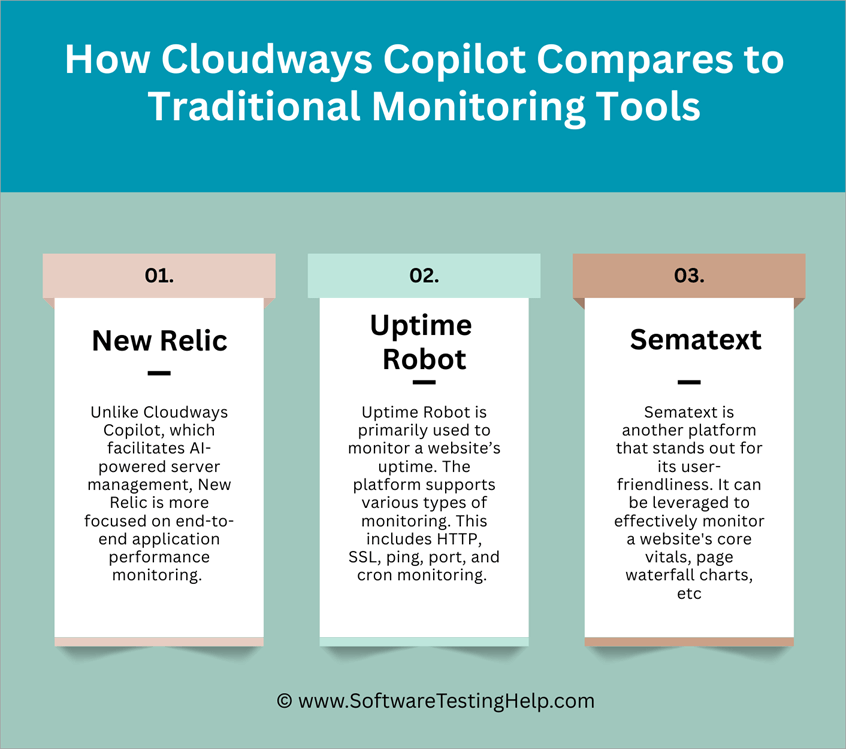
To really hit the point home on just how effective Cloudways Copilot is, I decided to pit it against some prominent traditional monitoring tools.
This is how it performed:
#1) New Relic
Unlike Cloudways Copilot, which facilitates AI-powered server management, New Relic is more focused on end-to-end application performance monitoring.
The platform is great when used to monitor infrastructure and applications across on-premise, cloud, and AI environments. New Relic excels in offering detailed error reports and full-stack visibility.
Website: https://newrelic.com/
#2) Uptime Robot
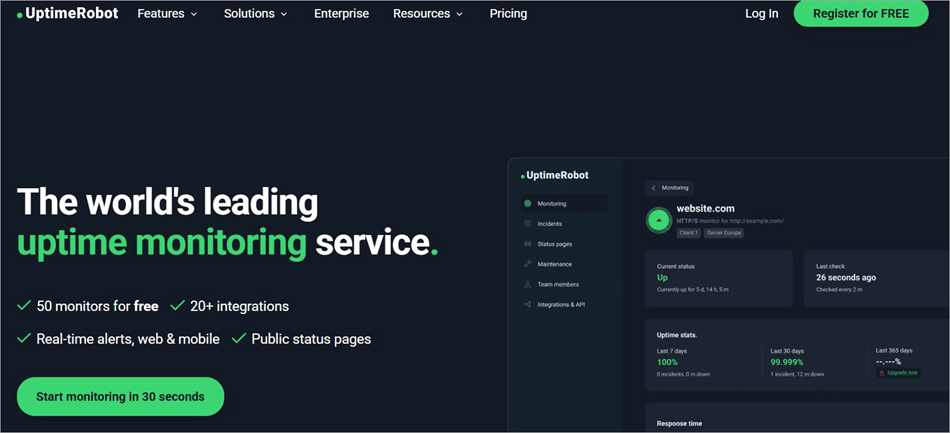
Uptime Robot is primarily used to monitor a website’s uptime. The platform supports various types of monitoring. This includes HTTP, SSL, ping, port, and cron monitoring.
The platform stands out for its free plan, which lets you monitor up to 50 websites without charge. It is also easy to set up, making it ideal for small businesses and start-ups.
Website: https://uptimerobot.com/
#3) Sematext
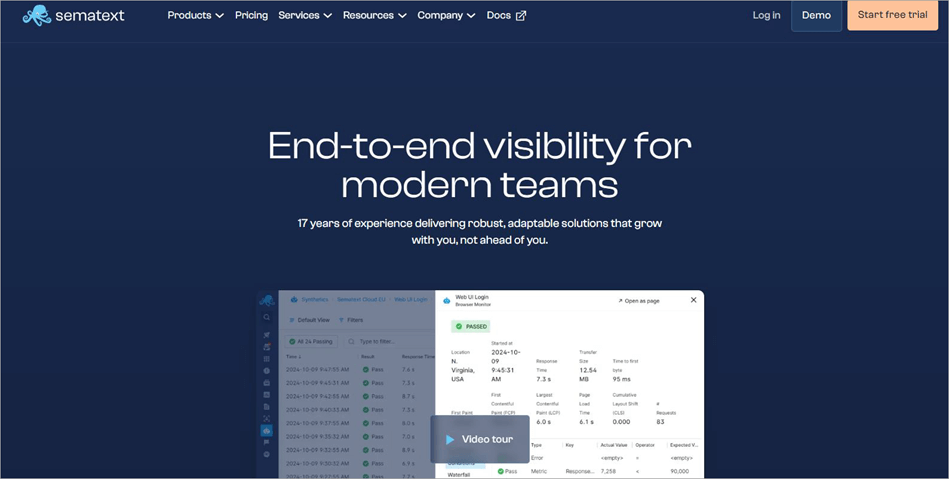
Sematext is another platform that stands out for its user-friendliness. It can be leveraged to monitor a website’s core vitals, page waterfall charts, etc., effectively. The platform also facilitates CI/CD tool integrations, thus helping you run monitor checks automatically during deployment.
The platform is ideal for SysAdmins and DevOps teams who wish to monitor applications across environments and troubleshoot issues.
Website: https://sematext.com/
While all the above tools are great when it comes to monitoring, Cloudways Copilot clearly has an edge over them, thanks to its AI-powered diagnostics and resolution capabilities. It is also much faster at resolving issues than many of its contemporaries, as evidenced by the testimonies of its past and current clients.
Pros and Cons of Cloudways Copilot
| Pros | Cons |
| 24/7 monitoring of critical AI components | Only meant for websites being hosted on the Cloudways platform. |
| AI-powered actionable insights | |
| Automated one-click resolution of issues with SmartFix | |
| Flexible, scalable plans. | |
| 4 times faster at detecting and resolving issues. |
Frequently Asked Questions
1. What types of issues can Cloudways Copilot detect and diagnose?
Cloudways Copilot monitors critical server components to detect and diagnose a variety of complex issues. They are as follows:
• Aggressive bot crawling
• DoS/DDoS attacks
• Disk space issues
• Webstack performance issues
• Backup system failure
• Disk inode issues, etc.
2. Can Cloudways Copilot automatically fix issues on my server?
Yes, thanks to Copilot’s AI capabilities and SmartFix feature, you can count on this tool to automatically resolve issues plaguing your hosting and server environments with a single click.
The AI understands the information it creates and uses the best methods to fix a problem more quickly and easily.
3. How accurate are Cloudways Copilot’s AI-powered insights?
Based on client testimonials available for reference, most agree that Cloudways Copilot’s insights are largely accurate and reliable. Copilot has an engineering team hard at work behind the scenes to assess and review all insights generated to make sure they are flawless.
4. Can you get human support with Cloudways Copilot?
Although the concept of Copilot revolves around less human intervention, you can still reach out to a human support team whenever you are facing an issue while using the tool.
You can get in touch with this team 24/7. The support itself is responsive and quite effective in helping users find a solution to any problem they are facing.
5. Will Cloudways Copilot put a load on my server?
Copilot does its job on Cloudways’ strong infrastructure and demands little to no memory or CPU usage. As such, your website’s server performance will not be affected as Copilot does its job in the background.
Watch this video to know how to solve problems quickly with Cloudways Copilot:
Final Verdict: Is Cloudways Copilot Worth It?
It’s not even been a year since Cloudways Copilot first made its presence felt, and it has already made quite an impression. You don’t have to look any further than the real-world case study of Mint Media to gauge just how effective it is at server or WordPress maintenance automation.
By leveraging automated AI insights and tailored solutions for issues, Cloudways Copilot helped Mint Media manage 180+ sites and save 15 hours a month.
If you have a website hosted by Cloudways, then it simply makes sense to use Copilot for all of your web and server maintenance requirements. It is excellent at detecting complex issues and resolving them automatically in no time.
I would highly recommend this AI toolset to all agencies and businesses that are managing multiple websites on Cloudways.
For more hosting-related guides, you can explore our range of tutorials below:
- 20+ BEST Cloud Hosting Providers
- Best WordPress Hosting Services
- The 19 Best Free Website Hosting And Domain Services
- How to Migrate a WordPress Site to Cloudways Lightning Stack
- General Purpose Vs CPU-Optimized Servers on Cloudways
- Top 10 Video Hosting Sites (Free and Paid Compared)
Was this helpful?
Recommended Reading
-

List of the Best Cloud Hosting Service Provider Companies with cost details and feature comparison: What is Cloud Hosting? Cloud hosting is the process of hosting web applications in a cloud computing environment. Organizations outsource the services for computing and storing of resources and that, in turn, is called cloud…
-
List of The Most Popular Free WordPress Hosting Services with Features and Comparisons. Select The Best WordPress Hosting Service For Your Business: WordPress hosting is the shared web hosting service that runs WordPress sites. WordPress hosting is used to improve the performance of the website such as loading speed and…
-
Review and compare the top free Website Hosting services with features and technical specifications and decide the best free web hosting service as per your requirements: When you own a business, you make efforts to make it grow. In today's time of digitalization, online marketing is a need for every…
-
AWS is a world leader in the industry of cloud computing. But for new users, it's difficult to configure AWS servers. This is where Managed Cloud Hosting Services can be helpful. This is a detailed review of how you can use Cloudways Managed AWS Cloud Hosting Service and take advantage…


