A complete hands-on review of Usercentrics Cookie Consent Management Platform. Learn more about its features, pricing, and integration to decide if it’s the right CMP for GDPR compliance on your website:
There’s been a lot of chatter going around recently on the topic of data privacy online. In the wake of alarming data breach stories in the news, people are rightfully concerned, thus compelling businesses to take measures to assuage those concerns.
This entails complying with established data privacy regulations by obtaining consent from users when collecting their data either via trackers or cookies.
Cookiebot by Usercentrics: Expert Review With Alternatives
Performing all the tasks associated with this can be risky and time-consuming for an average business. This is where cookie consent management platforms come into play.
These platforms primarily automate the collection and management of user consent preferences regarding the use of cookies and trackers. In doing so, they help companies meet compliance requirements put forth by globally recognized data privacy regulators.
One such platform that has been on my radar lately is Usercentrics, particularly its cookie consent management solution, Cookiebot CMP. Raved to the high heavens among online circles, I was intrigued enough to test the hype myself. So, I gave it a shot and would like to use this article to express my honest opinions.
So, without much further ado, let’s dive in.

What is Cookiebot By Usercentrics?
Founded in the year 2017, Usercentrics has been a leading provider of data privacy and consent management solutions for almost a decade.
Over the years, it has helped countless SMBs and growing businesses meet the compliance requirements put forth by global data privacy regulations like the CCPA, GDPR, ePrivacy, and more.
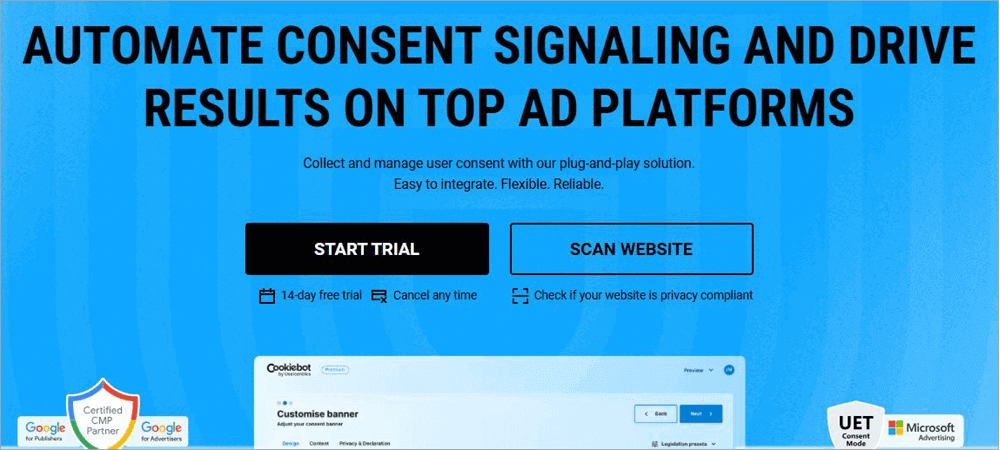
Cookiebot is perhaps its most prominent offering and is widely considered to be one of the finest cookie consent management platforms out there. This solution automates collecting, recording, and managing user consent on websites and applications via a displayed cookie consent banner.
This banner can be customized to meet both compliance and your brand’s specific requirements. That’s not all, though.
It comes equipped with a ton of features that together streamline the process of compliance and consent management for businesses. For instance, you get a website scanner, advanced reporting capabilities, and a robust cookie repository.
It also facilitates seamless integration with various other platforms. It is a Google Certified CMP that fully supports and integrates with Google Consent Mode v2 and Google Tag Manager.
Now that we know what Usercentics’ Cookiebot entails, let’s look at some of its most prominent features.
Key Features and Functionalities
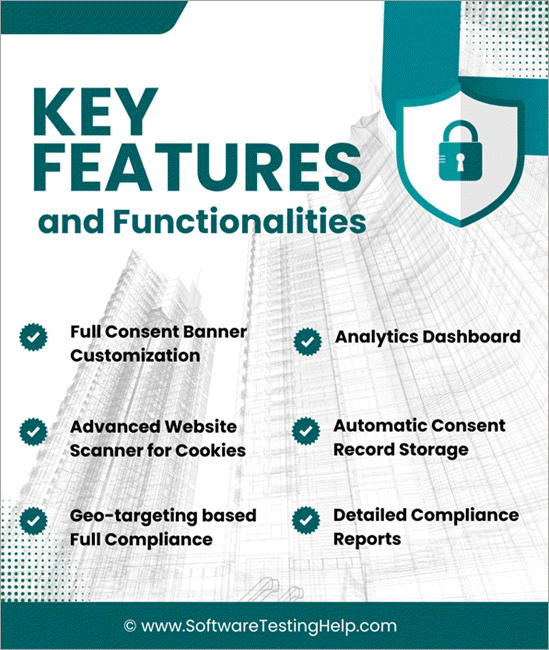
Unlike other, more traditional cookie consent management platforms being widely used today, Cookiebot’s features help it carve a rather distinct identity.
Below are some features that distinguish it from its competitors.
1. Full Consent Banner Customization
This is undoubtedly one of the CMP’s strongest USPs. The platform lets you design a consent banner to collect user consent on websites and applications. You can design this banner from scratch using the pre-built templates provided to you. I found the customization itself to be very extensive and satisfying.
Here is the image of the Customization banner:
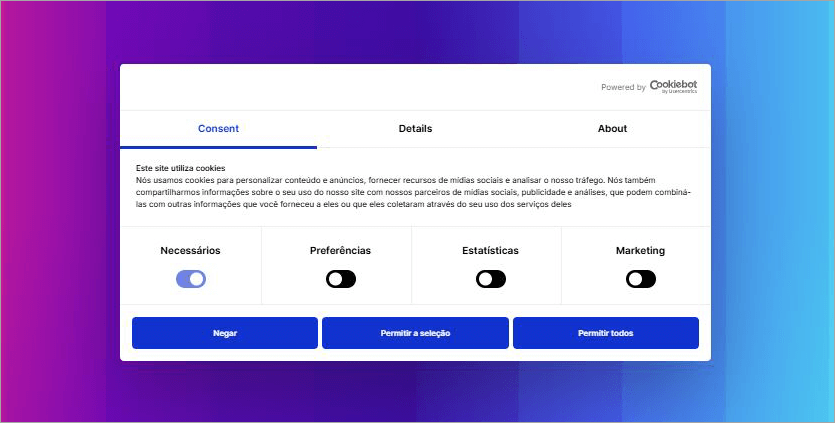
You can easily adjust the banner’s layout, color, and size in accordance with your brand’s identity. It also helps that Cookiebot CMP supports over 60 languages, which means you can design a banner in multiple languages with ease to make sure it complies with your region’s data privacy laws.
The level of customization you are granted can help you design an appealing banner that incites user engagement and helps you earn their trust.
2. Advanced Website Scanner for Cookies
This is a key feature that distinguishes Usercentrics’ Cookiebot from other consent management platforms out there. The platform can scan your entire website for cookies and trackers. The scanner is intelligent enough to categorize the findings of its scans. The platform categorizes cookies and trackers based on their function when it detects them.
As such, you know exactly what type of data is being collected. You are provided with detailed scan reports via email. The platform also automatically blocks all cookies and trackers until end-users have provided their consent. This ensures “True Prior Consent”, which is a core requirement of the GDPR/ePR.
Thanks to this advanced scanner, this CMP does a great job of ensuring your company meets compliance requirements and earns user trust without hassle.
3. Geo-targeting Based Full Compliance
Cookiebot by Usercentrics can help you achieve full compliance with various globally recognized data privacy laws, as shown in the image below.
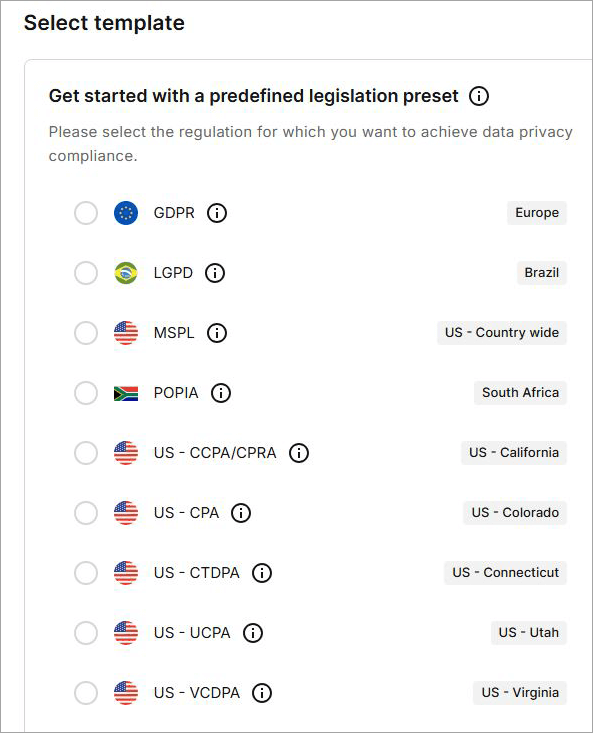
This includes the following:
- The GDPR
- VCDPA (Virginia)
- CCPA / CPRA (California)
- FADP (Switzerland)
- LGPD (Brazil)
- POPIA (South Africa)
No matter which jurisdiction your business operates in, you can count on Cookiebot by Usercentrics to manage consent in accordance with the regulations applicable in that specific region. The platform also ensures multi-regional compliance, thanks to its geo-targeting feature.
This feature automatically detects users worldwide and displays different banners in various regions. In doing so, the platform helps you achieve compliance with data privacy laws specific to a particular region while also letting you offer a personalized user experience.
4. Analytics Dashboard
The platform helps you keep tabs on the user consent being managed via an intuitive analytics dashboard.
Given below is the image of the Analytics dashboard:
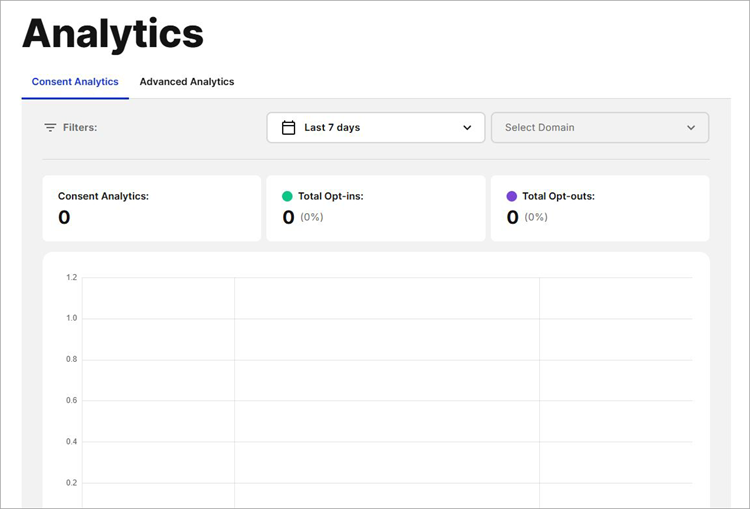
The dashboard displays the total opt-ins, opt-outs, and consents obtained over a specific period. You can refer to the consented data presented via this analytics dashboard to optimize your opt-in rates.
5. Automatic Consent Record Storage
You can count on the platform to automatically collect consent and store the records securely with strong encryption and an SSL connection. You can easily retrieve these records whenever necessary to prove compliance with data privacy regulations. Cookiebot will store this data on user consent for 12 months by default.
6. Detailed Compliance Reports
As a good cookie consent management platform should, Usercentrics’ Cookiebot offers you detailed compliance reports. These reports are easy to comprehend and include critical information, which can help you ferret out any compliance issues and rectify them immediately.
With these reports being generated automatically, you can demonstrate compliance at a moment’s notice in the event a regulatory body asks for it.
Integrations
Integrations are another highlight of this cookie consent management platform. It facilitates integrations across platforms, thus making it easier to collect consent on websites and applications. For instance, the platform integrates seamlessly with CMS like Shopify, HubSpot, and WordPress.
The platform even offers a dedicated plug-in for WordPress, thus helping users ensure privacy compliance on their websites built in WordPress. It is also a rare consent management platform that integrates with Google Consent Mode.
This integration, in particular, proves useful for websites relying on Google’s analytics and advertising functionality.
Likewise, you can integrate Cookiebot with various other platforms or tools like Google Tag Manager, Microsoft UET, and Clarity Consent Mode, etc., to easily display cookie consent banners across different environments.
Customer Support
I would say that Cookiebot’s support is responsive and effective. You can reach out to its support team via email. You can also find detailed articles, tutorials, and guides on the platform’s official site for help.
Regardless of what plan you choose, the quality of support remains consistent. Inquiries are addressed within 24 hours, which is swift.
Pros and Cons
Let’s take a look at the Pros & Cons of Usercentrics
| Pros | Cons |
| Customizable Consent Banner | The absence of dedicated priority support for the core plans is rather disappointing. |
| Seamless integrations with Google Consent Mode, Google Tag Manager, and various CMS tools. | |
| Analytics dashboard | |
| Geo-tagging to ensure compliance with various region-specific data privacy laws, | |
| Automatic cookie and tracker blocking | |
| Responsive customer support | |
| Easy to use |
Pricing
Cookiebot by Usercentrics is free to use in a limited capacity for smaller websites with up to 50 sub-pages. Its premium plans are as follows:
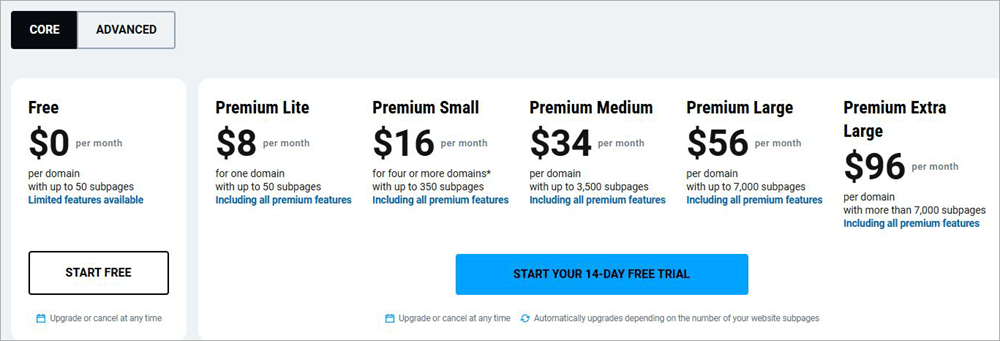
Their pricing information is tabulated below for your reference:
| Plans | Price | Domain | Subpages |
| Premium Lite | $8/month | 1 | Up to 50 |
| Premium Small | $16/month | Per Domain (Min. Four +) | Up to 350 |
| Premium Medium | $34/month | Per Domain | Up to 3500 |
| Premium Large | $56/month | Per Domain | Up to 7000 |
| Premium Extra Large | $96/month | Per Domain | Up to 7000 |
Users also have the option to go with the Usercentrics Web CMP version, which offers scalable privacy compliance and extended analytics, and automatic consent signaling to most ad platforms. You’ll need to contact the sales team and get a custom quote if you’re looking for a tailored solution for your website and mobile application.
You can take the platform for a test-drive for 14 days without charge. Simply sign up for free, and you’ll be charged once your 14-day free trial is over.
Besides Cookiebot, Usercentrics also offers different modules for privacy and consent management based on specific needs.
They’ll cost you as follows:
| Web CMP | • Essential: $8/month • Plus: $16/month • Pro: $34/month • Business: $56/month |
| App CMP | • Advanced: $60-1050/month • Premium Custom Plan |
| CTV CMP | Custom pricing |
| Privacy Policy Generator | • Free to use • Pro: $3/month |
The plans above do a good job of accommodating different website sizes and business needs. I would’ve liked a few more features with the free plan, but that’s just me being selfish, I guess.
How to Get Started with Cookiebot
Initial set-up or getting started with Cookiebot CMP is quite straightforward. Regardless of your technical prowess, I think you are going to have an easy time designing and implementing your consent banner via this platform.
As soon as you sign up, you’ll be redirected to the platform’s dashboard, which is aesthetically minimalistic and neatly organized. Just the way I like it. I like how the platform just walks you through the process.
Signup form of Cookiebot will be as shown below:
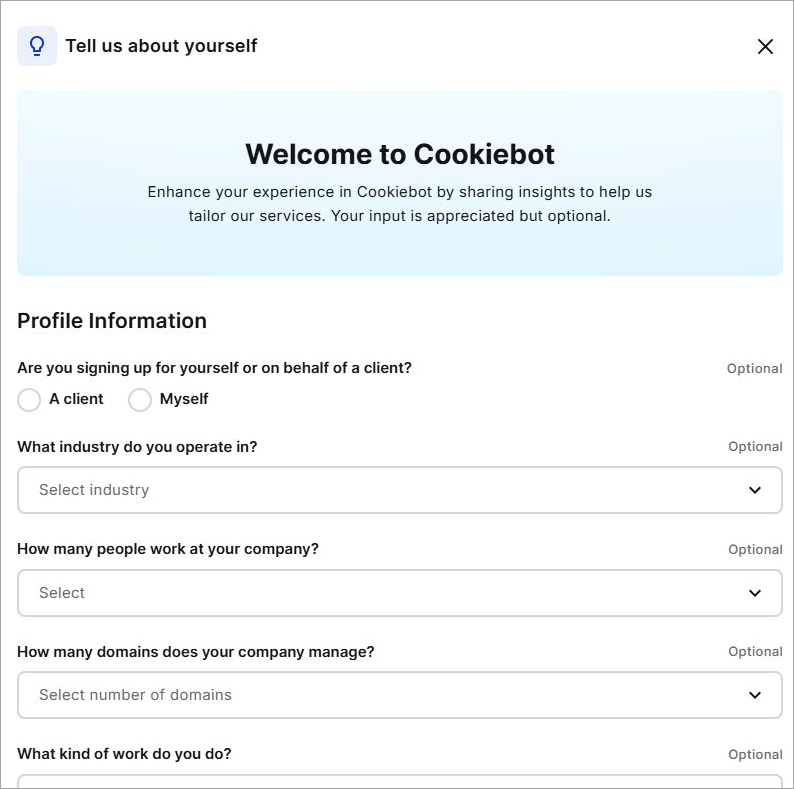
Immediately after signing up, you’ll be presented with the option to either choose one of the existing pre-built templates based on your region’s specific data privacy laws or fully customize the banner using HTML, CSS, or JavaScript.
In writing this article, I opted for the existing template as shown below.
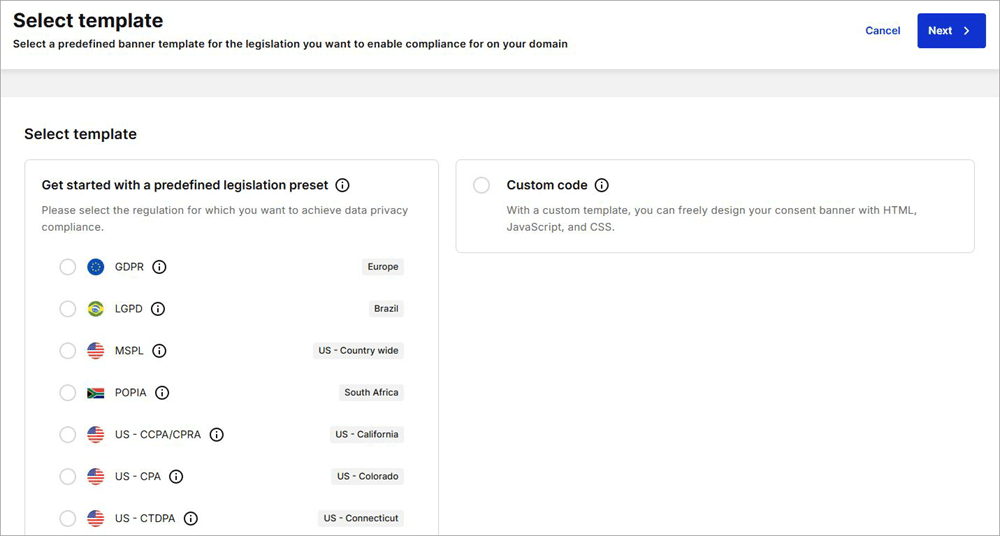
1. Select the template and hit the “Next” button at the top.
2. You’ll now find yourself on the main interface, where you’ll have the option of customizing your consent banner as shown in the image below.
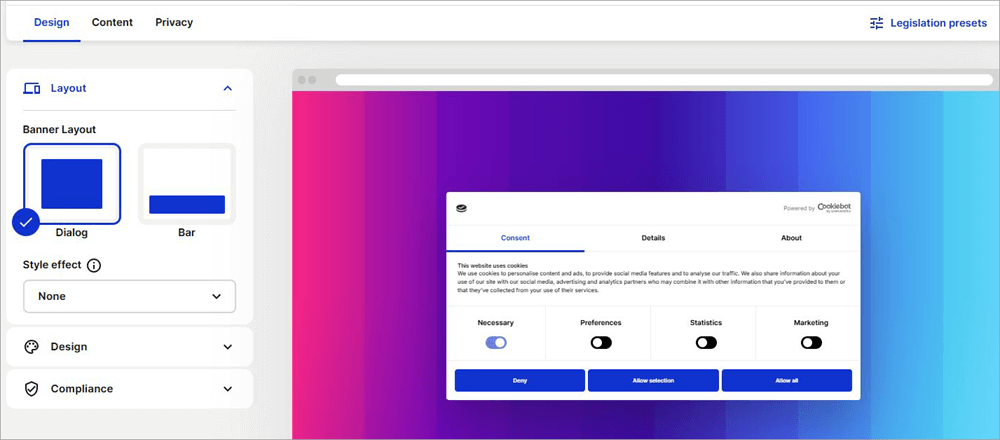
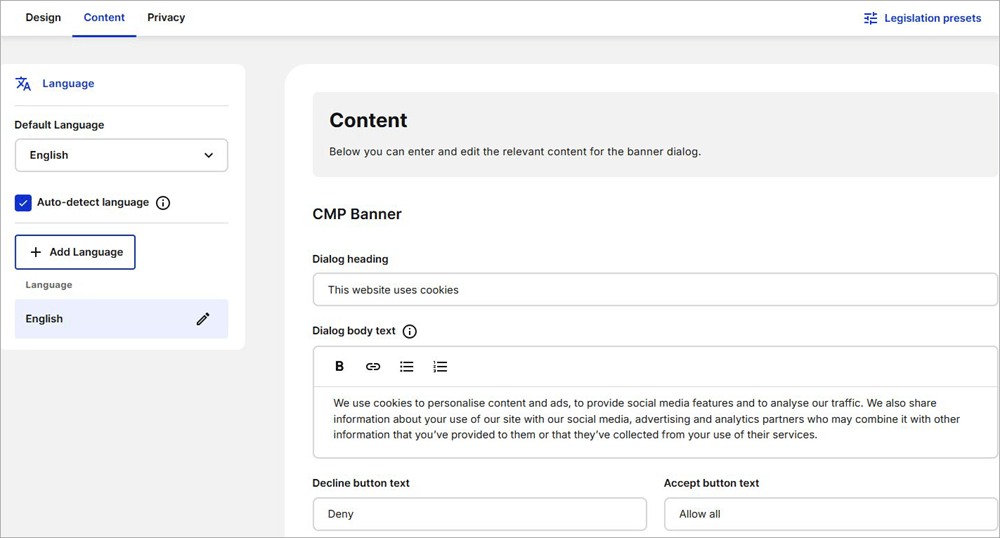
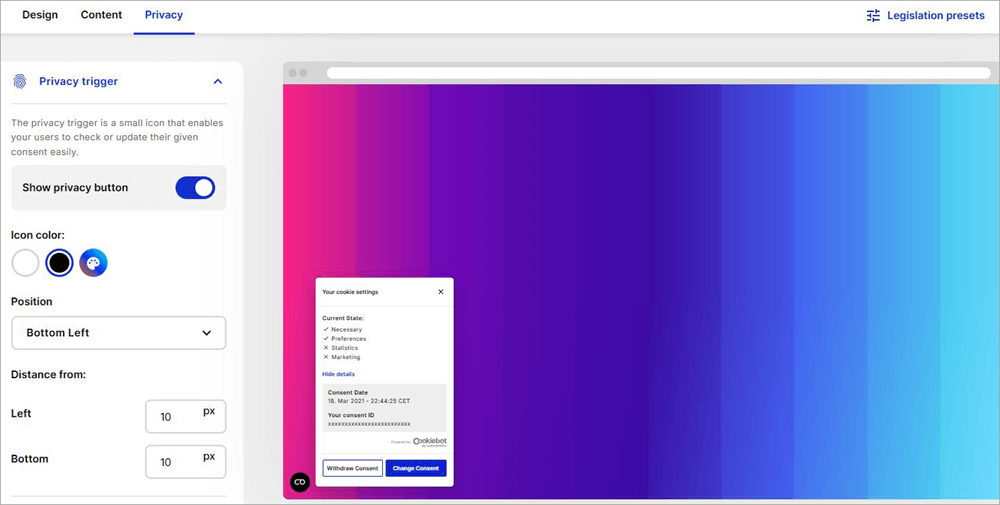
3. Modify the banner’s layout, style, and position, add relevant content to the banner’s dialog, and personalize the privacy trigger (a small icon that lets users check or update given consent).
Given below is the image of Content’s CMP Banner:
You can personalize Privacy Trigger as shown below:
4. Click on “Next” once you are done customizing the banner.
5. You’ll be taken to the implementation window as shown below.
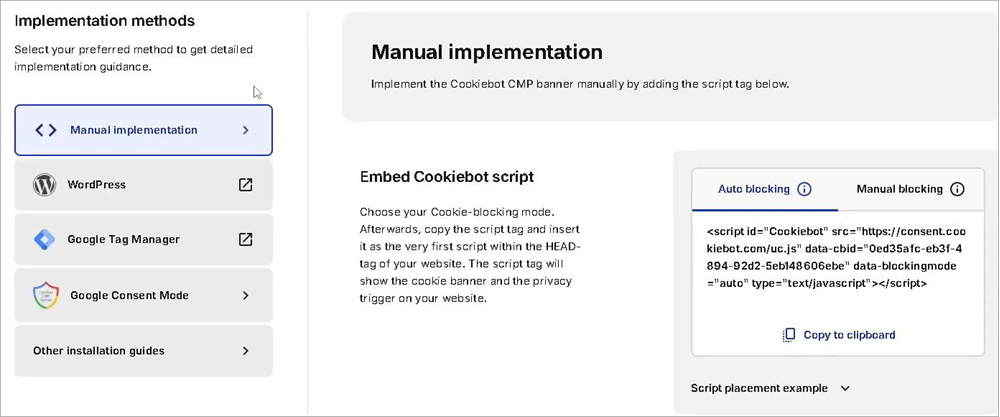
6. First, choose between “Auto-Blocking” or “Manual Blocking” and then copy the script tag.
You’ll need to paste this script tag on your website’s head tag. You can also opt for alternative methods of implementation via Google Tag Manager or WordPress for integrations.
In hindsight, I would describe my time customizing consent banners on Cookiebot as effortless. It was truly a breeze just navigating through various segments of the interface, and its minimalistic but visually striking design helps a lot.
It is apparent from the interface and the initial setup that Usercentrics prioritized user-friendliness in this CMP’s overall functionality.
List of the Best Usercentrics Alternatives
Usercentrics’ Cookiebot isn’t the only CCMP out there. It is always advisable to keep one’s options open. As such, I would suggest you keep the following competitors in mind, as they can serve as ideal alternatives to Usercentrics if the need ever arises.
- OneTrust
- CookieYes
- TrustArc
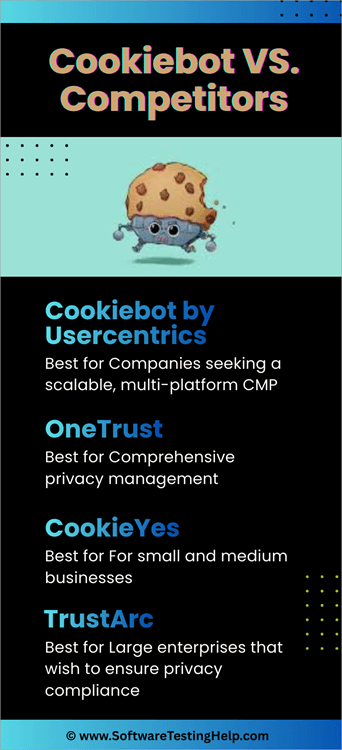
Comparing the Top Usercentrics Competitors
| Platform | Best For | Privacy Policy Generator | Integrations | Cross Domain Consent Sharing | Free Plan |
|---|---|---|---|---|---|
| Cookiebot by Usercentrics | Companies seeking a scalable, multi-platform CMP | Yes | WordPress, Google Consent Mode, Google Tag Manager, etc. | Yes | Yes, and a 14-day free trial is offered. |
| OneTrust | Comprehensive privacy management | Yes | Adobe, Microsoft, Snowflake. | Yes | No |
| CookieYes | For small and medium businesses | Yes | Wiz, WordPress, Shopify, etc. | No | Yes |
| TrustArc | Large enterprises that wish to ensure privacy compliance | No | MailChimp, Shopify, Slack, OpenAI. | No | No |
Here is a brief overview of Usercentrics’s competitors:
#1) OneTrust
Like Usercentrics, OneTrust is a consent management platform you can employ to manage user consent preferences across your websites, apps, CTV, and OTT channels.
The platform is perhaps one of the most popular ones out there as far as CMPs are concerned. It especially stands out for its ESG reporting, data mapping, and automation capabilities.
Price: Contact for a quote.
#2) CookieYes
This UK-based platform positions itself as an all-in-one CMP that caters to the needs of all business types. I agree with that sentiment.
The platform is perhaps best known and used as a plug-in for almost all CMS tools out there, like Shopify and WordPress. Like Usercentrics, you can employ CookieYes to design and customize cookie banners.
Price: Starts at $10/month
#3) TrustArc
Like Usercentrics, TrustArc is also a sought-after consent management platform offering a wide suite of products in the realm of data privacy and compliance management.
The platform supports 45 languages and is highly regarded for its user-friendly interface. It also stands out for its robust reporting capabilities.
Price: Contact for a quote.
User Reviews and Ratings
Reviews for Usercentrics and its associated products, like Cookiebot, have been generally positive. The platform has been well-received by its users, who largely have a lot of good things to say about their experience.
It enjoys respectable user ratings on platforms like G2 (4.3/5), Capterra (4.5/5), and Software Advice (4.5/5). One particular glowing review of the tool on G2 called it “A complete solution that simplifies regulatory compliance”.
Users mostly praised the tool’s user-friendliness, customization, and integrations.
Frequently Asked Questions
1. What is Usercentrics consent management?
Usercentrics is a leading provider of consent management solutions like Cookiebot. This solutions let you automate the process of obtaining, recording, and managing user consent for accepting cookies.
In doing so, a typical consent management platform ensures that companies comply with data privacy laws as dictated by the GDPR, HIPAA, and CCPA, etc.
2. Is Cookiebot by Usercentrics free?
Yes, Cookiebot is free to use. You can sign up for free and have it manage a smaller website with no more than 50 subpages. You can also try out its premium plans without charge with the 14-day free trial privilege.
3. How to manage cookie consent?
Consent for cookies must be managed in accordance with established global data privacy laws, which suggest asking permission from users before placing a cookie on their device.
The best way to get this permission is by placing a cookie consent banner on websites and applications. The best way to implement these banners is via platforms like Cookiebot by Usercentrics.
4. Where is Usercentrics from?
Usercentrics’ origins can be traced all the way back to 2017, when it was founded by Daniel Johannsen, Lisa Gradow, and Mischa Rurup. The company’s headquarters is based in Munich, Germany.
5. Does Cookiebot slow down my website?
Cookiebot is quite effective in its ability to load and manage cookies. As such, you can rest assured that it won’t affect your website’s speed if properly implemented.
Take a look at the video below to understand Cookie Banners that Won’t Send Your Customers Running:
Our Verdict
In the end, I adored Cookiebot by Usercentrics, a cookie consent management platform. It has to be one of the most user-friendly CMPs in existence today. Setting it up was a breeze. The same goes for designing and implementing a cookie consent banner. The platform is also a Google-certified CMP, which lends weight to its reputation.
I had no complaints or experienced any mishaps when configuring the banner or integrating the tool with a CMS tool. I also like the option you are offered to either manually implement the consent banner or get it done automatically through WordPress and Google Tag Manager.
Its Geo-Targeting feature ensures your website or app stays compliant with the data privacy laws applicable wherever your users are.
| Parameters | Score |
| Ease of Use | 5/5 |
| Integrations | 4.5/5 |
| Customization | 4.5/5 |
| Analytics Dashboard | 4.5/5 |
| Customer Support | 4/5 |
| Pricing | 4/5 |
I thought the support team was responsive and very helpful. That said, I would’ve appreciated not paying for the advanced version of the tool for priority support.
Overall, I would highly recommend Cookiebot by Usercentrics to businesses of all sizes for their privacy and compliance management needs.
For more quick data privacy-related guides, you can explore our range of data tutorials below:
- Data Breach Tutorial And Top 5 Data Breach Service Providers
- Top 10+ Best Data Governance Tools To Fulfill Your Data Needs
- Top 7 Check Point Data Loss Prevention (DLP) Alternatives
- The Top 10 Data Masking Tools and Software In 2025
Was this helpful?
Recommended Reading
-

Introduction to Cookies Primarily we will focus on what exactly HTTP cookies or Internet cookies are and how they work. It would be easy for you to understand the test cases for testing website cookies when you have a clear understanding of how cookies work, how cookies get stored on…
-

Explore the Best open source free and online Data Modeling Tools along with their Features: What is Data Modeling? Data modeling is the process of applying the techniques and methodologies to the data (data requirements) in order to convert it in a useful form. The process converts complex software design…
-
Most businesses are quickly appreciating the role of data integration as a strategy to increase their potential. Here, you will review the top Data Integration Companies with Comparisons: Having all important information in a central place improves convenience. It gives any business an advantage over its competitors. Businesses can now…
-
The list and comparison of the Most Popular Data Migration Tools: When we hear the term "Data Migration", questions like - What is data migration? Why is it needed? How is it done? etc., pop into our mind instantly. This article will address all the basic queries on Data Migration…