Quickly understand how to install IPTV Smarters Pro on Firestick, Android, iOS, Windows, Mac, or Smart TV with this simple guide. Improvize your streaming experience with IPTV Smarters Pro download:
IPTV stands for Internet Protocol Television. It allows users to watch television content through the internet. It’s different from traditional TV because it allows its users to watch content on demand. IPTV users can watch their favorite content anytime, from anywhere, using their mobile, PC, or Smart TV.
IPTV Smarters player is a media player that allows its users to watch movies, series, Live TV, and radio streaming. This service is quite popular around the world because it gives its users access to a vast range of content to watch anytime, from any device.
IPTV Smarters Pro: In-Depth Review
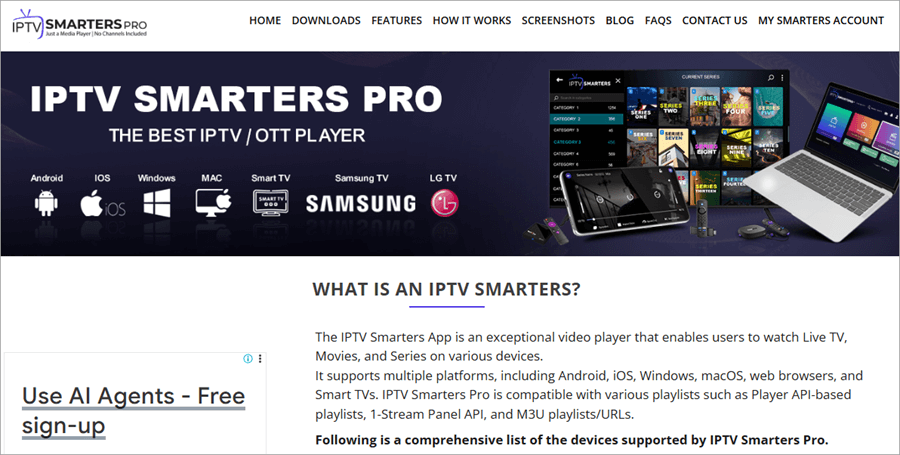
IPTV Smarters Pro is available as an application, compatible with the following devices – Android, Windows, MacOS, iOS, and Smart TVs
Watch this YouTube video to learn how IPTV works:
A report by Statista states that the number of OTT users is expected to reach 4.9 billion by the year 2029. These figures clearly state the increasing inclination of people towards online video streaming. This uplifts the demand for platforms like IPTV Smarters Pro.
[image source]
How to Choose an IPTV Service Provider
Watch this very useful YouTube video before choosing an IPTV service.
Based on our study and experience, we would like to give you some advice and tips, which will be useful for you if you are going to use an IPTV service.
- Make sure you go for a legal, authorized service provider only.
- Using a VPN will hide your IP address and browsing history from the advertisers, but can slow down your internet speed. But, safety and privacy are better than a bit slow internet.
- You can mark the channels you watch the most as favorites, for quick search.
- You can take the IPTV Smarters Pro app to the home screen for quick access.
- If the app doesn’t run smoothly, try clearing the cache.
- You would need a fast-running internet to watch IPTV content. Plus, make sure you have unlimited internet data, as it consumes a lot of data.
IPTV Smarters Features
With IPTV Smarters Pro, you will get access to the following features:
- Live TV, movies, series, radio streaming
- High-quality streaming
- Access different IPTV services from one place
- TV Program Guide
- Features like ‘Continue watching’, ‘TV Catch Up Streaming’, ‘Recently Added Movies & Series’, ‘Automated next episode play’, ‘Master search’, and more
- Recording feature: This allows you to record live content, to watch later. For recording Live TV, press and hold the cursor on the name of the channel, then select Start Recording. Now choose the duration of the recording, the location of the recorded file in your device, and the name you want for the recording, then click on Start Recording.
- Supports Multi-screens: You can split your device’s screen to watch multiple shows/contents at once. Isn’t it cool?
- TabView, Picture-in-picture, Local audio/video file playing features.
- M3u File and URL Loading Support
- VPN integration
- Content downloading
- Parental control: Users are allowed to set restrictions on access to some specific content. They can also set PIN-based access to sensitive content.
- Support for external players: You can use any media player like VLC or MX Player. This way, users can get the best streaming quality.
You can watch this YouTube video to learn how to use this feature
Suggested reading => Best Free IPTV Apps to watch live TV
The Master Search, External EPG Sources Support, Picture-in-Picture Support, and many other features are available with the premium version only. The premium version can be availed by paying a one-time fee of $2.99.
Please note that IPTV Smarters Pro is an application that allows its users to watch IPTV content ONLY when they have bought an IPTV subscription plan from a service provider. There are free as well as paid IPTV services available out there.
Some IPTV service providers give their users access to content that is obtained illegally. So users are advised to go for a trustworthy and authorized IPTV service only, to avoid legal troubles.
Another point to be noted is that the Smarters IPTV app was earlier available on the Google Play Store and the Apple App Store, but it is now removed from the Google Play Store. Download the application from third-party sources. It is advised to use a good VPN while using the IPTV Smarters Pro application. Plus, scan the app’s URL or APK file with a virus scanner.
How to Download IPTV Smarters on Firestick
To download IPTV Smarters Pro Firestick, follow these steps:
Step #1: First, download an app called Downloader. This is a safe app, and it allows Firesticks to install apps from third-party sources. For installing the Downloader app, do as stated under.
- Click on the
 Search option located on your Home Screen.
 - Now type Downloader.
- The download icon will appear on your screen. Click on it and then download the application.
- Open the app once downloaded.
- Click on Allow, then OK.
- Go back to the Main Menu.
 Search option located on your Home Screen.
Step #2: You will have to change the settings, to allow your Fire TV to download apps from third-party sources. For this purpose:
- Go to Settings
- Click on My Fire TV
- Now select Developer options
- Now click on Install Unknown Apps
- Select Downloader.
If you don’t find Developer options in your Fire TV settings, then do as follows:
- Go to Settings
- Select My Fire TV
- Go to About
- Click on Fire TV Stick 7 times. Developer options will be enabled.
- Now press the Back button
- Click on Developer options
- Allow your Fire TV to download apps from unknown sources.
Step #3: Now you can sideload the IPTV Smarters Pro APK. Follow these instructions:
- Open Downloader app
- Click on the Home option located on the left side of your screen
- Now go to the URL textbox on your screen
- Enter this link- firesticktricks.com/smarter or, You can enter this code- 78522
- Click on Go then Accept
- IPTV Smarters Pro will be downloaded on your device. Once it is done, click on Install.
- Once the Installation process is completed, click on Done.
- Now a box will appear on your screen which will ask you to delete the APK file used to download the IPTV Smarters Pro app. You can delete this APK file.
Now the IPTV Smarters Pro application is ready to be used for streaming content from various sources. Once you have done this, you will need to log in to your IPTV service inside the app. Your service provider would have provided you with the login details, including the M3U Playlist and EPG links.
Please be careful while watching illegal content, as your Internet Service Provider and the Government monitor your online activities all the time.
How to Set Up IPTV Smarters
Follow these steps to set up and load content into the IPTV Smarters Pro app once you have successfully installed it:
- Select the option Load Your Playlist or File URL on the home page.
- Click on Allow.
- Now you can type in the M3U URL (your IPTV service provider would have given you these login details) in the space provided on your screen, give a name to your playlist, and then click on Add user.
You can also log in through Xtream Codes API. These codes are shorter, so you’ll have less trouble typing these codes with your remote. Follow these steps for logging in through Xtreme Codes API:
- On your home screen, click on Login with Xtreme Codes API.
- Now type in your Name, Username, Password, and URL.
- Click on Add User.
Once you complete this process, you can watch your favorite content on your Fire TV.
IPTV Smarters Pro Apk: How to Use
Once you finish the login process, you will see these options on your screen:
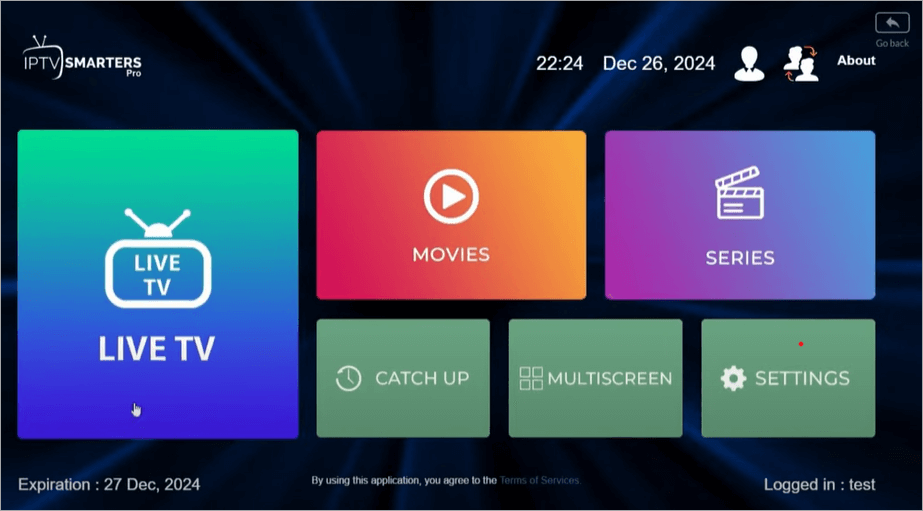
From here, you can choose Live TV, Movies, or Series to watch. You can go for the Catch Up option to continue watching content from where you left it. IPTV Smarters Pro even allows you to organize your channels the way you like. You can explore many more features in settings.
You can create a shortcut for the IPTV Smarters Pro app on your Fire TV
If the IPTV Smarters Pro does not appear on your home screen, you can create a shortcut by following these steps:
- Go to the App Library.
- Select and press the IPTV Smarters Pro app icon for 2-3 seconds.
- Now select the option Move to Home Screen.
How to download and install IPTV Smarters Pro on Android phones?
Follow these steps to download the IPTV Smarters Pro app on Android:
- Open the IPTV Smarters Pro download page https://www.iptvsmarters.com/#downloads
- Under the heading Android app, click on Direct Download .APK Files option
- The file will be downloaded to your phone
- Open Downloads from your browser
- Open the downloaded IPTV Smarters file
- Click on Install
- Tap on Mobile
- Click Save
- Now Accept the terms
- Log in to the app with the details provided by your IPTV service provider.
IPTV Smarters Pro for iOS devices
iOS users can download and install the Smarters Player Lite app from the App Store and then start watching content by typing in the login credentials.
IPTV Smarters Pro app for your PC
Follow these steps for downloading the IPTV Smarters Pro app on your Windows PC:
- Open https://www.iptvsmarters.com/ through your browser.
[image source]
- Click on Downloads.
- Under the heading Windows App, there will be an icon stating Available for Windows OS. Click on it.

- The app will start getting downloaded on your PC.
- Go to Downloads and click on the downloaded app file with its name starting with- IPTVSmartersProSetup.
- The installation process will start.
- Once the app gets installed, Accept the terms.
- Enter login details to start watching your favorite content.
The same process can be followed for downloading the app on MacOS devices; you’ll just have to click on the MacOS app, instead of Windows OS on the IPTV Smarters Pro website.
Further Reading => Most Popular IPTV Services of Canada
IPTV Smarters Pro app for your Browser
You can watch IPTV content through their Web Browser Player also. Follow these steps for streaming OTT content through your website browser–
- Go to the IPTV Smarters Pro website
- Open Downloads
- Under the heading Web Browser Player, there will be an icon stating Available for Web Browsers. Click on it.
- You will see this on your screen
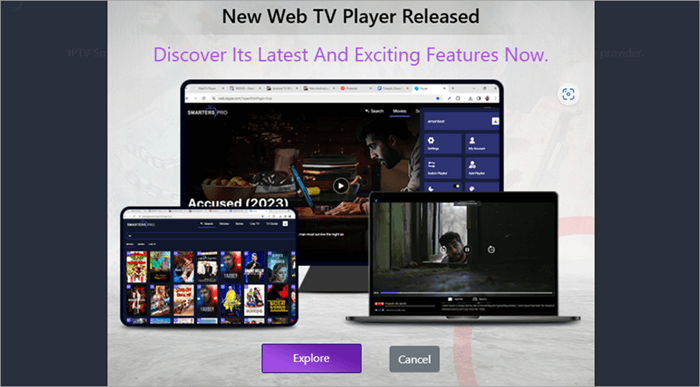
- Click on Explore.
- Now Accept the terms
- Login with the details provided to you by your IPTV service provider and start watching OTT content.
IPTV Smarters Pro for Smart TVs
Whether you use an LG Smart TV or a Samsung TV or any other Smart TV, you will most probably find the IPTV Smarters Pro app in its Store. Download and install the app, then fill in the login details to get started.
Please note that the app’s premium version is not available for LG and Samsung Smart TVs. In fact, for LG and Samsung Smart TVs, they offer all the features for free.
IPTV Smarters Vs. TiviMate
IPTV Smarters Pro app supports external players. If you are wondering which one to pick from IPTV Smarters and TiviMate, then go through the comparison table:
| Features | IPTV Smarters | TiviMate |
| Interface | Easy to use | Easy to use, customisable |
| Electronic Program Guide | Available in grid and timeline view | Available in different views |
| Recording | Allowed | Allowed |
| Multi screen support | Available | Available |
| Parental control | Lets you restrict access to sensitive content | Offered with the premium version |
| Compatibility | Supports Android, iOS, Windows, Smart TVs, and Firestick. | Runs on Android devices only |
| Free version | Available with ads and limited features | Available with limited features |
| Price | $2.99 for premium version (one-time fee) | $19.99 for lifetime, or $4.99 per year |
Further Reading => Best IPTV Free Trial Services
FAQs on Smarters IPTV
1. Can I get IPTV for free?
The IPTV Smarters Pro application is available for free. You can download it on Android, iOS, MacOS, Windows devices and Smart TVs. The basic features available in the app are free. You can opt for the premium version for more advanced features like Master Search, picture-in-picture support, and more.
The IPTV Smarters Pro app does not contain any OTT content. Buy an IPTV service subscription, to watch the IPTV content through the IPTV Smarters Pro app. The IPTV services can be availed for free, but with utmost caution because several services have obtained content illegally and can cause troubles for the end-user as well.
2. Do I need a VPN for IPTV Smarters Pro?
You can use IPTV Smarters Pro even without a VPN. But, it is advised to use a VPN, so that advertisers would not be able to collect information about your IP address, as well as your browsing history.
3. How to install IPTV Smarters Pro on TV?
You can install the IPTV Smarters Pro app on your smart TV, by following simple steps. All you need to do is:
• Go to the Store (Google Play Store- if you are using an Android TV, or Content Store for LG TVs, etc.)
• Search the IPTV Smarters Pro app and download it.
• Log in with the subscription details provided to you by your IPTV service provider.
4. Why is my IPTV Smarters Pro not working?
There can be one of the following reasons why your IPTV Smarters Pro app is not working:
• Your IPTV service may have expired
• You may need to clear the cache
• Your internet may be slow
• You may not have entered the correct login details.
5. Why use IPTV Smarters Pro?
IPTV Smarters Pro is a trusted application used for watching OTT content. It works with Android, iOS, MacOS, and Windows devices. The app acts as a media player that lets you watch your favorite content, including Live TV, series, movies, and more, anytime, from anywhere.
6. Does IPTV take a lot of internet?
Yes. IPTV consumes a lot of internet. You can only use an IPTV service when you have unlimited internet with good speed. Studies reveal that watching video content for an hour may consume over 500 MB of data if you watch it in Standard Definition, whereas High Definition Streaming requires more than 1 GB of data for an hour of streaming.
7. Is IPTV Smarters legal in USA?
IPTV Smarters is a legal service in itself. But if the IPTV service provider gives its users access to copyrighted content without proper, legal permissions, then it would be called illegal.
8. What are the cons of IPTV smarters?
Though IPTV Smarters is a modern and easy way to get access to loads of video content from around the world, it has certain drawbacks too, which are:
• You must have a proper, stable internet connection. Slow internet would spoil the whole streaming experience.
• You must look for a legal, reputed service provider, as many provide illegal content and thus create trouble for the buyers too.
• Getting access to such a huge library of content can lead to addiction.
9. How safe are IPTV smarters?
The IPTV Smarters Pro app is considered to be safe. You just need to be careful while choosing the IPTV service. An illegal service provider can cause serious trouble for the end-users too.
Suggested reading => Best IPTV Services for Amazon FireStick
Conclusion
In this article, we talked about how to install and use the IPTV Smarters Pro application on Firestick, Android phones, Smart TVs, iOS devices, and PCs.
We have also provided answers to some questions asked by IPTV users, to solve their issues and make their IPTV streaming experience better.
In the end, I would conclude that IPTV Smarters Pro is a smart option to watch unlimited online content. The features that they offer, like high-quality streaming, video recording, multi-screen support, parental control, and many more, make them so popular today. The only thing to be kept in mind while using these services is that the content you watch should be obtained from legal sources.
Was this helpful?
Recommended Reading
-

Are you searching for a legal IPTV subscription service in the USA? Here is a detailed Review of the best legal IPTV Services in the USA that adhere to laws and regulations. A reliable and legal IPTV service can be difficult to locate among so many unverified options in the…
-

In this article, we will learn about the SoapUI download and Installation process. Let's get started. In this tutorial, we will learn how to install SoapUI and SoapUI Pro with a trial key. We will also see a few major differences between SoapUI and SoapUI Pro and their plugins/add-ons at…
-
Review and compare the top popular and best IPTV Apps (IPTV Player) to Watch Live TV on Android. IPTV apps or IPTV players let you stream live TV channels directly on your Android device without relying on traditional cable or satellite services. With so many options available, choosing a reliable…
-
Here we will review and compare the most popular and top IPTV for FireStick and guide you to select the best IPTV service for FireStick: Internet Protocol Television or IPTV is quickly taking the online content streaming domain by storm. This advanced technology allows you to stream your favorite TV…