


Learn how to install Kodi Exodus Redux Addon from our step-by-step guide. Quickly set it up in minutes to unlock unlimited streaming on Kodi and enjoy your favorite shows and movies instantly:
The Exodus Redux is a fork (or revival) of the older Exodus add-on to Kodi. It is a third-party video add-on, not a host, but it uses scraping or aggregation of streaming links from hundreds of sources (websites) on the Internet, and displays them to the user in the Kodi interface.
How Exodus Redux works is that the user enters a movie or television show, Exodus Redux launches scrapers (programs) to retrieve potential links, after which the user clicks on a link, and Kodi plays it. (There are also redirects, host viability checks, etc, which are often resolved by the add-on).
Table of Contents:
- Exodus Redux Addon: Installation Guide
- Overview of Exodus Redux Add-On
- Features & Capabilities of Exodus Redux Add-on
- How to Install the Exodus Kodi/Exodus Redux Add-On: Step-by-Step Guide
- Specific Steps Per Device: Git Browser, etc.
- Benefits and Drawbacks of Exodus Redux Add-on
- Kodi Alternatives to Exodus Redux
- Comparing the Top Alternatives
- Recommendations on Alternative Selection
- Best Repository Sources of Exodus Redux/Forks
- Safety Tips & Best Practices
- Frequently Asked Questions
- Conclusion
Exodus Redux Addon: Installation Guide
It tries to maximize the probability of having a usable stream (which may be multiple qualities, host options) because it tries to bundle numerous sources.
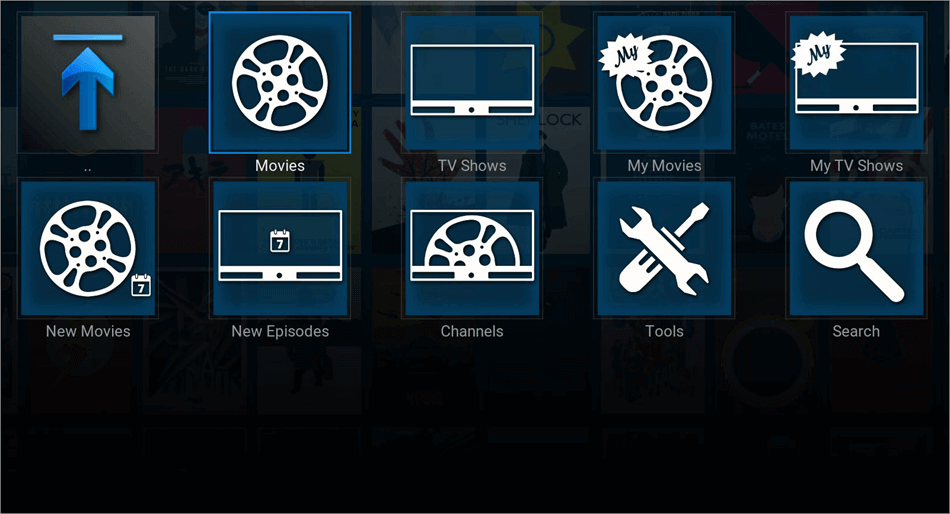
[Via kodiapps.com]
Overview of Exodus Redux Add-On
It frequently works with Debrid service integration (e.g., Real-Debrid, AllDebrid) to get access to better-quality and more reliable links. It has configuration parameters (tools, scraper settings, enable/disable, etc.) so that the behavior may be specialized.
Since it is a relatively basic link aggregator/streaming proxy, its performance, link quality, and reliability are strongly dependent on external sources (which may go offline, be slow, or blocked) and the efficiency of scraper modules.
This tutorial discusses the details of the installation of Exodus Redux Addon on Kodi. The prime objective of this tutorial is to provide you with all the essential information and guidance required to install the Exodus Redux Add-on on Kodi.
Here is the video guide on how to install the EXODUS Kodi Addon:
Features & Capabilities of Exodus Redux Add-on
Here’s a breakdown of its main features: what users typically expect:
| Feature | Description/Benefit |
| Large Content Catalog | Because it scrapes many sources, you may find a wide range of movies and TV shows, including older titles, recent ones, etc. |
| Multiple Quality/Host options | For a given title, you may see multiple streams: SD, HD, 1080p (if available), or different hosts. |
| Debrid/Premium Resolver Support | Use of Real-Debrid or other premium resolvers improves the availability of high-quality, buffer-resistant links. |
| Scraper Customization | You can enable/disable providers, choose which scraper module to use (Lambda, OpenScrapers, etc.), and adjust behavior. |
| Trakt/Account Sync Compatibility (sometimes) | Some forks or versions let you link your Trakt account for “watched / library” sync, though it depends on implementation. |
| Tools & Maintenance UI | It usually has a “Tools” or “Settings” section with options to clear cache, remove providers, reset modules, update scrapers, etc. |
| Frequent Updates (in some forks) | Because scrapers often break, many maintainers push updates to keep sources working (though not all forks are actively maintained). |
| Search/Filtering | Ability to search by title, filter by genre, year, quality, and sort results. |
However, note the following limitations for the said software:
- ISPs may geo-restrict or filter some sources.
- The connections are unstable, and many perish.
- Depending on the fork, the add-on may not work with newer versions of Kodi (Matrix and others).
- When scrapers or providers malfunction, it might have to be manually adjusted.
How to Install the Exodus Kodi/Exodus Redux Add-On: Step-by-Step Guide
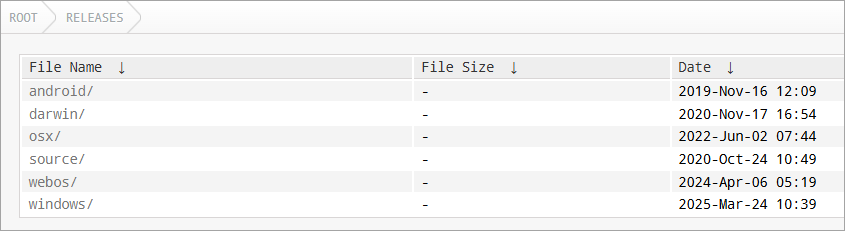
[Via mirrors.kodi]
Let us now delve into step-by-step methods of using this important software. The overall procedure is alike with most devices you may already have knowledge of, including Android boxes, Firestick, Windows, etc., although some device-specific notes can be made later.
[Via troypoint.com]
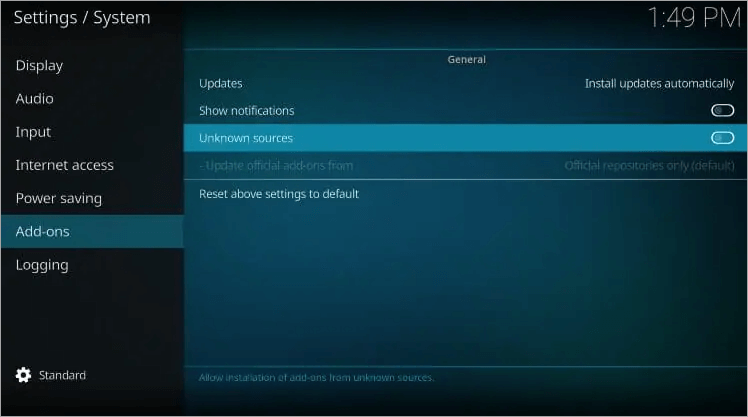
Step #1: Ensure that unknown sources/third-party add-ons are enabled for your device. Understand that the default setting of Kodi does not permit the installation of add-ons of unknown/unverified origin for security reasons. You must turn this on.
To carry this out, visit your device Settings  = System – Add-ons – Unknown sources.
Given below is the image of the warning prompts:
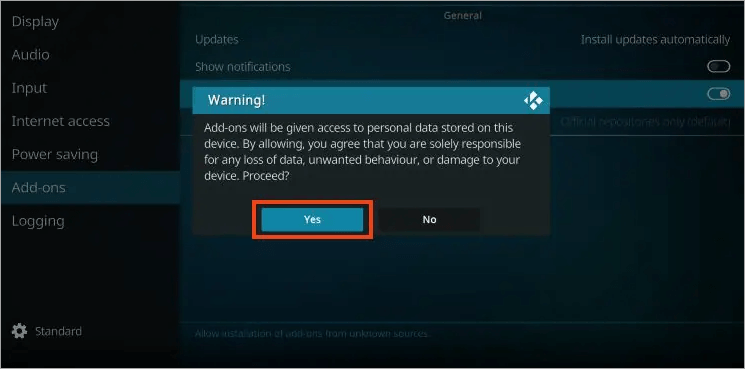
Confirm any warning prompts. This step enables Kodi to receive installations from non-official Kodi repositories. However, it presents some risks: it predisposes the installation of malicious or malfunctioning add-ons; thus, exercise caution.
Step #2: Apply a VPN/privacy protection. The add-ons can also be linked or can access content on unreliable third parties; it is highly advisable to have a good VPN that will obscure your IP address and encrypt your data.
Also, a VPN makes sure that your streaming activity cannot be easily noticed by your ISP (unless it regards such an activity as suspicious). VPN does not enable the legalization of illegal stuff; it is a privacy/security device.
Usual Procedures of Installing:
These instructions presuppose Kodi 18 (Leia) or the one that supports the specific fork of Exodus Redux. Some steps may not be compatible with the installation procedures of Kodi 19+ (Matrix) and later versions.
Step #3: Start the Kodi application on your device. Navigate to device Settings (gear icon).
Given below is the image of Add source option:
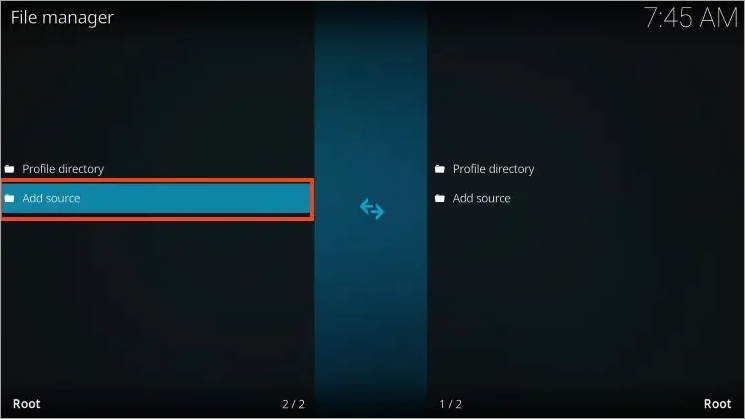
Step #4: Access File Manager on the device and follow the steps, which have the objective of adding a new source (URL) to the repository where the add-on is located.
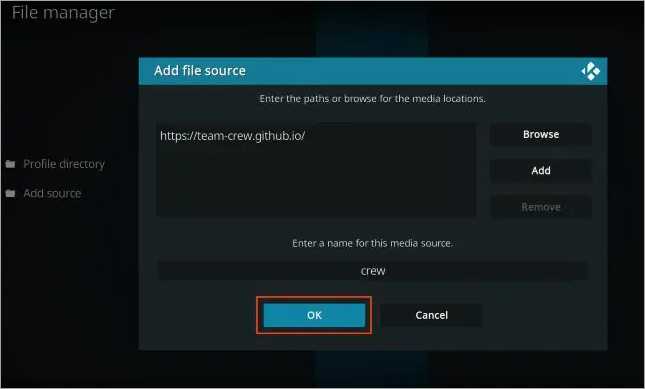
Step #5: Click “Add source”. This brings up a dialogue where a URL and a label are to be given.
Step #6: Click on <None> in which the path is requested.
The image below depicts the <None> path:
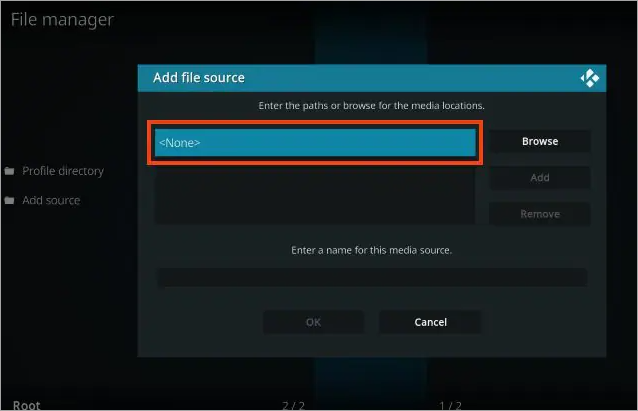
Step #7: Find and enter the repository URL, which is needed, which, in most cases, is https://i-a-c.github.io/ because this is where the forks of Exodus Redux are typically located.
The image below appears after entering the repository URL:
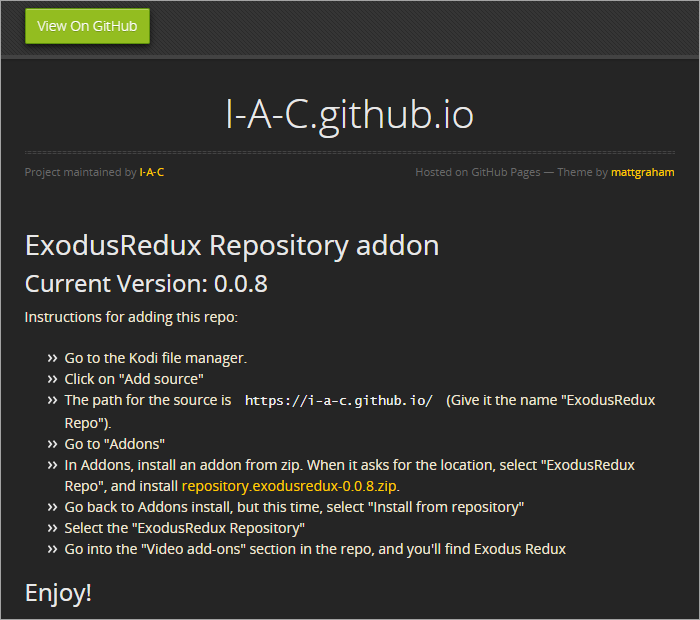
Step #8: After entering, click OK. Give it a new name, for instance, ExodusRedux Repo or Redux. By naming it this way, you can recognize it while undertaking the following steps.
Step #9: Return to Kodi Home – Add-ons.
Step #10: On the Add-ons menu, you will be utilizing the package installer/open box icon.
Step #11: Click on the icon of the open box (package installer). This usually appears in the upper-left corner (or through a menu), resulting in such options as installing a zip file, installing via repository, etc.
Step #12: Choose “Install from zip file”. You will notice added names of your sources (e.g., Redux). Select that.
Step #13: Select the repository zip file. e.g., repository.exodusredux-0.0.8.zip or whatever is in that repo at that particular time. Kodi shall de-pack and install the repository. You will then receive a message, for instance, confirming the installation, such as Exodus Redux Repo Add-on installed.
Step #14: Install Now, click on the “Install from repository”.Going back to the menu of the package installer, select the option of Install from repository.
Step #15: Open “Exodus Redux Repo”. Navigate to the already installed repository.
Step #16: Go to Video add-ons or other similar files. In that repository, there is the category of Video add-ons.
Step #17: Select Exodus Redux. Click “Install.” You may get a suggestion from Kodi, for instance, it may say: “These other dependencies will be downloaded. Click “OK.” Wait till you see, e.g., the Exodus Redux Add-on installed notification.
Step #18: Kodi Home – Add-ons – Video Add-ons – Exodus Redux. Launch it. Upon initial usage, a splash/update/info screen can be displayed – exit as necessary.
(Optional / recommended) Setting Scrapers/Providers: First of all, open the Exodus Redux app and navigate to Tools – Settings / Scraper Settings / Provider Settings. After this, enable desirable scraper modules such as Lambda, OpenScrapers, and enable all providers.
Step #19: If it is required to install scraper modules or dependencies, then permit it.
Step #20: Test a movie/show: Try to check other categories such as Movies, TV Shows, New, etc., and play one of them. When there are no streams or many do not work, it might be necessary to refresh providers (uncheck and recheck) or switch to a different scraper option.
Step #21: (When Exodus Redux is used) Authorize your debrid: In Exodus Redux – Tools – ResolveURL / Universal Resolvers – (Re)authorize Real-Debrid, etc.
Step #22: Enter the code onto a debrid site on the guide that is displayed on screen and typically requires a visit to a browser and a code. When this is completed, Exodus Redux will have debrid-backed links that will be included alongside free hosts, which will enhance reliability.
What does every action mean:
- Allow Unknown Sources: This is required due to the addon being located outside the official Kodi repository.
- Adding the Repository URL: Instructs Kodi on where to download the repository of add-ons code.
- Install via the ZIP: Installs the metadata/structure of the repository such that Kodi is aware of the addons that the repo has to offer.
- Installing Through a Repository – Exodus Redux: This will finally install the add-on itself and its dependencies.
- Setting up Scrapers/Activating Providers: This will make it possible for the add-on to locate and use viable streaming sources.
- Debrid Permission: This will ensure that more stable and superior streams are opened.
- Testing: Tests that everything functions and provides you with working experience.
Specific Steps Per Device: Git Browser, etc.
For devices like Fire TV, Firestick, Android boxes, and PCs, here’s how things might differ or can be done differently.
#1) Amazon devices (Android-based) FireStick/Fire TV
Here is the video guide on how to install Kodi on Amazon Fire TV:
FireStick does not permit unknown sources by default; therefore, you may need to enable the Fire OS settings initially under Apps from Unknown Sources to side-load Kodi.
Step #1: Navigate remotely; you will realize that screen arrangements vary a bit occasionally.
Step #2: Install the same repository/add-on by following the same steps of repository/add-on installation after enabling unknown sources and after installing Kodi. The older Firesticks may limit performance, hence debrid/resolvers are more important in minimizing buffering.
#2) Android TV/Android Boxes/Mi Box 4.2
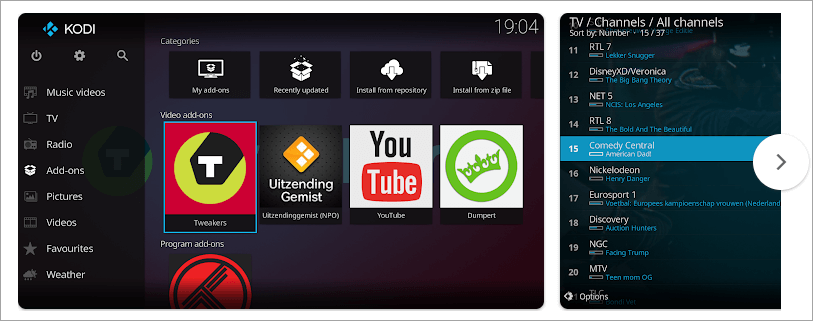
- Check from the Play Store because Kodi is available there. Check for compatibility.
- Use the same process above to enable unknown sources, add the repo, and install the add-on.
- There may be a difference between the remote layout and the screen layout. Core logic is the same.
#3) Windows/MacOS/Linux (PC)
- Kodi runs as an application.
- The steps (enable unknown sources, add source, install from zip, etc.) are all similar.
- More convenient to handle using a mouse/keyboard.
- A file explorer can also be used to copy the repository zip locally and then install it locally.
#4) Working With Git Browser/Alternative Method
- Other users choose to add add-ons to their system by GitHub username, over Git Browser (e.g., through Indigo, or through a Git Browser extension). This occasionally avoids faulty or displaced repository links.
#5) Typical Git Browser Method
Step #1: Install (or, in effect, have installed) Git Browser (in most cases, via a program add-on or installer add-on such as Indigo).
Step #2: Select Search by GitHub Username in Git Browser.
Step #3: Enter the name of the user who is the host of the repository (in the case of Exodus Redux, I-A-C).
Step #4: Git Browser will display possible repositories /zip files. Find repository.exodusredux-0.0.x.zip.
Step #5: Select and confirm install.
Step #6: After installation, go into Install from repository, Exodus Redux, etc.
This technique can be applied when a direct repository URL is altered or is not online; you then download directly from the GitHub account where the repo is stored.
Benefits and Drawbacks of Exodus Redux Add-on
Here are some of the Pros & Cons of Exodus Redux Add-on:
Pros
- Availability of a wide range of content (movies, TV shows) across several sources.
- Flexibility: A variety of settings (scrapers, providers) are available.
- Debrid services integration to increase quality/decrease buffering.
- Typically free (except for debrid) and easily customizable (when maintained), fast.
- You may have access to material on non-official sources (it will depend on the libraries and licensing in your area).
Cons & Risks
- Legality: Most of the streams are probably unlicensed/pirated, and this could be against the copyright laws in most jurisdictions.
- Security Risk: Checked addons/repos may include malware or malicious code, or redirect a user to phishing/harmful sites.
- Stability: Connections fail, sources die, scrapers malfunction. Frequent upkeep is required.
- No Customer Service: In case of an add-on failure, there is no customer care.
- Problems with Performance: Buffering, poor quality streams, or excessive waiting time are likely.
- Incompatibility: Some versions of Exodus Redux are not compatible with newer Kodi versions (Matrix / higher).
- ISP/Network Blocking: The traffic to known streaming addon domains or hosts is blocked or throttled by some ISPs.
- Reliance on Third Parties: Since the addon relies on outside scrapers, when the site closes down or the scraper is updated, the functionality is disrupted.
Kodi Alternatives to Exodus Redux
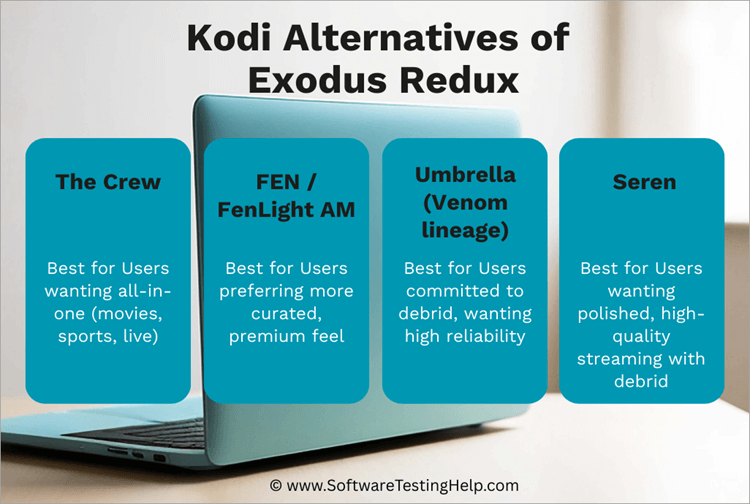
The Kodi users use some of the newer or more stable add-ons/forks:
- The Crew
- FEN / FEN Light / FenLight AM (Fork)
- Umbrella (Venom lineage)
- Seren
- Crackle
- Pluto TV
#1) The Crew
The Crew is a Kodi addon that is an all-in-one, providing content such as movies, TV shows, live television, sports, and other content. It crawls various sources and can be used together with debrid services (Real-Debrid, Premiumize, etc.).
Benefits over Exodus Redux:
- A better-kept, up-to-date codebase, and assist in lessening breakage.
- Wider focus: Sports and live TV, not only on-demand, are available to the Crew.
- Brids and Trakt sync.
- Simpler interface, better user experience, and comparatively easy to set up.
Cons compared with Exodus Redux:
- Numerous free/non-debrid links are no longer viable: The Crew is using more and more premium debrid links.
- More possibilities of failure (stream drop, broken links) because of the larger casting net (live, sports, etc.).
- Increased resource requirements: Live channel scrapers may need more resources to run.
- Continually scraper breaks and is still reliant on third parties, such as Exodus Redux.
- Legal / security risk: nothing is guaranteed to be safe or legal, like all third-party add-ons.
#2) FEN / FEN Light / FenLight AM (Fork)
FEN was a well-known Kodi add-on that concentrated on premium on-demand content. The original development was eventually sluggish. A fork called FenLight AM (or “Fen Light AM”) appeared to continue operating with external scrapers such as CocoScrapers.
Benefits over Exodus Redux:
- More stable and high quality: FEN was created to work with premium streams, particularly through debrid clouds.
- Less broken providers and preferred error management in most instances.
- For external scraper modules such as CocoScrapers, there is separate scraping logic, and more modular updates are installed.
- Forked/revived ones are supposed to keep FEN functionality alive, thus potentially offer features that Exodus Redux will not use in the future.
Weaknesses/Cons compared to Exodus Redux:
- Official support is on the decline: FEN is declared to give it up, and is not now actively kept up in most official forms.
- Forks (such as FenLight AM) rely on community maintenance; they might be unreliable.
- Not only does it need scrapers and debrid to be configured to work, but it also may only offer fewer links that work when used out of the box than some other distros, such as Exodus Redux.
- Perhaps a smaller provider base (fewer of the free links) than the wider scraping approach used by Exodus Redux.
- Usually, due to the death of scrapers or offline hosts.
#3) Umbrella (Venom lineage)
Umbrella is a Kodi video addon designed more as a debrid-first one. It is not always able to grab many (or any) free links; it uses premium resolvers (Real-Debrid, Premiumize, and so on).
Benefits over Exodus Redux:
- Fewer broken links on the free host results in reduced frustration in most instances and a cleaner, more stable streaming experience with debrid links.
- Active development, including support of Kodi versions (19, 20, 21), as observed in its GitHub repository.
- Has modular updates via external scraper modules (CocoScrapers) that look like the FEN forks.
- Provides a high-quality UI and layout, which in some cases is more modern than the older forks of Exodus.
- Increased Maintainability: The design is tight and less chaotic, and therefore, there aren’t as many random dead providers.
Cons in comparison to Exodus Redux:
- Debrid (premium) account is needed to be useful: free links can be limited or absent.
- Free users will have fewer options compared to Exodus Redux, which frequently loses more free links (although most of them are invalid).
- More tied down to dependencies: failure in the debrid service or scraper module causes Umbrella to lose several of its functions.
- Marginally Steeper Installation: To realize the maximum potential of the installed add-on, a user will need to install and configure scraper modules. He will need to authorize debrid services.
- Just like other unofficial add-ons, still subject to breakage, repo downtime, and security threats.
#4) Seren
Seren is a high-end add-on, a Kodi created by Nixgates. Seren features high-quality optimized links instead of just aggregated free links. The methods used to ensure high-quality links are debrid services and advanced scraping logic.
Benefits over Exodus Redux:
- Reliable & Quick Streaming: More reliable and faster streaming in cases of debrid consumption, as Seren focuses on the idea of smart play and the superior logic of the resolver.
- Improved user interaction and interface: There is not as much trial and error with bad links; it is more automated to find the best available stream.
- Sophisticated points such as auto-play, resume, and easier navigation.
- Since Seren disheartens or downplays free links to the quality ones, there is less frustration associated with broken hosts.
- More up-to-date maintenance and community support (particularly on the high-end use case) than most older forks of the Exodus.
Cons when compared to Exodus Redux:
- Seren is not so useful without a premium debrid account, as many links are minimal or nonexistent.
- Higher usage of debrid services: In case your debrid provider goes out of business or alters the API, Seren might crack on your end.
- Additional configuration overhead: More cost is incurred because the user also needs to install provider packages, authorize debrid, preferences, etc.
- The more curated experience might be limiting to some users who enjoyed browsing as many free hosts as possible.
- As ever vulnerable to scraping and host problems, as the external systems are modified, Seren can go offline until it is fixed.
#5) Crackle

Crackle is a free video streaming service that is ad-supported and offers on-demand streaming of movies, television shows, and original content. It focuses on traditional TV shows such as NewsRadio, ALF, and Red Dwarf in its catalog, as well as Crackle Originals, such as Snatch and Going from Broke.
The platform aims to provide easy access to entertainment free of subscription charges, which makes it a low-income-friendly option among the audience.
Launched originally as Sony in 2006, Crackle was acquired in the majority in 2019 by Chicken Soup for the Soul Entertainment, and it has been run by that organization with the same aim: providing free licensed content.
Benefits Over Exodus Redux:
- Crackle, in comparison with Exodus Redux, is not illegal and properly licensed, so the users will not face the possibility of piracy.
- It provides a reliable platform on such platforms as Roku, Fire TV, and PlayStation, and Exodus Redux needs to be installed on Kodi and regularly updated.
- The curated library of Crackle, such as their original content, such as Snatch and Going from Broke, is always available, whereas Exodus Redux frequently experiences broken links.
Cons in Comparison with Exodus Redux:
- The catalog produced by Crackle is free, but small and ad-interrupted, which makes this irritating to viewers accustomed to the massive scraperiqueness of Exodus Redux.
- Exodus Redux has been known to release new shows sooner than Crackle, which concentrates on older television hits and middle-tier movies.
- Exodus Redux users have access to cached streams provided that scrapers are available, and Crackle does not support offline downloading or even a rotating schedule.
Check our Detailed Review of Crackle with Alternatives
#6) Pluto TV

Pluto TV is a free streaming service, controlled by Paramount, which has hundreds of channels to stream live and thousands of movies on demand.
It broadcasts entertainment of all types, such as movies, news, sports, comedy, and children’s programming, and tries to create the impression of traditional television, but is available globally.
Benefits Over Exodus Redux:
- Legal programming content: Pluto TV offers official content of some of the biggest media affiliates, so the viewer is not prone to the risks of piracy that are typical of Exodus Redux.
- Accessibility: Pluto TV can be accessed through mobile, web, and smart televisions, and it does not necessitate any technical configurations, as is the case with Kodi of Exodus Redux.
- Live channels: Pluto TV has thematic channels such as classic sitcoms or true crime, which makes it appear like a lean-back experience that cannot be reproduced by Exodus Redux.
- International presence: Pluto TV operates in over 35 markets, providing localized content, whereas Exodus Redux operates on scraper links and does not always work.
- User base size: Pluto TV has over 80 million monthly active users, and it is more reliable and popular than the niche audience of Exodus Redux.
Cons Compared to Exodus Redux:
- Freshness on the Catalogs: In many cases, Pluto TV will have older movies and shows, but Exodus Redux scrapers will bring forward new releases in a shorter time frame.
- Ad Interruptions: The videos are free but largely ad-supported, which interrupts the viewing experience, unlike Exodus Redux, which has continuous streams.
- No Offline Downloads: Pluto TV does not offer any downloading, but the users of Exodus Redux may sometimes save the streams to watch them later.
- Rotating Availability: Individuals often leave and come back, so favorites can vanish, and Exodus Redux scrapers are there until links go dead.
- Less Personalized: The curated channels of Pluto TV do not offer the user a lot of control, whereas Exodus Redux does, enabling one to scrape and create libraries.
Comparing the Top Alternatives
Here’s a comparative summary in relative terms:
| Add-on | Free Link Coverage | Debrid-first strength | Stability & maintenance | Ease of use | Best for which user type? | ||||||
|---|---|---|---|---|---|---|---|---|---|---|---|
| Exodus Redux | Strong (many free links) | Medium | Medium (often breakage) | Moderate | Users wanting many link options including free ones | ||||||
| The Crew | Good free + debrid mix | Strong | Moderate-High | Easier for beginners | Users wanting all-in-one (movies, sports, live) | - | |||||
| FEN / FenLight AM | Moderate free coverage | Strong | Lower (depending on fork) | Moderate | Users preferring more curated, premium feel | ||||||
| Umbrella | Minimal free | Very strong | High (active) | Intermediate (setup required) | Users committed to debrid, wanting high reliability | ||||||
| Seren | Minimal free | Very strong | High (active) | A bit steeper setup | Users wanting polished, high-quality streaming with debrid |
Recommendations on Alternative Selection
Given below are some of the recommendations to be kept in mind while selecting an alternative:
- In case you already subscribe to a debrid provider (Real-Debrid, Premiumize, etc.), Umbrella or Seren can be more reliable, have fewer broken streams, and a better UX than Exodus Redux.
- As long as you use a lot of free links / more scraping variety, Exodus Redux or The Crew could still have more raw choices (although a variety of them probably will not work).
- To balance all these factors, The Crew is many times regarded as a good alternative to Exodus Redux among many users.
- No matter which add-on you choose, always remember to be cautious (VPN, trusted repo, scanner). The latter tend to be more stable, community, or, in the case of official add-ons, not at risk of legal proceedings.
Best Repository Sources of Exodus Redux/Forks
Here is a list of known popular repositories that host (or have hosted) Exodus Redux or other forks of it is listed below. However, caution is required because the availability of the repository varies frequently.
Therefore, ensure to always check first before installing. Most of these are homebrewed repositories. They can be out of commission, deleted, or hacked. Only use trusted or verified sources.
1. I-A-C / I-A-C.github.io: This is the repository that hosts repository.exodusredux-0.0.8.zip and is sometimes said to be the official host of the Exodus Redux repo.
2. It is where the most recommended installation of Exodus Redux is done.
3. LazyKodi: This repository has hosted several addons, including Exodus Redux, 13 Clowns, and Rising Tides, among others. It has the benefit, therefore, of there being several add-ons hosted, but the problem is that there is no assurance of security or integrity.
4. Kodi Repository: Kodi is known to have had previous iterations of Exodus and other addons.
5. XvBMC Repository: Mentioned in a few lists of add-ons as a repository where Exodus forks can be found.
6. TK Norris Repository: The repository is sometimes cited as the repository of older editions of Exodus-style add-ons.
7. Kodil Repo: This repo is also known as “KodiI” / “Kodil” repo and often appears in lists of Exodus add-ons.
8. Super Repository: This repository is common among older Kodi communities, and occasionally, it has forks of Exodus.
9. Cy4root: It does not directly support the Exodus Redux, but supports a large number of scraping addons and is occasionally used as a substitute repo in place of the video add-ons.
10. Octopus: A fork / relative project: That features add-ons such as Exodus Redux (Alvin, Taz19, etc.)
11. EzzerMac: This repo does not have to carry the name Exodus Redux, but it tends to be the place where the video add-ons, builds, and utilities are located, and it is also a favorite among the Kodi users.
Consider the following when choosing a repository, seek:
- Updates or current/recent commits for maintenance.
- Checksums or integrity-verified checksums.
- The reputation of the community can be trusted.
- Ensure you maintain a backup or mirror URLs just in case the primary is down.
Safety Tips & Best Practices
Enlisted below are some of the safety tips and best practices to be followed while installing Exodus Redux:
1. Since you are dealing with unofficial/third-party code, there are valid risks: The following are safety tips and best practices, which are explained as follows: It is important to use a well-known VPN / encryption service:
This will prevent the IP logging or monitoring of your activity and will conceal your traffic to the ISP, particularly in places where this type of streaming is not popular.
- The VPN will prevent ISP throttling as well.
- Have no DNS leaks, a kill switch, and decent speed of the VPN.
2. Refer to reliable or familiar repositories only: Malware may be introduced if or when you use unverified repos that may also contain malicious code.
- Before using repositories, check discussions and reviews discussing them. Also refer to GitHub history, open-source code, and community supervision.
3. Check any zip/repo file downloaded in an antivirus/malware scanner:
- Checking, e.g., with VirusTotal or an antivirus, to identify suspicious content, is possible before installing on a PC.
- Update Kodi and the add-on.
- Numerous scraper/dependency breaks are resolved through updates.
- Development through regular updates prevents the use of old/problematic code.
4. Only give access to the add-on you want: Avoid granting excessive write permissions or access to sensitive directories as much as you can.
- Authorize only required network/storage access.
5. Clean up your cache or stale data from time to time: Otherwise, conflicts may arise from such a filled cache or old data that is not cleared over time.
Overall, many builds or tools can be used to clear the cache of the add-on in Tools – Clear Cache.
6. Do not leave on the switch that allows installing software from unknown sources when not installing anything: You need to turn off “unknown sources” to reduce the exposure to malware risk.
7. Strong system security: Firewall, anti-malware. The OS needs to be patched and updated.
- Where possible, make use of sandboxing or firewalls to improve the security of the platform.
8. Be cautious of prompts/popups/external links: This is because some add-ons will attempt to direct to a phishing/advertising site.
- Do not use unrecognized external links, download unknown codec packs, or extras.
9. Understand the legal area of jurisdiction/copyright: Although you may be able to just access something illegal in your local jurisdiction.
At your own risk, use and look at the legal alternatives.
Just as a reminder, since Exodus Redux is not officially verified or supported by Kodi, you may experience issues with its safety or stability. Developed by independent coders, any outside changes, such as domain changes, removal, and hijacking, may destroy the add-ons.
It provides only an add-on repository option and not the necessary video add-on option. Thus, the customer could not install it on his video add-ons.
Usually, this implies that the repository zip is only the metadata of the repository and not the video add-on itself – either the video add-on itself is not provided (repo outdated), or the user has downloaded the wrong zip.
Frequently Asked Questions
1. Does Exodus Redux appear to be legal/safe to use?
It depends on what you stream. The add-on is just a tool that brings together links; it does not contain any content. Most of the streams it offers, however, may be unlicensed/pirated, and their use can be considered illegal in most jurisdictions.
In addition, add-ons and their repositories are not checked officially, and this can pose a threat of malware or malicious code. Use with caution.
2. Is Exodus Redux compatible with Kodi 19+ (Matrix)?
Kodi 19 does not work with certain versions and forks due to modifications in the Kodi architecture. This is because you should always confirm that the specific fork has been updated with your version of Kodi.
3. Why do I not see so many (or many) streams of a movie/show?
Perhaps scrapers/providers are malfunctioning, sources have expired, or your location / your ISP is blocking them. Refresh by switching on/off the providers to improve the links, scraper modules, or debrid services.
4. What is the difference between Exodus and Exodus Redux?
The first add-on is Exodus, and most add-ons have been forks and versions of this one over the years, but one specific fork is called Exodus Redux, which has new scrapers and features.
The most recent guides use the working title Exodus Redux, and not the ancient “Exodus” or the outdated version, which was called Exodus V8.
5. Is the use of VPN safe/anonymous?
The VPN helps conceal your IP and encrypt traffic, but it does not make illegitimate streaming legal, and it does not safeguard against malicious add-on program codes and information breaches. There are other safety best practices that you have to practice.
6. Is it possible to uninstall Exodus Redux / go back to the original Kodi?
It is possible to even uninstall Exodus Redux from Kodi using the add-on manager. In Kodi, go to the add-on and then click on uninstall. Also, delete the repository as desired in File Manager – Sources.
Conclusion
Exodus Redux is a third-party Kodi add-on that is a scraper and aggregator of streaming links (movies, TV shows) all over the internet. It is flexible and has the potential to access potentially massive content, particularly when paired with debrid services, yet it carries with it huge risks: legal, security, and reliability.
You can follow this process to install it: first, enable unknown sources; second, add a repository URL; third, install via zip; fourth, install the add-on; and fifth, configure scrapers/providers and the option of authorizing debrid services.
The difference in devices (Firestick, Android, PC) does not influence the way of navigation much, yet the main step is similar. It is also a good breakout to use Git Browser in case direct repo links go dead. The most significant issues are broken scrapers, dead providers, version incompatibility, or downtime of the repositories.
Some of the troubleshooting may require refreshing the providers or changing the sources. As a best practice, use VPNs, use only trusted repos as sources for the add-ons, scan for malware always, give limited permissions to add-ons, ensure regular maintenance, and understand the legal limits.
Due to the dangers, several users will simply switch to newer and more reliable or even entirely legal versions – so keep that in mind before committing.
For more quick streaming-related guides, you can explore our range of tutorials below:
- 10+ Best Kodi Addons From Kodi Repository And Third Party
- 10 Best VPN For Kodi: Online Streaming Platform [PAID & FREE]
- Tubi TV Alternatives and Competitors to Watch Movies
- Best Kissanime Alternatives
- The Best Free Live TV Streaming Services to Cut Your Cable Bill
- How to Connect Roku TV to Wifi Without Remote
- Ways to Fix When Fire Stick Won’t Load Home Screen
- Best 123movies Alternatives: Sites Like 123movies
Was this helpful?
Recommended Reading
-

Here you will find the list of top VPN For Kodi for review and comparison. Find out the best free VPN for Kodi to enhance your streaming experience: You may know Kodi is an online streaming platform brimming with versatile content that caters to a wide variety of entertainment preferences.…
-
Compare and review the top Kodi Addons to select the best addon for Kodi to enhance your streaming experience on the platform: People know Kodi as a widely revered open-source media player software that allows users to stream tons of content for free. Kodi in itself, however, might not be…
-
Review, compare and select among the popular Music Streaming Services and platforms to enjoy music from your favorite genre: The advent of the Internet has flooded our lives with content that is available at our convenience 24/7. From TV shows to movies, we have platforms today that offer a wide…
-
Hi Testers!! In this tutorial, you will get to learn the basic definition of performance testing. All other terminologies like load testing, volume testing, spike testing etc. can be explored via our website. => Click here for JMeter Tutorials: The Complete Free Training On JMeter (20+ Videos) Jmeter is a…


