Looking for steps to part ways with FuboTV? Read this exclusive guide to understand the exact process on how to unsubscribe, delete, or cancel FuboTV Subscription:
Fubo is the premium Live streaming service provider recommended for its sports streaming services, best to watch international soccer in the US. It is best for the viewers who want plenty of live sports with a dash of news and cable.
It offers access to more than 200 live TV channels, including sports, news, and entertainment in 4K quality streaming under Elite or Premier plans, and the rest you will get 1080p HD.
Table of Contents:
Cancel FuboTV Membership: Step-by-Step Guide

To install it, you can go to its website from Google and create your account or sign in to your account, select a subscription plan, payment method, and nothing more.
Here is the beginner’s guide for Fubo TV. It explains what Fubo TV is and how it works.
Even after providing exceptional services, there are some downsides, like it does not support PlayStation and Nintendo consoles, lacks parental control features & some key channels like CNN, HBO, TBS, etc, and it is comparatively very expensive.
In this article, you will learn about the streaming platform Fubo and various ways to cancel Fubo for any reason. Points that are mentioned in its cancellation policy are also briefly explained.
How to Cancel Fubo Subscription from Different Devices
How to cancel Fubo from a web browser
1. From a web browser: You can easily cancel your Fubo subscription from a web browser by following the steps given below:
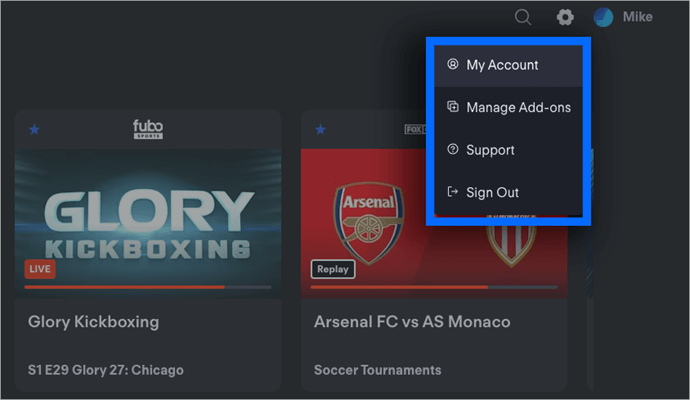
Step 1: Go to Google, search for FuboTV, log in to your account, and click on the My Profile menu in the top right corner.
via FuboTV
Step 2: Click on the “subscription and billing” menu given on the left side of the screen as shown below.
Step 3: Scroll down, and you will see an option to cancel your subscription. Click on that option.
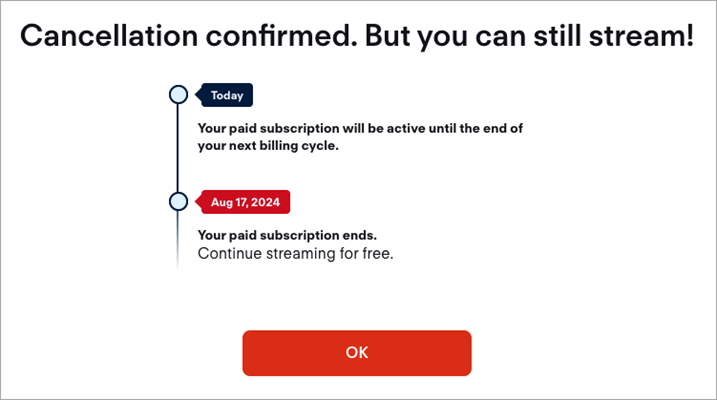
Step 4: Lastly, it will ask you to pause the subscription instead. Here you can choose or pause your subscription for 3 or 6 months if you wish, or you can unsubscribe by clicking on cancel subscription.
2. From Roku TV: You can also unsubscribe from the Fubo subscription from Roku. You can cancel the subscription directly from Roku as well as from the Roku website. For this, you need to follow the under-listed steps.
Further Reading => Steps to Turn Off Roku Device
Unsubscribe Fubo Directly from Roku
Step 1: Turn on the Roku TV. Press the home button on the remote.
Step 2: Now, see the Fubo app in the list to cancel it.
Step 3: Press the star (*) button.
Step 4: A list of options will be shown from which you need to select ‘Manage Subscriptions’.
Step 5: Then you need to press the “Cancel Subscription” button.
Step 6: You would be asked again if you want to cancel the subscription. Here, press ‘yes, cancel subscription’.
Further Reading => Top IPTV Service Providers
How to Remove Fubo From the Roku Website?
To cancel Fubo from the Roku website:
Step 1: Go to the Roku account page and sign in to your account.
Step 2: Select the Manage your Subscriptions option.
Step 3: A page containing all your subscription details will appear, headed under active subscriptions and expired subscriptions.
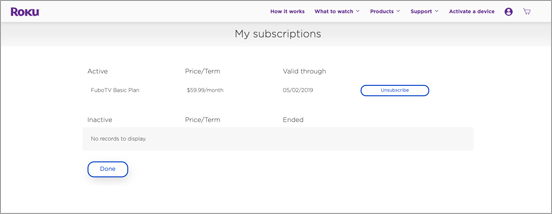
Step 4: Now, locate the Fubo app option and press the Unsubscribe button given next to it.
Step 5: Confirm cancellation
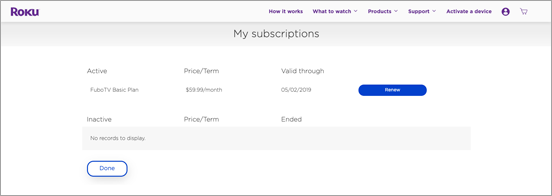
Step 6: It offers you to renew the subscription till the current plan expires.
Ways to Delete Fubo from Apple TV
There are a few simple steps to cancel your Fubo subscription from the Apple TV. These are as follows:
Step 1: Turn on your Apple TV and press the Home button on your remote.
Step 2: Go to the settings and select “Users and Accounts”
Step 3: Open your account and choose subscriptions.
Step 4: Here, you will see FuboTV. By scrolling down the page, you will see an option “Manage subscriptions” at the bottom of the page.
Step 5: Press “Cancel Subscription” and cancel it.
Further Reading => Steps to Cancel Peacock TV Subscription
How to Cancel Fubo from iOS Devices?
You can unsubscribe from your Fubo account from any iOS device simply by following certain easy steps:
Step 1: Open your iOS device and go to the settings.
Step 2: Now select your Apple ID or iCloud.
Step 3: Then select the “Subscriptions” option.
Step 4: Here, you will see all the apps for which you have subscribed to. Now select FuboTV.
Step 5: Press “Cancel Subscription” and confirm.
Steps to Cancel Fubo From Android Devices
The process for cancelling FuboTV on Android is different from that on iPhones. To cancel the subscription, you need to follow the given steps:
Step 1: Open your Android device and go to the “Google Play Store”.
Step 2: Now, select your account as shown in the top right corner of the screen.
Step 3: Then select the “Payments & Subscriptions” option.
Step 4: Here in the subscriptions menu, you will see a list of applications you have subscribed to. Press FuboTV from here.
Step 5: Click on the “Manage” option and then “Cancel Subscription”.
Suggested Read => Best Streaming Devices to Look For
How to Cancel Fubo from Amazon?
You can also cancel your Fubo subscription from Amazon if you signed up for it from there. Follow the steps below to cancel:
Step 1: Open your computer and go to Amazon.com
Step 2: Select the account and lists given in the top right corner of the screen
Step 3: A list of options would be presented from which you need to select “members and subscriptions”.
Step 4: Now, all the applications you have subscribed to will be seen on the screen. You need to click on Fubo and click “cancel subscription” on the right.
Fubo Cancellation Policy
According to the Fubo Cancellation policy:
- You will retain access until the end of your current billing cycle in case you have paid for one of its plans.
- When you sign up for a free trial from Roku, you will have access to its service till the free trial time expires.
- If you signed up for your account from its official website, i.e., FuboTV, then when cancelling its free trial, you would no longer be able to use its service anymore.
- No refunds are available for prepaid or partial months of service.
- Tip- You should contact your bank to stop paying for Fubo subscriptions in advance.
- It also provides you with the option to pause your subscription instead of cancelling it, and you wouldn’t be charged for upto 3-6 months.
Also Read => Top Rated Streaming Services
Here is the video on how to install Fubo:
Frequently Asked Questions
1. Does Fubo charge a cancellation fee?
No, it does not charge a cancellation fee. However, you may still be charged, if you cancel Fubo subscription due to negligence, or if you have a pending bill. You must get a confirmation email for the same. If not, then contact the support (844) – 5 6 9 – 4 5 0 0; otherwise, you would be charged again.
2. How do I exit Fubo?
You can easily exit Fubo; you just need to follow some simple steps:
• Go to the Fubo website and log in to your account.
• Go to “My Account” / “Subscription & Billing”/ Cancel Subscription.
3. Can I get a refund for FuboTV?
No, after subscribing to its plan, you would not get any refund. It has a strict refund policy. You can only get a refund if it has been wrongly charged in any circumstance.
4. How do I contact Fubo?
Fubo offers various ways to get in touch with its customers or to solve their issues through 24/7 live chat or virtual assistant, help centre, FAQs, and phone (844-441-3826).
5. How do I cancel Fubo on Amazon Prime?
By following certain simple steps, you can cancel Fubo on Amazon Prime itself. For this, open your account on Amazon.com/ Accounts & lists/ Members & Subscriptions/ Fubo/ cancel.
6. Can I pause my Fubo subscription?
Yes, you can pause the Fubo subscription. At the time of its cancellation, it asks you to pause it otherwise. From there, you can select between the pause and cancel options.
7. How do I manage my Fubo subscription?
You can easily manage your Fubo subscription directly from your account on the Fubo website. From there, click on My Account/Subscription & Billing. Here you can manage your subscriptions, including billing information, cancellation, upgrading, degrading, etc.
8. Can you cancel FuboTV before the free trial ends?
Yes, you can cancel the FuboTV before the free trial ends, and you would not be charged anything, but you will not get another free trial.
9. What is the downside of Fubo?
Even after many advantages, there are some downsides of Fubo, like it does not have parental controls, chargeable regional sports, offers its live streams in 720p only, and more.
Conclusion
Fubo is no doubt one of the best sports streaming platforms. Despite offering all the competitive features from high-quality streaming to hundreds of channels and much more, it has some of its downsides like overly expensive plans, no parental control, no PlayStation and Nintendo console support, etc.
The user may want to discontinue their subscription for any reason, and it provides a flexible cancellation policy. We have mentioned the process on how to cancel the fubo free trial or how to cancel a fubo subscription from different devices, so that it may help the needful.
Was this helpful?
Recommended Reading
-

Here is a detailed review and comparison of the top free Sports Streaming Sites to watch live sports matches online, like Football, Basketball and Baseball. Are you a hardcore sports fan and would like to watch live sports online on your TV, PC, or mobile devices? then you are in the…
-
Wondering how to Cancel Paramount Plus Subscription? Explore the simple ways to unsubscribe Paramount Plus and understand how to delete Paramount Plus and manage your account to stop future charges: Paramount Plus is probably one of the more underrated streaming platforms I’ve used to watch content. It has a good…
-
Are you looking for ways to Cancel Peacock Membership? Explore the simple steps to learn how to Cancel Peacock TV Subscription easily in just a few minutes: Peacock is another in a barrage of streaming platforms dominating the entertainment industry. Thanks to its affordable subscription plans and interesting content catalog,…
-
Review and comparison of the Best Streaming Service that will help you decide on the top streaming TV services to play your movies and shows: Thought about what to do on your weekends? If you just want to spend your time at home- what's better than binge-watching? The best streaming…