Wondering how to Cancel Paramount Plus Subscription? Explore the simple ways to unsubscribe Paramount Plus and understand how to delete Paramount Plus and manage your account to stop future charges:
Paramount Plus is probably one of the more underrated streaming platforms I’ve used to watch content. It has a good slate of original shows occasionally, but nothing warrants a long and consistent subscription period.
If you share my opinion on Paramount Plus after being subscribed to it for a long time, you may also wonder how to cancel your subscription. As with all streaming services, your subscription is auto-renewed each month or year unless you explicitly decide to cancel it.
Table of Contents:
How to Unsubscribe From Paramount Plus: Simple Steps

If you aren’t using Paramount Plus but still hold its subscription, you might lose money for no reason.
Consider this article your guide on how to cancel Paramount Plus. I’ll be going through the cancellation process on all Paramount Plus-compatible devices, thus leaving no stone unturned in my effort to help you cancel a Paramount Plus subscription.
So, without much further ado, let’s dive in.
Paramount Plus: An Overview

Formerly known as CBS All Access, Paramount Plus is a subscription-based over-the-top streaming service/video-on-demand platform. It is owned by Paramount Global, the same company behind some of Hollywood’s biggest movies.
One thing that sets it apart from all the other streaming services, like Hulu or Netflix, is its content library, which primarily comprises shows and content from CBS Studios, CBS Media Ventures, and Paramount Pictures.
So if you are a fan of either of these networks or studios, then you would be Paramount Plus is particularly interesting. That’s not to say Paramount Plus doesn’t feature shows produced exclusively for the streaming service.
Paramount Plus has enjoyed its fair share of success in producing and airing shows and movies that have become massive hits.
That said, the streaming library isn’t for everyone.
Devices Compatible With Paramount Plus
Paramount Plus works on every conceivable streaming device and technology out there. You could enjoy the platform on the go via your Android or Apple smartphone. You can watch it on your video game consoles like PlayStation or Xbox.
Other devices include Roku, FireTV, Xfinity, and all smart TVs. How you cancel the Paramount subscription will largely depend on the type of device you are using.
Paramount Plus’ Subscription Plans
Paramount Plus offers subscription plans that could be characterized as enticing, especially when you compare the price with other popular streaming services. The basic monthly plan will cost you $7.99/month and $59.99/year.
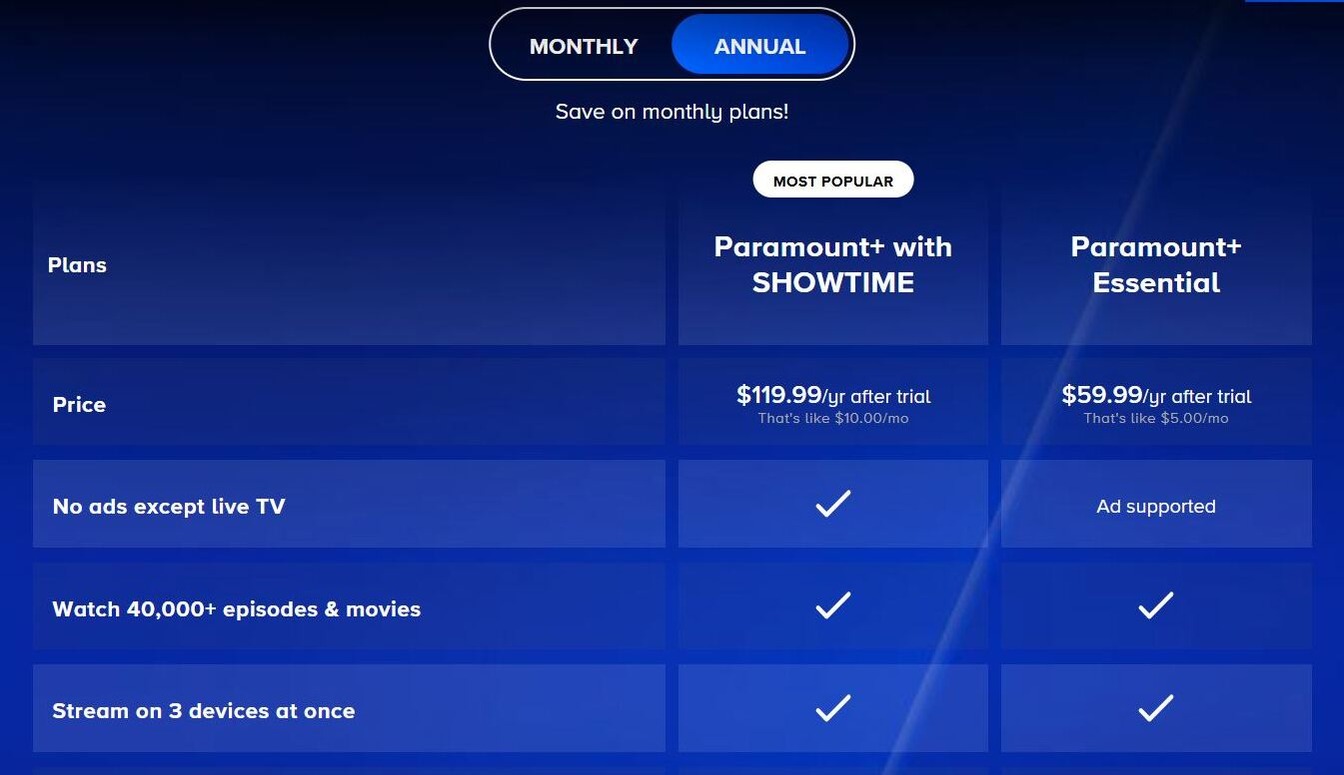
This basic plan will grant you access to over 40000 movies and TV shows. You’ll also be able to stream on 3 devices at once. However, you’ll have content with an occasional display of ADS.
To get rid of the Ads, you can upgrade to a plan that costs $12.99/month or $119.99/year. This plan gives you ad-free access to Paramount Plus’ entire library. Plus, you also get the added privilege of enjoying original shows from SHOWTIME and streaming CBS Live.
Also Read => Review of Free & Commercial Pop Up Blockers
Also worth noting is that you will be on a 7-day trial period upon signing up for the first time. You won’t be charged during this trial period. You can cancel your free trial anytime during this 7-day duration to stream Paramount Plus content without paying a dime.
You have the option to choose between a monthly and an annual subscription. Whatever plan you choose, know that these plans will auto-renew themselves unless you decide to cancel the subscription manually.
I’ll now show you how to do that.
How to Cancel Paramount Plus
#1) If using on your Computer or Mobile Browser
Most people I know use Paramount Plus on their computer’s browser. If you are one of these people, then I suggest you do the following to successfully unsubscribe.
- Launch your Paramount Plus account on the browser.
- Click on your User Name, which will be displayed in the upper right-hand corner of your screen.
- Click “Account”.
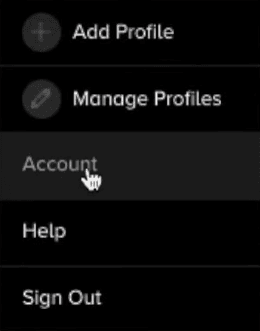
- In the Account page, scroll down to find “Subscription and Billing”.
- In the “Subscription and Billing” page, select “Subscriptions” and you’ll find an option that spells out – “Cancel Subscription”

- Click on it and confirm your decision.
Pat yourself on the back as you’ve successfully managed to halt your subscription to Paramount Plus.
#2) How to Unsubscribe from Paramount Plus on Apple Devices
Apple has made it very convenient for users to cancel App subscriptions without actually having to launch the concerned app. Here’s how you do it:
1) On iPhone
- On your smartphone, click on “Settings”.
- Now, click on your Apple ID.
- On the following page, tap on “Subscriptions”.
- Find the active subscription for Paramount Plus and tap on it.
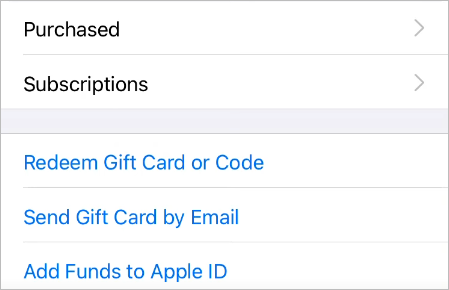
- Hit the “Cancel Subscription” to conclude the process.
2) On Apple TV
- On your Apple TV home screen, click on “Settings”.
- Select “Users and Accounts”.
- Select your Account and then select Subscriptions.
- Find and select the Paramount+ subscription and choose the cancel option.
#3) How to Cancel Paramount Plus on Android Devices
Canceling Paramount Plus on Android is just as simple. Follow the instructions below:
- Open the Play Store on your Android Device.
- Click on your Profile icon, which will be in the top-right corner of your screen.
- Tap on the Payments and Subscriptions option > Tap Subscriptions.
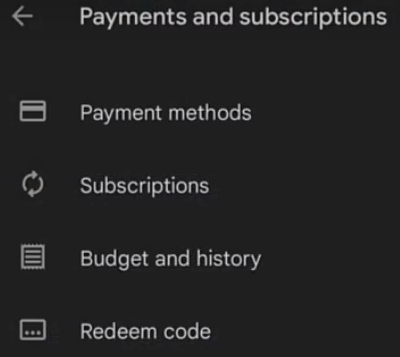
- Select the Paramount Plus subscription from the options and tap on the “Cancel Subscription” button.
You can use the same method to unsubscribe from Paramount Plus across all Android Tablet and Smart TV devices.
#4) How to Unsubscribe from Paramount Plus via Roku
Roku makes it very convenient for users to manage their subscriptions. If you are using Paramount Plus on Roku, pay heed to the following steps.
- Get your Roku remote and press the home button on it.
- Now use the directional pad on that same remote to find and select Paramount Plus.
- Once you’ve selected Paramount Plus, press * on your remote. This will open a menu.
- Select Manage Subscriptions.
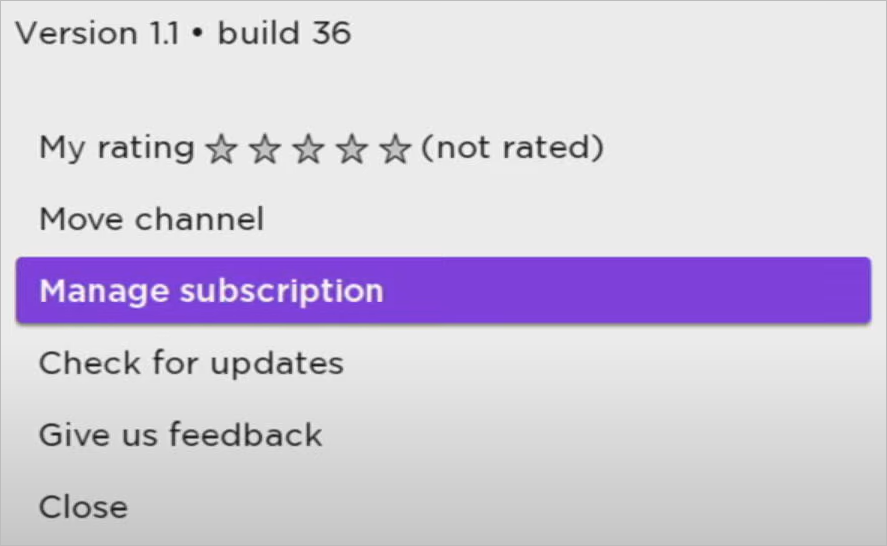
- Click on Cancel Subscription
Just like that, your Paramount Plus account cancellation is now complete.
#5) How to Cancel Paramount Plus on Amazon Fire TV
Again, the process is very simple and will take you a couple of quick steps.
- Open Amazon on your web browser
- Navigate to Your Account -> Digital Content and devices -> Your Apps.
- Select Manage -> Your Subscriptions.
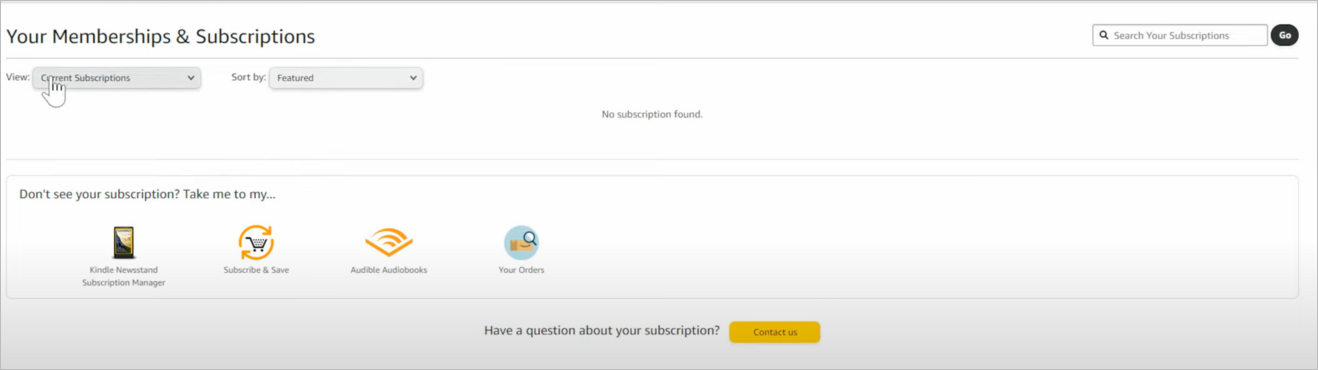
- You’ll find your Paramount Plus account here with the option to cancel it.
#6) How to Cancel Paramount Plus on Xfinity
It is super simple to cancel your subscriptions on an Xfinity device. If you would like to end your Paramount Plus subscription on Xfinity, simply follow the instructions below.
- Sign in to your Xfinity account
- Navigate to the account management section.
- Scroll down to an option that asks, “Need to change something?” Under this option, select “Manage Premium Channels”.
- Now, find Paramount Plus’ active subscription and uncheck the box on it.
- Select “Review” to reflect on your recently made change and confirm the cancellation.
How to Delete a Paramount Plus Account
All the methods I’ve discussed so far have been about canceling your subscription. This still leaves you some room to restart your subscription in the future if you wish to do so. However, you could also opt to permanently delete your Paramount Plus account. Doing so will completely deactivate your existing account.
People often opt for such an extreme measure out of concern for their privacy on such platforms. Although Paramount Plus is reputable and adheres to a stringent privacy policy, I can empathize with folks who’d want to deactivate their account, especially if they’ve decided to never use Paramount Plus again.
Deleting your Paramount Plus account isn’t as straightforward as renewing your subscription. The very first thing you need to do is paste the following URL in your browser – https://help.paramountplus.com/s/contact-us
This will immediately take you to the contact form that you’ll need to fill up. Give information like your name, your plan, address, etc., with a brief description of why you’d like to delete your Paramount Plus account.
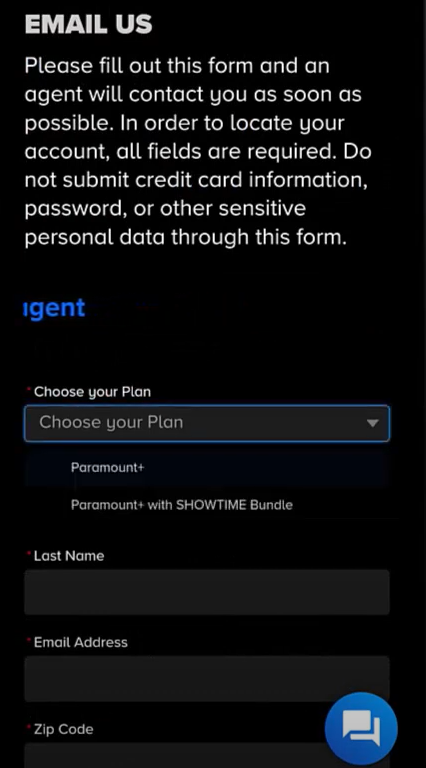
Once the form is filled up, hit the submit button and wait for a response from the representatives.
Why Cancel Paramount Plus Subscription
The reasons to unsubscribe from Paramount Plus will vary from person to person. For me, it ultimately came down that there wasn’t anything in Paramount Plus’ library for me to look forward to. This is a conundrum that many streaming service users face. If you aren’t consistently using a streaming service, why would you continue to pay for it?
You can always restart your subscription once there is something to watch on the platform, anyway. Another reason why people choose to unsubscribe has to do with them wanting to upgrade or downgrade their plan.
I think all reasons to unsubscribe are valid, and it is wise to cancel your subscription if you feel the service isn’t catering to you consistently.
Here is the video to know more about Paramount Plus: 5 things to know before you sign up for Paramount+
FAQs on Unsubscribe Paramount Plus
1. Is Paramount Plus still free with Amazon Prime?
People with an Amazon Prime subscription have a variety of channels to choose from to expand their entertainment streaming library. Paramount Plus is one such channel. However, the platform’s services aren’t free with a Prime subscription alone. You’ll need to pay a fee on top of your Prime subscription to stream Paramount Plus.
2. Can you cancel Paramount Plus anytime?
Yes, you are free to cancel Paramount Plus anytime you wish. You will be charged based on your subscription plan. If you are on a monthly plan, you’ll be charged for that month. You can cancel anytime during that month, and you’ll be able to use the service until that month is over. The same principle applies to the annual plan as well.
3. How do I speak to someone at Paramount Plus?
The best way to reach Paramount Plus support is via live chat. This chat is active 24/7, thus allowing you to reach an agent quickly to resolve a query. Alternatively, you can fill out a form describing the problem you are facing and have someone from Paramount Plus’ support team reach out to you within 24 hours.
I must say, their support team is one of the best I’ve experienced. They are responsive and deal with any issue you put in front of them with professionalism and patience.
4. How do I change my Paramount Plus plan?
People often make the mistake of canceling their subscription when all they want to do is change their plan. You do not have to go through the trouble of canceling your Paramount Plus subscription, as you have the option to change your subscription from within your active account.
To change your Paramount Plus plan, I suggest you do:
– Open your Paramount Plus account.
– Click on your user name, which will be in the top-right corner of your screen
– Click Accounts from the drop-down menu.
– Under the Accounts section, you’ll now have the option to change your plan. Click on it, choose your plan, and hit the confirm button.
5. Why can’t I get into my Paramount Plus account?
There could be several reasons for this issue. It could be because of a bad internet connection or perhaps the Paramount Plus servers are down. Check whether your Internet connection is proper. If not, call your ISP. Also, Google to see if Paramount Plus’ servers are down.
If none of the above issues are the case, I suggest cleaning your browser history and cache or rebooting the Paramount Plus app. If the issue persists, try to contact Paramount Plus support.
Suggested Reading =>> Top Movie Streaming Platforms
Conclusion
I think Paramount Plus is a decent little streaming platform that sort of falls short when it comes to having a library of original shows and movies. You can still catch a great show or movie on the platform every once in a while. However, this does not warrant a consistent subscription to the service.
So it makes sense why anyone would want to cancel their Paramount Plus subscription. It is very simple to cancel Paramount Plus. It will only take you a couple of quick steps to get the deed done.
Of course, you are always welcome to resume your subscription anytime, as your account isn’t going anywhere unless you’ve requested its permanent termination. I hope you’ve found this guide useful and will now have no issues canceling your Paramount Plus subscription.
Was this helpful?
Recommended Reading
-

Get acquainted with the top Streaming Devices along with features, technical specifications, etc. to compare and select the best streaming device for TV: Are you missing out on the exclusive content that is being launched by the best OTT platforms in your country? It's time to start streaming exclusive content…
-

Explore the top-rated free online movie streaming sites to enjoy unlimited entertainment at your fingertips. Discover the best Free Movie Websites for streaming movies without spending a dime: In an era where digital platforms rule our entertainment domain, exploring top-notch films to watch without any cost can appear to be…
-
This ESPN Live Sports Review will give you a complete understanding of the ESPN Platform along with its features, pricing, performance, and overall user experience in detail: Since childhood, ESPN has been my go-to channel to catch live sports. Whether it was football and cricket or any other variety show…
-
Review and comparison of the Best Streaming Service that will help you decide on the top streaming TV services to play your movies and shows: Thought about what to do on your weekends? If you just want to spend your time at home- what's better than binge-watching? The best streaming…